2026 Guide - Enterprise-Grade PM Tools for SMEs
Feb 17, 2026
Project Management
AI Automation
SME Growth
Project Management
AI Automation
SME Growth
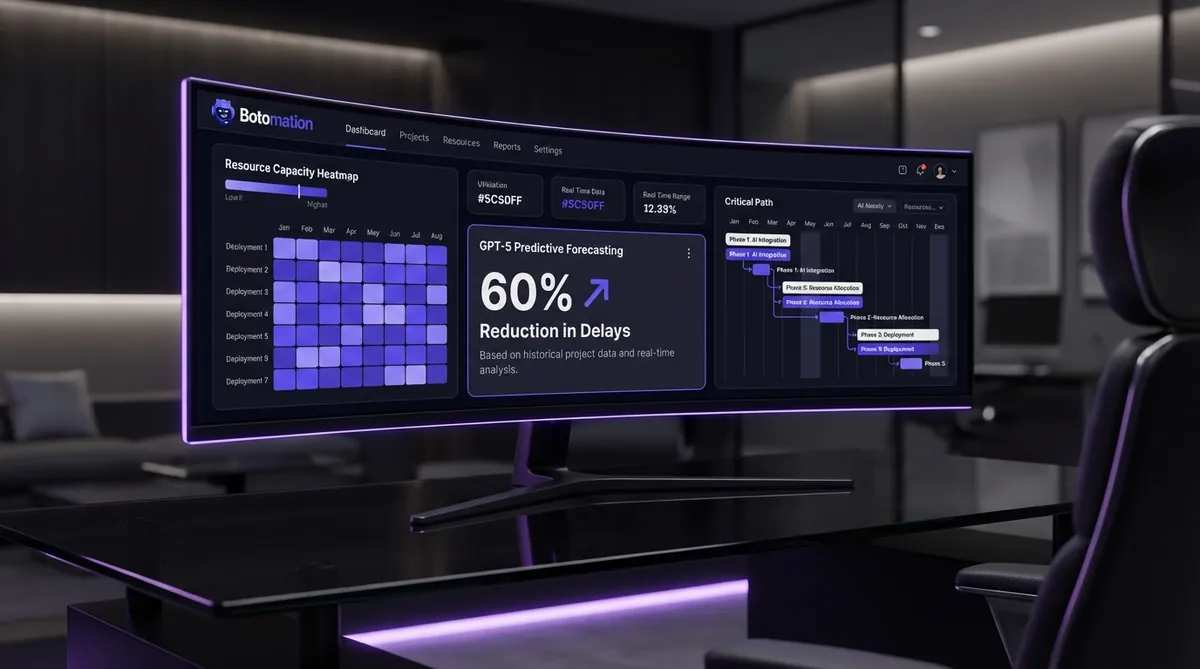
Small and medium-sized enterprises often reach a stagnant operational plateau where the very tools that fueled their early success begin to act as anchors. You might recognize the symptoms: a reliance on sprawling spreadsheets, critical project updates buried in fragmented Slack threads, and a general lack of organizational alignment. Historically, the only cure for this operational chaos was a massive investment in enterprise software that required a dedicated team just to maintain. However, as of January 2026, the landscape has shifted fundamentally, allowing smaller teams to wield the same level of operational sophistication as Fortune 500 companies.
The strategic democratization of high-level project management means that the gap between a ten-person agency and a global corporation is no longer defined by the quality of their systems, particularly when utilizing enterprise-grade solutions for small businesses. Modern tools now deliver approximately 90% of traditional enterprise functionality at a fraction of the legacy cost. This guide is designed to help you navigate this new reality, focusing on how to implement these powerful systems without the bloated overhead or the steep learning curves that previously defined high-end project management.
Partnering with an agency like Botomation allows you to bypass the trial-and-error phase that often sinks digital transformation efforts. While many businesses attempt to "plug and play" with these tools, our team focuses on building the custom logic and AI integrations that turn a simple task manager into a high-performance revenue engine. We believe that for an SME to truly compete in 2026, they need more than just a subscription; they require a tailored operational framework that works autonomously while they sleep.
What Makes a Project Management Tool Truly Enterprise Grade
When evaluating enterprise-grade features for an SME, we look for capabilities that transcend simple checklists. In the current market, true enterprise functionality is defined by the ability to predict bottlenecks before they manifest and manage resources across multiple complex workstreams simultaneously. It is about transitioning from a reactive state, characterized by constant fire-fighting, to a proactive state where your data dictates exactly where to focus your energy.
Consider the case of a mid-sized consulting firm we recently observed that was struggling with consistent project overruns. By upgrading from a basic task list to a system featuring automated resource leveling and predictive forecasting, they managed to reduce project delays by a staggering 60% within two quarters. They did not hire more staff; they simply gained visibility into where their existing team was being throttled. This is the power of enterprise-level visibility applied to a lean organization.
In 2026, the technical standard has been raised significantly by the integration of advanced models like GPT-5 and specialized project forecasting engines, providing new opportunities for implementing AI in small to medium businesses. These tools can now analyze historical project data to suggest realistic deadlines, often identifying risks that a human project manager might overlook. For an SME, this means you can bid on larger contracts with the confidence that your delivery will not crumble under the pressure of increased complexity.
Essential Enterprise Features for Growing Teams
The first pillar of enterprise-grade management is sophisticated resource allocation and capacity planning. In a smaller team, every hour is critical; having a "heatmap" of your team's availability prevents the burnout that often follows a successful sales period. These tools allow you to see not just who is busy, but who possesses the specific skills required to take on a new high-priority task without jeopardizing existing commitments.
Advanced timeline management and dependency tracking represent the second pillar. In complex projects, a delay in one minor task can have a cascading effect on the entire delivery schedule. Enterprise-grade tools use "critical path" logic to automatically adjust the entire project timeline when a single dependency shifts. This ensures that everyone on the team is always working from the most current version of the truth, rather than an outdated project plan.
Finally, budget tracking and financial forecasting must be integrated directly into the project workflow. You should be able to monitor the financial health of a project in real-time, comparing actual hours worked against the original estimate. This level of transparency allows for immediate course correction if a project begins to drift into unprofitable territory, protecting your margins before they dissipate.
Distinguishing Mission Critical Features from Unnecessary Complexity
One of the most significant mistakes an SME can make is over-complicating internal processes simply because a tool allows for it. For instance, while a massive corporation might require a twelve-step approval workflow for a single document, a smaller team will find this level of bureaucracy stifling. You must distinguish between features that provide clarity and those that merely add friction to the creative process.
Custom reporting is a prime example of a mission-critical feature, as it allows you to distill complex data into the specific metrics that matter to your leadership team. Conversely, pre-built templates for industries that do not match your niche can often lead to "feature bloat," where your team spends more time filling out forms than performing actual work. The goal is to find a balance where the system supports the work rather than becoming the work itself.
Integration depth is another area where you must be strategic. An enterprise-grade setup should connect your project management tool to your CRM, your financial software, and your communication platforms. If your project data lives in a vacuum, you lose the primary benefit of automation. At Botomation, we specialize in creating these deep integrations, ensuring that data flows seamlessly between systems so that your team never has to enter the same information twice.
The Most Effective Project Management Tools for SMEs in 2026
The market for project management software has matured to the point where "affordable" no longer implies "underpowered." There is a clear hierarchy of tools that have successfully bridged the gap between consumer-friendly interfaces and enterprise-level power. Choosing the right one depends entirely on your specific workflow—whether you are a creative agency, a construction firm, or a software development shop.
| Feature | Monday.com | Asana Premium | ClickUp | Smartsheet |
|---|---|---|---|---|
| **Primary Strength** | Visual Customization | Task Logic & UX | All-in-One Features | Data & Spreadsheets |
| **Best For** | Marketing/Creative | Product Teams | Fast-Growing Startups | Finance/Operations |
| **AI Integration** | High (Custom Bots) | Medium (Workflows) | High (Native AI) | Medium (Data Analysis) |
| **Scalability** | Excellent | Good | Excellent | High |
The current 2026 version of Microsoft Project has also made significant strides, introducing AI-assisted task optimization that can automatically reorder a backlog based on team efficiency and project priority. This type of technical advancement is no longer reserved for those with million-dollar IT budgets. Each of these platforms offers a different path to the same goal: total operational clarity.
Solutions for Collaboration and High-Level Communication
Monday.com remains a leader in the visual project management space because of its incredible flexibility. It allows teams to build "low-code" applications on top of their project boards, making it feel less like a rigid tool and more like a custom-built solution. For SMEs that need to see the "big picture" at a glance, its dashboarding capabilities are virtually unmatched in the mid-market price range.
Asana Premium has doubled down on task management with a focus on "Work Graph" technology, which visualizes how every individual task contributes to a larger company goal. This is particularly useful for CEOs who want to ensure that their team's daily output is actually moving the needle on high-level strategy. Meanwhile, ClickUp has positioned itself as the "everything app," combining documents, goals, and chat into a single interface that aims to replace multiple subscriptions.
Stat Box: The Impact of Modern PM Tools
* Productivity Boost: Teams using AI-integrated PM tools report a 32% increase in task completion rates.
* Cost Savings: Replacing 3-4 fragmented tools with one integrated platform saves the average SME $1,200 per user/year.
* Reduced Meetings: Automated status reporting reduces time spent in "update meetings" by 45%.
Advanced Planning and Heavyweight Resource Management
For organizations that require a more data-centric approach, Smartsheet offers a spreadsheet-based interface that belies its underlying power. It is an enterprise-grade engine that handles complex calculations and massive data sets with ease, making it a favorite for finance-heavy projects. It integrates deeply with tools like Power BI and Tableau, allowing for a level of reporting that was previously only available to data scientists.
Wrike and Adobe Workfront represent the "heavy hitters" of the group, designed specifically for organizations with high-volume, complex workflows. Wrike’s advanced planning features, such as its dynamic request forms and automated proofing, make it ideal for creative teams that need to manage a constant stream of incoming requests. Adobe Workfront, while on the higher end of the price spectrum, provides a level of governance and approval workflow sophistication that is essential for regulated industries or very large-scale digital production.
How to Successfully Implement Enterprise Systems in a Small Team
The failure of most project management initiatives is rarely due to the software; it is typically due to a lack of a clear implementation strategy, such as following specific steps to automate project management and billing. You cannot simply purchase a license, send a login link to your staff, and expect a transformation. True implementation requires a shift in culture and a disciplined approach to how work is defined and tracked in order to scale business operations with AI automation. This is where many founders get overwhelmed, and it is exactly where a partner like Botomation provides the most value by handling the technical heavy lifting and process design.
Change management is the "secret sauce" of successful adoption. You must demonstrate to your team that the new system is not a tool for micromanagement, but a way to protect their time and make their jobs easier. When people see that a tool can reduce admin tasks in service operations by eliminating two hours of manual data entry every day, they become its biggest advocates. A marketing agency we worked with recently saw client satisfaction scores jump by 40% simply because their account managers finally had the bandwidth to be proactive rather than reactive.
The Critical Phase of Pre-Implementation Planning
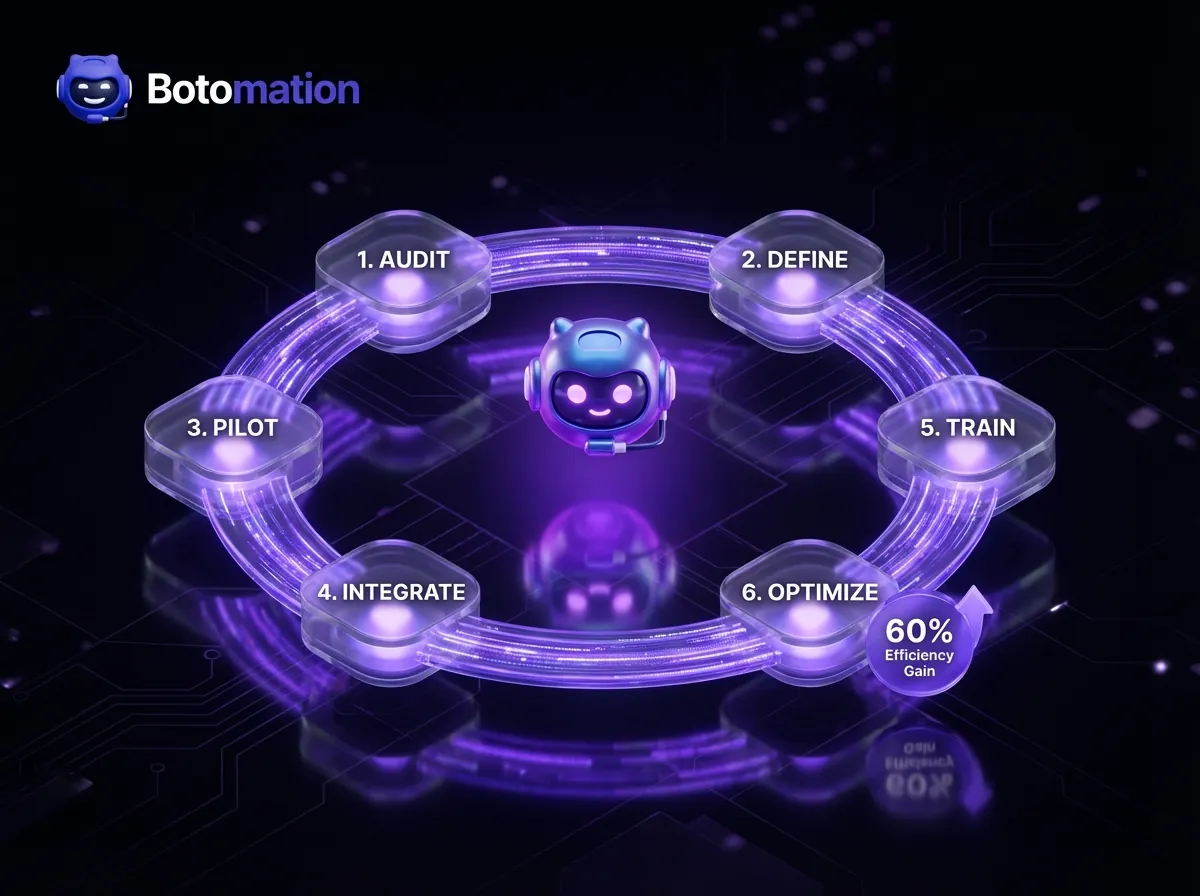
Before you configure a single board in a new tool, you must conduct a thorough assessment of your current gaps. What are the specific bottlenecks that are costing you money today? Is it a lack of clear ownership on tasks, or are your project timelines consistently unrealistic? Mapping out your "as-is" process versus your desired "to-be" process is the first step in ensuring the tool you choose actually solves your problems.
You also need to define clear roles for the implementation. Who is the "Product Owner" within your company who will make decisions on how the tool is configured? What is the budget for not just the software, but the training and the time lost during the transition? Setting these expectations early prevents the project from stalling out mid-way through implementation.
Step-by-Step Implementation Guide
- Audit Your Current Stack: Identify every tool currently used for communication and tracking. Decide which ones stay and which ones are being replaced to avoid "tool fatigue."
- Define Your Core Workflows: Document exactly how a project moves from "lead" to "completed." Do not automate a broken process; fix the process first.
- Build a Pilot Group: Select 3-5 team members to test the new system for two weeks. Gather their feedback and adjust the configuration before rolling it out company-wide.
- Data Migration and Integration: Move your active projects into the new system. Connect your AI agents and other software (like your CRM) to ensure data flows automatically.
- Company-Wide Training: Conduct hands-on workshops. Focus on "How this makes your life easier" rather than just "Which buttons to click."
- Review and Optimize: After 30 days, analyze the data. Are people using it? Where are they getting stuck? Refine the setup based on real-world usage.
Configuring Your System for Maximum Efficiency
Once the plan is in place, the focus shifts to configuration. This is where you translate your business logic into the software. Setting up custom templates for recurring project types ensures that nothing is forgotten and that every team member follows the same high standard of delivery, which is a key component to automate the client onboarding process. This consistency is what allows an SME to scale without the quality of their work suffering.
Security and access controls are also vital, especially if you are working with sensitive client data or external contractors. Enterprise-grade tools allow for granular permissions, meaning you can give a freelancer access to a single task without exposing your entire project pipeline or financial data. Finally, integrating the system with your existing tech stack—such as your email and calendar—ensures that the project management tool becomes the "central nervous system" of your business.
Mastering Resource Allocation and Timeline Management
One of the most significant advantages of enterprise-grade systems is the ability to manage the "human" element of projects with mathematical precision. In many SMEs, resource allocation is done by intuition, which leads to some team members being overworked while others are underutilized. By using allocation tools, you can visualize your team's capacity in real-time, allowing you to make informed hiring decisions or adjust project timelines before a crisis occurs.
The 2026 technical landscape has introduced AI features that can automatically adjust project timelines based on actual resource availability. If a key developer goes on sick leave, a modern system can recalculate the impact on every project they are involved in and suggest the best way to redistribute their tasks. This level of dynamic planning was once the domain of specialized analysts, but it is now accessible to any CEO with the right setup.
Strategies for Optimizing Your Team's Output
Capacity planning is about more than just filling an eight-hour day; it is about ensuring that those hours are spent on the right objectives. By using skill-based resource assignment, you can ensure that your most complex tasks are handled by your most experienced people, while simpler tasks are delegated appropriately. This does not just improve project outcomes; it also helps with team development by giving people work that matches their current skill level and pushes them to grow.
Cross-training initiatives can also be managed through these platforms. By tracking who is learning new skills, you can increase your resource flexibility, making your company more resilient to turnover or sudden spikes in demand. When your project management tool reflects the actual capabilities of your team, your planning becomes significantly more accurate.
Advanced Timeline and Dependency Control
Critical path analysis is a technique that identifies the sequence of tasks that determines the shortest possible duration for a project. In an enterprise-grade tool, this is calculated automatically. If a task on the critical path is delayed by one day, the entire project end-date moves by one day. Knowing which tasks are on this path allows you to prioritize your team's focus where it matters most.
Dependency tracking is the "glue" that holds complex projects together. Whether it is a client needing to approve a design before coding can begin, or a permit needing to be issued before construction starts, these dependencies must be visible to everyone. Risk assessment features within these tools can flag tasks that are at high risk of causing a delay, allowing you to intervene early. Instead of wondering why a project is late, you will have a data-driven post-mortem that tells you exactly where the process broke down.
Enhancing Team Collaboration and Stakeholder Engagement
Communication is often the first thing to break as a company grows. When you are a team of three, you can just talk across the desk; when you are a team of thirty, you need a system. Enterprise-grade project management tools solve this by moving communication out of silos and into the context of the work itself. This reduces the "noise" of general chat and ensures that when someone looks at a task, they see the entire history of decisions and feedback associated with it.
A tech startup we partnered with recently reported that they reduced project communication delays by 50% after moving their internal feedback loops directly into their project management tool. By eliminating the need to "check email" or "search Slack," their developers were able to stay in a state of flow for much longer periods. This is the difference between a team that is "busy" and a team that is "productive."
Streamlining Internal Communication Channels
The most effective way to improve internal communication is through task-level commenting and feedback. Instead of a general meeting to discuss progress, team members can leave updates directly on the tasks they are working on. This creates a searchable, permanent record of the project's evolution. Status updates become automated, as the system can notify relevant stakeholders the moment a task moves from "In Progress" to "Review."
Modern tools also include features for meeting scheduling and document sharing that are linked directly to project milestones. This ensures that every meeting has a clear agenda based on actual project data, and every document is easily accessible to those who need it. By centralizing these assets, you eliminate the "where is that file?" frustration that plagues so many growing businesses.
Managing External Stakeholders and Client Expectations
For many SMEs, the client is the most important stakeholder. Enterprise-grade tools often include client portals that give your customers a controlled view of project progress. This transparency builds immense trust; when a client can see that you are hitting milestones and completing tasks in real-time, they are much less likely to send "check-in" emails that distract your team.
Automated status reporting and milestone notifications further enhance this relationship. You can set the system to send a weekly summary of progress to your clients, highlighting what was achieved and what is planned for the following week. This level of professional communication makes a small agency look like a global powerhouse, providing a competitive edge. Document sharing and approval workflows also ensure that clients can provide feedback in a structured way, preventing the "vague feedback" trap that often leads to scope creep.
Frequently Asked Questions
Will these enterprise tools be too complex for my small team to learn?
Modern tools are designed with user experience as a primary priority. While they possess deep functionality, the daily interface for most team members is highly intuitive. The complexity is usually managed on the backend by administrators or an agency partner like Botomation, leaving your team with a clean, easy-to-use workspace.
How much do these enterprise-grade systems actually cost?
Most platforms operate on a per-user, per-month basis. For a team of 10 to 20 people, you can expect to spend between $150 and $400 per month for a premium tier. Compared to the cost of a single missed deadline or a redundant hire, the return on investment is typically realized within the first 60 days.
Can I integrate these tools with my existing custom software?
Yes, most enterprise-grade project management tools feature robust APIs. At Botomation, we specialize in building custom bridges between these platforms and your legacy systems, ensuring that your data is never trapped in an isolated silo.
Do I really need AI features in my project management?
In 2026, AI is no longer a luxury; it is a competitive necessity. AI-driven forecasting and task automation allow you to operate with a much leaner team than was possible five years ago by learning how to automate repetitive business tasks with AI agents. It handles the manual labor of scheduling and data entry, allowing your human talent to focus on high-value creative and strategic work.
Partnering with Botomation for Operational Excellence
The transition to enterprise-grade project management is the single most important step an SME can take toward sustainable scaling. The "Old Way" of managing projects—relying on manual updates, fragmented tools, and gut-feeling resource planning—is simply too slow and expensive for the 2026 market. By adopting the "New Way," you replace these inefficient legacy processes with lightning-fast custom code and 24/7 AI agents that work tirelessly to keep your business on track.
At Botomation, we do not just recommend tools; we build the revenue engines that drive your growth. We bridge the gap between complex AI technology and practical business results, ensuring that your digital infrastructure is an asset, not a liability. We understand that as a founder or CEO, your time is best spent on strategy and growth, not on troubleshooting project management software. Our team of experts takes the burden of implementation and optimization off your shoulders, delivering enterprise-grade speed and operational efficiency at a price that makes sense for your business.
The choice is clear: you can continue to fight against the friction of outdated systems, or you can partner with an agency that understands how to leverage the most advanced technology of 2026 to your advantage. Stop losing money to operational chaos and start building a business that is truly built to scale.
Ready to automate your growth? Book a call below.
Small and medium-sized enterprises often reach a stagnant operational plateau where the very tools that fueled their early success begin to act as anchors. You might recognize the symptoms: a reliance on sprawling spreadsheets, critical project updates buried in fragmented Slack threads, and a general lack of organizational alignment. Historically, the only cure for this operational chaos was a massive investment in enterprise software that required a dedicated team just to maintain. However, as of January 2026, the landscape has shifted fundamentally, allowing smaller teams to wield the same level of operational sophistication as Fortune 500 companies.
The strategic democratization of high-level project management means that the gap between a ten-person agency and a global corporation is no longer defined by the quality of their systems, particularly when utilizing enterprise-grade solutions for small businesses. Modern tools now deliver approximately 90% of traditional enterprise functionality at a fraction of the legacy cost. This guide is designed to help you navigate this new reality, focusing on how to implement these powerful systems without the bloated overhead or the steep learning curves that previously defined high-end project management.
Partnering with an agency like Botomation allows you to bypass the trial-and-error phase that often sinks digital transformation efforts. While many businesses attempt to "plug and play" with these tools, our team focuses on building the custom logic and AI integrations that turn a simple task manager into a high-performance revenue engine. We believe that for an SME to truly compete in 2026, they need more than just a subscription; they require a tailored operational framework that works autonomously while they sleep.
What Makes a Project Management Tool Truly Enterprise Grade
When evaluating enterprise-grade features for an SME, we look for capabilities that transcend simple checklists. In the current market, true enterprise functionality is defined by the ability to predict bottlenecks before they manifest and manage resources across multiple complex workstreams simultaneously. It is about transitioning from a reactive state, characterized by constant fire-fighting, to a proactive state where your data dictates exactly where to focus your energy.
Consider the case of a mid-sized consulting firm we recently observed that was struggling with consistent project overruns. By upgrading from a basic task list to a system featuring automated resource leveling and predictive forecasting, they managed to reduce project delays by a staggering 60% within two quarters. They did not hire more staff; they simply gained visibility into where their existing team was being throttled. This is the power of enterprise-level visibility applied to a lean organization.
In 2026, the technical standard has been raised significantly by the integration of advanced models like GPT-5 and specialized project forecasting engines, providing new opportunities for implementing AI in small to medium businesses. These tools can now analyze historical project data to suggest realistic deadlines, often identifying risks that a human project manager might overlook. For an SME, this means you can bid on larger contracts with the confidence that your delivery will not crumble under the pressure of increased complexity.
Essential Enterprise Features for Growing Teams
The first pillar of enterprise-grade management is sophisticated resource allocation and capacity planning. In a smaller team, every hour is critical; having a "heatmap" of your team's availability prevents the burnout that often follows a successful sales period. These tools allow you to see not just who is busy, but who possesses the specific skills required to take on a new high-priority task without jeopardizing existing commitments.
Advanced timeline management and dependency tracking represent the second pillar. In complex projects, a delay in one minor task can have a cascading effect on the entire delivery schedule. Enterprise-grade tools use "critical path" logic to automatically adjust the entire project timeline when a single dependency shifts. This ensures that everyone on the team is always working from the most current version of the truth, rather than an outdated project plan.
Finally, budget tracking and financial forecasting must be integrated directly into the project workflow. You should be able to monitor the financial health of a project in real-time, comparing actual hours worked against the original estimate. This level of transparency allows for immediate course correction if a project begins to drift into unprofitable territory, protecting your margins before they dissipate.
Distinguishing Mission Critical Features from Unnecessary Complexity
One of the most significant mistakes an SME can make is over-complicating internal processes simply because a tool allows for it. For instance, while a massive corporation might require a twelve-step approval workflow for a single document, a smaller team will find this level of bureaucracy stifling. You must distinguish between features that provide clarity and those that merely add friction to the creative process.
Custom reporting is a prime example of a mission-critical feature, as it allows you to distill complex data into the specific metrics that matter to your leadership team. Conversely, pre-built templates for industries that do not match your niche can often lead to "feature bloat," where your team spends more time filling out forms than performing actual work. The goal is to find a balance where the system supports the work rather than becoming the work itself.
Integration depth is another area where you must be strategic. An enterprise-grade setup should connect your project management tool to your CRM, your financial software, and your communication platforms. If your project data lives in a vacuum, you lose the primary benefit of automation. At Botomation, we specialize in creating these deep integrations, ensuring that data flows seamlessly between systems so that your team never has to enter the same information twice.
The Most Effective Project Management Tools for SMEs in 2026
The market for project management software has matured to the point where "affordable" no longer implies "underpowered." There is a clear hierarchy of tools that have successfully bridged the gap between consumer-friendly interfaces and enterprise-level power. Choosing the right one depends entirely on your specific workflow—whether you are a creative agency, a construction firm, or a software development shop.
| Feature | Monday.com | Asana Premium | ClickUp | Smartsheet |
|---|---|---|---|---|
| **Primary Strength** | Visual Customization | Task Logic & UX | All-in-One Features | Data & Spreadsheets |
| **Best For** | Marketing/Creative | Product Teams | Fast-Growing Startups | Finance/Operations |
| **AI Integration** | High (Custom Bots) | Medium (Workflows) | High (Native AI) | Medium (Data Analysis) |
| **Scalability** | Excellent | Good | Excellent | High |
The current 2026 version of Microsoft Project has also made significant strides, introducing AI-assisted task optimization that can automatically reorder a backlog based on team efficiency and project priority. This type of technical advancement is no longer reserved for those with million-dollar IT budgets. Each of these platforms offers a different path to the same goal: total operational clarity.
Solutions for Collaboration and High-Level Communication
Monday.com remains a leader in the visual project management space because of its incredible flexibility. It allows teams to build "low-code" applications on top of their project boards, making it feel less like a rigid tool and more like a custom-built solution. For SMEs that need to see the "big picture" at a glance, its dashboarding capabilities are virtually unmatched in the mid-market price range.
Asana Premium has doubled down on task management with a focus on "Work Graph" technology, which visualizes how every individual task contributes to a larger company goal. This is particularly useful for CEOs who want to ensure that their team's daily output is actually moving the needle on high-level strategy. Meanwhile, ClickUp has positioned itself as the "everything app," combining documents, goals, and chat into a single interface that aims to replace multiple subscriptions.
Stat Box: The Impact of Modern PM Tools
* Productivity Boost: Teams using AI-integrated PM tools report a 32% increase in task completion rates.
* Cost Savings: Replacing 3-4 fragmented tools with one integrated platform saves the average SME $1,200 per user/year.
* Reduced Meetings: Automated status reporting reduces time spent in "update meetings" by 45%.
Advanced Planning and Heavyweight Resource Management
For organizations that require a more data-centric approach, Smartsheet offers a spreadsheet-based interface that belies its underlying power. It is an enterprise-grade engine that handles complex calculations and massive data sets with ease, making it a favorite for finance-heavy projects. It integrates deeply with tools like Power BI and Tableau, allowing for a level of reporting that was previously only available to data scientists.
Wrike and Adobe Workfront represent the "heavy hitters" of the group, designed specifically for organizations with high-volume, complex workflows. Wrike’s advanced planning features, such as its dynamic request forms and automated proofing, make it ideal for creative teams that need to manage a constant stream of incoming requests. Adobe Workfront, while on the higher end of the price spectrum, provides a level of governance and approval workflow sophistication that is essential for regulated industries or very large-scale digital production.
How to Successfully Implement Enterprise Systems in a Small Team
The failure of most project management initiatives is rarely due to the software; it is typically due to a lack of a clear implementation strategy, such as following specific steps to automate project management and billing. You cannot simply purchase a license, send a login link to your staff, and expect a transformation. True implementation requires a shift in culture and a disciplined approach to how work is defined and tracked in order to scale business operations with AI automation. This is where many founders get overwhelmed, and it is exactly where a partner like Botomation provides the most value by handling the technical heavy lifting and process design.
Change management is the "secret sauce" of successful adoption. You must demonstrate to your team that the new system is not a tool for micromanagement, but a way to protect their time and make their jobs easier. When people see that a tool can reduce admin tasks in service operations by eliminating two hours of manual data entry every day, they become its biggest advocates. A marketing agency we worked with recently saw client satisfaction scores jump by 40% simply because their account managers finally had the bandwidth to be proactive rather than reactive.
The Critical Phase of Pre-Implementation Planning
Before you configure a single board in a new tool, you must conduct a thorough assessment of your current gaps. What are the specific bottlenecks that are costing you money today? Is it a lack of clear ownership on tasks, or are your project timelines consistently unrealistic? Mapping out your "as-is" process versus your desired "to-be" process is the first step in ensuring the tool you choose actually solves your problems.
You also need to define clear roles for the implementation. Who is the "Product Owner" within your company who will make decisions on how the tool is configured? What is the budget for not just the software, but the training and the time lost during the transition? Setting these expectations early prevents the project from stalling out mid-way through implementation.
Step-by-Step Implementation Guide
- Audit Your Current Stack: Identify every tool currently used for communication and tracking. Decide which ones stay and which ones are being replaced to avoid "tool fatigue."
- Define Your Core Workflows: Document exactly how a project moves from "lead" to "completed." Do not automate a broken process; fix the process first.
- Build a Pilot Group: Select 3-5 team members to test the new system for two weeks. Gather their feedback and adjust the configuration before rolling it out company-wide.
- Data Migration and Integration: Move your active projects into the new system. Connect your AI agents and other software (like your CRM) to ensure data flows automatically.
- Company-Wide Training: Conduct hands-on workshops. Focus on "How this makes your life easier" rather than just "Which buttons to click."
- Review and Optimize: After 30 days, analyze the data. Are people using it? Where are they getting stuck? Refine the setup based on real-world usage.
Configuring Your System for Maximum Efficiency
Once the plan is in place, the focus shifts to configuration. This is where you translate your business logic into the software. Setting up custom templates for recurring project types ensures that nothing is forgotten and that every team member follows the same high standard of delivery, which is a key component to automate the client onboarding process. This consistency is what allows an SME to scale without the quality of their work suffering.
Security and access controls are also vital, especially if you are working with sensitive client data or external contractors. Enterprise-grade tools allow for granular permissions, meaning you can give a freelancer access to a single task without exposing your entire project pipeline or financial data. Finally, integrating the system with your existing tech stack—such as your email and calendar—ensures that the project management tool becomes the "central nervous system" of your business.
Mastering Resource Allocation and Timeline Management
One of the most significant advantages of enterprise-grade systems is the ability to manage the "human" element of projects with mathematical precision. In many SMEs, resource allocation is done by intuition, which leads to some team members being overworked while others are underutilized. By using allocation tools, you can visualize your team's capacity in real-time, allowing you to make informed hiring decisions or adjust project timelines before a crisis occurs.
The 2026 technical landscape has introduced AI features that can automatically adjust project timelines based on actual resource availability. If a key developer goes on sick leave, a modern system can recalculate the impact on every project they are involved in and suggest the best way to redistribute their tasks. This level of dynamic planning was once the domain of specialized analysts, but it is now accessible to any CEO with the right setup.
Strategies for Optimizing Your Team's Output
Capacity planning is about more than just filling an eight-hour day; it is about ensuring that those hours are spent on the right objectives. By using skill-based resource assignment, you can ensure that your most complex tasks are handled by your most experienced people, while simpler tasks are delegated appropriately. This does not just improve project outcomes; it also helps with team development by giving people work that matches their current skill level and pushes them to grow.
Cross-training initiatives can also be managed through these platforms. By tracking who is learning new skills, you can increase your resource flexibility, making your company more resilient to turnover or sudden spikes in demand. When your project management tool reflects the actual capabilities of your team, your planning becomes significantly more accurate.
Advanced Timeline and Dependency Control
Critical path analysis is a technique that identifies the sequence of tasks that determines the shortest possible duration for a project. In an enterprise-grade tool, this is calculated automatically. If a task on the critical path is delayed by one day, the entire project end-date moves by one day. Knowing which tasks are on this path allows you to prioritize your team's focus where it matters most.
Dependency tracking is the "glue" that holds complex projects together. Whether it is a client needing to approve a design before coding can begin, or a permit needing to be issued before construction starts, these dependencies must be visible to everyone. Risk assessment features within these tools can flag tasks that are at high risk of causing a delay, allowing you to intervene early. Instead of wondering why a project is late, you will have a data-driven post-mortem that tells you exactly where the process broke down.
Enhancing Team Collaboration and Stakeholder Engagement
Communication is often the first thing to break as a company grows. When you are a team of three, you can just talk across the desk; when you are a team of thirty, you need a system. Enterprise-grade project management tools solve this by moving communication out of silos and into the context of the work itself. This reduces the "noise" of general chat and ensures that when someone looks at a task, they see the entire history of decisions and feedback associated with it.
A tech startup we partnered with recently reported that they reduced project communication delays by 50% after moving their internal feedback loops directly into their project management tool. By eliminating the need to "check email" or "search Slack," their developers were able to stay in a state of flow for much longer periods. This is the difference between a team that is "busy" and a team that is "productive."
Streamlining Internal Communication Channels
The most effective way to improve internal communication is through task-level commenting and feedback. Instead of a general meeting to discuss progress, team members can leave updates directly on the tasks they are working on. This creates a searchable, permanent record of the project's evolution. Status updates become automated, as the system can notify relevant stakeholders the moment a task moves from "In Progress" to "Review."
Modern tools also include features for meeting scheduling and document sharing that are linked directly to project milestones. This ensures that every meeting has a clear agenda based on actual project data, and every document is easily accessible to those who need it. By centralizing these assets, you eliminate the "where is that file?" frustration that plagues so many growing businesses.
Managing External Stakeholders and Client Expectations
For many SMEs, the client is the most important stakeholder. Enterprise-grade tools often include client portals that give your customers a controlled view of project progress. This transparency builds immense trust; when a client can see that you are hitting milestones and completing tasks in real-time, they are much less likely to send "check-in" emails that distract your team.
Automated status reporting and milestone notifications further enhance this relationship. You can set the system to send a weekly summary of progress to your clients, highlighting what was achieved and what is planned for the following week. This level of professional communication makes a small agency look like a global powerhouse, providing a competitive edge. Document sharing and approval workflows also ensure that clients can provide feedback in a structured way, preventing the "vague feedback" trap that often leads to scope creep.
Frequently Asked Questions
Will these enterprise tools be too complex for my small team to learn?
Modern tools are designed with user experience as a primary priority. While they possess deep functionality, the daily interface for most team members is highly intuitive. The complexity is usually managed on the backend by administrators or an agency partner like Botomation, leaving your team with a clean, easy-to-use workspace.
How much do these enterprise-grade systems actually cost?
Most platforms operate on a per-user, per-month basis. For a team of 10 to 20 people, you can expect to spend between $150 and $400 per month for a premium tier. Compared to the cost of a single missed deadline or a redundant hire, the return on investment is typically realized within the first 60 days.
Can I integrate these tools with my existing custom software?
Yes, most enterprise-grade project management tools feature robust APIs. At Botomation, we specialize in building custom bridges between these platforms and your legacy systems, ensuring that your data is never trapped in an isolated silo.
Do I really need AI features in my project management?
In 2026, AI is no longer a luxury; it is a competitive necessity. AI-driven forecasting and task automation allow you to operate with a much leaner team than was possible five years ago by learning how to automate repetitive business tasks with AI agents. It handles the manual labor of scheduling and data entry, allowing your human talent to focus on high-value creative and strategic work.
Partnering with Botomation for Operational Excellence
The transition to enterprise-grade project management is the single most important step an SME can take toward sustainable scaling. The "Old Way" of managing projects—relying on manual updates, fragmented tools, and gut-feeling resource planning—is simply too slow and expensive for the 2026 market. By adopting the "New Way," you replace these inefficient legacy processes with lightning-fast custom code and 24/7 AI agents that work tirelessly to keep your business on track.
At Botomation, we do not just recommend tools; we build the revenue engines that drive your growth. We bridge the gap between complex AI technology and practical business results, ensuring that your digital infrastructure is an asset, not a liability. We understand that as a founder or CEO, your time is best spent on strategy and growth, not on troubleshooting project management software. Our team of experts takes the burden of implementation and optimization off your shoulders, delivering enterprise-grade speed and operational efficiency at a price that makes sense for your business.
The choice is clear: you can continue to fight against the friction of outdated systems, or you can partner with an agency that understands how to leverage the most advanced technology of 2026 to your advantage. Stop losing money to operational chaos and start building a business that is truly built to scale.
Ready to automate your growth? Book a call below.
Get Started
Book a FREE Consultation Right NOW!
Schedule a Call with Our Team To Make Your Business More Efficient with AI Instantly.
Read More
2026 Guide - Enterprise-Grade PM Tools for SMEs
Master enterprise-grade project management tools for SMEs. Scale with AI automation, resource planning, and custom workflows for maximum efficiency.
Affordable BI Tools for Growing Companies 2026 Guide
Learn how WhatsApp AI slashes support costs for e-commerce & SaaS. Proven strategies to boost sales, recover carts, and scale 24/7 service.