Automate Order Tracking Notifications with WhatsApp (2026)
Feb 17, 2026
AI Automation
E-commerce
Shopify
AI Automation
E-commerce
Shopify
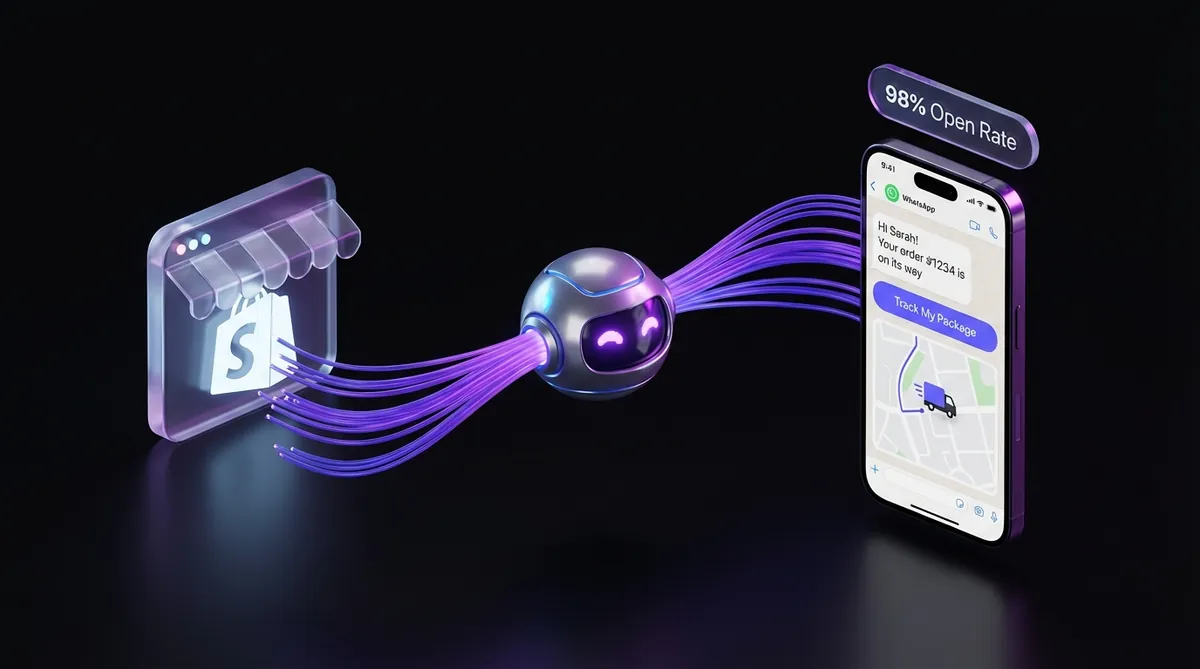
The modern e-commerce landscape in 2026 has transitioned far beyond passive communication. Relying exclusively on email to update customers about their purchases is increasingly ineffective against overflowing inboxes and declining open rates. Current industry data indicates that while email open rates typically hover around 20%, WhatsApp message open rates exceed 98%. This disparity presents a significant opportunity for Shopify store owners to bridge the communication gap between shipment and delivery through proactive engagement. When you automate order tracking notifications with whatsapp, you are not merely sending a message; you are meeting your customers on the platform they utilize most frequently throughout their day.
The business impact of this strategic shift is both measurable and immediate. High-growth Shopify stores report a 30% to 40% reduction in customer support tickets almost immediately following the implementation of WhatsApp tracking automation. The primary catalyst is the elimination of "Where Is My Order" (WISMO) inquiries, which typically saturate support queues and drain operational resources. For instance, the global fashion brand Zara successfully integrated advanced WhatsApp automation in 2024, resulting in a 35% decrease in tracking-related inquiries. By providing real-time, friction-free updates, they transformed a potential point of customer anxiety into a seamless extension of the brand experience.
This guide provides a comprehensive roadmap for implementing these systems within your Shopify ecosystem. We will explore the technical requirements of the WhatsApp Business API, the strategic design of message templates, and the advanced logic required to handle complex shipping scenarios. Whether you are managing a small business or a high-volume enterprise store, understanding how to implement Shopify WhatsApp order tracking is no longer a luxury—it is a fundamental requirement for operational efficiency in 2026.
Understanding WhatsApp Automation for Order Tracking in Shopify
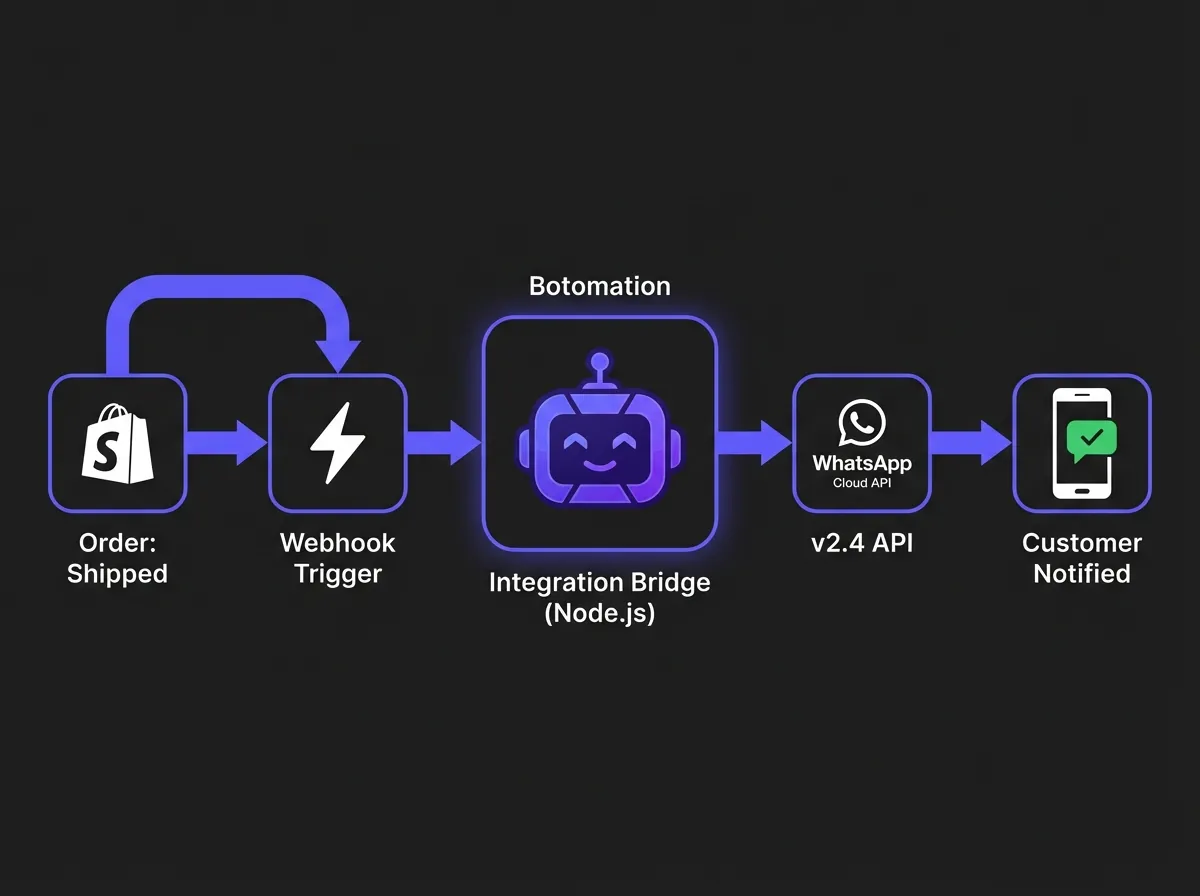
To successfully automate order tracking notifications with whatsapp, you must first understand the Shopify WhatsApp integration for order status updates infrastructure that facilitates it. Unlike the standard WhatsApp application used for personal messaging, the WhatsApp Business API is engineered specifically for programmatic, high-volume communication. This API allows businesses to send "utility messages," which are pre-approved templates used for functional updates such as automated Shopify order confirmations and shipping alerts. These messages are highly reliable and can be triggered automatically by specific events occurring within your Shopify backend.
In October 2024, Meta released the WhatsApp Business Platform v2.4, introducing critical updates for e-commerce merchants. This version includes enhanced message templates that support dynamic variables and improved delivery tracking metrics. One of the most significant advancements is the ability to monitor "read receipts" at a granular level, allowing your team to see exactly when a customer has viewed their tracking information. This level of transparency assists in identifying potential delivery issues before the customer even recognizes a problem exists.
The technical core of this integration relies on webhooks. When an order status changes in Shopify—moving from "Unfulfilled" to "Shipped," for example—Shopify sends a data payload to a specific endpoint. Our team at Botomation configures these endpoints to interpret that data and immediately trigger the corresponding WhatsApp message. This process occurs in milliseconds, ensuring the customer receives an update the moment the shipping label is generated or the package is scanned by the carrier.
WhatsApp Business API vs WhatsApp Business App for E-commerce
Many smaller merchants begin their journey using the standard WhatsApp Business App, but this quickly becomes a bottleneck as the business scales. The Business App is designed for manual interactions and is limited to a small number of linked devices. Crucially, it does not allow you to initiate a conversation with a customer who has not messaged you first, which is a significant limitation for proactive order tracking. The API, however, facilitates "Business-Initiated Conversations," provided you utilize an approved template and the customer has opted in.
The API also supports a much larger contact database, whereas the App begins to struggle once you exceed 1,000 contacts. From a cost perspective, the API operates on a conversation-based pricing model. Depending on the destination country, a utility conversation typically costs between $0.05 and $0.15. While this is a paid service, the ROI is found in the hours of manual labor saved and the significant reduction in support overhead. Partnering with an agency like Botomation ensures that these costs are optimized through efficient template management and high-precision targeting.
Benefits of WhatsApp Order Tracking Automation
The psychological impact of receiving a WhatsApp update is profound. When a customer receives a notification that their order is "out for delivery" directly on their mobile device, it creates a sense of security and professional care. Retail giant Decathlon saw a 25% increase in their customer satisfaction (CSAT) scores in late 2024 after they began utilizing WhatsApp for all post-purchase communication to boost customer retention. This proactive approach reduces support tickets with WhatsApp order tracking by effectively closing the "anxiety gap" that occurs between the moment of purchase and the moment of delivery.
Beyond customer satisfaction, there is a clear operational benefit. Shopify merchant surveys consistently show that automated tracking updates reduce total support ticket volume by 30% to 50%. This allows your support staff to handle more complex issues, such as returns or product inquiries, rather than spending their time copying and pasting tracking numbers into emails. Furthermore, WhatsApp supports rich media, meaning you can include carrier logos, images of the items shipped, and direct links to the carrier's tracking page, making the information far more accessible than a text-heavy email.
Expert Insight: "The most successful brands in 2026 treat the post-purchase experience as a marketing opportunity, often combining tracking with WhatsApp abandoned cart recovery to maximize revenue. By providing flawless tracking via WhatsApp, you aren't just solving a support problem; you are building the trust necessary for the next sale." — Senior Consultant, Botomation.
Setting Up WhatsApp Business API Integration with Shopify
The process to automate order tracking notifications with whatsapp begins with a robust technical foundation. It requires a coordinated setup involving Meta Business Manager and your Shopify admin. First, you must have a verified WhatsApp Business Account (WABA). This verification process ensures that your brand appears with an official profile, complete with your logo and business details, which is essential for maintaining high trust levels with your customers.
The landscape changed significantly in December 2024 with the release of the WhatsApp Cloud API. This update simplified the authentication process and improved rate limiting, making it easier for high-volume stores to send thousands of messages simultaneously without delays. For Shopify merchants, this means that custom integrations are now more stable and faster to deploy. Whether you are on a standard Shopify plan or Shopify Plus, our experts at Botomation can build a custom bridge that connects these two ecosystems seamlessly.
Creating WhatsApp Business Account and Message Templates
Setting up your account through Meta Business Manager is the first hurdle. You will need to provide business documentation to prove your identity, which Meta typically reviews within a few business days. Once verified, the next step is designing your message templates. These are the specific formats for your order updates. WhatsApp is strict about these; they must be categorized as "Utility" messages and cannot contain any promotional content if they are to be used for tracking updates.
Template approval usually takes between 24 and 48 hours. A well-designed template uses dynamic variables—placeholders like {{1}} for the customer's name, {{2}} for the order number, and {{3}} for the tracking URL. During the approval process, you must provide samples of how these variables will be populated. If a template is rejected, it is often because the language is too sales-oriented or the formatting is inconsistent. Our team handles this entire submission process to ensure your templates are approved on the first attempt.
Configuring Shopify Webhooks for Order Status Changes
Webhooks are the "messengers" that inform your WhatsApp integration when an event has occurred in Shopify. To automate order tracking notifications with whatsapp effectively, you need to monitor three primary events: orders/create, orders/updated, and fulfillment_events/create. Each time one of these events occurs, Shopify sends a JSON payload containing all the relevant details about the order and the customer.
Security is paramount during this step. Every webhook sent by Shopify includes a digital signature (the X-Shopify-Hmac-Sha256 header). Your integration must validate this signature to ensure the data actually originated from Shopify and hasn't been intercepted or forged. We implement these security protocols as a standard part of our integration service, ensuring that customer data remains encrypted and protected throughout the transmission process.
Building the Integration Bridge
The "bridge" is the custom software that sits between Shopify and WhatsApp. This is usually a Node.js or Python application hosted on a secure cloud server, which can be optimized through custom web development to ensure it handles high traffic volumes efficiently. Its function is to receive the Shopify webhook, extract the necessary information (like the customer's phone number and tracking ID), and then format a request to the WhatsApp Cloud API. This bridge also needs a database to store the mapping between Shopify order IDs and WhatsApp conversation IDs, which is crucial for handling follow-up questions from the customer.
Error handling is a critical component of this bridge. What happens if the WhatsApp API is temporarily unavailable? Or what if a customer provides an invalid phone number? A professional integration includes a retry mechanism with exponential backoff, ensuring that messages are eventually delivered even if there is a temporary glitch. At Botomation, we build these bridges to be "fault-tolerant," meaning they can handle the massive spikes in traffic that occur during Black Friday or major product launches without dropping a single notification.
Creating Effective Order Tracking Message Templates for WhatsApp
Design is as important as technology when you automate order tracking notifications with whatsapp. A poorly formatted message can confuse customers or lead to your number being reported as spam. In 2026, WhatsApp's policy allows for much richer content than in previous years. You can now include interactive buttons, such as a "Track My Package" button that opens the carrier's website directly, or a "Contact Support" button that initiates a chat with your team.
A/B testing across various e-commerce sectors has shown that templates including the shipping carrier's name and a clear estimated delivery date have a 15% higher engagement rate. Customers appreciate knowing exactly who is delivering their package. Furthermore, the 2026 update to the WhatsApp Business Platform now supports the inclusion of carrier logos within the message header. This visual cue helps customers immediately identify the purpose of the message before they even read the text.
Designing High-Converting Message Templates
A high-converting template follows a specific psychological flow: Greeting -> Order Identification -> Status Update -> Action Item. For example, instead of a dry "Order 1234 has shipped," a better approach is: "Hi Sarah! Great news—your order #1234 from [Brand Name] is on its way. You can follow its journey here: [Link]." This personal touch, combined with a clear call to action, makes the message feel like a service rather than an automated alert.
Amazon Fashion conducted a study in late 2024 showing that simplifying their WhatsApp templates led to a 28% reduction in tracking-related support calls. They moved from long, detailed messages to short, punchy updates with a single, prominent "Track" button. By focusing on the one thing the customer wants to know—"Where is my stuff?"—they improved the user experience while lowering their own operational costs.
Compliance and Approval Process for Templates
Compliance is the hidden challenge of WhatsApp automation. Meta has strict guidelines to prevent the platform from becoming a source of spam. If you attempt to include a discount coupon into a tracking notification, your template will likely be rejected, and repeated violations can lead to account suspension. Utility messages must be purely functional.
When we submit templates for our clients, we ensure they align perfectly with the latest 2026 guidelines. This includes proper use of "Quick Reply" buttons and ensuring that the opt-out mechanism is clear if the customer no longer wishes to receive updates. It is also important to note that once a template is approved, you cannot change its structure without re-submitting it. This is why we design flexible templates that can accommodate various shipping scenarios from the start.
| Feature | WhatsApp Business App | WhatsApp Business API (Botomation) |
|---|---|---|
| **Automation Level** | Manual / Limited | Fully Autonomous |
| **Message Volume** | Low (Single device) | Unlimited (Cloud-based) |
| **Broadcast Limits** | 256 contacts | Unlimited |
| **Proactive Messaging** | Not allowed (Customer must start) | Allowed (Via approved templates) |
| **Integration** | None | Deep Shopify / ERP Integration |
| **Support Reduction** | Minimal | Up to 80% with AI Agents |
Advanced Implementation: Triggering WhatsApp Messages Based on Order Status
The true power of choosing to automate order tracking notifications with whatsapp lies in the granularity of the triggers. You don't just want to send one message when an item ships; you want to keep the customer informed at every major milestone. In November 2024, WhatsApp introduced a specific "Order Status" message type that allows for even more structured updates. This feature enables a "live" status bar within the chat interface, showing the customer exactly where their package is in the fulfillment pipeline.
Mapping these statuses requires a deep understanding of how Shopify handles fulfillment data. An order isn't just "shipped" or "delivered." There are intermediate stages: "Label Created," "Picked Up," "In Transit," "Out for Delivery," and "Attempted Delivery." Each of these stages represents a moment where a customer might feel anxious. By mapping these specific Shopify fulfillment events to distinct WhatsApp templates, you provide a level of service that rivals major marketplaces like Amazon.
Mapping Shopify Order States to WhatsApp Notifications
The logic begins the moment an order is placed. The first message should be a confirmation that includes a summary of the items purchased. This reassures the customer that their payment was successful and the order is being processed. Once the warehouse team fulfills the order, the "Shipment" message is triggered. This is the most critical notification, as it contains the tracking number and the link to the carrier's portal.
The "Out for Delivery" and "Delivered" notifications are the final pieces of the puzzle. The "Delivered" message is particularly useful because it acts as a digital proof of delivery. You can even include information on how to manage WhatsApp automation for returns and exchanges or a link to a "How-to-use" guide for the product they just received. This transition from "Tracking" to "Post-Purchase Support" is where WhatsApp bots for 24/7 support shine, as they can handle any immediate questions the customer might have upon opening their package.
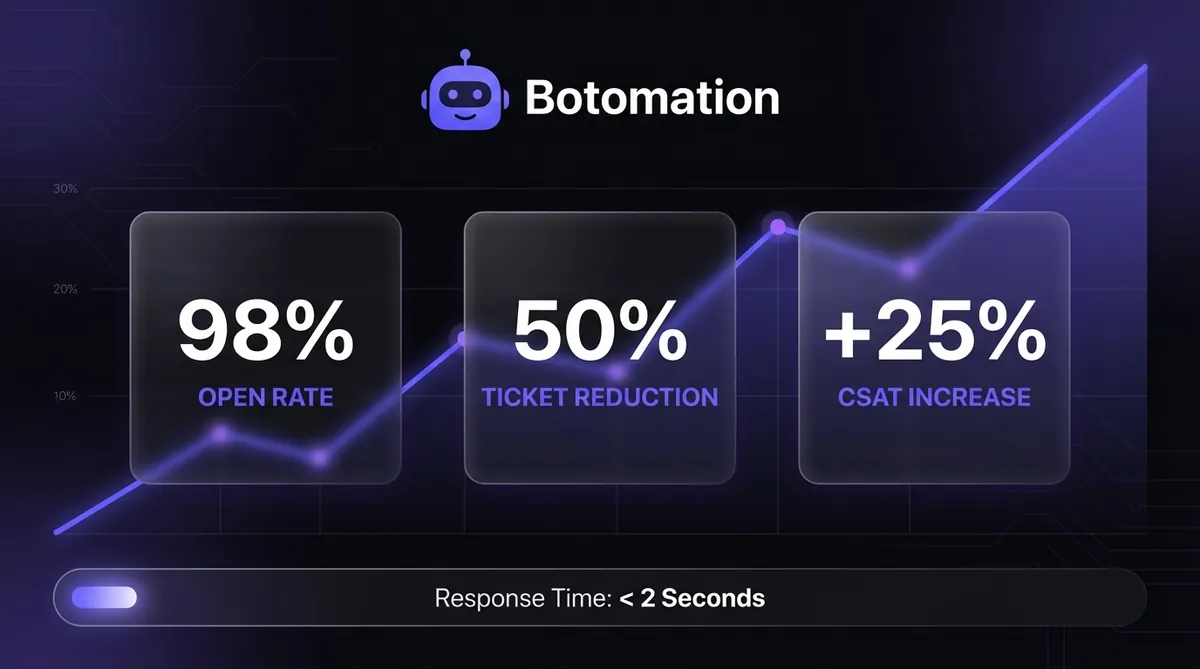
The Impact of Automation at a Glance
- Open Rate: 98% (compared to 20% for email)
- Support Ticket Reduction: 35-50% on average
- Customer Satisfaction (CSAT): 25% increase post-implementation
- Response Time: < 2 seconds for automated updates
Measuring Success: Analytics and Performance Metrics
You cannot manage what you do not measure. When you automate order tracking notifications with whatsapp, you gain access to a wealth of data that email simply cannot provide. The WhatsApp Business API provides detailed logs for every message sent, including "Sent," "Delivered," and "Read" statuses. By analyzing these metrics, you can identify if certain carriers are slower to update their tracking or if customers in specific regions are experiencing delivery delays.
In 2024, ASOS reported that after automating their WhatsApp notifications, they didn't just see fewer tickets; they saw a fundamental shift in their ROI. By reducing the time their support team spent on manual tracking updates, they were able to reallocate those resources to high-value sales assistance. The result was a 45% reduction in support costs related to order inquiries. To achieve similar results, you must track your metrics before and after implementation to quantify the exact value the automation is bringing to your bottom line.
Tracking Delivery and Engagement Metrics
Delivery rates are your first indicator of health. If your delivery rate drops below 95%, it usually suggests an issue with your phone number's reputation or that you are attempting to message invalid numbers. Because WhatsApp is tied to a physical device/SIM, delivery is much more reliable than email, which can be blocked by spam filters. We also track the click-through rate (CTR) on the tracking links provided in the messages. High CTRs indicate that the messages are timely and the information is relevant to the customer.
Another key metric is the "Session Initiation Rate." This measures how many customers reply to your automated tracking updates. While the goal of automation is to reduce work, a high reply rate can actually be a good thing if those replies are being handled by an AI agent. It shows that customers feel comfortable interacting with your brand on WhatsApp, which opens the door for future marketing opportunities and personalized product recommendations that can increase your average order value by up to 35%.
ROI Analysis and Cost-Benefit Calculation
To understand the true value, let's look at the numbers. Consider a mid-sized Shopify store receiving 1,000 tracking inquiries per month. If a support agent spends an average of 3 minutes per inquiry, that is 3,000 minutes (50 hours) of labor. At a cost of $25 per hour (including benefits), that is $1,250 per month spent just on "Where is my order?" questions.
Compare this to the cost of WhatsApp automation. If you send 4,000 messages (4 per order: Confirm, Ship, Out for Delivery, Delivered) at an average cost of $0.10 per conversation, your total messaging cost is roughly $400. Even after adding the service fee for a premium agency like Botomation to manage the system, the savings are substantial. More importantly, you have eliminated 50 hours of tedious work, allowing your team to focus on growth-oriented tasks.
Troubleshooting Common Implementation Challenges
No technical system is perfect, and when you automate order tracking notifications with whatsapp, you must be prepared for occasional hurdles. The most common issues involve webhook timeouts and rate limiting. During massive sales events like Black Friday, Shopify may send thousands of webhooks per second. If your integration bridge isn't designed to handle this volume, it can crash, leading to missed notifications.
The release of WhatsApp v2.5 in January 2026 addressed many of these stability concerns by introducing "Asynchronous Webhook Processing." This allows the API to acknowledge receipt of the data immediately and process the message in the background. However, your internal bridge must still be robust enough to queue these messages properly. Our team uses enterprise-grade message queuing systems (like RabbitMQ or Amazon SQS) to ensure that every single notification is eventually sent, regardless of server load.
Handling Webhook Failures and Message Queuing
If a message fails to deliver because the customer's phone was offline or the API had a momentary hiccup, you need a "Retry Logic." We implement an exponential backoff strategy, where the system attempts to resend the message after 1 minute, then 5 minutes, then 30 minutes. This ensures maximum delivery rates without triggering "spam" protections.
Monitoring is also essential. We set up real-time alerts so that if the failure rate exceeds a certain threshold (e.g., 5%), our engineering team is notified immediately. This proactive monitoring is the difference between an "amateur" setup and a professional agency service. We don't wait for you to tell us there is a problem; we are usually already fixing it before you notice.
Rate Limiting and Message Volume Management
WhatsApp assigns a "Quality Rating" to your phone number. If you send too many messages that are blocked or reported by users, your rating drops, and WhatsApp will limit the number of messages you can send per day. To avoid this, it is vital to only message customers who have explicitly opted in during the Shopify checkout process.
We also manage "Tiering." New WhatsApp API accounts start at Tier 1 (1,000 unique customers per 24 hours). As you consistently send high-quality messages, WhatsApp automatically moves you to Tier 2 (10,000), Tier 3 (100,000), and eventually Tier 4 (unlimited). By managing your rollout carefully and ensuring your templates are helpful rather than annoying, we help you climb these tiers quickly so your automation can grow alongside your business.
How to Automate Your Tracking: Step-by-Step
While the technical details are complex, the path to implementation follows a clear sequence when you partner with experts.
- Verify your Meta Business Manager: Ensure your business is legally verified and your phone number is ready for the API.
- Submit Templates for Approval: Draft your "Order Confirmed," "Shipped," and "Delivered" templates following 2026 guidelines.
- Configure Shopify Webhooks: Set up the secure endpoints to listen for fulfillment events in your Shopify admin.
- Deploy the Integration Bridge: Launch the custom software that connects Shopify's data to the WhatsApp Cloud API.
- Test with Live Orders: Run a series of test transactions to ensure variables (name, tracking link) are populating correctly.
- Monitor and Optimize: Use the first 30 days of data to refine your templates and adjust the timing of your notifications.
Frequently Asked Questions
Does this work with all shipping carriers?
Yes, as long as the carrier provides a tracking URL that can be stored in Shopify, the automation can pull that data and send it via WhatsApp. This includes major global carriers like UPS, FedEx, and DHL, as well as local regional couriers.
How do customers opt-in to WhatsApp notifications?
The most effective way is to add a checkbox to your Shopify checkout page or "Thank You" page. Customers simply enter their phone number and check a box to receive updates. This ensures compliance with both Meta's policies and global privacy laws like GDPR.
Can I use the same number for support and automated tracking?
Absolutely. In fact, we recommend it. Using a single "Official Business Account" number creates a consistent brand identity. Our system can distinguish between an automated notification being sent out and a customer's incoming support query, routing the latter to your support team or an AI agent.
What happens if a customer doesn't have WhatsApp?
The system can be configured with a "fallback" logic. If the WhatsApp API returns an error indicating the number is not on the platform, our bridge can automatically trigger a standard SMS or an email instead, ensuring the customer is never left in the dark.
The Future of Your Post-Purchase Experience
The transition to automated WhatsApp communication represents a fundamental shift in how e-commerce brands interact with their customers. In 2026, the "Old Way" of sending static emails and hoping for the best is no longer sufficient. It leads to overwhelmed support teams, frustrated customers, and lost revenue. The "New Way"—powered by the WhatsApp Business API and the expertise of Botomation—is instant, personal, and highly efficient.
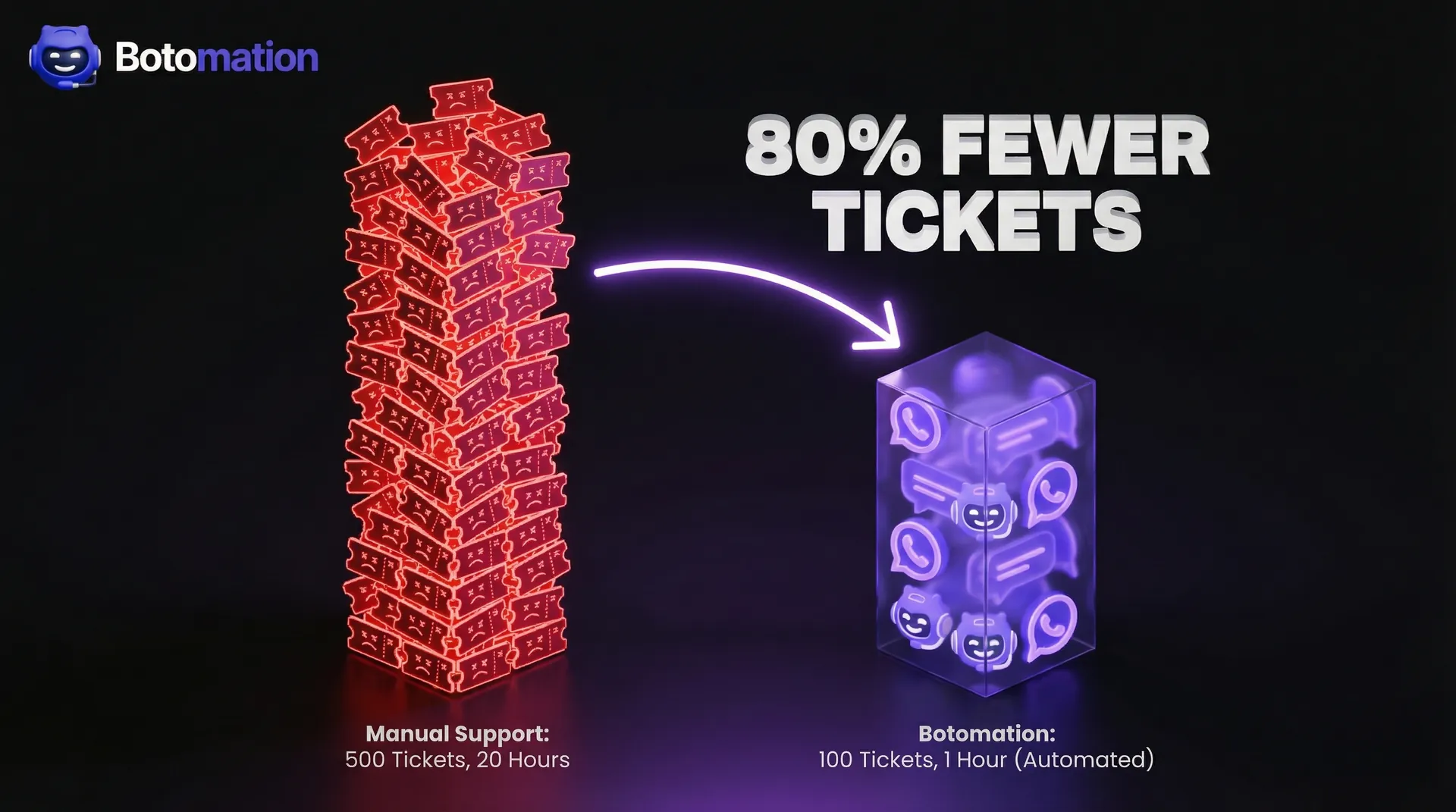
By choosing to automate order tracking notifications with whatsapp, you are making a strategic investment in your brand's operational health. You are choosing to reduce your support burden by up to 80%, increase your customer satisfaction scores, and build a foundation of trust that drives repeat purchases. This isn't just about sending a tracking number; it's about creating a world-class customer experience that sets you apart from the competition.
The technical complexities of Meta's API updates, Shopify's webhook architecture, and the design of high-converting templates are significant. However, you don't have to navigate this alone. Our team at Botomation specializes in building these deep AI and automation integrations for Shopify stores that are ready to scale. We handle the heavy lifting—from account verification and template approval to building the custom integration bridge—so you can focus on growing your business.
Ready to automate your growth? Book a free consultation call below.
The modern e-commerce landscape in 2026 has transitioned far beyond passive communication. Relying exclusively on email to update customers about their purchases is increasingly ineffective against overflowing inboxes and declining open rates. Current industry data indicates that while email open rates typically hover around 20%, WhatsApp message open rates exceed 98%. This disparity presents a significant opportunity for Shopify store owners to bridge the communication gap between shipment and delivery through proactive engagement. When you automate order tracking notifications with whatsapp, you are not merely sending a message; you are meeting your customers on the platform they utilize most frequently throughout their day.
The business impact of this strategic shift is both measurable and immediate. High-growth Shopify stores report a 30% to 40% reduction in customer support tickets almost immediately following the implementation of WhatsApp tracking automation. The primary catalyst is the elimination of "Where Is My Order" (WISMO) inquiries, which typically saturate support queues and drain operational resources. For instance, the global fashion brand Zara successfully integrated advanced WhatsApp automation in 2024, resulting in a 35% decrease in tracking-related inquiries. By providing real-time, friction-free updates, they transformed a potential point of customer anxiety into a seamless extension of the brand experience.
This guide provides a comprehensive roadmap for implementing these systems within your Shopify ecosystem. We will explore the technical requirements of the WhatsApp Business API, the strategic design of message templates, and the advanced logic required to handle complex shipping scenarios. Whether you are managing a small business or a high-volume enterprise store, understanding how to implement Shopify WhatsApp order tracking is no longer a luxury—it is a fundamental requirement for operational efficiency in 2026.
Understanding WhatsApp Automation for Order Tracking in Shopify
To successfully automate order tracking notifications with whatsapp, you must first understand the Shopify WhatsApp integration for order status updates infrastructure that facilitates it. Unlike the standard WhatsApp application used for personal messaging, the WhatsApp Business API is engineered specifically for programmatic, high-volume communication. This API allows businesses to send "utility messages," which are pre-approved templates used for functional updates such as automated Shopify order confirmations and shipping alerts. These messages are highly reliable and can be triggered automatically by specific events occurring within your Shopify backend.
In October 2024, Meta released the WhatsApp Business Platform v2.4, introducing critical updates for e-commerce merchants. This version includes enhanced message templates that support dynamic variables and improved delivery tracking metrics. One of the most significant advancements is the ability to monitor "read receipts" at a granular level, allowing your team to see exactly when a customer has viewed their tracking information. This level of transparency assists in identifying potential delivery issues before the customer even recognizes a problem exists.
The technical core of this integration relies on webhooks. When an order status changes in Shopify—moving from "Unfulfilled" to "Shipped," for example—Shopify sends a data payload to a specific endpoint. Our team at Botomation configures these endpoints to interpret that data and immediately trigger the corresponding WhatsApp message. This process occurs in milliseconds, ensuring the customer receives an update the moment the shipping label is generated or the package is scanned by the carrier.
WhatsApp Business API vs WhatsApp Business App for E-commerce
Many smaller merchants begin their journey using the standard WhatsApp Business App, but this quickly becomes a bottleneck as the business scales. The Business App is designed for manual interactions and is limited to a small number of linked devices. Crucially, it does not allow you to initiate a conversation with a customer who has not messaged you first, which is a significant limitation for proactive order tracking. The API, however, facilitates "Business-Initiated Conversations," provided you utilize an approved template and the customer has opted in.
The API also supports a much larger contact database, whereas the App begins to struggle once you exceed 1,000 contacts. From a cost perspective, the API operates on a conversation-based pricing model. Depending on the destination country, a utility conversation typically costs between $0.05 and $0.15. While this is a paid service, the ROI is found in the hours of manual labor saved and the significant reduction in support overhead. Partnering with an agency like Botomation ensures that these costs are optimized through efficient template management and high-precision targeting.
Benefits of WhatsApp Order Tracking Automation
The psychological impact of receiving a WhatsApp update is profound. When a customer receives a notification that their order is "out for delivery" directly on their mobile device, it creates a sense of security and professional care. Retail giant Decathlon saw a 25% increase in their customer satisfaction (CSAT) scores in late 2024 after they began utilizing WhatsApp for all post-purchase communication to boost customer retention. This proactive approach reduces support tickets with WhatsApp order tracking by effectively closing the "anxiety gap" that occurs between the moment of purchase and the moment of delivery.
Beyond customer satisfaction, there is a clear operational benefit. Shopify merchant surveys consistently show that automated tracking updates reduce total support ticket volume by 30% to 50%. This allows your support staff to handle more complex issues, such as returns or product inquiries, rather than spending their time copying and pasting tracking numbers into emails. Furthermore, WhatsApp supports rich media, meaning you can include carrier logos, images of the items shipped, and direct links to the carrier's tracking page, making the information far more accessible than a text-heavy email.
Expert Insight: "The most successful brands in 2026 treat the post-purchase experience as a marketing opportunity, often combining tracking with WhatsApp abandoned cart recovery to maximize revenue. By providing flawless tracking via WhatsApp, you aren't just solving a support problem; you are building the trust necessary for the next sale." — Senior Consultant, Botomation.
Setting Up WhatsApp Business API Integration with Shopify
The process to automate order tracking notifications with whatsapp begins with a robust technical foundation. It requires a coordinated setup involving Meta Business Manager and your Shopify admin. First, you must have a verified WhatsApp Business Account (WABA). This verification process ensures that your brand appears with an official profile, complete with your logo and business details, which is essential for maintaining high trust levels with your customers.
The landscape changed significantly in December 2024 with the release of the WhatsApp Cloud API. This update simplified the authentication process and improved rate limiting, making it easier for high-volume stores to send thousands of messages simultaneously without delays. For Shopify merchants, this means that custom integrations are now more stable and faster to deploy. Whether you are on a standard Shopify plan or Shopify Plus, our experts at Botomation can build a custom bridge that connects these two ecosystems seamlessly.
Creating WhatsApp Business Account and Message Templates
Setting up your account through Meta Business Manager is the first hurdle. You will need to provide business documentation to prove your identity, which Meta typically reviews within a few business days. Once verified, the next step is designing your message templates. These are the specific formats for your order updates. WhatsApp is strict about these; they must be categorized as "Utility" messages and cannot contain any promotional content if they are to be used for tracking updates.
Template approval usually takes between 24 and 48 hours. A well-designed template uses dynamic variables—placeholders like {{1}} for the customer's name, {{2}} for the order number, and {{3}} for the tracking URL. During the approval process, you must provide samples of how these variables will be populated. If a template is rejected, it is often because the language is too sales-oriented or the formatting is inconsistent. Our team handles this entire submission process to ensure your templates are approved on the first attempt.
Configuring Shopify Webhooks for Order Status Changes
Webhooks are the "messengers" that inform your WhatsApp integration when an event has occurred in Shopify. To automate order tracking notifications with whatsapp effectively, you need to monitor three primary events: orders/create, orders/updated, and fulfillment_events/create. Each time one of these events occurs, Shopify sends a JSON payload containing all the relevant details about the order and the customer.
Security is paramount during this step. Every webhook sent by Shopify includes a digital signature (the X-Shopify-Hmac-Sha256 header). Your integration must validate this signature to ensure the data actually originated from Shopify and hasn't been intercepted or forged. We implement these security protocols as a standard part of our integration service, ensuring that customer data remains encrypted and protected throughout the transmission process.
Building the Integration Bridge
The "bridge" is the custom software that sits between Shopify and WhatsApp. This is usually a Node.js or Python application hosted on a secure cloud server, which can be optimized through custom web development to ensure it handles high traffic volumes efficiently. Its function is to receive the Shopify webhook, extract the necessary information (like the customer's phone number and tracking ID), and then format a request to the WhatsApp Cloud API. This bridge also needs a database to store the mapping between Shopify order IDs and WhatsApp conversation IDs, which is crucial for handling follow-up questions from the customer.
Error handling is a critical component of this bridge. What happens if the WhatsApp API is temporarily unavailable? Or what if a customer provides an invalid phone number? A professional integration includes a retry mechanism with exponential backoff, ensuring that messages are eventually delivered even if there is a temporary glitch. At Botomation, we build these bridges to be "fault-tolerant," meaning they can handle the massive spikes in traffic that occur during Black Friday or major product launches without dropping a single notification.
Creating Effective Order Tracking Message Templates for WhatsApp
Design is as important as technology when you automate order tracking notifications with whatsapp. A poorly formatted message can confuse customers or lead to your number being reported as spam. In 2026, WhatsApp's policy allows for much richer content than in previous years. You can now include interactive buttons, such as a "Track My Package" button that opens the carrier's website directly, or a "Contact Support" button that initiates a chat with your team.
A/B testing across various e-commerce sectors has shown that templates including the shipping carrier's name and a clear estimated delivery date have a 15% higher engagement rate. Customers appreciate knowing exactly who is delivering their package. Furthermore, the 2026 update to the WhatsApp Business Platform now supports the inclusion of carrier logos within the message header. This visual cue helps customers immediately identify the purpose of the message before they even read the text.
Designing High-Converting Message Templates
A high-converting template follows a specific psychological flow: Greeting -> Order Identification -> Status Update -> Action Item. For example, instead of a dry "Order 1234 has shipped," a better approach is: "Hi Sarah! Great news—your order #1234 from [Brand Name] is on its way. You can follow its journey here: [Link]." This personal touch, combined with a clear call to action, makes the message feel like a service rather than an automated alert.
Amazon Fashion conducted a study in late 2024 showing that simplifying their WhatsApp templates led to a 28% reduction in tracking-related support calls. They moved from long, detailed messages to short, punchy updates with a single, prominent "Track" button. By focusing on the one thing the customer wants to know—"Where is my stuff?"—they improved the user experience while lowering their own operational costs.
Compliance and Approval Process for Templates
Compliance is the hidden challenge of WhatsApp automation. Meta has strict guidelines to prevent the platform from becoming a source of spam. If you attempt to include a discount coupon into a tracking notification, your template will likely be rejected, and repeated violations can lead to account suspension. Utility messages must be purely functional.
When we submit templates for our clients, we ensure they align perfectly with the latest 2026 guidelines. This includes proper use of "Quick Reply" buttons and ensuring that the opt-out mechanism is clear if the customer no longer wishes to receive updates. It is also important to note that once a template is approved, you cannot change its structure without re-submitting it. This is why we design flexible templates that can accommodate various shipping scenarios from the start.
| Feature | WhatsApp Business App | WhatsApp Business API (Botomation) |
|---|---|---|
| **Automation Level** | Manual / Limited | Fully Autonomous |
| **Message Volume** | Low (Single device) | Unlimited (Cloud-based) |
| **Broadcast Limits** | 256 contacts | Unlimited |
| **Proactive Messaging** | Not allowed (Customer must start) | Allowed (Via approved templates) |
| **Integration** | None | Deep Shopify / ERP Integration |
| **Support Reduction** | Minimal | Up to 80% with AI Agents |
Advanced Implementation: Triggering WhatsApp Messages Based on Order Status
The true power of choosing to automate order tracking notifications with whatsapp lies in the granularity of the triggers. You don't just want to send one message when an item ships; you want to keep the customer informed at every major milestone. In November 2024, WhatsApp introduced a specific "Order Status" message type that allows for even more structured updates. This feature enables a "live" status bar within the chat interface, showing the customer exactly where their package is in the fulfillment pipeline.
Mapping these statuses requires a deep understanding of how Shopify handles fulfillment data. An order isn't just "shipped" or "delivered." There are intermediate stages: "Label Created," "Picked Up," "In Transit," "Out for Delivery," and "Attempted Delivery." Each of these stages represents a moment where a customer might feel anxious. By mapping these specific Shopify fulfillment events to distinct WhatsApp templates, you provide a level of service that rivals major marketplaces like Amazon.
Mapping Shopify Order States to WhatsApp Notifications
The logic begins the moment an order is placed. The first message should be a confirmation that includes a summary of the items purchased. This reassures the customer that their payment was successful and the order is being processed. Once the warehouse team fulfills the order, the "Shipment" message is triggered. This is the most critical notification, as it contains the tracking number and the link to the carrier's portal.
The "Out for Delivery" and "Delivered" notifications are the final pieces of the puzzle. The "Delivered" message is particularly useful because it acts as a digital proof of delivery. You can even include information on how to manage WhatsApp automation for returns and exchanges or a link to a "How-to-use" guide for the product they just received. This transition from "Tracking" to "Post-Purchase Support" is where WhatsApp bots for 24/7 support shine, as they can handle any immediate questions the customer might have upon opening their package.
The Impact of Automation at a Glance
- Open Rate: 98% (compared to 20% for email)
- Support Ticket Reduction: 35-50% on average
- Customer Satisfaction (CSAT): 25% increase post-implementation
- Response Time: < 2 seconds for automated updates
Measuring Success: Analytics and Performance Metrics
You cannot manage what you do not measure. When you automate order tracking notifications with whatsapp, you gain access to a wealth of data that email simply cannot provide. The WhatsApp Business API provides detailed logs for every message sent, including "Sent," "Delivered," and "Read" statuses. By analyzing these metrics, you can identify if certain carriers are slower to update their tracking or if customers in specific regions are experiencing delivery delays.
In 2024, ASOS reported that after automating their WhatsApp notifications, they didn't just see fewer tickets; they saw a fundamental shift in their ROI. By reducing the time their support team spent on manual tracking updates, they were able to reallocate those resources to high-value sales assistance. The result was a 45% reduction in support costs related to order inquiries. To achieve similar results, you must track your metrics before and after implementation to quantify the exact value the automation is bringing to your bottom line.
Tracking Delivery and Engagement Metrics
Delivery rates are your first indicator of health. If your delivery rate drops below 95%, it usually suggests an issue with your phone number's reputation or that you are attempting to message invalid numbers. Because WhatsApp is tied to a physical device/SIM, delivery is much more reliable than email, which can be blocked by spam filters. We also track the click-through rate (CTR) on the tracking links provided in the messages. High CTRs indicate that the messages are timely and the information is relevant to the customer.
Another key metric is the "Session Initiation Rate." This measures how many customers reply to your automated tracking updates. While the goal of automation is to reduce work, a high reply rate can actually be a good thing if those replies are being handled by an AI agent. It shows that customers feel comfortable interacting with your brand on WhatsApp, which opens the door for future marketing opportunities and personalized product recommendations that can increase your average order value by up to 35%.
ROI Analysis and Cost-Benefit Calculation
To understand the true value, let's look at the numbers. Consider a mid-sized Shopify store receiving 1,000 tracking inquiries per month. If a support agent spends an average of 3 minutes per inquiry, that is 3,000 minutes (50 hours) of labor. At a cost of $25 per hour (including benefits), that is $1,250 per month spent just on "Where is my order?" questions.
Compare this to the cost of WhatsApp automation. If you send 4,000 messages (4 per order: Confirm, Ship, Out for Delivery, Delivered) at an average cost of $0.10 per conversation, your total messaging cost is roughly $400. Even after adding the service fee for a premium agency like Botomation to manage the system, the savings are substantial. More importantly, you have eliminated 50 hours of tedious work, allowing your team to focus on growth-oriented tasks.
Troubleshooting Common Implementation Challenges
No technical system is perfect, and when you automate order tracking notifications with whatsapp, you must be prepared for occasional hurdles. The most common issues involve webhook timeouts and rate limiting. During massive sales events like Black Friday, Shopify may send thousands of webhooks per second. If your integration bridge isn't designed to handle this volume, it can crash, leading to missed notifications.
The release of WhatsApp v2.5 in January 2026 addressed many of these stability concerns by introducing "Asynchronous Webhook Processing." This allows the API to acknowledge receipt of the data immediately and process the message in the background. However, your internal bridge must still be robust enough to queue these messages properly. Our team uses enterprise-grade message queuing systems (like RabbitMQ or Amazon SQS) to ensure that every single notification is eventually sent, regardless of server load.
Handling Webhook Failures and Message Queuing
If a message fails to deliver because the customer's phone was offline or the API had a momentary hiccup, you need a "Retry Logic." We implement an exponential backoff strategy, where the system attempts to resend the message after 1 minute, then 5 minutes, then 30 minutes. This ensures maximum delivery rates without triggering "spam" protections.
Monitoring is also essential. We set up real-time alerts so that if the failure rate exceeds a certain threshold (e.g., 5%), our engineering team is notified immediately. This proactive monitoring is the difference between an "amateur" setup and a professional agency service. We don't wait for you to tell us there is a problem; we are usually already fixing it before you notice.
Rate Limiting and Message Volume Management
WhatsApp assigns a "Quality Rating" to your phone number. If you send too many messages that are blocked or reported by users, your rating drops, and WhatsApp will limit the number of messages you can send per day. To avoid this, it is vital to only message customers who have explicitly opted in during the Shopify checkout process.
We also manage "Tiering." New WhatsApp API accounts start at Tier 1 (1,000 unique customers per 24 hours). As you consistently send high-quality messages, WhatsApp automatically moves you to Tier 2 (10,000), Tier 3 (100,000), and eventually Tier 4 (unlimited). By managing your rollout carefully and ensuring your templates are helpful rather than annoying, we help you climb these tiers quickly so your automation can grow alongside your business.
How to Automate Your Tracking: Step-by-Step
While the technical details are complex, the path to implementation follows a clear sequence when you partner with experts.
- Verify your Meta Business Manager: Ensure your business is legally verified and your phone number is ready for the API.
- Submit Templates for Approval: Draft your "Order Confirmed," "Shipped," and "Delivered" templates following 2026 guidelines.
- Configure Shopify Webhooks: Set up the secure endpoints to listen for fulfillment events in your Shopify admin.
- Deploy the Integration Bridge: Launch the custom software that connects Shopify's data to the WhatsApp Cloud API.
- Test with Live Orders: Run a series of test transactions to ensure variables (name, tracking link) are populating correctly.
- Monitor and Optimize: Use the first 30 days of data to refine your templates and adjust the timing of your notifications.
Frequently Asked Questions
Does this work with all shipping carriers?
Yes, as long as the carrier provides a tracking URL that can be stored in Shopify, the automation can pull that data and send it via WhatsApp. This includes major global carriers like UPS, FedEx, and DHL, as well as local regional couriers.
How do customers opt-in to WhatsApp notifications?
The most effective way is to add a checkbox to your Shopify checkout page or "Thank You" page. Customers simply enter their phone number and check a box to receive updates. This ensures compliance with both Meta's policies and global privacy laws like GDPR.
Can I use the same number for support and automated tracking?
Absolutely. In fact, we recommend it. Using a single "Official Business Account" number creates a consistent brand identity. Our system can distinguish between an automated notification being sent out and a customer's incoming support query, routing the latter to your support team or an AI agent.
What happens if a customer doesn't have WhatsApp?
The system can be configured with a "fallback" logic. If the WhatsApp API returns an error indicating the number is not on the platform, our bridge can automatically trigger a standard SMS or an email instead, ensuring the customer is never left in the dark.
The Future of Your Post-Purchase Experience
The transition to automated WhatsApp communication represents a fundamental shift in how e-commerce brands interact with their customers. In 2026, the "Old Way" of sending static emails and hoping for the best is no longer sufficient. It leads to overwhelmed support teams, frustrated customers, and lost revenue. The "New Way"—powered by the WhatsApp Business API and the expertise of Botomation—is instant, personal, and highly efficient.
By choosing to automate order tracking notifications with whatsapp, you are making a strategic investment in your brand's operational health. You are choosing to reduce your support burden by up to 80%, increase your customer satisfaction scores, and build a foundation of trust that drives repeat purchases. This isn't just about sending a tracking number; it's about creating a world-class customer experience that sets you apart from the competition.
The technical complexities of Meta's API updates, Shopify's webhook architecture, and the design of high-converting templates are significant. However, you don't have to navigate this alone. Our team at Botomation specializes in building these deep AI and automation integrations for Shopify stores that are ready to scale. We handle the heavy lifting—from account verification and template approval to building the custom integration bridge—so you can focus on growing your business.
Ready to automate your growth? Book a free consultation call below.
Get Started
Book a FREE Consultation Right NOW!
Schedule a Call with Our Team To Make Your Business More Efficient with AI Instantly.
Read More
Automate Order Tracking Notifications with WhatsApp (2026)
Automate order tracking notifications with whatsapp to reduce support tickets and boost CSAT for Shopify stores using the 2026 WhatsApp Business API.
Reduce Support Tickets Order Tracking WhatsApp Bot 2026 Guide
Learn how WhatsApp AI slashes support costs for e-commerce & SaaS. Proven strategies to boost sales, recover carts, and scale 24/7 service.