7 Steps to Automate Project Management and Billing Processes
Jan 8, 2026
Project Management
Billing Automation
AI Automation
Project Management
Billing Automation
AI Automation
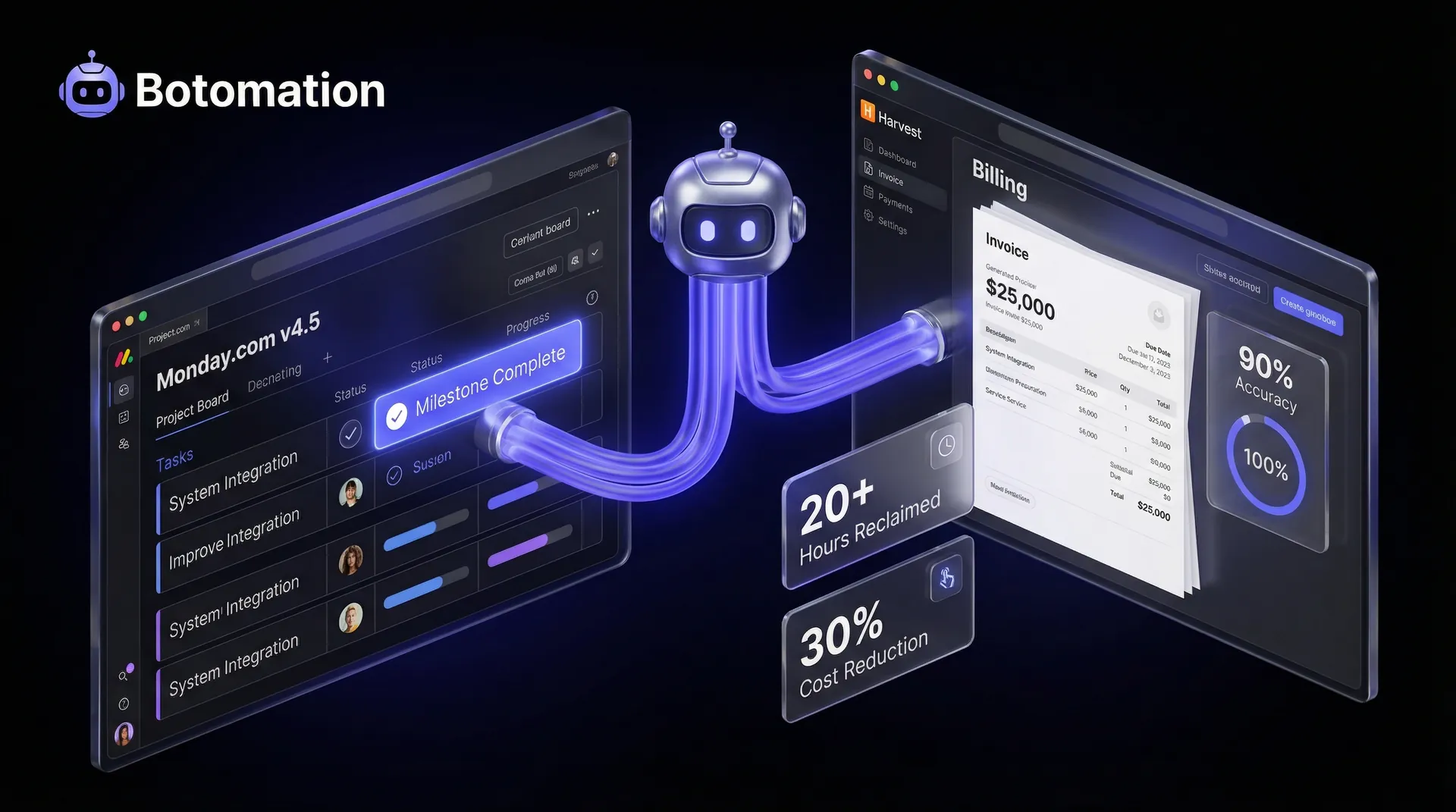
Running a service-based business in 2026 requires a level of operational precision that manual processes simply cannot provide. When we discuss how to automate project management and billing processes, we are addressing the fundamental transition from a reactive business model to a proactive, high-efficiency engine. This transition is often powered by specialized service business workflow automation software that bridges the gap between delivery and finance. For most firms, project management involves automating administrative tasks such as tracking deliverables and timelines, while billing focuses on capturing hours and sending invoices. However, the true power lies in connecting these two functions so they operate as a single, unified workflow without human intervention.
Recent 2026 data indicates that the average professional services firm still loses roughly 30% of its billable potential to administrative friction and manual tracking errors. This "admin tax" manifests as unrecorded hours, delayed invoice cycles, and project managers who spend more time updating spreadsheets than leading their teams. By choosing to reduce admin tasks in service operations with workflow automation, our team at Botomation has seen partners reclaim over 20 hours per project, transforming overhead into pure profit. This isn't just about installing new software; it is about re-engineering how data flows through your organization to ensure that every minute worked is a minute billed.
Why You Should Automate Project Management and Billing Processes in 2026
Automation in the context of service delivery is the strategic use of integrated systems to handle the hand-offs between project milestones and financial transactions. In 2026, this looks like a system where a developer finishes a task in Monday.com v4.5, which instantly updates the project budget, triggers a time entry in your tracking tool, and notifies the client of the progress. According to research by Deloitte, companies that prioritize this level of operational integration see a 30% reduction in total operational costs within the first year. These savings do not come from cutting staff, but from removing the invisible labor of manual data entry and reconciliation.
The landscape of tools has shifted dramatically this year. We are no longer limited to simple "if-this-then-that" logic. Modern solutions like enterprise-grade project management for SMEs, the latest Monday.com updates, and Harvest’s AI-driven automation features allow for complex, multi-stage workflows that understand the context of a project. For example, a system can now recognize when a project is approaching its budget ceiling and automatically pause non-essential tasks while alerting the account manager. This level of sophistication is what separates the market leaders from firms still struggling with manual oversight.
What is the Financial Impact of Manual Management?
The hidden costs of manual project tracking are often far higher than business owners realize. Consider a mid-sized consulting firm where five project managers each spend five hours a week manually reconciling timesheets and drafting invoices. At a conservative internal cost of $100 per hour, that firm is burning $25,000 every month just on the act of billing. When you factor in inevitable human errors—such as forgotten expenses or miscalculated rates—the financial leakage becomes a significant barrier to scaling operations without adding headcount.
A recent case study involving a boutique legal consultancy highlighted this exact problem. Before partnering with our experts, they were spending approximately 25 hours per project on administrative overhead. By calculating the time waste across their 40 annual projects, we identified a $30,000 annual loss in wasted administrative time alone. This doesn't even account for the opportunity cost of those project managers not focusing on client retention or automated lead qualification to drive new business development.
Tangible Benefits of Integrated Systems
Moving away from the "Old Way" of manual entry leads to a dramatic improvement in billing accuracy and client trust. When a client receives an invoice that is perfectly aligned with the project milestones they just approved, the friction of the payment process disappears. Automated systems allow for real-time milestone notifications, ensuring that stakeholders are never surprised by a bill. This transparency is a competitive advantage in a market where clients demand instant visibility into their investments.
The metrics from companies that have embraced this shift are staggering. We have observed organizations improving their billing accuracy by over 90% through automated data entry validation, simply by removing the "manual bridge" between project work and the accounting department. By automating the time-tracking triggers, these firms ensure that no billable second falls through the cracks. This leads to a healthier cash flow and a significantly shorter "days sales outstanding" (DSO) period, as invoices are generated and sent the moment work is completed.
Expert Insight: "In 2026, the bottleneck for service firms isn't talent acquisition; it's administrative friction. If your project managers are acting as data entry clerks, you are overpaying for administration and under-utilizing your best assets." — Senior Consultant at Botomation.
Mapping Your Current Project Management and Billing Workflows
Before you can automate project management and billing processes, you must have a crystal-clear understanding of your current state. This mapping is an essential part of business process automation for service companies. Most service businesses operate on "tribal knowledge"—unwritten rules about how things get done. To automate effectively, our team works with you to document every single touchpoint, from the moment you automate the client onboarding process to the second the final payment hits your bank account. This mapping process often reveals redundant steps that have been performed for years simply because "that's how we've always done it."
A marketing agency we recently collaborated with found that their 8-step billing process involved three different people checking the same time-log for errors. By mapping this workflow, we identified that 60% of the steps were redundant and could be handled by a single automated validation rule. This exercise isn't just about preparing for automation; it is a fundamental audit of your business's health. You cannot automate a broken process; you must first optimize the logic, then apply the technology.
How to Identify Bottlenecks in Your Current Process?
The most common bottlenecks in service firms are time tracking delays, invoice approval lags, and the lack of automated lead verification during the sales hand-off. When employees wait until Friday afternoon to log their hours, accuracy drops by an estimated 40%. This leads to a ripple effect: the project manager can't verify the hours until Monday, the finance team can't draft the invoice until Wednesday, and the client doesn't receive it until the following week. This delay is a primary driver of cash flow volatility.
Specific metrics from firms facing these challenges show that every manual approval step adds an average of 1.5 days to the billing cycle. If your process has four manual approvals, you are looking at a six-day delay before an invoice even leaves your office. Quantifying this time impact is essential for building the business case for automation. It turns a "nice-to-have" upgrade into a "must-have" financial necessity for the survival of the firm.
Documenting Your Current Project to Billing Workflow
To document your workflow properly, you need to gather input from every department involved. Project managers see the day-to-day execution, while the finance team sees the end-of-month fallout. Using techniques like functional decomposition, you can break down a "project" into its constituent tasks, triggers, and financial outcomes. This documentation serves as the blueprint for the automation architecture our experts build for our partners.
A professional services firm specializing in engineering recently went through this process and discovered that their "simple" billing process actually involved 14 different software hand-offs. Many of these were manual copy-paste actions between a project tool and a spreadsheet. By documenting this, they were able to see exactly where the "glue" was missing. This level of detail is what allows an agency like Botomation to step in and create a high-performance, automated environment.
Best Automation Tools for Project Management and Billing in 2026
The tool selection process in 2026 is less about finding a "do-it-all" platform and more about finding the right ecosystem. While some platforms claim to handle everything, the most successful firms use a "best-of-breed" approach, connecting disparate software tools via a sophisticated automation layer. We often see project management automation tools like Monday.com v4.5 used as the central nervous system, while specialized tools like QuickBooks or Xero handle the heavy financial lifting. The key is ensuring these tools speak the same language to automate invoice and billing workflow tasks through advanced API integrations.
New entrants and major updates have changed the game this year. ClickUp’s new automation engine allows for conditional logic that was previously only available in custom-coded solutions. Float’s resource scheduling now integrates directly with billing forecasts, allowing you to see your future cash flow based on the current project schedule. When comparing these tools, we look at their integration density—how easily they can pass data to other systems without requiring a third-party connector for every single move.
| Feature | Monday.com v4.5 | ClickUp Automation Engine | Asana Enterprise |
|---|---|---|---|
| **Billing Integration** | Native with QB/Xero | High via API | Moderate |
| **Time Tracking** | AI-Assisted | Built-in | Integration Required |
| **Custom Logic** | Extensive | Very High | Standard |
| **2026 AI Features** | Predictive Budgeting | Auto-Task Generation | Resource Leveling |
| **Best For** | Complex Workflows | High-Velocity Teams | Creative Agencies |
Which are the Best Comprehensive Project Management Platforms?
Platforms like Monday.com and Asana have evolved into much more than task lists. In 2026, they serve as the "Source of Truth" for both project health and financial status. A consulting firm we partnered with implemented a fully integrated Monday.com environment that synced directly with their billing software. By doing so, they eliminated the need for a full-time billing coordinator, saving over $50,000 annually while increasing their project capacity by 20%.\n\nThe integration capabilities of these platforms are the true "hero" of the story. When your project management tool can "talk" to your accounting software, the manual data entry that usually plagues the end of the month vanishes. Instead of a person moving data, the system triggers an invoice the moment a "Status" column changes to "Approved by Client." This is the "New Way" of operating—where the software handles the chores, and the humans handle the strategy.
Specialized Billing and Time Tracking Solutions
For firms that require granular time tracking, tools like Harvest, Toggl, and Clockify remain essential. However, in 2026, these tools have moved beyond simple stopwatches. They now feature automated time capture that uses AI to suggest entries based on your calendar and file activity. This reduces the burden on staff and ensures that even the smallest billable tasks, like a quick client email, are captured and accounted for.
Real-world examples from our service sector clients show that switching to automated time-capture workflows can reduce the time spent on weekly timesheets from 90 minutes per employee to less than 15. For a 20-person agency, that is 25 hours of reclaimed productivity every single week. When these tools are properly integrated into the broader project management ecosystem by Botomation, the transition from "tracked time" to "sent invoice" becomes a background process that requires zero manual intervention.
Stat Box: The Cost of Inefficiency
* Manual Error Rate: 12-15% in manual billing entries.
* Time Leakage: 2.5 hours per week per employee on unrecorded tasks.
* Revenue Impact: Average 5-8% increase in top-line revenue after automating time capture.
* Admin Savings: 40-60% reduction in back-office costs within 6 months.
A 7-Step Implementation Guide to Automate Project Management and Billing Processes
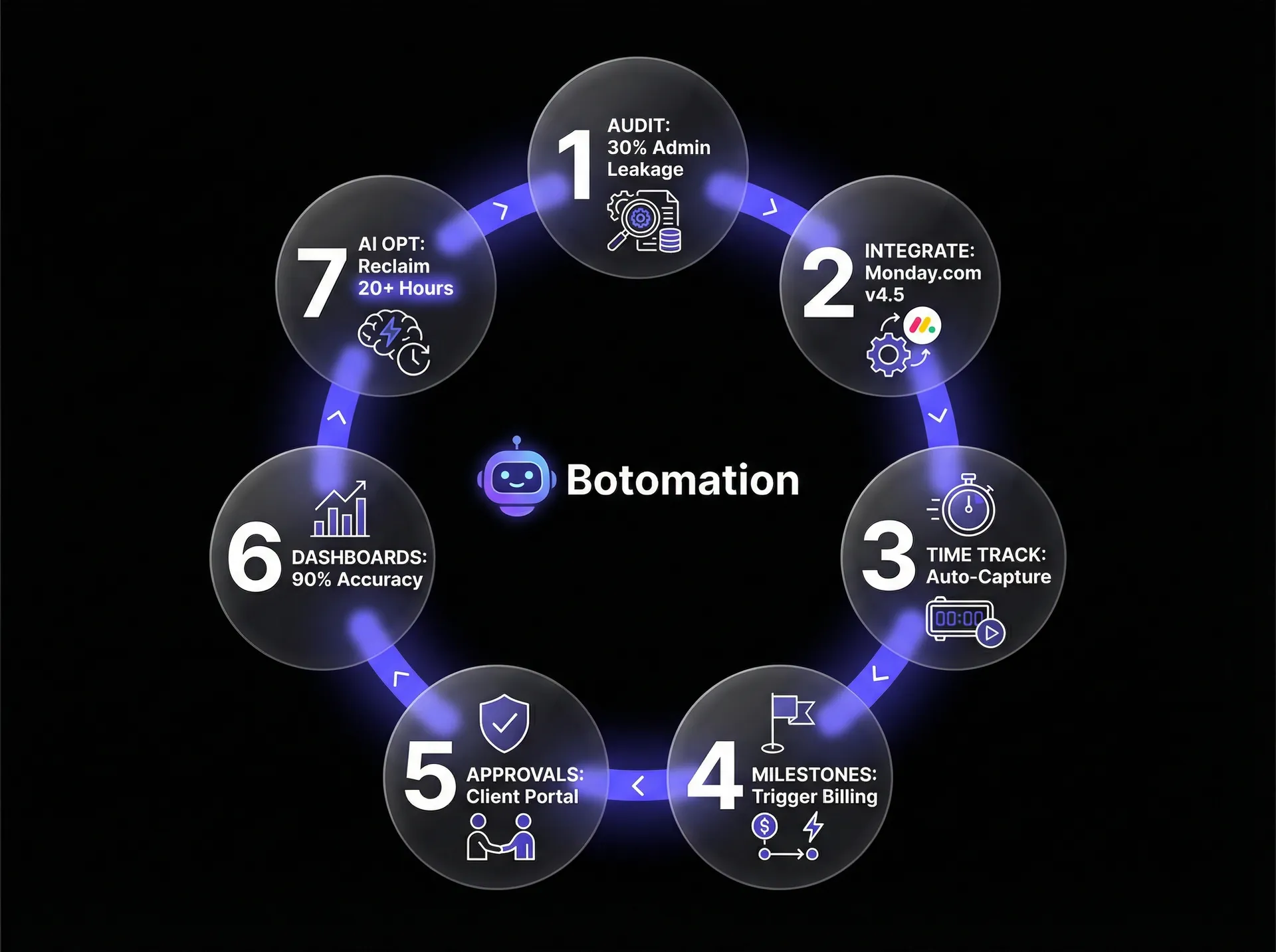
Implementing a system to automate project management and billing processes requires a structured approach. You cannot simply flip a switch; you need to build a foundation that supports your specific business logic. At Botomation, we follow a rigorous 7-step process to ensure that our clients' transitions are smooth and that the resulting system is resilient enough to handle the complexities of real-world service delivery. This guide focuses on achieving workflow automation for professional services and helps to automate repetitive tasks service business owners often struggle with.
The following guide outlines the technical and strategic steps, including how to scale business operations with RPA, necessary to move from manual chaos to automated precision. This process accounts for the latest 2026 technical standards, including the use of GPT-5 driven data validation and high-speed API connectivity.
Step 1: Auditing Your Current Technical Stack
Before introducing new tools, we conduct a deep audit of what you already have. Many firms are paying for redundant features across multiple subscriptions. We identify which tools are essential, which can be retired, and where the data silos exist. The goal is to create a lean tech stack where every piece of software serves a distinct purpose and is capable of communicating with the rest of the ecosystem.
Step 2: Selecting and Integrating Your Core Tools
Based on the audit, we select the "Source of Truth" (usually a PM tool) and the "Financial Engine" (an accounting tool). The integration setup is the most critical part of this step. We don't just use basic connectors; we build custom API bridges that allow for two-way data sync. This ensures that if a budget is updated in the accounting software, it is instantly reflected in the project management dashboard for the PM to see.
A marketing agency we worked with integrated Asana with Harvest and QuickBooks using this method. They went from a system where data was manually moved three times to a system where data moved once, automatically, with 100% accuracy. This integration is the "glue" that Botomation provides, ensuring your tools work as a single unit.
Step 3: Configuring Automated Time Tracking and Triggers
We move away from manual clocks and toward activity-based triggers. For example, when a designer opens a specific project file in Figma, the system can automatically start a timer for that client. We also set up "Milestone Triggers." When a project phase is marked as 100% complete in the PM tool, the system automatically pulls all associated time entries and expenses into a draft invoice, ready for a final one-click review.
Step 4: Establishing Milestone Billing and Notifications
In 2026, client communication must be as automated as the billing itself. We set up automated notifications that inform the client when a milestone is reached and when an invoice is being generated. This proactive communication reduces "invoice shock" and builds a level of professional transparency that manual systems can't match. A consulting firm using this approach saved 15 hours per project by eliminating back-and-forth emails regarding project status and billing queries.
Step 5: Implementing Automated Approval Workflows
Not every invoice should go out without a human eye, but the process of getting that eye on the invoice should be automated. We build internal approval paths where the system routes the draft invoice to the correct manager based on the project type or department. If the manager doesn't approve it within 24 hours, the system sends a reminder. This ensures that the billing cycle never grinds to a halt because someone is on vacation or too busy to check their inbox.
Step 6: Setting Up Real-Time Financial Dashboards
With data flowing automatically, we can now build real-time dashboards. These are living visualizations of your firm's health. You can see your "Burn Rate" versus "Budget" in real-time, allowing you to make adjustments before a project becomes unprofitable. This level of foresight is only possible when your project management and billing data live in the same integrated environment.
Step 7: Continuous Optimization and AI Training
The final step is to let the system learn. In 2026, we use AI models to analyze your historical project data to predict future resource needs and identify potential billing leaks. Our team at Botomation stays involved to refine these automations, ensuring that as your business grows, your systems evolve to scale business operations with AI automation. This is the "New Way" of business—constant, automated improvement.
Measuring Success and ROI of Billing Automation
The decision to automate project management and billing processes must be backed by clear financial outcomes. We look for hard numbers: the reduction in unbilled hours, the decrease in the average time to get paid (DSO), and the total hours reclaimed by the management team. In 2026, the benchmark for a successful implementation is a minimum 25% increase in administrative efficiency within the first quarter.
Calculating the ROI is a straightforward process when you have the data. If you reclaim 20 hours of a project manager’s time per month, and that manager’s hourly rate is $150, you have just generated $3,000 in monthly value from a single person. Multiply that across a team of ten, and the automation pays for itself in a matter of weeks. Beyond the direct savings, the improved cash flow from faster billing allows firms to reinvest in growth much more aggressively.
Tracking Key Performance Indicators
To truly understand the impact of automation, you must monitor specific KPIs using affordable BI tools for growing companies. Billing accuracy is a major one—how many invoices are contested by clients due to errors? In an automated system, this number should trend toward zero. We also track "Time Tracking Efficiency," which measures the gap between when work is performed and when it is logged. The smaller this gap, the more accurate your financial data will be.
Our partners report a 60% improvement in overall billing efficiency. This means they are sending more invoices, more accurately, with less effort. They also see a significant boost in client satisfaction scores, as clients appreciate the clear, timely, and professional nature of the automated billing communications. These metrics provide the proof of concept needed to continue expanding automation into other areas of the business.
Calculating Financial Returns
Let's look at the math of a typical implementation. If a firm with $2M in annual revenue has a 5% leakage due to manual errors and forgotten time, they are losing $100,000 every year. If the cost of partnering with an agency like Botomation to build a comprehensive automation system is $30,000, the firm sees a 233% ROI in the first year alone, just from recovering lost revenue.
Step-by-Step ROI Calculation:
- Base Admin Cost: $45,000 (annual salary portion spent on manual billing)
- Benefits/Overhead: $11,250 (25% of base)
- Total Manual Cost: $56,250
- Automation Efficiency Gain: 70% ($39,375 saved)
- Recovered Revenue (5% of $2M): $100,000
- Total Annual Benefit: $139,375
This calculation shows that the "Old Way" of manual management isn't just slow—it's incredibly expensive. By investing in the "New Way," you aren't just buying software; you are securing a massive, recurring financial return that strengthens the foundation of your entire company.
Frequently Asked Questions
How long does it take to see results from billing automation?
Most service businesses see a noticeable impact on their time-tracking accuracy within the first 30 days. Full ROI, including the reduction in billing cycles and administrative overhead, typically manifests within 90 days as the team becomes fully acclimated to the new automated workflows and the "Source of Truth" data becomes established.
Will our clients find automated billing too impersonal?
On the contrary, clients in 2026 prefer the "New Way" of automated transparency. They value receiving accurate, timely invoices that correspond exactly to the milestones they've approved. Automation allows for more frequent, smaller updates, which is much more professional than a giant, unexpected bill at the end of a project.
What if we use a niche software that doesn't have a direct integration?
This is where the expertise of an agency like Botomation becomes vital. We specialize in building the "glue" between disparate systems. Using advanced API protocols and custom middleware, we can connect almost any software tool, ensuring that your data flows smoothly regardless of the specific platforms you use.
How do we handle team resistance to new time-tracking tools?
Resistance usually stems from the "Old Way" of tools being difficult to use. By implementing AI-assisted time capture and frictionless interfaces, we make the process easier for the team than the manual alternative. When employees see that automation removes the "Friday afternoon timesheet dread," adoption rates typically skyrocket.
Is my data secure when connecting all these platforms?
Security is a cornerstone of the systems we build. In 2026, we utilize SOC2-compliant integration methods and end-to-end encryption for all data passing between your project management and billing tools. By centralizing your data flow through a managed automation architecture, you actually gain more control and visibility over your data than you had with fragmented manual processes.
The Path to Operational Excellence
The transition to automated project management and billing is no longer an optional upgrade for service companies; it is a requirement for survival in a high-velocity market. This shift is a key part of digital transformation for service business operations. The "Old Way" of manual data entry, spreadsheet reconciliation, and delayed invoicing is a recipe for stagnation and lost profit. As we have seen, the financial impact of these inefficiencies is massive, often costing firms six figures in lost time and unbilled revenue every single year.
Partnering with an expert agency like Botomation allows you to bypass the steep learning curve and technical pitfalls of DIY automation. Our team provides the strategic oversight and technical "glue" needed to turn your disconnected tools into a high-performance engine. We don't just give you a tool; we give you a business that runs on autopilot, allowing your leadership team to focus on what they do best: growing the company and serving your clients.
The most successful service firms in 2026 are those that have recognized their administrative overhead is a choice, not a necessity. By choosing the "New Way," you are choosing to reclaim your time, protect your margins, and provide a superior experience for your clients. The numbers are clear, the technology is ready, and the competitive advantage is yours for the taking.
Ready to automate your growth? Book a call below.
Running a service-based business in 2026 requires a level of operational precision that manual processes simply cannot provide. When we discuss how to automate project management and billing processes, we are addressing the fundamental transition from a reactive business model to a proactive, high-efficiency engine. This transition is often powered by specialized service business workflow automation software that bridges the gap between delivery and finance. For most firms, project management involves automating administrative tasks such as tracking deliverables and timelines, while billing focuses on capturing hours and sending invoices. However, the true power lies in connecting these two functions so they operate as a single, unified workflow without human intervention.
Recent 2026 data indicates that the average professional services firm still loses roughly 30% of its billable potential to administrative friction and manual tracking errors. This "admin tax" manifests as unrecorded hours, delayed invoice cycles, and project managers who spend more time updating spreadsheets than leading their teams. By choosing to reduce admin tasks in service operations with workflow automation, our team at Botomation has seen partners reclaim over 20 hours per project, transforming overhead into pure profit. This isn't just about installing new software; it is about re-engineering how data flows through your organization to ensure that every minute worked is a minute billed.
Why You Should Automate Project Management and Billing Processes in 2026
Automation in the context of service delivery is the strategic use of integrated systems to handle the hand-offs between project milestones and financial transactions. In 2026, this looks like a system where a developer finishes a task in Monday.com v4.5, which instantly updates the project budget, triggers a time entry in your tracking tool, and notifies the client of the progress. According to research by Deloitte, companies that prioritize this level of operational integration see a 30% reduction in total operational costs within the first year. These savings do not come from cutting staff, but from removing the invisible labor of manual data entry and reconciliation.
The landscape of tools has shifted dramatically this year. We are no longer limited to simple "if-this-then-that" logic. Modern solutions like enterprise-grade project management for SMEs, the latest Monday.com updates, and Harvest’s AI-driven automation features allow for complex, multi-stage workflows that understand the context of a project. For example, a system can now recognize when a project is approaching its budget ceiling and automatically pause non-essential tasks while alerting the account manager. This level of sophistication is what separates the market leaders from firms still struggling with manual oversight.
What is the Financial Impact of Manual Management?
The hidden costs of manual project tracking are often far higher than business owners realize. Consider a mid-sized consulting firm where five project managers each spend five hours a week manually reconciling timesheets and drafting invoices. At a conservative internal cost of $100 per hour, that firm is burning $25,000 every month just on the act of billing. When you factor in inevitable human errors—such as forgotten expenses or miscalculated rates—the financial leakage becomes a significant barrier to scaling operations without adding headcount.
A recent case study involving a boutique legal consultancy highlighted this exact problem. Before partnering with our experts, they were spending approximately 25 hours per project on administrative overhead. By calculating the time waste across their 40 annual projects, we identified a $30,000 annual loss in wasted administrative time alone. This doesn't even account for the opportunity cost of those project managers not focusing on client retention or automated lead qualification to drive new business development.
Tangible Benefits of Integrated Systems
Moving away from the "Old Way" of manual entry leads to a dramatic improvement in billing accuracy and client trust. When a client receives an invoice that is perfectly aligned with the project milestones they just approved, the friction of the payment process disappears. Automated systems allow for real-time milestone notifications, ensuring that stakeholders are never surprised by a bill. This transparency is a competitive advantage in a market where clients demand instant visibility into their investments.
The metrics from companies that have embraced this shift are staggering. We have observed organizations improving their billing accuracy by over 90% through automated data entry validation, simply by removing the "manual bridge" between project work and the accounting department. By automating the time-tracking triggers, these firms ensure that no billable second falls through the cracks. This leads to a healthier cash flow and a significantly shorter "days sales outstanding" (DSO) period, as invoices are generated and sent the moment work is completed.
Expert Insight: "In 2026, the bottleneck for service firms isn't talent acquisition; it's administrative friction. If your project managers are acting as data entry clerks, you are overpaying for administration and under-utilizing your best assets." — Senior Consultant at Botomation.
Mapping Your Current Project Management and Billing Workflows
Before you can automate project management and billing processes, you must have a crystal-clear understanding of your current state. This mapping is an essential part of business process automation for service companies. Most service businesses operate on "tribal knowledge"—unwritten rules about how things get done. To automate effectively, our team works with you to document every single touchpoint, from the moment you automate the client onboarding process to the second the final payment hits your bank account. This mapping process often reveals redundant steps that have been performed for years simply because "that's how we've always done it."
A marketing agency we recently collaborated with found that their 8-step billing process involved three different people checking the same time-log for errors. By mapping this workflow, we identified that 60% of the steps were redundant and could be handled by a single automated validation rule. This exercise isn't just about preparing for automation; it is a fundamental audit of your business's health. You cannot automate a broken process; you must first optimize the logic, then apply the technology.
How to Identify Bottlenecks in Your Current Process?
The most common bottlenecks in service firms are time tracking delays, invoice approval lags, and the lack of automated lead verification during the sales hand-off. When employees wait until Friday afternoon to log their hours, accuracy drops by an estimated 40%. This leads to a ripple effect: the project manager can't verify the hours until Monday, the finance team can't draft the invoice until Wednesday, and the client doesn't receive it until the following week. This delay is a primary driver of cash flow volatility.
Specific metrics from firms facing these challenges show that every manual approval step adds an average of 1.5 days to the billing cycle. If your process has four manual approvals, you are looking at a six-day delay before an invoice even leaves your office. Quantifying this time impact is essential for building the business case for automation. It turns a "nice-to-have" upgrade into a "must-have" financial necessity for the survival of the firm.
Documenting Your Current Project to Billing Workflow
To document your workflow properly, you need to gather input from every department involved. Project managers see the day-to-day execution, while the finance team sees the end-of-month fallout. Using techniques like functional decomposition, you can break down a "project" into its constituent tasks, triggers, and financial outcomes. This documentation serves as the blueprint for the automation architecture our experts build for our partners.
A professional services firm specializing in engineering recently went through this process and discovered that their "simple" billing process actually involved 14 different software hand-offs. Many of these were manual copy-paste actions between a project tool and a spreadsheet. By documenting this, they were able to see exactly where the "glue" was missing. This level of detail is what allows an agency like Botomation to step in and create a high-performance, automated environment.
Best Automation Tools for Project Management and Billing in 2026
The tool selection process in 2026 is less about finding a "do-it-all" platform and more about finding the right ecosystem. While some platforms claim to handle everything, the most successful firms use a "best-of-breed" approach, connecting disparate software tools via a sophisticated automation layer. We often see project management automation tools like Monday.com v4.5 used as the central nervous system, while specialized tools like QuickBooks or Xero handle the heavy financial lifting. The key is ensuring these tools speak the same language to automate invoice and billing workflow tasks through advanced API integrations.
New entrants and major updates have changed the game this year. ClickUp’s new automation engine allows for conditional logic that was previously only available in custom-coded solutions. Float’s resource scheduling now integrates directly with billing forecasts, allowing you to see your future cash flow based on the current project schedule. When comparing these tools, we look at their integration density—how easily they can pass data to other systems without requiring a third-party connector for every single move.
| Feature | Monday.com v4.5 | ClickUp Automation Engine | Asana Enterprise |
|---|---|---|---|
| **Billing Integration** | Native with QB/Xero | High via API | Moderate |
| **Time Tracking** | AI-Assisted | Built-in | Integration Required |
| **Custom Logic** | Extensive | Very High | Standard |
| **2026 AI Features** | Predictive Budgeting | Auto-Task Generation | Resource Leveling |
| **Best For** | Complex Workflows | High-Velocity Teams | Creative Agencies |
Which are the Best Comprehensive Project Management Platforms?
Platforms like Monday.com and Asana have evolved into much more than task lists. In 2026, they serve as the "Source of Truth" for both project health and financial status. A consulting firm we partnered with implemented a fully integrated Monday.com environment that synced directly with their billing software. By doing so, they eliminated the need for a full-time billing coordinator, saving over $50,000 annually while increasing their project capacity by 20%.\n\nThe integration capabilities of these platforms are the true "hero" of the story. When your project management tool can "talk" to your accounting software, the manual data entry that usually plagues the end of the month vanishes. Instead of a person moving data, the system triggers an invoice the moment a "Status" column changes to "Approved by Client." This is the "New Way" of operating—where the software handles the chores, and the humans handle the strategy.
Specialized Billing and Time Tracking Solutions
For firms that require granular time tracking, tools like Harvest, Toggl, and Clockify remain essential. However, in 2026, these tools have moved beyond simple stopwatches. They now feature automated time capture that uses AI to suggest entries based on your calendar and file activity. This reduces the burden on staff and ensures that even the smallest billable tasks, like a quick client email, are captured and accounted for.
Real-world examples from our service sector clients show that switching to automated time-capture workflows can reduce the time spent on weekly timesheets from 90 minutes per employee to less than 15. For a 20-person agency, that is 25 hours of reclaimed productivity every single week. When these tools are properly integrated into the broader project management ecosystem by Botomation, the transition from "tracked time" to "sent invoice" becomes a background process that requires zero manual intervention.
Stat Box: The Cost of Inefficiency
* Manual Error Rate: 12-15% in manual billing entries.
* Time Leakage: 2.5 hours per week per employee on unrecorded tasks.
* Revenue Impact: Average 5-8% increase in top-line revenue after automating time capture.
* Admin Savings: 40-60% reduction in back-office costs within 6 months.
A 7-Step Implementation Guide to Automate Project Management and Billing Processes
Implementing a system to automate project management and billing processes requires a structured approach. You cannot simply flip a switch; you need to build a foundation that supports your specific business logic. At Botomation, we follow a rigorous 7-step process to ensure that our clients' transitions are smooth and that the resulting system is resilient enough to handle the complexities of real-world service delivery. This guide focuses on achieving workflow automation for professional services and helps to automate repetitive tasks service business owners often struggle with.
The following guide outlines the technical and strategic steps, including how to scale business operations with RPA, necessary to move from manual chaos to automated precision. This process accounts for the latest 2026 technical standards, including the use of GPT-5 driven data validation and high-speed API connectivity.
Step 1: Auditing Your Current Technical Stack
Before introducing new tools, we conduct a deep audit of what you already have. Many firms are paying for redundant features across multiple subscriptions. We identify which tools are essential, which can be retired, and where the data silos exist. The goal is to create a lean tech stack where every piece of software serves a distinct purpose and is capable of communicating with the rest of the ecosystem.
Step 2: Selecting and Integrating Your Core Tools
Based on the audit, we select the "Source of Truth" (usually a PM tool) and the "Financial Engine" (an accounting tool). The integration setup is the most critical part of this step. We don't just use basic connectors; we build custom API bridges that allow for two-way data sync. This ensures that if a budget is updated in the accounting software, it is instantly reflected in the project management dashboard for the PM to see.
A marketing agency we worked with integrated Asana with Harvest and QuickBooks using this method. They went from a system where data was manually moved three times to a system where data moved once, automatically, with 100% accuracy. This integration is the "glue" that Botomation provides, ensuring your tools work as a single unit.
Step 3: Configuring Automated Time Tracking and Triggers
We move away from manual clocks and toward activity-based triggers. For example, when a designer opens a specific project file in Figma, the system can automatically start a timer for that client. We also set up "Milestone Triggers." When a project phase is marked as 100% complete in the PM tool, the system automatically pulls all associated time entries and expenses into a draft invoice, ready for a final one-click review.
Step 4: Establishing Milestone Billing and Notifications
In 2026, client communication must be as automated as the billing itself. We set up automated notifications that inform the client when a milestone is reached and when an invoice is being generated. This proactive communication reduces "invoice shock" and builds a level of professional transparency that manual systems can't match. A consulting firm using this approach saved 15 hours per project by eliminating back-and-forth emails regarding project status and billing queries.
Step 5: Implementing Automated Approval Workflows
Not every invoice should go out without a human eye, but the process of getting that eye on the invoice should be automated. We build internal approval paths where the system routes the draft invoice to the correct manager based on the project type or department. If the manager doesn't approve it within 24 hours, the system sends a reminder. This ensures that the billing cycle never grinds to a halt because someone is on vacation or too busy to check their inbox.
Step 6: Setting Up Real-Time Financial Dashboards
With data flowing automatically, we can now build real-time dashboards. These are living visualizations of your firm's health. You can see your "Burn Rate" versus "Budget" in real-time, allowing you to make adjustments before a project becomes unprofitable. This level of foresight is only possible when your project management and billing data live in the same integrated environment.
Step 7: Continuous Optimization and AI Training
The final step is to let the system learn. In 2026, we use AI models to analyze your historical project data to predict future resource needs and identify potential billing leaks. Our team at Botomation stays involved to refine these automations, ensuring that as your business grows, your systems evolve to scale business operations with AI automation. This is the "New Way" of business—constant, automated improvement.
Measuring Success and ROI of Billing Automation
The decision to automate project management and billing processes must be backed by clear financial outcomes. We look for hard numbers: the reduction in unbilled hours, the decrease in the average time to get paid (DSO), and the total hours reclaimed by the management team. In 2026, the benchmark for a successful implementation is a minimum 25% increase in administrative efficiency within the first quarter.
Calculating the ROI is a straightforward process when you have the data. If you reclaim 20 hours of a project manager’s time per month, and that manager’s hourly rate is $150, you have just generated $3,000 in monthly value from a single person. Multiply that across a team of ten, and the automation pays for itself in a matter of weeks. Beyond the direct savings, the improved cash flow from faster billing allows firms to reinvest in growth much more aggressively.
Tracking Key Performance Indicators
To truly understand the impact of automation, you must monitor specific KPIs using affordable BI tools for growing companies. Billing accuracy is a major one—how many invoices are contested by clients due to errors? In an automated system, this number should trend toward zero. We also track "Time Tracking Efficiency," which measures the gap between when work is performed and when it is logged. The smaller this gap, the more accurate your financial data will be.
Our partners report a 60% improvement in overall billing efficiency. This means they are sending more invoices, more accurately, with less effort. They also see a significant boost in client satisfaction scores, as clients appreciate the clear, timely, and professional nature of the automated billing communications. These metrics provide the proof of concept needed to continue expanding automation into other areas of the business.
Calculating Financial Returns
Let's look at the math of a typical implementation. If a firm with $2M in annual revenue has a 5% leakage due to manual errors and forgotten time, they are losing $100,000 every year. If the cost of partnering with an agency like Botomation to build a comprehensive automation system is $30,000, the firm sees a 233% ROI in the first year alone, just from recovering lost revenue.
Step-by-Step ROI Calculation:
- Base Admin Cost: $45,000 (annual salary portion spent on manual billing)
- Benefits/Overhead: $11,250 (25% of base)
- Total Manual Cost: $56,250
- Automation Efficiency Gain: 70% ($39,375 saved)
- Recovered Revenue (5% of $2M): $100,000
- Total Annual Benefit: $139,375
This calculation shows that the "Old Way" of manual management isn't just slow—it's incredibly expensive. By investing in the "New Way," you aren't just buying software; you are securing a massive, recurring financial return that strengthens the foundation of your entire company.
Frequently Asked Questions
How long does it take to see results from billing automation?
Most service businesses see a noticeable impact on their time-tracking accuracy within the first 30 days. Full ROI, including the reduction in billing cycles and administrative overhead, typically manifests within 90 days as the team becomes fully acclimated to the new automated workflows and the "Source of Truth" data becomes established.
Will our clients find automated billing too impersonal?
On the contrary, clients in 2026 prefer the "New Way" of automated transparency. They value receiving accurate, timely invoices that correspond exactly to the milestones they've approved. Automation allows for more frequent, smaller updates, which is much more professional than a giant, unexpected bill at the end of a project.
What if we use a niche software that doesn't have a direct integration?
This is where the expertise of an agency like Botomation becomes vital. We specialize in building the "glue" between disparate systems. Using advanced API protocols and custom middleware, we can connect almost any software tool, ensuring that your data flows smoothly regardless of the specific platforms you use.
How do we handle team resistance to new time-tracking tools?
Resistance usually stems from the "Old Way" of tools being difficult to use. By implementing AI-assisted time capture and frictionless interfaces, we make the process easier for the team than the manual alternative. When employees see that automation removes the "Friday afternoon timesheet dread," adoption rates typically skyrocket.
Is my data secure when connecting all these platforms?
Security is a cornerstone of the systems we build. In 2026, we utilize SOC2-compliant integration methods and end-to-end encryption for all data passing between your project management and billing tools. By centralizing your data flow through a managed automation architecture, you actually gain more control and visibility over your data than you had with fragmented manual processes.
The Path to Operational Excellence
The transition to automated project management and billing is no longer an optional upgrade for service companies; it is a requirement for survival in a high-velocity market. This shift is a key part of digital transformation for service business operations. The "Old Way" of manual data entry, spreadsheet reconciliation, and delayed invoicing is a recipe for stagnation and lost profit. As we have seen, the financial impact of these inefficiencies is massive, often costing firms six figures in lost time and unbilled revenue every single year.
Partnering with an expert agency like Botomation allows you to bypass the steep learning curve and technical pitfalls of DIY automation. Our team provides the strategic oversight and technical "glue" needed to turn your disconnected tools into a high-performance engine. We don't just give you a tool; we give you a business that runs on autopilot, allowing your leadership team to focus on what they do best: growing the company and serving your clients.
The most successful service firms in 2026 are those that have recognized their administrative overhead is a choice, not a necessity. By choosing the "New Way," you are choosing to reclaim your time, protect your margins, and provide a superior experience for your clients. The numbers are clear, the technology is ready, and the competitive advantage is yours for the taking.
Ready to automate your growth? Book a call below.
Get Started
Book a FREE Consultation Right NOW!
Schedule a Call with Our Team To Make Your Business More Efficient with AI Instantly.
Read More
7 Steps to Automate Project Management and Billing Processes
Automate project management and billing processes to boost service business growth. Streamline workflows, reduce manual entry, and improve ROI in 2026.
Automate Client Onboarding Process Services - 2026 Guide
Learn how WhatsApp AI slashes support costs for e-commerce & SaaS. Proven strategies to boost sales, recover carts, and scale 24/7 service.