Automate Client Onboarding Process Services - 2026 Guide
Jan 8, 2026
AI Automation
Operations
Client Onboarding
AI Automation
Operations
Client Onboarding
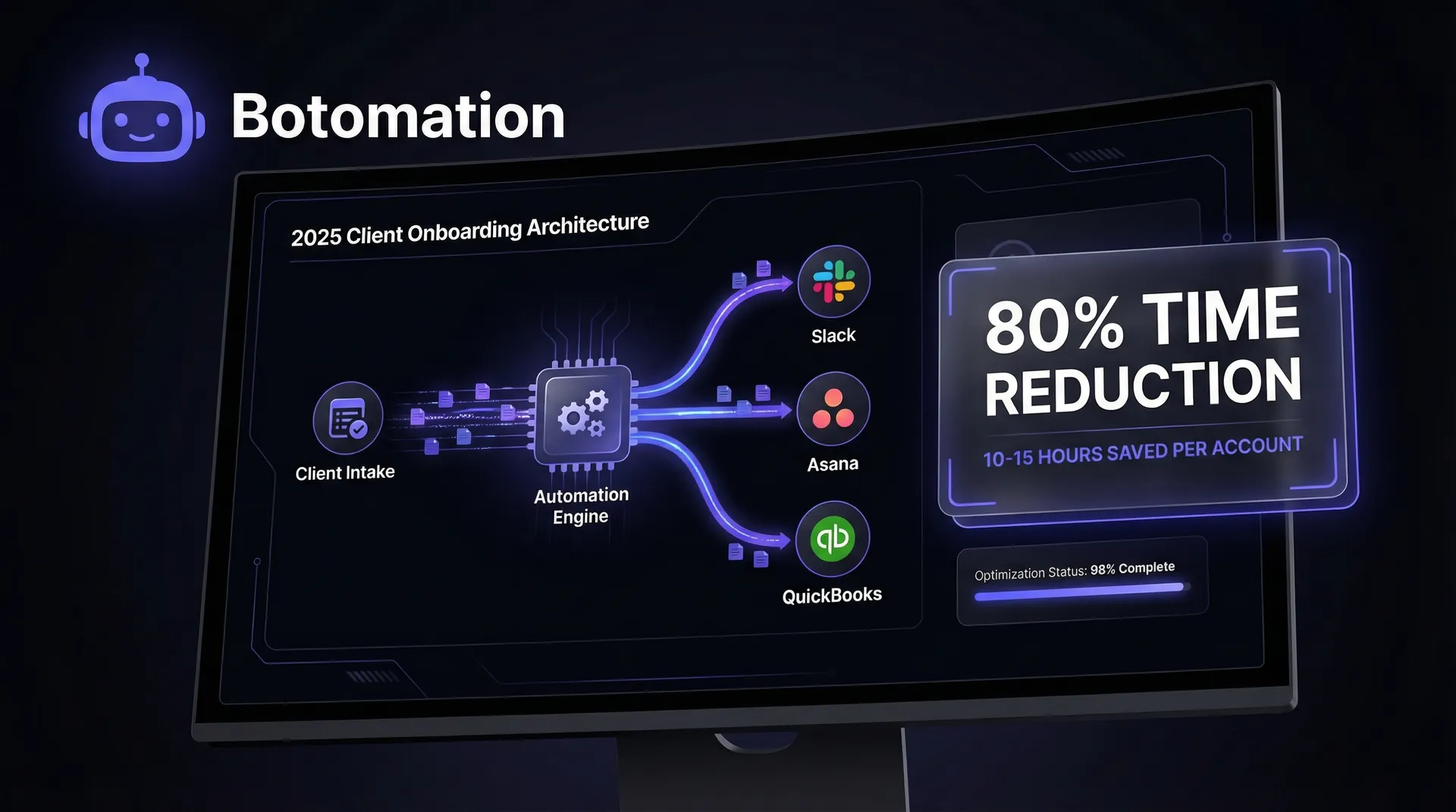
A client's initial handshake represents a moment of peak excitement and professional validation. To maintain this momentum, savvy firms must automate client onboarding process services to eliminate the crushing wave of administrative debt that typically follows a sale. Between drafting custom contracts, chasing down identity verification documents, setting up project management boards, and scheduling kickoff calls, the "honeymoon phase" often dissolves into a frantic scramble of emails and spreadsheets. As of January 2026, manual onboarding processes are no longer just a nuisance; they are a significant drain on profitability. Many firms now reduce admin tasks in service operations to reclaim the 10 to 15 hours of high-level staff time typically lost to every single new account.
When a Director of Operations or a COO reviews the quarterly balance sheet, the hidden costs of manual onboarding are often buried under "general administration." Yet, when you multiply those 10 hours by twenty new clients a year, you are looking at five full work weeks dedicated solely to repetitive data entry and follow-up. This inefficiency creates a bottleneck that limits your agency’s ability to scale business operations with AI automation. If your team is buried in the "how" of starting a project, they cannot focus on the "what" of delivering the actual service.
Operations Spotlight: 2026 Automation Benchmarks
- Cost Reduction: 30% average decrease in operational overhead.
- Efficiency: 80% reduction in time-to-onboard.
- Customer Success: 25% average lift in CSAT scores.
- Productivity: 77% of teams report significant capacity gains.
The solution lies in a comprehensive automation architecture that moves beyond simple software triggers. We are talking about a fundamental shift where your internal systems act as a silent partner, handling the heavy lifting of data migration and communication. By the end of this guide, you will understand how to automate client onboarding process services to reduce onboarding time by 80%, transforming a multi-day ordeal into a coordinated, instantaneous experience. Our team at Botomation specializes in building these bridges, ensuring that your tools don't just exist in isolation but work together to drive growth.
Why You Should Automate Client Onboarding Process Services in 2026
In the context of a modern service organization, workflow automation is the practice of using logic-based systems to handle the hand-offs between different departments and software tools. It is the "connective tissue" that ensures when a lead signs a contract in your CRM, a folder is automatically created in your cloud storage, a Slack channel is provisioned for the team, and a welcome sequence is triggered for the client. Global consulting leaders like Deloitte and PwC have moved aggressively toward these hyper-automated models to maintain their margins. By removing the human element from non-cognitive tasks, these firms ensure that their expensive consultants are focused on strategy rather than searching for missing PDF attachments.
Recent research indicates that organizations implementing intelligent automation see an average cost reduction of nearly 30%. This isn't achieved by replacing humans, but by repurposing them. In late 2026, we are seeing a significant trend toward AI-integrated onboarding as firms learn how to automate repetitive business tasks with AI agents. Tools like Process Street 5.0 now utilize generative logic to build custom checklists based on the specific services purchased, while Zapier’s latest AI features allow for natural language processing to categorize and route client documents without a human ever opening the file.
The Current State of Manual Client Onboarding
The reality for many firms is a disjointed series of "copy-paste" marathons. Without a complete guide to automated data sync for CRM & email marketing, a salesperson closes a deal and manually sends an email to the operations lead. The operations lead then manually types the client’s details into a project management tool like Asana or ClickUp. They then draft a manual invoice in QuickBooks and wait for a notification. This fragmented approach is a breeding ground for human error. A misspelled name or a missed checkbox on a tax form can delay a project by weeks and erode the client's trust before the work even begins.
Consider the case of a mid-sized management consulting firm we recently analyzed. Before partnering with Botomation, they were spending an average of 40 hours per client on onboarding tasks. This included everything from manual background checks to the creation of bespoke client portals. With a steady flow of 20 new clients per year, the firm was burning 800 hours annually on administrative tasks. At an average internal cost of $100 per hour for senior staff, that is an $80,000 annual leak in their operational budget.
Benefits of Automated Client Onboarding Systems
When you transition to an automated system, the most immediate shift is the compression of time. What used to take four business days—waiting for emails to be read and actions to be taken—now happens in four minutes. Shopify’s merchant onboarding is a prime example of this at scale; they have reduced the friction of setting up a complex digital storefront to a series of automated prompts that handle everything from domain registration to payment gateway integration.
Beyond speed, there is the factor of "data integrity." Automated systems do not make typos. When a client enters their information into a secure intake form, that data is pushed directly into your CRM through automated CRM email integration, as well as your billing and project management tools. This creates a single source of truth that follows the client throughout their lifecycle. Salesforce service teams have reported that this level of consistency leads to a 25% increase in client satisfaction scores. Clients feel cared for when the transition from "sales" to "delivery" is invisible and effortless.
"Automation is not about removing the human touch; it is about removing the human friction that prevents you from delivering a premium experience." — Botomation Operations Lead
Best Practices for Mapping Your Current Client Onboarding Workflow
Before you can automate, you must document. You cannot build a reliable bridge if you do not know the distance between the two points. Mapping your current workflow requires a cold, hard look at every click, every email, and every "check-in" that occurs from the moment a prospect says "yes" to the moment the project begins. This documentation is a vital part of any complete guide to automating administrative tasks in 2026. This documentation serves as the blueprint for your automation project, highlighting where the logic is sound and where the process is broken.
Start by gathering your department heads. You need the salesperson who knows the client's initial promises, the operations manager who handles the logistics, and the account manager who will eventually take the lead. Often, these three people have different versions of what the "onboarding process" actually looks like. Reconciling these viewpoints is the first step toward a unified, automated system. HubSpot’s success in onboarding automation stems from this exact cross-departmental alignment, ensuring that no data is lost in the "no-man's land" between sales and service.
Identifying Pain Points in Your Current Onboarding Process
The most common bottlenecks are usually hidden in plain sight. Document collection is a frequent offender. If your team is manually emailing clients to ask for their logos, brand guidelines, or financial records, you are creating a massive lag. A marketing agency we worked with found that 75% of their onboarding errors were caused by staff members misfiling these documents or losing track of which version was the most recent. By identifying this specific pain point, they were able to implement an automated file request system that categorized and stored documents the moment the client uploaded them.
Quantifying these steps is essential. Don't just say "it takes a long time." Use real metrics. If it takes 15 minutes to create a folder structure, 30 minutes to draft an initial project plan, and 20 minutes to send a welcome email, that is over an hour of work that can be condensed into a 5-second automation script. When you add up these small "administrative papercuts," you begin to see why your team feels constantly behind.
Documenting Your Workflow for Automation Projects
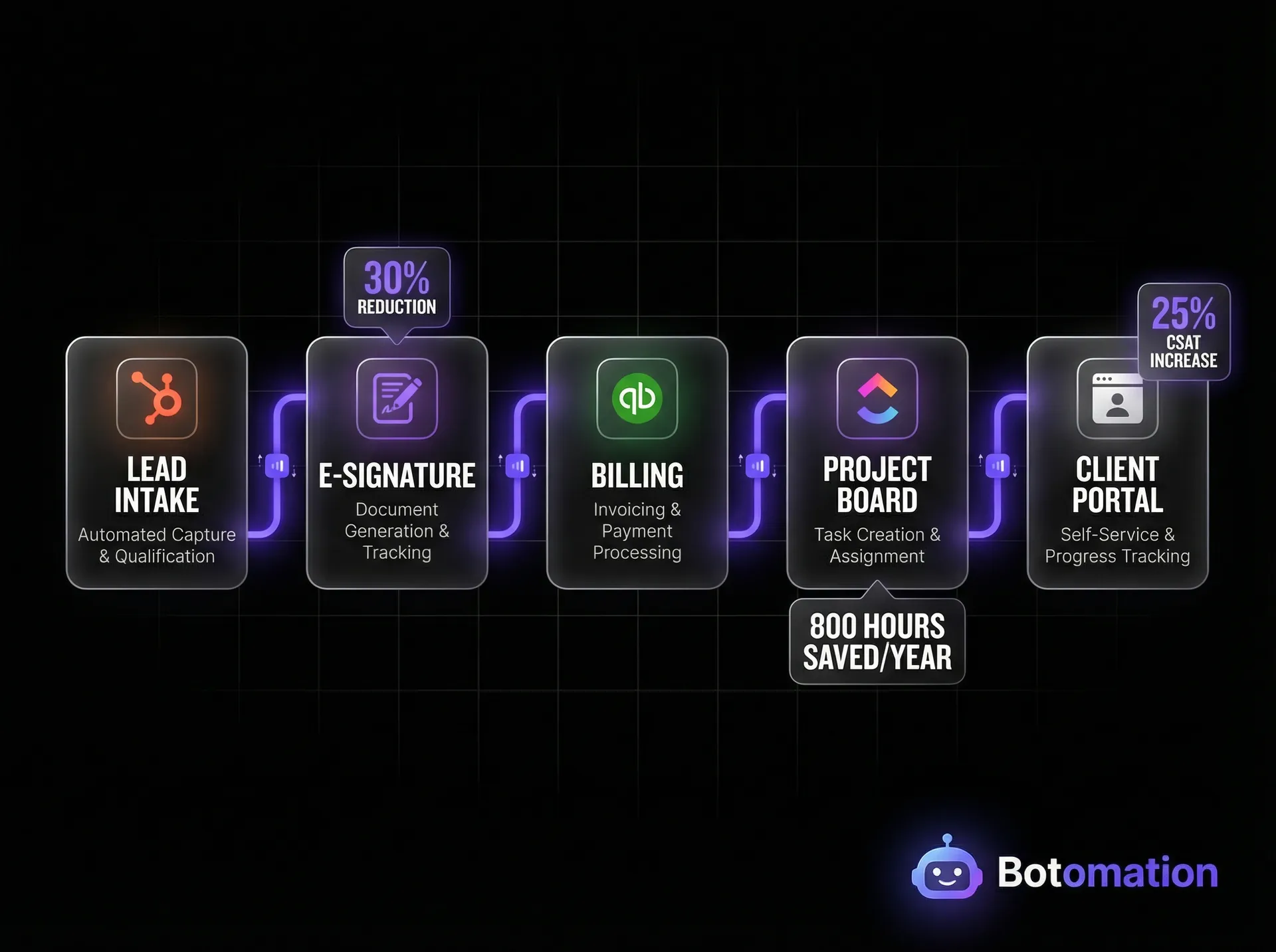
To document effectively, use visual flowcharts rather than long-form text documents. Tools like Lucidchart or even simple whiteboarding applications allow you to see the "if/then" logic of your business. For example: "If the client chooses the Premium Package, then trigger the advanced intake form; if they choose the Basic Package, trigger the standard form." This logical branching is exactly what an automation engine needs to function.
A consulting firm we partnered with recently documented their 12-step onboarding process and discovered that four of those steps were completely redundant. They were asking for the client’s billing address three different times in three different forms. By consolidating these into a single automated data point, they simplified the experience for the client and the team. This level of clarity is vital when you begin the technical implementation phase.
Top Workflow Automation Tools for Service-Based Business Onboarding in 2026
The tool landscape in 2026 is more robust than ever, but the key is choosing a stack that talks to each other. We often see businesses make the mistake of buying "best-in-class" tools that are essentially islands. When you connect disparate software tools for business automation, you avoid the trap of failing to eliminate data silos between business applications. The power of Botomation lies in our ability to act as the architect, ensuring that your ActiveCampaign (for communication), Airtable (for data management), and Process Street (for checklists) function as a single, cohesive unit.
Make.com (formerly Integromat) has released version 7.2, which includes advanced error-handling and "shadow execution" features that allow us to test complex workflows without affecting live data. Similarly, n8n has made massive strides in self-hosted automation, offering businesses more control over their data privacy while maintaining the ease of a visual builder. These tools are the engines, but the logic we build into them is the fuel.
| Feature | ActiveCampaign | Process Street 5.0 | Airtable (Enterprise) | Make.com v7.2 |
|---|---|---|---|---|
| **Primary Use** | Email & CRM Automation | Workflow Checklists | Relational Database | Advanced Integrations |
| **AI Capabilities** | Predictive Sending | AI Task Generation | AI Data Categorization | Natural Language Triggers |
| **Setup Complexity** | Moderate | Low | Moderate | High (Expert Required) |
| **Best For** | Client Communication | Standard Operating Procedures | Data Tracking | Connecting Disparate Tools |
Enterprise Solutions for Large Service Organizations
For larger organizations with strict compliance requirements, enterprise-grade tools like Microsoft Power Automate and Salesforce Flow are the standard. These platforms offer deep integration with the existing Microsoft 365 or Salesforce ecosystems, providing a level of security and auditability that smaller tools may lack. In 2026, Power Automate has introduced "Co-pilot for Operations," which allows managers to describe a workflow in plain English and have the system build the underlying architecture.
One professional services firm we consulted for was able to save $150,000 annually by migrating their manual onboarding to a Salesforce-driven automation. By utilizing the built-in logic of Salesforce Flow, they eliminated the need for three full-time administrative roles whose sole job was to move data between departments. This scale of savings is only possible when the automation is deeply embedded into the company's core infrastructure.
Mid-Market Tools for Growing Service Businesses
For growing agencies and mid-market firms, the combination of Zapier and Make.com remains the gold standard. These tools offer the flexibility to connect thousands of different applications without needing a massive enterprise budget. Recent 2026 updates to Zapier have introduced "Tables," which allows for internal data storage directly within the automation platform, reducing the need for external spreadsheets.
A boutique marketing agency recently reduced their onboarding costs by 40% simply by using Make.com to connect their sales proposal tool (PandaDoc) with their project management tool (ClickUp). The moment a contract was signed, the automation would look at the line items in the proposal and automatically create the corresponding tasks in ClickUp. This eliminated the "interpretation phase" where project managers had to guess what was promised during the sales cycle.
Step-by-Step Guide to Automate Client Onboarding Process Services
Implementing automation is not a "set it and forget it" task; it is a strategic deployment. To achieve the 80% time reduction we discussed earlier, you must follow a structured implementation path. This ensures that every part of the client journey is accounted for and that the technical "plumbing" is sound. In 2026, we are leveraging the OpenAI API v4 to handle unstructured data, such as reading a client's "special requests" in a contact form and automatically flagging them for the account manager.
The following seven-step process is the framework our experts at Botomation use to transform manual operations into automated powerhouses.
Step 1: Automated Lead Qualification and Contact Collection
The onboarding process actually begins before the contract is signed. By using smart forms or WhatsApp AI agents for B2B lead qualification, you can collect essential data points during the lead generation phase. Instead of a generic "Contact Us" form, use a dynamic intake form that asks for the client's industry, budget, and specific needs.
A consulting firm we worked with was able to reduce their lead qualification time from 4 hours to just 15 minutes. The automation would take the form submission, run the company name through a database like Clearbit to pull firmographic data, and then assign a "lead score." If the score was high enough, the system would automatically send a calendar link for a discovery call. This ensures that your high-value team members are only speaking to qualified prospects who are ready to be onboarded.
Step 2: Creating Automated Document and Contract Workflows
The most significant delay in any service business is the "contract dance." Waiting for a client to print, sign, scan, and return a document is a relic of the past. By integrating tools like DocuSign or PandaDoc into your workflow, you can automate the entire legal phase.
When a salesperson marks a deal as "Closed/Won" in the CRM, the automation should:
- Generate a custom contract based on the deal terms.
- Email the contract to the primary stakeholder.
- Send a "nudging" email if the document isn't signed within 48 hours.
- Once signed, save a PDF copy into the client's dedicated folder in Google Drive or SharePoint.
A legal services firm we partnered with automated this exact sequence and saved 20 hours per month. More importantly, they reduced the "time-to-sign" from an average of five days down to just six hours.
Step 3: Financial Integration and Initial Billing
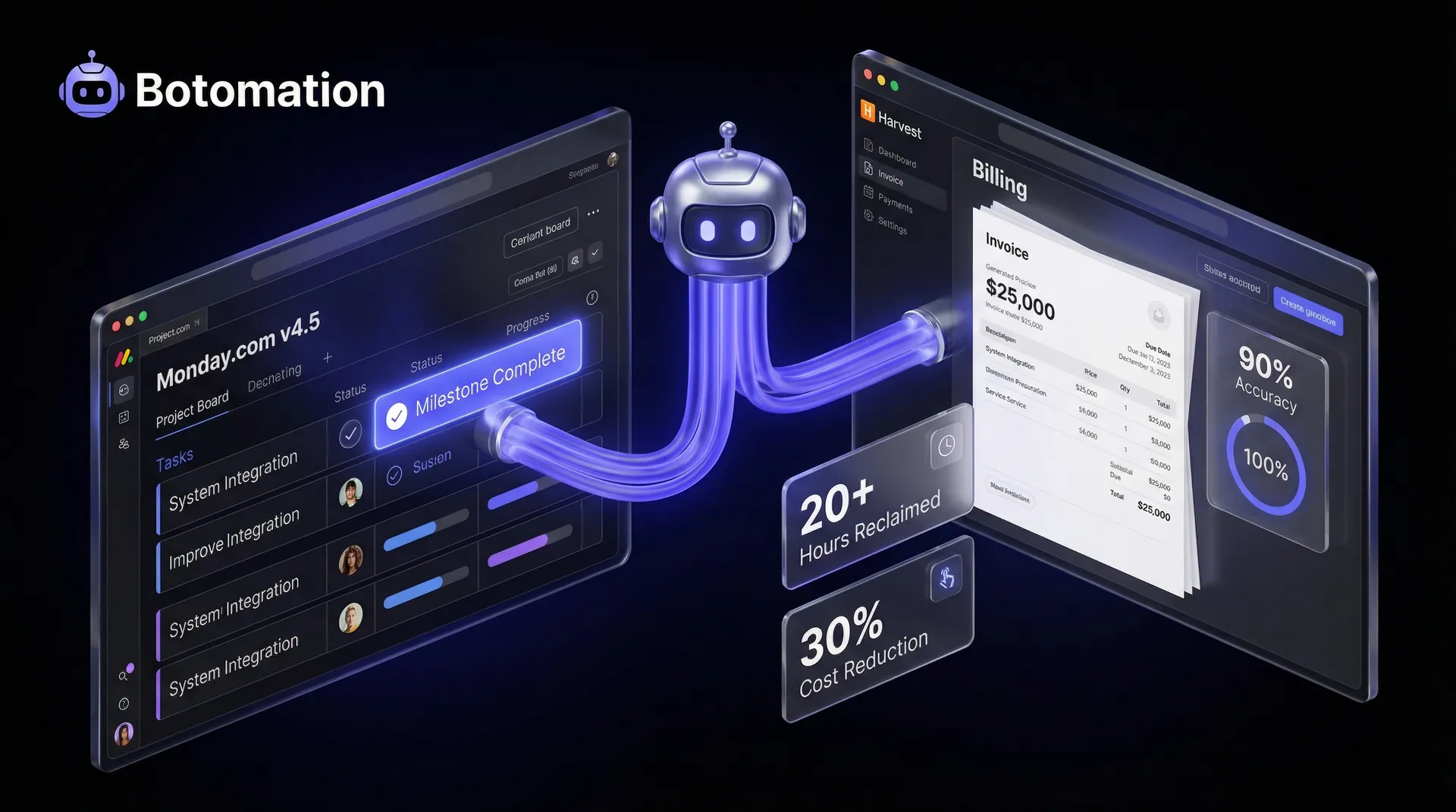
The moment the contract is signed, your accounting system should be notified. Whether you use QuickBooks, Xero, or FreshBooks, the automation should create a new customer profile and issue the initial deposit invoice. There is no reason for an accountant to manually type in an invoice for a standard service package. This integration also ensures that the project doesn't start until the payment is confirmed, protecting your firm's cash flow. Following proven steps to automate project management and billing ensures these financial triggers are foolproof.
Step 4: Provisioning Internal Systems
Once the deposit is paid, the system should "provision" the project. This means creating a new project in your management tool (like Mavenlink or Teamwork), setting up a Slack or Microsoft Teams channel with the correct team members, and creating a client-facing portal. By using templates, you ensure that every project starts with the same high standard of organization, a key component of enterprise-grade project management for SMEs in 2026.
Step 5: The Automated Welcome Sequence
First impressions are everything. While your team is getting the internal work ready, the client should receive a series of "Welcome" emails. These shouldn't just be "Thanks for the money" notes. They should include a link to a "What to Expect" video, a request for any remaining assets, and an invitation to schedule their kickoff call. This keeps the momentum high and reduces "buyer's remorse."
Step 6: Asset Collection and AI Categorization
In 2026, we use OpenAI API v4 to analyze the assets a client uploads. If a client uploads a low-resolution logo, the AI can detect this immediately and send a polite automated message asking for a high-res vector file. This prevents your creative team from getting stuck later in the process.
Step 7: Kickoff and Hand-off to Delivery
The final step is the human hand-off. The automation, designed to replace manual data entry work with AI agents, compiles all the data collected—the contract, the intake form answers, and the uploaded assets—to create a "Briefing Document" for the account manager. This ensures the human lead is fully briefed and ready to provide a premium experience from the very first minute of the kickoff call.
Measuring ROI and Success Metrics for Client Onboarding Automation
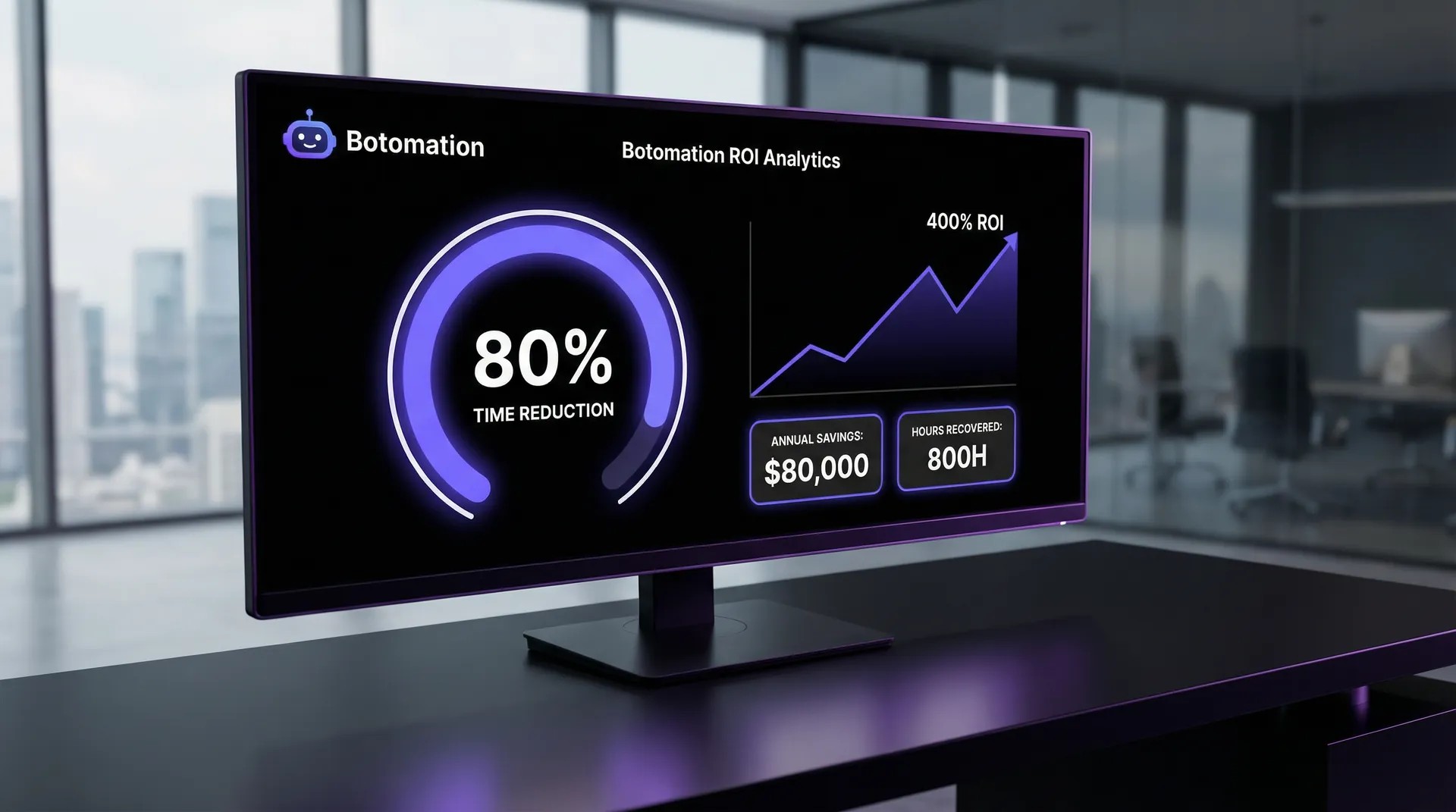
You cannot manage what you do not measure. To justify the investment in automation, you must track specific Key Performance Indicators (KPIs) that prove the system is working. In 2026, 77% of service teams report that they have seen a significant increase in productivity after implementing automation, but that productivity must be translated into dollars and cents for the executive team.
The most obvious metric is "Time to Value." How long does it take from the moment a client signs the contract to the moment the project actually begins? In a manual world, this might be 10 days. In an automated world, it should be less than 48 hours. This speed not only impresses the client but allows your firm to recognize revenue faster, serving as a primary way to reduce operational costs by 40% with AI automation.
Setting Up Tracking and Analytics for Onboarding Success
We recommend building a custom dashboard—either in Airtable or a tool like Looker Studio—that tracks every stage of the onboarding funnel. You should be able to see exactly where clients are getting stuck. Are they failing to sign the contract? Are they not uploading their assets? By visualizing this data, you can refine your automated "nudges" to address specific friction points.
A marketing agency we worked with tracked these metrics and discovered that their "asset collection" phase was taking 5 days on average. By adding an automated SMS reminder for clients who hadn't uploaded files within 24 hours, they were able to bring that average down to 2 days. This 60% improvement in onboarding speed had a direct impact on their ability to take on 15% more clients per quarter without hiring additional staff.
Calculating Cost Savings and Productivity Gains
To calculate your ROI, use a simple formula that accounts for the "fully burdened" cost of your employees. This includes their base salary plus benefits, taxes, and overhead.
The Math of Automation ROI:
- Manual Time Per Client: 15 hours
- Average Hourly Cost of Staff: $75/hr (burdened rate for senior operations staff).
- Annual Clients: 40
- Total Manual Cost: 15 hours x $75/hr x 40 clients = $45,000 per year.
- Automated Time Per Client: 3 hours
- Total Automated Cost: 3 hours x $75/hr x 40 clients = $9,000 per year.
- Annual Savings: $36,000.
In this scenario, the business saves $36,000 in labor costs every year. However, the real ROI is much higher when you consider "Opportunity Cost." Those 480 hours (12 hours saved per client x 40 clients) can now be spent on billable work or strategic growth. If that staff member can generate $200/hr in billable value, you have just "unlocked" $96,000 in additional revenue potential. This is why we see firms achieving a 400% ROI within the first year of partnering with Botomation.
Frequently Asked Questions
What are the common implementation challenges when automating onboarding?
The biggest hurdle is usually "data silos" between departments. If your sales team refuses to use the CRM properly, the automation won't have the data it needs to trigger the next steps. Security is also a major concern in 2026. When we build these systems, we prioritize end-to-end encryption and ensure that all integrations comply with GDPR and CCPA standards.
Is automation going to make my client experience feel cold and robotic?
Quite the opposite. By automating the boring, repetitive parts of the process, you free up your team to provide more meaningful, high-touch interactions. Instead of spending 30 minutes "confirming receipt of a PDF," your account manager can spend that 30 minutes researching the client's industry. Automation handles the "what," so your humans can focus on the "why."
How long does it take to see results from an automation project?
Most of our clients see an immediate reduction in administrative workload within the first 30 days of implementation. The full ROI usually becomes apparent by the end of the first quarter, once the team has fully adapted to the new workflow and the transition has been smoothed out.
Do I need a full-time developer to maintain these systems?
No. While the initial setup requires expert architectural knowledge, the modern tools of 2026 are designed to be managed by operations professionals. We build our systems to be "low-code," meaning your team can make minor adjustments without needing to write a single line of code.
Can I automate onboarding if my services are highly customized for every client?
Yes. In fact, highly customized services benefit the most from automation. We use "conditional logic" to ensure that the onboarding path changes based on the specific services purchased. The system will recognize the project type and trigger the appropriate document requests and task lists automatically.
The transition from manual chaos to automated precision is the single most important move a service-based business can make in 2026. The "old way" of doing business—relying on the memory and manual labor of your staff to handle administrative hand-offs—is a recipe for burnout and stagnation. It creates a ceiling on your growth that no amount of "working harder" can break through.
By partnering with Botomation, you aren't just buying a set of tools; you are investing in a premium operational architecture. Our experts act as the glue that connects your entire business, ensuring that your CRM, your project management, and your billing systems talk to each other without human intervention. We remove the risk of human error and give your team back the gift of time. The competitive advantage in the coming years will not belong to the firm with the most employees, but to the firm with the most efficient systems.
Ready to automate your growth? Stop losing money to manual admin today. Book a call below.
A client's initial handshake represents a moment of peak excitement and professional validation. To maintain this momentum, savvy firms must automate client onboarding process services to eliminate the crushing wave of administrative debt that typically follows a sale. Between drafting custom contracts, chasing down identity verification documents, setting up project management boards, and scheduling kickoff calls, the "honeymoon phase" often dissolves into a frantic scramble of emails and spreadsheets. As of January 2026, manual onboarding processes are no longer just a nuisance; they are a significant drain on profitability. Many firms now reduce admin tasks in service operations to reclaim the 10 to 15 hours of high-level staff time typically lost to every single new account.
When a Director of Operations or a COO reviews the quarterly balance sheet, the hidden costs of manual onboarding are often buried under "general administration." Yet, when you multiply those 10 hours by twenty new clients a year, you are looking at five full work weeks dedicated solely to repetitive data entry and follow-up. This inefficiency creates a bottleneck that limits your agency’s ability to scale business operations with AI automation. If your team is buried in the "how" of starting a project, they cannot focus on the "what" of delivering the actual service.
Operations Spotlight: 2026 Automation Benchmarks
- Cost Reduction: 30% average decrease in operational overhead.
- Efficiency: 80% reduction in time-to-onboard.
- Customer Success: 25% average lift in CSAT scores.
- Productivity: 77% of teams report significant capacity gains.
The solution lies in a comprehensive automation architecture that moves beyond simple software triggers. We are talking about a fundamental shift where your internal systems act as a silent partner, handling the heavy lifting of data migration and communication. By the end of this guide, you will understand how to automate client onboarding process services to reduce onboarding time by 80%, transforming a multi-day ordeal into a coordinated, instantaneous experience. Our team at Botomation specializes in building these bridges, ensuring that your tools don't just exist in isolation but work together to drive growth.
Why You Should Automate Client Onboarding Process Services in 2026
In the context of a modern service organization, workflow automation is the practice of using logic-based systems to handle the hand-offs between different departments and software tools. It is the "connective tissue" that ensures when a lead signs a contract in your CRM, a folder is automatically created in your cloud storage, a Slack channel is provisioned for the team, and a welcome sequence is triggered for the client. Global consulting leaders like Deloitte and PwC have moved aggressively toward these hyper-automated models to maintain their margins. By removing the human element from non-cognitive tasks, these firms ensure that their expensive consultants are focused on strategy rather than searching for missing PDF attachments.
Recent research indicates that organizations implementing intelligent automation see an average cost reduction of nearly 30%. This isn't achieved by replacing humans, but by repurposing them. In late 2026, we are seeing a significant trend toward AI-integrated onboarding as firms learn how to automate repetitive business tasks with AI agents. Tools like Process Street 5.0 now utilize generative logic to build custom checklists based on the specific services purchased, while Zapier’s latest AI features allow for natural language processing to categorize and route client documents without a human ever opening the file.
The Current State of Manual Client Onboarding
The reality for many firms is a disjointed series of "copy-paste" marathons. Without a complete guide to automated data sync for CRM & email marketing, a salesperson closes a deal and manually sends an email to the operations lead. The operations lead then manually types the client’s details into a project management tool like Asana or ClickUp. They then draft a manual invoice in QuickBooks and wait for a notification. This fragmented approach is a breeding ground for human error. A misspelled name or a missed checkbox on a tax form can delay a project by weeks and erode the client's trust before the work even begins.
Consider the case of a mid-sized management consulting firm we recently analyzed. Before partnering with Botomation, they were spending an average of 40 hours per client on onboarding tasks. This included everything from manual background checks to the creation of bespoke client portals. With a steady flow of 20 new clients per year, the firm was burning 800 hours annually on administrative tasks. At an average internal cost of $100 per hour for senior staff, that is an $80,000 annual leak in their operational budget.
Benefits of Automated Client Onboarding Systems
When you transition to an automated system, the most immediate shift is the compression of time. What used to take four business days—waiting for emails to be read and actions to be taken—now happens in four minutes. Shopify’s merchant onboarding is a prime example of this at scale; they have reduced the friction of setting up a complex digital storefront to a series of automated prompts that handle everything from domain registration to payment gateway integration.
Beyond speed, there is the factor of "data integrity." Automated systems do not make typos. When a client enters their information into a secure intake form, that data is pushed directly into your CRM through automated CRM email integration, as well as your billing and project management tools. This creates a single source of truth that follows the client throughout their lifecycle. Salesforce service teams have reported that this level of consistency leads to a 25% increase in client satisfaction scores. Clients feel cared for when the transition from "sales" to "delivery" is invisible and effortless.
"Automation is not about removing the human touch; it is about removing the human friction that prevents you from delivering a premium experience." — Botomation Operations Lead
Best Practices for Mapping Your Current Client Onboarding Workflow
Before you can automate, you must document. You cannot build a reliable bridge if you do not know the distance between the two points. Mapping your current workflow requires a cold, hard look at every click, every email, and every "check-in" that occurs from the moment a prospect says "yes" to the moment the project begins. This documentation is a vital part of any complete guide to automating administrative tasks in 2026. This documentation serves as the blueprint for your automation project, highlighting where the logic is sound and where the process is broken.
Start by gathering your department heads. You need the salesperson who knows the client's initial promises, the operations manager who handles the logistics, and the account manager who will eventually take the lead. Often, these three people have different versions of what the "onboarding process" actually looks like. Reconciling these viewpoints is the first step toward a unified, automated system. HubSpot’s success in onboarding automation stems from this exact cross-departmental alignment, ensuring that no data is lost in the "no-man's land" between sales and service.
Identifying Pain Points in Your Current Onboarding Process
The most common bottlenecks are usually hidden in plain sight. Document collection is a frequent offender. If your team is manually emailing clients to ask for their logos, brand guidelines, or financial records, you are creating a massive lag. A marketing agency we worked with found that 75% of their onboarding errors were caused by staff members misfiling these documents or losing track of which version was the most recent. By identifying this specific pain point, they were able to implement an automated file request system that categorized and stored documents the moment the client uploaded them.
Quantifying these steps is essential. Don't just say "it takes a long time." Use real metrics. If it takes 15 minutes to create a folder structure, 30 minutes to draft an initial project plan, and 20 minutes to send a welcome email, that is over an hour of work that can be condensed into a 5-second automation script. When you add up these small "administrative papercuts," you begin to see why your team feels constantly behind.
Documenting Your Workflow for Automation Projects
To document effectively, use visual flowcharts rather than long-form text documents. Tools like Lucidchart or even simple whiteboarding applications allow you to see the "if/then" logic of your business. For example: "If the client chooses the Premium Package, then trigger the advanced intake form; if they choose the Basic Package, trigger the standard form." This logical branching is exactly what an automation engine needs to function.
A consulting firm we partnered with recently documented their 12-step onboarding process and discovered that four of those steps were completely redundant. They were asking for the client’s billing address three different times in three different forms. By consolidating these into a single automated data point, they simplified the experience for the client and the team. This level of clarity is vital when you begin the technical implementation phase.
Top Workflow Automation Tools for Service-Based Business Onboarding in 2026
The tool landscape in 2026 is more robust than ever, but the key is choosing a stack that talks to each other. We often see businesses make the mistake of buying "best-in-class" tools that are essentially islands. When you connect disparate software tools for business automation, you avoid the trap of failing to eliminate data silos between business applications. The power of Botomation lies in our ability to act as the architect, ensuring that your ActiveCampaign (for communication), Airtable (for data management), and Process Street (for checklists) function as a single, cohesive unit.
Make.com (formerly Integromat) has released version 7.2, which includes advanced error-handling and "shadow execution" features that allow us to test complex workflows without affecting live data. Similarly, n8n has made massive strides in self-hosted automation, offering businesses more control over their data privacy while maintaining the ease of a visual builder. These tools are the engines, but the logic we build into them is the fuel.
| Feature | ActiveCampaign | Process Street 5.0 | Airtable (Enterprise) | Make.com v7.2 |
|---|---|---|---|---|
| **Primary Use** | Email & CRM Automation | Workflow Checklists | Relational Database | Advanced Integrations |
| **AI Capabilities** | Predictive Sending | AI Task Generation | AI Data Categorization | Natural Language Triggers |
| **Setup Complexity** | Moderate | Low | Moderate | High (Expert Required) |
| **Best For** | Client Communication | Standard Operating Procedures | Data Tracking | Connecting Disparate Tools |
Enterprise Solutions for Large Service Organizations
For larger organizations with strict compliance requirements, enterprise-grade tools like Microsoft Power Automate and Salesforce Flow are the standard. These platforms offer deep integration with the existing Microsoft 365 or Salesforce ecosystems, providing a level of security and auditability that smaller tools may lack. In 2026, Power Automate has introduced "Co-pilot for Operations," which allows managers to describe a workflow in plain English and have the system build the underlying architecture.
One professional services firm we consulted for was able to save $150,000 annually by migrating their manual onboarding to a Salesforce-driven automation. By utilizing the built-in logic of Salesforce Flow, they eliminated the need for three full-time administrative roles whose sole job was to move data between departments. This scale of savings is only possible when the automation is deeply embedded into the company's core infrastructure.
Mid-Market Tools for Growing Service Businesses
For growing agencies and mid-market firms, the combination of Zapier and Make.com remains the gold standard. These tools offer the flexibility to connect thousands of different applications without needing a massive enterprise budget. Recent 2026 updates to Zapier have introduced "Tables," which allows for internal data storage directly within the automation platform, reducing the need for external spreadsheets.
A boutique marketing agency recently reduced their onboarding costs by 40% simply by using Make.com to connect their sales proposal tool (PandaDoc) with their project management tool (ClickUp). The moment a contract was signed, the automation would look at the line items in the proposal and automatically create the corresponding tasks in ClickUp. This eliminated the "interpretation phase" where project managers had to guess what was promised during the sales cycle.
Step-by-Step Guide to Automate Client Onboarding Process Services
Implementing automation is not a "set it and forget it" task; it is a strategic deployment. To achieve the 80% time reduction we discussed earlier, you must follow a structured implementation path. This ensures that every part of the client journey is accounted for and that the technical "plumbing" is sound. In 2026, we are leveraging the OpenAI API v4 to handle unstructured data, such as reading a client's "special requests" in a contact form and automatically flagging them for the account manager.
The following seven-step process is the framework our experts at Botomation use to transform manual operations into automated powerhouses.
Step 1: Automated Lead Qualification and Contact Collection
The onboarding process actually begins before the contract is signed. By using smart forms or WhatsApp AI agents for B2B lead qualification, you can collect essential data points during the lead generation phase. Instead of a generic "Contact Us" form, use a dynamic intake form that asks for the client's industry, budget, and specific needs.
A consulting firm we worked with was able to reduce their lead qualification time from 4 hours to just 15 minutes. The automation would take the form submission, run the company name through a database like Clearbit to pull firmographic data, and then assign a "lead score." If the score was high enough, the system would automatically send a calendar link for a discovery call. This ensures that your high-value team members are only speaking to qualified prospects who are ready to be onboarded.
Step 2: Creating Automated Document and Contract Workflows
The most significant delay in any service business is the "contract dance." Waiting for a client to print, sign, scan, and return a document is a relic of the past. By integrating tools like DocuSign or PandaDoc into your workflow, you can automate the entire legal phase.
When a salesperson marks a deal as "Closed/Won" in the CRM, the automation should:
- Generate a custom contract based on the deal terms.
- Email the contract to the primary stakeholder.
- Send a "nudging" email if the document isn't signed within 48 hours.
- Once signed, save a PDF copy into the client's dedicated folder in Google Drive or SharePoint.
A legal services firm we partnered with automated this exact sequence and saved 20 hours per month. More importantly, they reduced the "time-to-sign" from an average of five days down to just six hours.
Step 3: Financial Integration and Initial Billing
The moment the contract is signed, your accounting system should be notified. Whether you use QuickBooks, Xero, or FreshBooks, the automation should create a new customer profile and issue the initial deposit invoice. There is no reason for an accountant to manually type in an invoice for a standard service package. This integration also ensures that the project doesn't start until the payment is confirmed, protecting your firm's cash flow. Following proven steps to automate project management and billing ensures these financial triggers are foolproof.
Step 4: Provisioning Internal Systems
Once the deposit is paid, the system should "provision" the project. This means creating a new project in your management tool (like Mavenlink or Teamwork), setting up a Slack or Microsoft Teams channel with the correct team members, and creating a client-facing portal. By using templates, you ensure that every project starts with the same high standard of organization, a key component of enterprise-grade project management for SMEs in 2026.
Step 5: The Automated Welcome Sequence
First impressions are everything. While your team is getting the internal work ready, the client should receive a series of "Welcome" emails. These shouldn't just be "Thanks for the money" notes. They should include a link to a "What to Expect" video, a request for any remaining assets, and an invitation to schedule their kickoff call. This keeps the momentum high and reduces "buyer's remorse."
Step 6: Asset Collection and AI Categorization
In 2026, we use OpenAI API v4 to analyze the assets a client uploads. If a client uploads a low-resolution logo, the AI can detect this immediately and send a polite automated message asking for a high-res vector file. This prevents your creative team from getting stuck later in the process.
Step 7: Kickoff and Hand-off to Delivery
The final step is the human hand-off. The automation, designed to replace manual data entry work with AI agents, compiles all the data collected—the contract, the intake form answers, and the uploaded assets—to create a "Briefing Document" for the account manager. This ensures the human lead is fully briefed and ready to provide a premium experience from the very first minute of the kickoff call.
Measuring ROI and Success Metrics for Client Onboarding Automation
You cannot manage what you do not measure. To justify the investment in automation, you must track specific Key Performance Indicators (KPIs) that prove the system is working. In 2026, 77% of service teams report that they have seen a significant increase in productivity after implementing automation, but that productivity must be translated into dollars and cents for the executive team.
The most obvious metric is "Time to Value." How long does it take from the moment a client signs the contract to the moment the project actually begins? In a manual world, this might be 10 days. In an automated world, it should be less than 48 hours. This speed not only impresses the client but allows your firm to recognize revenue faster, serving as a primary way to reduce operational costs by 40% with AI automation.
Setting Up Tracking and Analytics for Onboarding Success
We recommend building a custom dashboard—either in Airtable or a tool like Looker Studio—that tracks every stage of the onboarding funnel. You should be able to see exactly where clients are getting stuck. Are they failing to sign the contract? Are they not uploading their assets? By visualizing this data, you can refine your automated "nudges" to address specific friction points.
A marketing agency we worked with tracked these metrics and discovered that their "asset collection" phase was taking 5 days on average. By adding an automated SMS reminder for clients who hadn't uploaded files within 24 hours, they were able to bring that average down to 2 days. This 60% improvement in onboarding speed had a direct impact on their ability to take on 15% more clients per quarter without hiring additional staff.
Calculating Cost Savings and Productivity Gains
To calculate your ROI, use a simple formula that accounts for the "fully burdened" cost of your employees. This includes their base salary plus benefits, taxes, and overhead.
The Math of Automation ROI:
- Manual Time Per Client: 15 hours
- Average Hourly Cost of Staff: $75/hr (burdened rate for senior operations staff).
- Annual Clients: 40
- Total Manual Cost: 15 hours x $75/hr x 40 clients = $45,000 per year.
- Automated Time Per Client: 3 hours
- Total Automated Cost: 3 hours x $75/hr x 40 clients = $9,000 per year.
- Annual Savings: $36,000.
In this scenario, the business saves $36,000 in labor costs every year. However, the real ROI is much higher when you consider "Opportunity Cost." Those 480 hours (12 hours saved per client x 40 clients) can now be spent on billable work or strategic growth. If that staff member can generate $200/hr in billable value, you have just "unlocked" $96,000 in additional revenue potential. This is why we see firms achieving a 400% ROI within the first year of partnering with Botomation.
Frequently Asked Questions
What are the common implementation challenges when automating onboarding?
The biggest hurdle is usually "data silos" between departments. If your sales team refuses to use the CRM properly, the automation won't have the data it needs to trigger the next steps. Security is also a major concern in 2026. When we build these systems, we prioritize end-to-end encryption and ensure that all integrations comply with GDPR and CCPA standards.
Is automation going to make my client experience feel cold and robotic?
Quite the opposite. By automating the boring, repetitive parts of the process, you free up your team to provide more meaningful, high-touch interactions. Instead of spending 30 minutes "confirming receipt of a PDF," your account manager can spend that 30 minutes researching the client's industry. Automation handles the "what," so your humans can focus on the "why."
How long does it take to see results from an automation project?
Most of our clients see an immediate reduction in administrative workload within the first 30 days of implementation. The full ROI usually becomes apparent by the end of the first quarter, once the team has fully adapted to the new workflow and the transition has been smoothed out.
Do I need a full-time developer to maintain these systems?
No. While the initial setup requires expert architectural knowledge, the modern tools of 2026 are designed to be managed by operations professionals. We build our systems to be "low-code," meaning your team can make minor adjustments without needing to write a single line of code.
Can I automate onboarding if my services are highly customized for every client?
Yes. In fact, highly customized services benefit the most from automation. We use "conditional logic" to ensure that the onboarding path changes based on the specific services purchased. The system will recognize the project type and trigger the appropriate document requests and task lists automatically.
The transition from manual chaos to automated precision is the single most important move a service-based business can make in 2026. The "old way" of doing business—relying on the memory and manual labor of your staff to handle administrative hand-offs—is a recipe for burnout and stagnation. It creates a ceiling on your growth that no amount of "working harder" can break through.
By partnering with Botomation, you aren't just buying a set of tools; you are investing in a premium operational architecture. Our experts act as the glue that connects your entire business, ensuring that your CRM, your project management, and your billing systems talk to each other without human intervention. We remove the risk of human error and give your team back the gift of time. The competitive advantage in the coming years will not belong to the firm with the most employees, but to the firm with the most efficient systems.
Ready to automate your growth? Stop losing money to manual admin today. Book a call below.
Get Started
Book a FREE Consultation Right NOW!
Schedule a Call with Our Team To Make Your Business More Efficient with AI Instantly.
Read More
Automate Client Onboarding Process Services - 2026 Guide
Master how to automate client onboarding process services. Reduce manual data entry, optimize CRM workflows, and improve operational ROI in 2026.
Automated Data Sync Eliminate CRM Manual Entry 2026
Learn how WhatsApp AI slashes support costs for e-commerce & SaaS. Proven strategies to boost sales, recover carts, and scale 24/7 service.