7 Steps to Fast Loading Custom Websites for Marketing in 2026
Jan 7, 2026
Custom Websites
AI Automation
Marketing ROI
Custom Websites
AI Automation
Marketing ROI
Marketing budgets in 2026 are being incinerated by slow-loading landing pages that fail to capture user attention within the first few hundred milliseconds. We have reached a critical point where a delay of even half a second can trigger a catastrophic drop in conversion rates, as modern users expect instantaneous responses from every digital interaction. The landscape of performance has shifted from a technical luxury to a foundational requirement for any campaign hoping to achieve a positive return on ad spend, making custom web development for marketing more critical than ever. When a visitor clicks an ad on their mobile device while commuting, they are not just seeking information; they are demanding a frictionless experience that respects their time and data.
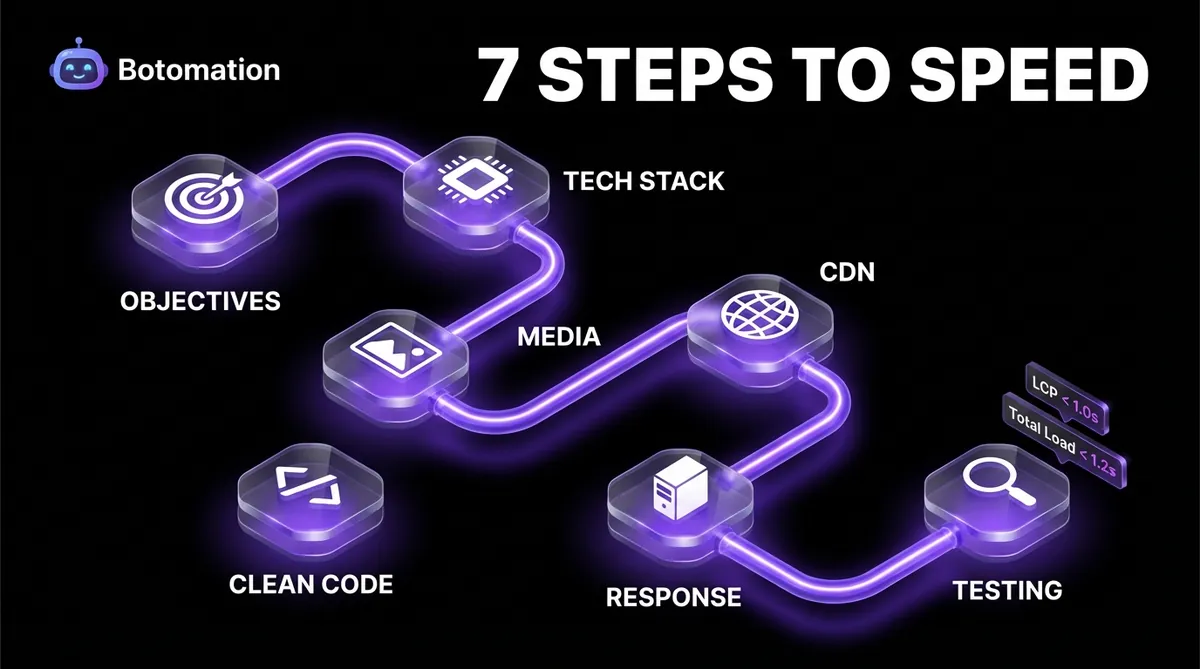
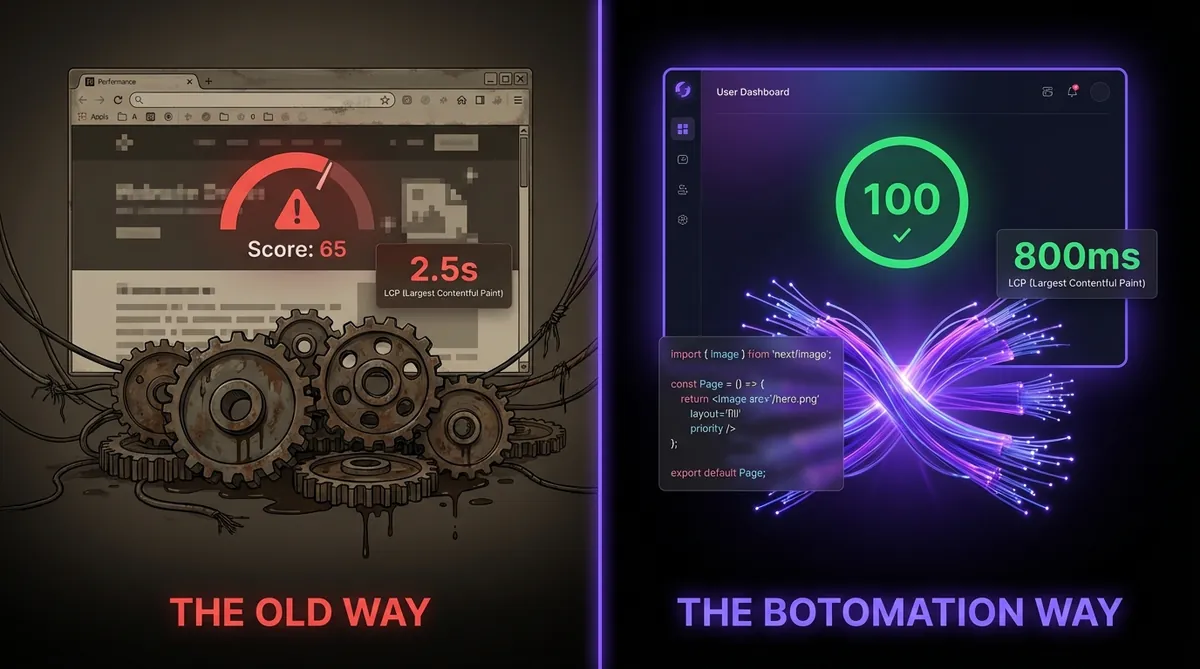
The reality of modern marketing is that your creative assets and copy are only as effective as the infrastructure they inhabit. A beautiful, high-converting design is worthless if the browser is still struggling to parse bloated JavaScript files while the user has already navigated back to their social feed. This guide outlines a rigorous, seven-step methodology for building fast loading custom websites that consistently outperform the competition. By moving away from the "Old Way" of heavy, template-based builders and understanding the performance differences between WordPress and custom development, brands can finally stop losing revenue to technical debt. Our team at Botomation has refined this process to ensure that every marketing dollar is backed by a website that loads with the speed and precision required in the current high-stakes environment.
Defining Marketing Objectives for Fast Loading Custom Websites
Before a single line of code is written, a successful project must begin with a ruthless evaluation of campaign objectives. Most businesses make the mistake of treating performance as an afterthought—something to be "fixed" after the design is finalized. In 2026, speed is a core design constraint that dictates every creative and technical decision from day one. You must establish clear Key Performance Indicators (KPIs) that link directly to the technical health of the site. If your goal is to reduce the cost per acquisition (CPA), you must acknowledge that a faster site naturally lowers this metric by increasing the percentage of visitors who actually reach the "Thank You" page, which is essential for custom web development for marketing and maximizing your overall marketing ROI.
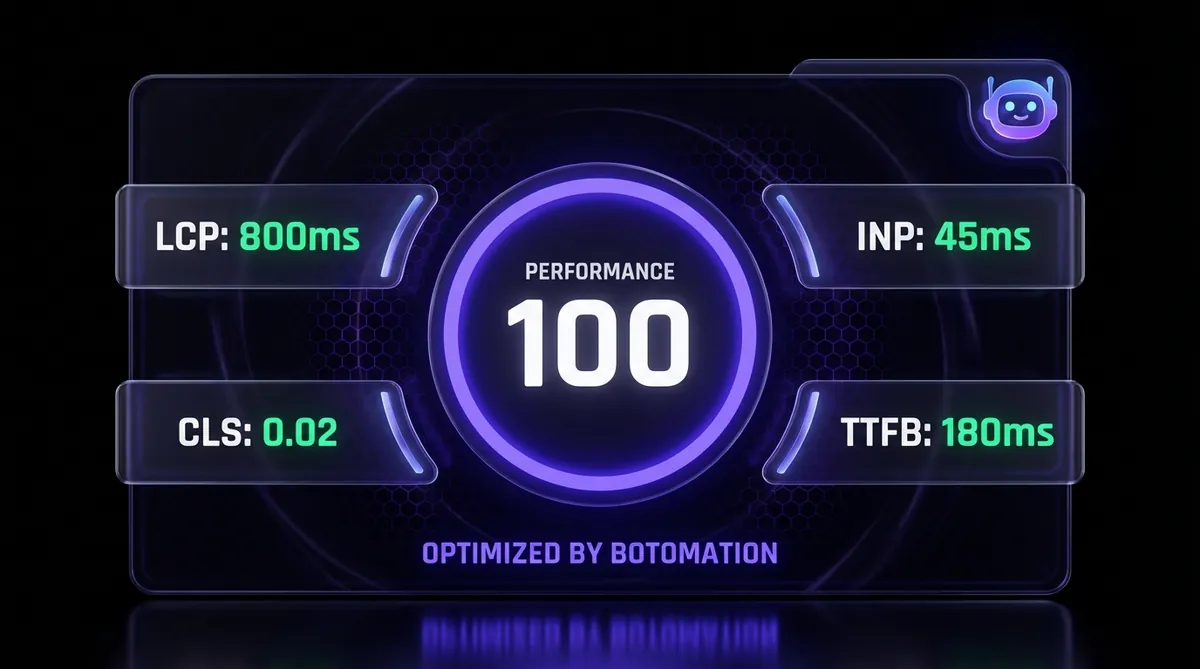
Setting these goals requires a deep understanding of your target audience's behavior and their hardware. A campaign targeting rural areas with inconsistent 5G coverage requires a much stricter performance budget than a B2B campaign targeting office workers on high-speed fiber optics. You should define success metrics not just in terms of sales, but in terms of technical milestones like the Largest Contentful Paint (LCP). By establishing that the hero image must be visible in under 800 milliseconds, you provide the development team with a clear mandate that overrides the desire for unnecessary visual flourishes.
Setting Marketing KPIs
The connection between technical speed and marketing success is quantifiable and direct. When we analyze marketing KPIs, we typically focus on conversion rates, bounce rates, and average session duration. However, these are lagging indicators heavily influenced by the leading indicator of site speed. You should set a primary KPI for "Total Load Time" that does not exceed 1.2 seconds on a standard mobile connection. This ensures that the user is engaged before their attention wanders or they feel frustrated by a blank screen.
Equally important is the "Interaction to Next Paint" (INP) metric, which has become the gold standard for measuring responsiveness in 2026. If a user clicks a "Sign Up" button and there is a perceptible delay before the site responds, the psychological trust is broken. Your KPIs should include a requirement that all interactive elements respond within 50 milliseconds. This level of snappiness creates a "premium" feel that template-based sites simply cannot replicate, positioning your brand as a leader in its space.
Performance Benchmarking
To know where you are going, you must have a clear picture of current industry standards. In the past, a three-second load time was considered acceptable; in 2026, that is an eternity. We now look at Core Web Vitals optimization techniques as the bare minimum for staying competitive in search engine rankings and user retention. A site that scores anything less than a 90 on Google PageSpeed Insights is actively being penalized by both Google's algorithms and user patience.
| Metric | Good (Green) | Needs Improvement (Yellow) | Poor (Red) |
|---|---|---|---|
| Largest Contentful Paint (LCP) | < 1.0s | 1.0s - 2.5s | > 2.5s |
| Interaction to Next Paint (INP) | < 100ms | 100ms - 200ms | > 200ms |
| Cumulative Layout Shift (CLS) | < 0.05 | 0.05 - 0.1 | > 0.1 |
| Time to First Byte (TTFB) | < 200ms | 200ms - 500ms | > 500ms |
Using these benchmarks allows you to move away from subjective opinions about "how the site feels" toward objective data. If your current WordPress site is hitting a 2.5s LCP, you are likely losing 20-30% of your potential conversions before the page even finishes loading. By targeting the "Good" range across all metrics, you create a foundation for conversion rate optimization through custom design, ensuring your marketing copy can fulfill its purpose without being hindered by technical friction.
Choosing the Right Technology Stack for Fast Loading Custom Websites
The "Old Way" of building marketing sites involves stacking plugins on top of a bloated CMS like WordPress or using heavy "no-code" builders that generate thousands of lines of unnecessary code. This approach is the primary reason why most marketing campaigns underperform. To achieve fast loading custom websites, you must utilize a modern tech stack that prioritizes performance from the ground up, which is the cornerstone of professional custom web development for conversion rate optimization. In 2026, this typically means moving toward a "Headless" architecture or using frameworks like Next.js 15 or SvelteKit that offer server-side rendering (SSR) and static site generation (SSG) out of the box.
These technologies allow us to pre-render pages into static HTML files that can be served instantly from a global network. Unlike traditional sites that must build the page from a database for every visit, a custom-coded site from Botomation is already built and waiting. This reduces server workload to almost zero and ensures the user receives content as fast as their internet connection allows. Choosing the right stack also involves selecting a hosting provider optimized for these modern frameworks, such as Vercel or Netlify, which provide the infrastructure needed to handle massive traffic spikes during a successful campaign.
Technology Evaluation Criteria
When evaluating a technology stack, the most critical factor is the "bundle size" sent to the browser. Many popular frameworks are powerful but come with a heavy tax of JavaScript that must be downloaded and executed before the site becomes interactive. A high-performance stack should allow for "tree-shaking" and custom JavaScript optimization, a process that automatically removes any code that isn't being used on a specific page. This keeps the site lean and ensures the browser's main thread is not hijacked by background processes.
Another key criterion is the ability to handle "Edge Functions." This technology allows us to run small pieces of code on servers located physically close to the user. For a global marketing campaign, this means a user in London and a user in Tokyo will both experience the same lightning-fast response times. Our team focuses on these technical nuances because we know that the difference between a 200ms and a 500ms response time can be the difference between a lead and a bounce.
Optimizing Your Tech Stack
Optimization is a philosophy that must be applied to every component of the stack. This includes how data is fetched from the backend and how CSS is delivered to the browser. We prefer "CSS-in-JS" or Utility-First CSS solutions that only ship the styles required for the elements currently on the screen. This prevents the browser from having to download a massive stylesheet for the entire site when the user is only looking at a single landing page.
By avoiding the bloat of third-party plugins, we eliminate the security risks and performance bottlenecks that plague standard websites. Every feature on a Botomation custom site is hand-coded to serve a specific purpose, ensuring that there is no "dead weight" in the codebase. This level of precision is what allows us to guarantee 100/100 PageSpeed scores on performance audits—a feat that is virtually impossible with off-the-shelf templates or visual builders.
Optimize Images and Media for Lightning Speed
Visual storytelling is the heart of high-converting custom e-commerce websites, but high-resolution images and videos are often the biggest culprits behind slow load times. In 2026, we no longer rely on standard JPEGs or PNGs, which are inefficient and heavy. Instead, we use modern formats like AVIF and WebP, which offer superior compression without sacrificing visual quality. These formats can reduce file sizes by up to 80%, allowing for rich, immersive designs that still load in the blink of an eye.
The impact of media optimization on campaign performance is staggering. If a landing page features a hero image that is 2MB in size, a user on a mobile connection may wait several seconds for that image to appear. During that time, they are staring at a blank box, which signals to their brain that the site is broken. By optimizing that same image down to 100KB using AVIF, we ensure the brand's message is delivered instantly. This is particularly vital for fast e-commerce website development or luxury brands where high-quality visuals are non-negotiable for credibility.
Image Compression Techniques
Effective image compression in 2026 involves more than just running a file through a compression tool. It requires an automated pipeline that generates multiple versions of every image to suit different screen sizes, known as "responsive images." A mobile user should never be forced to download a 4000-pixel wide desktop image; they should receive a version perfectly sized for their phone's screen.
We also implement "lazy loading," a technique where images are only downloaded when they are about to scroll into the user's view. This prioritizes content "above the fold," ensuring the user can start interacting with the page immediately while the rest of the media loads silently in the background. For marketing campaigns using AI-generated assets from Midjourney v7, these optimization steps are essential to handle the high levels of detail these images contain.
Modern Media Formats
The shift to AVIF has been a significant win for performance-minded developers. AVIF supports transparency and high dynamic range (HDR) while maintaining a fraction of the file size of older formats. While some older browsers may not support it, we implement "fallback" mechanisms that serve a WebP or JPEG version if necessary. This ensures that no user is left behind, regardless of their device.
Video content is another area where optimization is critical. Instead of embedding heavy YouTube players that load hundreds of kilobytes of third-party scripts, we use self-hosted, highly compressed MP4 or WebM files for background loops. For longer marketing videos, we utilize "facades" that show a static preview image and only load the actual video player when the user clicks "Play." This keeps the initial page load incredibly fast while still providing the rich video experience that drives engagement.
Implement Caching and CDN Solutions
Caching is the process of storing a copy of your website's files in a temporary location so they can be accessed more quickly. Without caching, every time a user visits your site, their browser must request every file from your main server, which might be thousands of miles away. By implementing a sophisticated caching strategy, we can store these files directly on the user's device or on a Content Delivery Network (CDN) just a few miles from their physical location.
For global marketing campaigns, a CDN is not optional; it is a requirement. If your server is in New York and you are running ads in London, Sydney, and Singapore, those international users will experience significant latency without a CDN. A CDN like Cloudflare or Vercel Edge distributes your site's content across hundreds of servers worldwide. When a user in Sydney clicks your ad, they are served the site from a server in Sydney, reducing the "round-trip" time and making the site feel local and instantaneous.
Caching Strategies
We utilize several layers of caching to ensure maximum speed. The first is "browser caching," where we instruct the user's device to remember certain files, like your logo or brand fonts, so they don't have to be re-downloaded on every page visit. The second is "server-side caching," which stores the final HTML of your pages so the server doesn't have to "rethink" when a request arrives.
In 2026, we also use "Stale-While-Revalidate" (SWR) strategies. This allows the site to show the user a cached version of the page immediately while the server checks in the background for updates. This results in a zero-wait experience for the user while ensuring they always see the most current marketing offers. It is a level of technical sophistication that you simply won't find in standard agency builds.
CDN Selection and Setup
Choosing a CDN provider involves evaluating their "Edge Network" density and their ability to handle dynamic content. While many providers offer basic static file hosting, the best CDNs for marketing sites allow for "Edge Computing." This means we can run personalized marketing logic—like showing a different headline based on the user's location—directly at the edge server.
Configuring these systems correctly is a complex task that our experts handle as part of every build. We ensure that your CDN is not just a storage locker for files, but an active participant in delivering your site. This includes automatic image optimization at the edge and "Brotli" compression for text files, which is even more efficient than the older Gzip standard. The result is a site that feels just as fast in London as it does in Los Angeles.
Minimize Code and Eliminate Bloat
One of the most common reasons for slow websites is "code bloat." This happens when developers use pre-made themes or frameworks that include thousands of lines of code for features the site never uses. It is the digital equivalent of carrying a massive Swiss Army knife when you only need a single blade. At Botomation, we believe in "Pure Speed," which means every line of code in your custom website serves a specific purpose, which is crucial for how to improve website speed for better conversions.
Eliminating bloat is particularly important for mobile performance. A mobile phone's processor is significantly less powerful than a desktop computer's. When a site is bloated with unnecessary JavaScript, the phone's processor must work overtime to sort through it, causing the site to stutter. By writing clean, efficient code, we reduce the workload on the user's device, leading to a smoother experience that keeps them engaged with your marketing message.
Clean Code Practices
Our developers follow a strict mobile-first web development philosophy. We start with the simplest possible version of the site and only add complexity where it is absolutely necessary for the user experience. We use modern CSS techniques like "Grid" and "Flexbox" to create complex layouts without the need for heavy JavaScript libraries. This approach not only makes the site faster but also makes it much easier to maintain as your marketing strategy evolves.
We also prioritize "Critical CSS." This is a technique where we identify the exact styles needed to render the top part of the page and inline those styles directly into the HTML. This allows the page to start looking "right" even before the main stylesheet has finished downloading. It is these small, technical details that separate a professional custom build from a generic template.
Eliminating Bloat
The biggest source of bloat in 2026 is often third-party scripts; we often eliminate third-party scripts such as tracking pixels and chat widgets to maintain a perfect PageSpeed score. While these are necessary for marketing, they can destroy performance if not managed correctly. We use "Partytown" or similar technologies to offload these scripts to a "Web Worker," which acts like a separate lane of traffic for the browser. This prevents third-party tools from slowing down the primary site experience.
We also perform regular audits of our code to find and remove functions that are no longer needed. If a marketing campaign ends, the code associated with it should be removed, not just hidden. This commitment to cleanliness is why our sites consistently achieve 100/100 scores on performance tests. We don't just build a site and walk away; we ensure it stays lean and fast for the long haul.
Optimize Server Response Time
Even the most optimized front-end will feel slow if the server takes too long to respond to the initial request. This is measured as "Time to First Byte" (TTFB). If your server is slow, the user is left looking at a blank screen while the server struggles to find the data it needs. In 2026, we solve this by using high-performance hosting environments and optimizing how our code interacts with the database, especially when building fast e-commerce websites for small business.
For marketing sites, where traffic can spike suddenly due to a viral post or a major ad campaign, server responsiveness is a critical issue. If your server crashes under the weight of 10,000 simultaneous visitors, your entire ad spend for that day is wasted. Our custom-coded solutions are designed to be "Serverless," meaning they automatically scale up to handle any amount of traffic without slowing down or crashing.
Server Optimization
We optimize server response times by minimizing the number of "hops" a request must take. In a traditional setup, a request might go from the user to a load balancer, then to a web server, then to a database, and then all the way back. We use "Edge Databases" and "Connection Pooling" to make this process as direct as possible. This ensures that the server starts sending data back to the user in less than 200 milliseconds.
Hosting is another critical factor. We avoid cheap, shared hosting providers that cram thousands of websites onto a single server. Instead, we use dedicated, cloud-native infrastructure specifically tuned for the frameworks we use. This provides a level of reliability and speed that is essential for professional marketing campaigns.
Database Performance
Many marketing sites rely on a database to store product information, blog posts, or user data. If database queries are not optimized, they become a major bottleneck. We use "Object-Relational Mapping" (ORM) tools like Prisma, which are designed to write the most efficient possible database queries. We also implement caching layers for the database itself, so that frequently requested information can be retrieved instantly without a full database search.
Monitoring is the final piece of the puzzle. We use real-time monitoring tools to track how our servers are performing under load. If we see a specific query taking too long, we optimize it before it affects the user experience. This proactive approach to server management is a core part of the Botomation service, ensuring your site is always ready for its next big influx of visitors.
Test, Monitor, and Iterate for Continuous Improvement
The launch of a website is not the end of the journey; it is the beginning. Performance can degrade over time as new content is added or third-party scripts are updated. To maintain fast loading custom websites, you must implement a system of continuous monitoring and testing, which is essential SEO for marketing directors who need to maintain visibility and lead volume.
In 2026, we use "Synthetic Monitoring" to simulate users visiting the site from different locations and devices every hour. This gives us a constant stream of data on how the site is performing. If a load time creeps up from 1.2s to 1.5s, we get an immediate alert and can investigate the cause. This level of vigilance is what keeps our clients at the top of their industries.
Monitoring Tools
We rely on a suite of professional tools to keep our sites fast. Google PageSpeed Insights and Lighthouse are our baseline, but we also use more advanced tools like WebPageTest.org, which allows us to see exactly how a site loads on a real mobile device over a slow 4G connection. This "real-world" testing is vital for understanding the true user experience.
We also use "Real User Monitoring" (RUM), which collects anonymized data from actual visitors to your site. This tells us how the site is performing for a user on an old Android phone in a rural area versus a user on a new iPhone in a city. This data is invaluable for making informed decisions about where to focus our optimization efforts next.
Iterative Improvement
Performance optimization is a game of inches. Once we have achieved a fast load time, we look for ways to make it even faster. This might involve A/B testing two different versions of a page to see which one has a better "Time to Interactive." Or it might involve experimenting with new browser features as they are released.
"Performance is not a project; it is a feature that must be defended every single day. The moment you stop monitoring is the moment you start losing your competitive edge."
By treating performance as a continuous process, we ensure that your website remains a high-performance asset for years to come. This iterative approach allows us to stay ahead of changes in Google's algorithms and shifts in user behavior, keeping your marketing campaigns running at peak efficiency.
How to Audit Your Website Speed in 5 Minutes
If you suspect your current website is costing you money, you can perform a quick audit using these steps, or follow our 5-day guide for a professional website to see how a modern build should function. This will give you a baseline understanding of where your performance stands compared to 2026 standards.
- Open Google PageSpeed Insights: Go to the official tool and enter your landing page URL.
- Analyze the Mobile Score: Ignore the desktop score for now; mobile is where most marketing traffic lives. If your score is below 90, you have a problem.
- Check the LCP: Look for the "Largest Contentful Paint" metric. If it's over 2.5 seconds, your users are waiting too long to see your message.
- Identify the "Total Blocking Time": This tells you how much JavaScript is "freezing" the page. High numbers here mean a frustrated user.
- Review the "Opportunities" Section: Google will list specific images or scripts that are slowing you down.
- Calculate the Potential Loss: Use a simple formula: (Monthly Ad Spend) x (Bounce Rate Increase due to Speed). If your site is 2 seconds slower than competitors, your bounce rate is likely 15-20% higher.
- Compare with a Custom Build: Imagine those same metrics at 100/100. That is the Botomation standard.
Frequently Asked Questions
Why shouldn't I just use a premium WordPress theme?
Even "premium" themes are designed to be multipurpose, meaning they include code for hundreds of features you will never use. This inherent bloat makes it impossible to achieve the same level of speed as a hand-coded, custom website. Furthermore, as we explore in our WordPress vs custom development performance guide, WordPress relies on a database-heavy architecture that is significantly slower than the modern "Static" or "Edge" approach we use at Botomation.
How does site speed actually affect my SEO rankings?
Since the introduction of Core Web Vitals, Google has made it clear that user experience is a primary ranking factor. A slow site will be pushed down in search results in favor of faster competitors, even if your content is superior; this is why we prioritize building SEO-friendly websites from scratch. By optimizing for speed, you are actively telling Google that your site is a high-quality destination worthy of the top spot.
Is a custom-coded site harder to update than a drag-and-drop builder?
Not with the way we build them. We use "Headless CMS" solutions that give you a simple, user-friendly dashboard to update your text and images. You get all the ease of a builder without any of the performance-killing bloat. It is the best of both worlds: a high-performance engine with an easy-to-use steering wheel.
Can you fix my existing slow website?
In most cases, trying to "fix" a bloated template-based site is like trying to turn a minivan into a Formula 1 car; you can make it faster, but it will never be elite. We typically recommend a fresh, custom build to ensure a 100/100 performance score. Because we offer custom websites in 5 days for small business, it is often faster and more cost-effective to start fresh than to spend weeks patching an old system.
The "Old Way" of building websites—relying on heavy plugins, slow servers, and bloated themes—is a relic of the past that is actively draining your marketing budget. In 2026, the only way to stay competitive is to embrace the "New Way": fast loading custom websites that are hand-coded for maximum performance and conversion. By following this 7-step process, you ensure that every visitor who clicks your ad is met with an instant, premium experience that builds trust and drives action.
At Botomation, our team specializes in creating these high-performance assets. We don't just build websites; we build conversion engines that crush the competition in speed and SEO. With our guaranteed 100/100 PageSpeed scores and rapid 5-day delivery, there is no reason to settle for a slow, bloated site that is holding your business back. Partnering with us is the most logical step you can take to secure the future of your marketing campaigns.
Ready to automate your growth? Book a call below.
Marketing budgets in 2026 are being incinerated by slow-loading landing pages that fail to capture user attention within the first few hundred milliseconds. We have reached a critical point where a delay of even half a second can trigger a catastrophic drop in conversion rates, as modern users expect instantaneous responses from every digital interaction. The landscape of performance has shifted from a technical luxury to a foundational requirement for any campaign hoping to achieve a positive return on ad spend, making custom web development for marketing more critical than ever. When a visitor clicks an ad on their mobile device while commuting, they are not just seeking information; they are demanding a frictionless experience that respects their time and data.
The reality of modern marketing is that your creative assets and copy are only as effective as the infrastructure they inhabit. A beautiful, high-converting design is worthless if the browser is still struggling to parse bloated JavaScript files while the user has already navigated back to their social feed. This guide outlines a rigorous, seven-step methodology for building fast loading custom websites that consistently outperform the competition. By moving away from the "Old Way" of heavy, template-based builders and understanding the performance differences between WordPress and custom development, brands can finally stop losing revenue to technical debt. Our team at Botomation has refined this process to ensure that every marketing dollar is backed by a website that loads with the speed and precision required in the current high-stakes environment.
Defining Marketing Objectives for Fast Loading Custom Websites
Before a single line of code is written, a successful project must begin with a ruthless evaluation of campaign objectives. Most businesses make the mistake of treating performance as an afterthought—something to be "fixed" after the design is finalized. In 2026, speed is a core design constraint that dictates every creative and technical decision from day one. You must establish clear Key Performance Indicators (KPIs) that link directly to the technical health of the site. If your goal is to reduce the cost per acquisition (CPA), you must acknowledge that a faster site naturally lowers this metric by increasing the percentage of visitors who actually reach the "Thank You" page, which is essential for custom web development for marketing and maximizing your overall marketing ROI.
Setting these goals requires a deep understanding of your target audience's behavior and their hardware. A campaign targeting rural areas with inconsistent 5G coverage requires a much stricter performance budget than a B2B campaign targeting office workers on high-speed fiber optics. You should define success metrics not just in terms of sales, but in terms of technical milestones like the Largest Contentful Paint (LCP). By establishing that the hero image must be visible in under 800 milliseconds, you provide the development team with a clear mandate that overrides the desire for unnecessary visual flourishes.
Setting Marketing KPIs
The connection between technical speed and marketing success is quantifiable and direct. When we analyze marketing KPIs, we typically focus on conversion rates, bounce rates, and average session duration. However, these are lagging indicators heavily influenced by the leading indicator of site speed. You should set a primary KPI for "Total Load Time" that does not exceed 1.2 seconds on a standard mobile connection. This ensures that the user is engaged before their attention wanders or they feel frustrated by a blank screen.
Equally important is the "Interaction to Next Paint" (INP) metric, which has become the gold standard for measuring responsiveness in 2026. If a user clicks a "Sign Up" button and there is a perceptible delay before the site responds, the psychological trust is broken. Your KPIs should include a requirement that all interactive elements respond within 50 milliseconds. This level of snappiness creates a "premium" feel that template-based sites simply cannot replicate, positioning your brand as a leader in its space.
Performance Benchmarking
To know where you are going, you must have a clear picture of current industry standards. In the past, a three-second load time was considered acceptable; in 2026, that is an eternity. We now look at Core Web Vitals optimization techniques as the bare minimum for staying competitive in search engine rankings and user retention. A site that scores anything less than a 90 on Google PageSpeed Insights is actively being penalized by both Google's algorithms and user patience.
| Metric | Good (Green) | Needs Improvement (Yellow) | Poor (Red) |
|---|---|---|---|
| Largest Contentful Paint (LCP) | < 1.0s | 1.0s - 2.5s | > 2.5s |
| Interaction to Next Paint (INP) | < 100ms | 100ms - 200ms | > 200ms |
| Cumulative Layout Shift (CLS) | < 0.05 | 0.05 - 0.1 | > 0.1 |
| Time to First Byte (TTFB) | < 200ms | 200ms - 500ms | > 500ms |
Using these benchmarks allows you to move away from subjective opinions about "how the site feels" toward objective data. If your current WordPress site is hitting a 2.5s LCP, you are likely losing 20-30% of your potential conversions before the page even finishes loading. By targeting the "Good" range across all metrics, you create a foundation for conversion rate optimization through custom design, ensuring your marketing copy can fulfill its purpose without being hindered by technical friction.
Choosing the Right Technology Stack for Fast Loading Custom Websites
The "Old Way" of building marketing sites involves stacking plugins on top of a bloated CMS like WordPress or using heavy "no-code" builders that generate thousands of lines of unnecessary code. This approach is the primary reason why most marketing campaigns underperform. To achieve fast loading custom websites, you must utilize a modern tech stack that prioritizes performance from the ground up, which is the cornerstone of professional custom web development for conversion rate optimization. In 2026, this typically means moving toward a "Headless" architecture or using frameworks like Next.js 15 or SvelteKit that offer server-side rendering (SSR) and static site generation (SSG) out of the box.
These technologies allow us to pre-render pages into static HTML files that can be served instantly from a global network. Unlike traditional sites that must build the page from a database for every visit, a custom-coded site from Botomation is already built and waiting. This reduces server workload to almost zero and ensures the user receives content as fast as their internet connection allows. Choosing the right stack also involves selecting a hosting provider optimized for these modern frameworks, such as Vercel or Netlify, which provide the infrastructure needed to handle massive traffic spikes during a successful campaign.
Technology Evaluation Criteria
When evaluating a technology stack, the most critical factor is the "bundle size" sent to the browser. Many popular frameworks are powerful but come with a heavy tax of JavaScript that must be downloaded and executed before the site becomes interactive. A high-performance stack should allow for "tree-shaking" and custom JavaScript optimization, a process that automatically removes any code that isn't being used on a specific page. This keeps the site lean and ensures the browser's main thread is not hijacked by background processes.
Another key criterion is the ability to handle "Edge Functions." This technology allows us to run small pieces of code on servers located physically close to the user. For a global marketing campaign, this means a user in London and a user in Tokyo will both experience the same lightning-fast response times. Our team focuses on these technical nuances because we know that the difference between a 200ms and a 500ms response time can be the difference between a lead and a bounce.
Optimizing Your Tech Stack
Optimization is a philosophy that must be applied to every component of the stack. This includes how data is fetched from the backend and how CSS is delivered to the browser. We prefer "CSS-in-JS" or Utility-First CSS solutions that only ship the styles required for the elements currently on the screen. This prevents the browser from having to download a massive stylesheet for the entire site when the user is only looking at a single landing page.
By avoiding the bloat of third-party plugins, we eliminate the security risks and performance bottlenecks that plague standard websites. Every feature on a Botomation custom site is hand-coded to serve a specific purpose, ensuring that there is no "dead weight" in the codebase. This level of precision is what allows us to guarantee 100/100 PageSpeed scores on performance audits—a feat that is virtually impossible with off-the-shelf templates or visual builders.
Optimize Images and Media for Lightning Speed
Visual storytelling is the heart of high-converting custom e-commerce websites, but high-resolution images and videos are often the biggest culprits behind slow load times. In 2026, we no longer rely on standard JPEGs or PNGs, which are inefficient and heavy. Instead, we use modern formats like AVIF and WebP, which offer superior compression without sacrificing visual quality. These formats can reduce file sizes by up to 80%, allowing for rich, immersive designs that still load in the blink of an eye.
The impact of media optimization on campaign performance is staggering. If a landing page features a hero image that is 2MB in size, a user on a mobile connection may wait several seconds for that image to appear. During that time, they are staring at a blank box, which signals to their brain that the site is broken. By optimizing that same image down to 100KB using AVIF, we ensure the brand's message is delivered instantly. This is particularly vital for fast e-commerce website development or luxury brands where high-quality visuals are non-negotiable for credibility.
Image Compression Techniques
Effective image compression in 2026 involves more than just running a file through a compression tool. It requires an automated pipeline that generates multiple versions of every image to suit different screen sizes, known as "responsive images." A mobile user should never be forced to download a 4000-pixel wide desktop image; they should receive a version perfectly sized for their phone's screen.
We also implement "lazy loading," a technique where images are only downloaded when they are about to scroll into the user's view. This prioritizes content "above the fold," ensuring the user can start interacting with the page immediately while the rest of the media loads silently in the background. For marketing campaigns using AI-generated assets from Midjourney v7, these optimization steps are essential to handle the high levels of detail these images contain.
Modern Media Formats
The shift to AVIF has been a significant win for performance-minded developers. AVIF supports transparency and high dynamic range (HDR) while maintaining a fraction of the file size of older formats. While some older browsers may not support it, we implement "fallback" mechanisms that serve a WebP or JPEG version if necessary. This ensures that no user is left behind, regardless of their device.
Video content is another area where optimization is critical. Instead of embedding heavy YouTube players that load hundreds of kilobytes of third-party scripts, we use self-hosted, highly compressed MP4 or WebM files for background loops. For longer marketing videos, we utilize "facades" that show a static preview image and only load the actual video player when the user clicks "Play." This keeps the initial page load incredibly fast while still providing the rich video experience that drives engagement.
Implement Caching and CDN Solutions
Caching is the process of storing a copy of your website's files in a temporary location so they can be accessed more quickly. Without caching, every time a user visits your site, their browser must request every file from your main server, which might be thousands of miles away. By implementing a sophisticated caching strategy, we can store these files directly on the user's device or on a Content Delivery Network (CDN) just a few miles from their physical location.
For global marketing campaigns, a CDN is not optional; it is a requirement. If your server is in New York and you are running ads in London, Sydney, and Singapore, those international users will experience significant latency without a CDN. A CDN like Cloudflare or Vercel Edge distributes your site's content across hundreds of servers worldwide. When a user in Sydney clicks your ad, they are served the site from a server in Sydney, reducing the "round-trip" time and making the site feel local and instantaneous.
Caching Strategies
We utilize several layers of caching to ensure maximum speed. The first is "browser caching," where we instruct the user's device to remember certain files, like your logo or brand fonts, so they don't have to be re-downloaded on every page visit. The second is "server-side caching," which stores the final HTML of your pages so the server doesn't have to "rethink" when a request arrives.
In 2026, we also use "Stale-While-Revalidate" (SWR) strategies. This allows the site to show the user a cached version of the page immediately while the server checks in the background for updates. This results in a zero-wait experience for the user while ensuring they always see the most current marketing offers. It is a level of technical sophistication that you simply won't find in standard agency builds.
CDN Selection and Setup
Choosing a CDN provider involves evaluating their "Edge Network" density and their ability to handle dynamic content. While many providers offer basic static file hosting, the best CDNs for marketing sites allow for "Edge Computing." This means we can run personalized marketing logic—like showing a different headline based on the user's location—directly at the edge server.
Configuring these systems correctly is a complex task that our experts handle as part of every build. We ensure that your CDN is not just a storage locker for files, but an active participant in delivering your site. This includes automatic image optimization at the edge and "Brotli" compression for text files, which is even more efficient than the older Gzip standard. The result is a site that feels just as fast in London as it does in Los Angeles.
Minimize Code and Eliminate Bloat
One of the most common reasons for slow websites is "code bloat." This happens when developers use pre-made themes or frameworks that include thousands of lines of code for features the site never uses. It is the digital equivalent of carrying a massive Swiss Army knife when you only need a single blade. At Botomation, we believe in "Pure Speed," which means every line of code in your custom website serves a specific purpose, which is crucial for how to improve website speed for better conversions.
Eliminating bloat is particularly important for mobile performance. A mobile phone's processor is significantly less powerful than a desktop computer's. When a site is bloated with unnecessary JavaScript, the phone's processor must work overtime to sort through it, causing the site to stutter. By writing clean, efficient code, we reduce the workload on the user's device, leading to a smoother experience that keeps them engaged with your marketing message.
Clean Code Practices
Our developers follow a strict mobile-first web development philosophy. We start with the simplest possible version of the site and only add complexity where it is absolutely necessary for the user experience. We use modern CSS techniques like "Grid" and "Flexbox" to create complex layouts without the need for heavy JavaScript libraries. This approach not only makes the site faster but also makes it much easier to maintain as your marketing strategy evolves.
We also prioritize "Critical CSS." This is a technique where we identify the exact styles needed to render the top part of the page and inline those styles directly into the HTML. This allows the page to start looking "right" even before the main stylesheet has finished downloading. It is these small, technical details that separate a professional custom build from a generic template.
Eliminating Bloat
The biggest source of bloat in 2026 is often third-party scripts; we often eliminate third-party scripts such as tracking pixels and chat widgets to maintain a perfect PageSpeed score. While these are necessary for marketing, they can destroy performance if not managed correctly. We use "Partytown" or similar technologies to offload these scripts to a "Web Worker," which acts like a separate lane of traffic for the browser. This prevents third-party tools from slowing down the primary site experience.
We also perform regular audits of our code to find and remove functions that are no longer needed. If a marketing campaign ends, the code associated with it should be removed, not just hidden. This commitment to cleanliness is why our sites consistently achieve 100/100 scores on performance tests. We don't just build a site and walk away; we ensure it stays lean and fast for the long haul.
Optimize Server Response Time
Even the most optimized front-end will feel slow if the server takes too long to respond to the initial request. This is measured as "Time to First Byte" (TTFB). If your server is slow, the user is left looking at a blank screen while the server struggles to find the data it needs. In 2026, we solve this by using high-performance hosting environments and optimizing how our code interacts with the database, especially when building fast e-commerce websites for small business.
For marketing sites, where traffic can spike suddenly due to a viral post or a major ad campaign, server responsiveness is a critical issue. If your server crashes under the weight of 10,000 simultaneous visitors, your entire ad spend for that day is wasted. Our custom-coded solutions are designed to be "Serverless," meaning they automatically scale up to handle any amount of traffic without slowing down or crashing.
Server Optimization
We optimize server response times by minimizing the number of "hops" a request must take. In a traditional setup, a request might go from the user to a load balancer, then to a web server, then to a database, and then all the way back. We use "Edge Databases" and "Connection Pooling" to make this process as direct as possible. This ensures that the server starts sending data back to the user in less than 200 milliseconds.
Hosting is another critical factor. We avoid cheap, shared hosting providers that cram thousands of websites onto a single server. Instead, we use dedicated, cloud-native infrastructure specifically tuned for the frameworks we use. This provides a level of reliability and speed that is essential for professional marketing campaigns.
Database Performance
Many marketing sites rely on a database to store product information, blog posts, or user data. If database queries are not optimized, they become a major bottleneck. We use "Object-Relational Mapping" (ORM) tools like Prisma, which are designed to write the most efficient possible database queries. We also implement caching layers for the database itself, so that frequently requested information can be retrieved instantly without a full database search.
Monitoring is the final piece of the puzzle. We use real-time monitoring tools to track how our servers are performing under load. If we see a specific query taking too long, we optimize it before it affects the user experience. This proactive approach to server management is a core part of the Botomation service, ensuring your site is always ready for its next big influx of visitors.
Test, Monitor, and Iterate for Continuous Improvement
The launch of a website is not the end of the journey; it is the beginning. Performance can degrade over time as new content is added or third-party scripts are updated. To maintain fast loading custom websites, you must implement a system of continuous monitoring and testing, which is essential SEO for marketing directors who need to maintain visibility and lead volume.
In 2026, we use "Synthetic Monitoring" to simulate users visiting the site from different locations and devices every hour. This gives us a constant stream of data on how the site is performing. If a load time creeps up from 1.2s to 1.5s, we get an immediate alert and can investigate the cause. This level of vigilance is what keeps our clients at the top of their industries.
Monitoring Tools
We rely on a suite of professional tools to keep our sites fast. Google PageSpeed Insights and Lighthouse are our baseline, but we also use more advanced tools like WebPageTest.org, which allows us to see exactly how a site loads on a real mobile device over a slow 4G connection. This "real-world" testing is vital for understanding the true user experience.
We also use "Real User Monitoring" (RUM), which collects anonymized data from actual visitors to your site. This tells us how the site is performing for a user on an old Android phone in a rural area versus a user on a new iPhone in a city. This data is invaluable for making informed decisions about where to focus our optimization efforts next.
Iterative Improvement
Performance optimization is a game of inches. Once we have achieved a fast load time, we look for ways to make it even faster. This might involve A/B testing two different versions of a page to see which one has a better "Time to Interactive." Or it might involve experimenting with new browser features as they are released.
"Performance is not a project; it is a feature that must be defended every single day. The moment you stop monitoring is the moment you start losing your competitive edge."
By treating performance as a continuous process, we ensure that your website remains a high-performance asset for years to come. This iterative approach allows us to stay ahead of changes in Google's algorithms and shifts in user behavior, keeping your marketing campaigns running at peak efficiency.
How to Audit Your Website Speed in 5 Minutes
If you suspect your current website is costing you money, you can perform a quick audit using these steps, or follow our 5-day guide for a professional website to see how a modern build should function. This will give you a baseline understanding of where your performance stands compared to 2026 standards.
- Open Google PageSpeed Insights: Go to the official tool and enter your landing page URL.
- Analyze the Mobile Score: Ignore the desktop score for now; mobile is where most marketing traffic lives. If your score is below 90, you have a problem.
- Check the LCP: Look for the "Largest Contentful Paint" metric. If it's over 2.5 seconds, your users are waiting too long to see your message.
- Identify the "Total Blocking Time": This tells you how much JavaScript is "freezing" the page. High numbers here mean a frustrated user.
- Review the "Opportunities" Section: Google will list specific images or scripts that are slowing you down.
- Calculate the Potential Loss: Use a simple formula: (Monthly Ad Spend) x (Bounce Rate Increase due to Speed). If your site is 2 seconds slower than competitors, your bounce rate is likely 15-20% higher.
- Compare with a Custom Build: Imagine those same metrics at 100/100. That is the Botomation standard.
Frequently Asked Questions
Why shouldn't I just use a premium WordPress theme?
Even "premium" themes are designed to be multipurpose, meaning they include code for hundreds of features you will never use. This inherent bloat makes it impossible to achieve the same level of speed as a hand-coded, custom website. Furthermore, as we explore in our WordPress vs custom development performance guide, WordPress relies on a database-heavy architecture that is significantly slower than the modern "Static" or "Edge" approach we use at Botomation.
How does site speed actually affect my SEO rankings?
Since the introduction of Core Web Vitals, Google has made it clear that user experience is a primary ranking factor. A slow site will be pushed down in search results in favor of faster competitors, even if your content is superior; this is why we prioritize building SEO-friendly websites from scratch. By optimizing for speed, you are actively telling Google that your site is a high-quality destination worthy of the top spot.
Is a custom-coded site harder to update than a drag-and-drop builder?
Not with the way we build them. We use "Headless CMS" solutions that give you a simple, user-friendly dashboard to update your text and images. You get all the ease of a builder without any of the performance-killing bloat. It is the best of both worlds: a high-performance engine with an easy-to-use steering wheel.
Can you fix my existing slow website?
In most cases, trying to "fix" a bloated template-based site is like trying to turn a minivan into a Formula 1 car; you can make it faster, but it will never be elite. We typically recommend a fresh, custom build to ensure a 100/100 performance score. Because we offer custom websites in 5 days for small business, it is often faster and more cost-effective to start fresh than to spend weeks patching an old system.
The "Old Way" of building websites—relying on heavy plugins, slow servers, and bloated themes—is a relic of the past that is actively draining your marketing budget. In 2026, the only way to stay competitive is to embrace the "New Way": fast loading custom websites that are hand-coded for maximum performance and conversion. By following this 7-step process, you ensure that every visitor who clicks your ad is met with an instant, premium experience that builds trust and drives action.
At Botomation, our team specializes in creating these high-performance assets. We don't just build websites; we build conversion engines that crush the competition in speed and SEO. With our guaranteed 100/100 PageSpeed scores and rapid 5-day delivery, there is no reason to settle for a slow, bloated site that is holding your business back. Partnering with us is the most logical step you can take to secure the future of your marketing campaigns.
Ready to automate your growth? Book a call below.
Marketing budgets in 2026 are being incinerated by slow-loading landing pages that fail to capture user attention within the first few hundred milliseconds. We have reached a critical point where a delay of even half a second can trigger a catastrophic drop in conversion rates, as modern users expect instantaneous responses from every digital interaction. The landscape of performance has shifted from a technical luxury to a foundational requirement for any campaign hoping to achieve a positive return on ad spend, making custom web development for marketing more critical than ever. When a visitor clicks an ad on their mobile device while commuting, they are not just seeking information; they are demanding a frictionless experience that respects their time and data.
The reality of modern marketing is that your creative assets and copy are only as effective as the infrastructure they inhabit. A beautiful, high-converting design is worthless if the browser is still struggling to parse bloated JavaScript files while the user has already navigated back to their social feed. This guide outlines a rigorous, seven-step methodology for building fast loading custom websites that consistently outperform the competition. By moving away from the "Old Way" of heavy, template-based builders and understanding the performance differences between WordPress and custom development, brands can finally stop losing revenue to technical debt. Our team at Botomation has refined this process to ensure that every marketing dollar is backed by a website that loads with the speed and precision required in the current high-stakes environment.
Defining Marketing Objectives for Fast Loading Custom Websites
Before a single line of code is written, a successful project must begin with a ruthless evaluation of campaign objectives. Most businesses make the mistake of treating performance as an afterthought—something to be "fixed" after the design is finalized. In 2026, speed is a core design constraint that dictates every creative and technical decision from day one. You must establish clear Key Performance Indicators (KPIs) that link directly to the technical health of the site. If your goal is to reduce the cost per acquisition (CPA), you must acknowledge that a faster site naturally lowers this metric by increasing the percentage of visitors who actually reach the "Thank You" page, which is essential for custom web development for marketing and maximizing your overall marketing ROI.
Setting these goals requires a deep understanding of your target audience's behavior and their hardware. A campaign targeting rural areas with inconsistent 5G coverage requires a much stricter performance budget than a B2B campaign targeting office workers on high-speed fiber optics. You should define success metrics not just in terms of sales, but in terms of technical milestones like the Largest Contentful Paint (LCP). By establishing that the hero image must be visible in under 800 milliseconds, you provide the development team with a clear mandate that overrides the desire for unnecessary visual flourishes.
Setting Marketing KPIs
The connection between technical speed and marketing success is quantifiable and direct. When we analyze marketing KPIs, we typically focus on conversion rates, bounce rates, and average session duration. However, these are lagging indicators heavily influenced by the leading indicator of site speed. You should set a primary KPI for "Total Load Time" that does not exceed 1.2 seconds on a standard mobile connection. This ensures that the user is engaged before their attention wanders or they feel frustrated by a blank screen.
Equally important is the "Interaction to Next Paint" (INP) metric, which has become the gold standard for measuring responsiveness in 2026. If a user clicks a "Sign Up" button and there is a perceptible delay before the site responds, the psychological trust is broken. Your KPIs should include a requirement that all interactive elements respond within 50 milliseconds. This level of snappiness creates a "premium" feel that template-based sites simply cannot replicate, positioning your brand as a leader in its space.
Performance Benchmarking
To know where you are going, you must have a clear picture of current industry standards. In the past, a three-second load time was considered acceptable; in 2026, that is an eternity. We now look at Core Web Vitals optimization techniques as the bare minimum for staying competitive in search engine rankings and user retention. A site that scores anything less than a 90 on Google PageSpeed Insights is actively being penalized by both Google's algorithms and user patience.
| Metric | Good (Green) | Needs Improvement (Yellow) | Poor (Red) |
|---|---|---|---|
| Largest Contentful Paint (LCP) | < 1.0s | 1.0s - 2.5s | > 2.5s |
| Interaction to Next Paint (INP) | < 100ms | 100ms - 200ms | > 200ms |
| Cumulative Layout Shift (CLS) | < 0.05 | 0.05 - 0.1 | > 0.1 |
| Time to First Byte (TTFB) | < 200ms | 200ms - 500ms | > 500ms |
Using these benchmarks allows you to move away from subjective opinions about "how the site feels" toward objective data. If your current WordPress site is hitting a 2.5s LCP, you are likely losing 20-30% of your potential conversions before the page even finishes loading. By targeting the "Good" range across all metrics, you create a foundation for conversion rate optimization through custom design, ensuring your marketing copy can fulfill its purpose without being hindered by technical friction.
Choosing the Right Technology Stack for Fast Loading Custom Websites
The "Old Way" of building marketing sites involves stacking plugins on top of a bloated CMS like WordPress or using heavy "no-code" builders that generate thousands of lines of unnecessary code. This approach is the primary reason why most marketing campaigns underperform. To achieve fast loading custom websites, you must utilize a modern tech stack that prioritizes performance from the ground up, which is the cornerstone of professional custom web development for conversion rate optimization. In 2026, this typically means moving toward a "Headless" architecture or using frameworks like Next.js 15 or SvelteKit that offer server-side rendering (SSR) and static site generation (SSG) out of the box.
These technologies allow us to pre-render pages into static HTML files that can be served instantly from a global network. Unlike traditional sites that must build the page from a database for every visit, a custom-coded site from Botomation is already built and waiting. This reduces server workload to almost zero and ensures the user receives content as fast as their internet connection allows. Choosing the right stack also involves selecting a hosting provider optimized for these modern frameworks, such as Vercel or Netlify, which provide the infrastructure needed to handle massive traffic spikes during a successful campaign.
Technology Evaluation Criteria
When evaluating a technology stack, the most critical factor is the "bundle size" sent to the browser. Many popular frameworks are powerful but come with a heavy tax of JavaScript that must be downloaded and executed before the site becomes interactive. A high-performance stack should allow for "tree-shaking" and custom JavaScript optimization, a process that automatically removes any code that isn't being used on a specific page. This keeps the site lean and ensures the browser's main thread is not hijacked by background processes.
Another key criterion is the ability to handle "Edge Functions." This technology allows us to run small pieces of code on servers located physically close to the user. For a global marketing campaign, this means a user in London and a user in Tokyo will both experience the same lightning-fast response times. Our team focuses on these technical nuances because we know that the difference between a 200ms and a 500ms response time can be the difference between a lead and a bounce.
Optimizing Your Tech Stack
Optimization is a philosophy that must be applied to every component of the stack. This includes how data is fetched from the backend and how CSS is delivered to the browser. We prefer "CSS-in-JS" or Utility-First CSS solutions that only ship the styles required for the elements currently on the screen. This prevents the browser from having to download a massive stylesheet for the entire site when the user is only looking at a single landing page.
By avoiding the bloat of third-party plugins, we eliminate the security risks and performance bottlenecks that plague standard websites. Every feature on a Botomation custom site is hand-coded to serve a specific purpose, ensuring that there is no "dead weight" in the codebase. This level of precision is what allows us to guarantee 100/100 PageSpeed scores on performance audits—a feat that is virtually impossible with off-the-shelf templates or visual builders.
Optimize Images and Media for Lightning Speed
Visual storytelling is the heart of high-converting custom e-commerce websites, but high-resolution images and videos are often the biggest culprits behind slow load times. In 2026, we no longer rely on standard JPEGs or PNGs, which are inefficient and heavy. Instead, we use modern formats like AVIF and WebP, which offer superior compression without sacrificing visual quality. These formats can reduce file sizes by up to 80%, allowing for rich, immersive designs that still load in the blink of an eye.
The impact of media optimization on campaign performance is staggering. If a landing page features a hero image that is 2MB in size, a user on a mobile connection may wait several seconds for that image to appear. During that time, they are staring at a blank box, which signals to their brain that the site is broken. By optimizing that same image down to 100KB using AVIF, we ensure the brand's message is delivered instantly. This is particularly vital for fast e-commerce website development or luxury brands where high-quality visuals are non-negotiable for credibility.
Image Compression Techniques
Effective image compression in 2026 involves more than just running a file through a compression tool. It requires an automated pipeline that generates multiple versions of every image to suit different screen sizes, known as "responsive images." A mobile user should never be forced to download a 4000-pixel wide desktop image; they should receive a version perfectly sized for their phone's screen.
We also implement "lazy loading," a technique where images are only downloaded when they are about to scroll into the user's view. This prioritizes content "above the fold," ensuring the user can start interacting with the page immediately while the rest of the media loads silently in the background. For marketing campaigns using AI-generated assets from Midjourney v7, these optimization steps are essential to handle the high levels of detail these images contain.
Modern Media Formats
The shift to AVIF has been a significant win for performance-minded developers. AVIF supports transparency and high dynamic range (HDR) while maintaining a fraction of the file size of older formats. While some older browsers may not support it, we implement "fallback" mechanisms that serve a WebP or JPEG version if necessary. This ensures that no user is left behind, regardless of their device.
Video content is another area where optimization is critical. Instead of embedding heavy YouTube players that load hundreds of kilobytes of third-party scripts, we use self-hosted, highly compressed MP4 or WebM files for background loops. For longer marketing videos, we utilize "facades" that show a static preview image and only load the actual video player when the user clicks "Play." This keeps the initial page load incredibly fast while still providing the rich video experience that drives engagement.
Implement Caching and CDN Solutions
Caching is the process of storing a copy of your website's files in a temporary location so they can be accessed more quickly. Without caching, every time a user visits your site, their browser must request every file from your main server, which might be thousands of miles away. By implementing a sophisticated caching strategy, we can store these files directly on the user's device or on a Content Delivery Network (CDN) just a few miles from their physical location.
For global marketing campaigns, a CDN is not optional; it is a requirement. If your server is in New York and you are running ads in London, Sydney, and Singapore, those international users will experience significant latency without a CDN. A CDN like Cloudflare or Vercel Edge distributes your site's content across hundreds of servers worldwide. When a user in Sydney clicks your ad, they are served the site from a server in Sydney, reducing the "round-trip" time and making the site feel local and instantaneous.
Caching Strategies
We utilize several layers of caching to ensure maximum speed. The first is "browser caching," where we instruct the user's device to remember certain files, like your logo or brand fonts, so they don't have to be re-downloaded on every page visit. The second is "server-side caching," which stores the final HTML of your pages so the server doesn't have to "rethink" when a request arrives.
In 2026, we also use "Stale-While-Revalidate" (SWR) strategies. This allows the site to show the user a cached version of the page immediately while the server checks in the background for updates. This results in a zero-wait experience for the user while ensuring they always see the most current marketing offers. It is a level of technical sophistication that you simply won't find in standard agency builds.
CDN Selection and Setup
Choosing a CDN provider involves evaluating their "Edge Network" density and their ability to handle dynamic content. While many providers offer basic static file hosting, the best CDNs for marketing sites allow for "Edge Computing." This means we can run personalized marketing logic—like showing a different headline based on the user's location—directly at the edge server.
Configuring these systems correctly is a complex task that our experts handle as part of every build. We ensure that your CDN is not just a storage locker for files, but an active participant in delivering your site. This includes automatic image optimization at the edge and "Brotli" compression for text files, which is even more efficient than the older Gzip standard. The result is a site that feels just as fast in London as it does in Los Angeles.
Minimize Code and Eliminate Bloat
One of the most common reasons for slow websites is "code bloat." This happens when developers use pre-made themes or frameworks that include thousands of lines of code for features the site never uses. It is the digital equivalent of carrying a massive Swiss Army knife when you only need a single blade. At Botomation, we believe in "Pure Speed," which means every line of code in your custom website serves a specific purpose, which is crucial for how to improve website speed for better conversions.
Eliminating bloat is particularly important for mobile performance. A mobile phone's processor is significantly less powerful than a desktop computer's. When a site is bloated with unnecessary JavaScript, the phone's processor must work overtime to sort through it, causing the site to stutter. By writing clean, efficient code, we reduce the workload on the user's device, leading to a smoother experience that keeps them engaged with your marketing message.
Clean Code Practices
Our developers follow a strict mobile-first web development philosophy. We start with the simplest possible version of the site and only add complexity where it is absolutely necessary for the user experience. We use modern CSS techniques like "Grid" and "Flexbox" to create complex layouts without the need for heavy JavaScript libraries. This approach not only makes the site faster but also makes it much easier to maintain as your marketing strategy evolves.
We also prioritize "Critical CSS." This is a technique where we identify the exact styles needed to render the top part of the page and inline those styles directly into the HTML. This allows the page to start looking "right" even before the main stylesheet has finished downloading. It is these small, technical details that separate a professional custom build from a generic template.
Eliminating Bloat
The biggest source of bloat in 2026 is often third-party scripts; we often eliminate third-party scripts such as tracking pixels and chat widgets to maintain a perfect PageSpeed score. While these are necessary for marketing, they can destroy performance if not managed correctly. We use "Partytown" or similar technologies to offload these scripts to a "Web Worker," which acts like a separate lane of traffic for the browser. This prevents third-party tools from slowing down the primary site experience.
We also perform regular audits of our code to find and remove functions that are no longer needed. If a marketing campaign ends, the code associated with it should be removed, not just hidden. This commitment to cleanliness is why our sites consistently achieve 100/100 scores on performance tests. We don't just build a site and walk away; we ensure it stays lean and fast for the long haul.
Optimize Server Response Time
Even the most optimized front-end will feel slow if the server takes too long to respond to the initial request. This is measured as "Time to First Byte" (TTFB). If your server is slow, the user is left looking at a blank screen while the server struggles to find the data it needs. In 2026, we solve this by using high-performance hosting environments and optimizing how our code interacts with the database, especially when building fast e-commerce websites for small business.
For marketing sites, where traffic can spike suddenly due to a viral post or a major ad campaign, server responsiveness is a critical issue. If your server crashes under the weight of 10,000 simultaneous visitors, your entire ad spend for that day is wasted. Our custom-coded solutions are designed to be "Serverless," meaning they automatically scale up to handle any amount of traffic without slowing down or crashing.
Server Optimization
We optimize server response times by minimizing the number of "hops" a request must take. In a traditional setup, a request might go from the user to a load balancer, then to a web server, then to a database, and then all the way back. We use "Edge Databases" and "Connection Pooling" to make this process as direct as possible. This ensures that the server starts sending data back to the user in less than 200 milliseconds.
Hosting is another critical factor. We avoid cheap, shared hosting providers that cram thousands of websites onto a single server. Instead, we use dedicated, cloud-native infrastructure specifically tuned for the frameworks we use. This provides a level of reliability and speed that is essential for professional marketing campaigns.
Database Performance
Many marketing sites rely on a database to store product information, blog posts, or user data. If database queries are not optimized, they become a major bottleneck. We use "Object-Relational Mapping" (ORM) tools like Prisma, which are designed to write the most efficient possible database queries. We also implement caching layers for the database itself, so that frequently requested information can be retrieved instantly without a full database search.
Monitoring is the final piece of the puzzle. We use real-time monitoring tools to track how our servers are performing under load. If we see a specific query taking too long, we optimize it before it affects the user experience. This proactive approach to server management is a core part of the Botomation service, ensuring your site is always ready for its next big influx of visitors.
Test, Monitor, and Iterate for Continuous Improvement
The launch of a website is not the end of the journey; it is the beginning. Performance can degrade over time as new content is added or third-party scripts are updated. To maintain fast loading custom websites, you must implement a system of continuous monitoring and testing, which is essential SEO for marketing directors who need to maintain visibility and lead volume.
In 2026, we use "Synthetic Monitoring" to simulate users visiting the site from different locations and devices every hour. This gives us a constant stream of data on how the site is performing. If a load time creeps up from 1.2s to 1.5s, we get an immediate alert and can investigate the cause. This level of vigilance is what keeps our clients at the top of their industries.
Monitoring Tools
We rely on a suite of professional tools to keep our sites fast. Google PageSpeed Insights and Lighthouse are our baseline, but we also use more advanced tools like WebPageTest.org, which allows us to see exactly how a site loads on a real mobile device over a slow 4G connection. This "real-world" testing is vital for understanding the true user experience.
We also use "Real User Monitoring" (RUM), which collects anonymized data from actual visitors to your site. This tells us how the site is performing for a user on an old Android phone in a rural area versus a user on a new iPhone in a city. This data is invaluable for making informed decisions about where to focus our optimization efforts next.
Iterative Improvement
Performance optimization is a game of inches. Once we have achieved a fast load time, we look for ways to make it even faster. This might involve A/B testing two different versions of a page to see which one has a better "Time to Interactive." Or it might involve experimenting with new browser features as they are released.
"Performance is not a project; it is a feature that must be defended every single day. The moment you stop monitoring is the moment you start losing your competitive edge."
By treating performance as a continuous process, we ensure that your website remains a high-performance asset for years to come. This iterative approach allows us to stay ahead of changes in Google's algorithms and shifts in user behavior, keeping your marketing campaigns running at peak efficiency.
How to Audit Your Website Speed in 5 Minutes
If you suspect your current website is costing you money, you can perform a quick audit using these steps, or follow our 5-day guide for a professional website to see how a modern build should function. This will give you a baseline understanding of where your performance stands compared to 2026 standards.
- Open Google PageSpeed Insights: Go to the official tool and enter your landing page URL.
- Analyze the Mobile Score: Ignore the desktop score for now; mobile is where most marketing traffic lives. If your score is below 90, you have a problem.
- Check the LCP: Look for the "Largest Contentful Paint" metric. If it's over 2.5 seconds, your users are waiting too long to see your message.
- Identify the "Total Blocking Time": This tells you how much JavaScript is "freezing" the page. High numbers here mean a frustrated user.
- Review the "Opportunities" Section: Google will list specific images or scripts that are slowing you down.
- Calculate the Potential Loss: Use a simple formula: (Monthly Ad Spend) x (Bounce Rate Increase due to Speed). If your site is 2 seconds slower than competitors, your bounce rate is likely 15-20% higher.
- Compare with a Custom Build: Imagine those same metrics at 100/100. That is the Botomation standard.
Frequently Asked Questions
Why shouldn't I just use a premium WordPress theme?
Even "premium" themes are designed to be multipurpose, meaning they include code for hundreds of features you will never use. This inherent bloat makes it impossible to achieve the same level of speed as a hand-coded, custom website. Furthermore, as we explore in our WordPress vs custom development performance guide, WordPress relies on a database-heavy architecture that is significantly slower than the modern "Static" or "Edge" approach we use at Botomation.
How does site speed actually affect my SEO rankings?
Since the introduction of Core Web Vitals, Google has made it clear that user experience is a primary ranking factor. A slow site will be pushed down in search results in favor of faster competitors, even if your content is superior; this is why we prioritize building SEO-friendly websites from scratch. By optimizing for speed, you are actively telling Google that your site is a high-quality destination worthy of the top spot.
Is a custom-coded site harder to update than a drag-and-drop builder?
Not with the way we build them. We use "Headless CMS" solutions that give you a simple, user-friendly dashboard to update your text and images. You get all the ease of a builder without any of the performance-killing bloat. It is the best of both worlds: a high-performance engine with an easy-to-use steering wheel.
Can you fix my existing slow website?
In most cases, trying to "fix" a bloated template-based site is like trying to turn a minivan into a Formula 1 car; you can make it faster, but it will never be elite. We typically recommend a fresh, custom build to ensure a 100/100 performance score. Because we offer custom websites in 5 days for small business, it is often faster and more cost-effective to start fresh than to spend weeks patching an old system.
The "Old Way" of building websites—relying on heavy plugins, slow servers, and bloated themes—is a relic of the past that is actively draining your marketing budget. In 2026, the only way to stay competitive is to embrace the "New Way": fast loading custom websites that are hand-coded for maximum performance and conversion. By following this 7-step process, you ensure that every visitor who clicks your ad is met with an instant, premium experience that builds trust and drives action.
At Botomation, our team specializes in creating these high-performance assets. We don't just build websites; we build conversion engines that crush the competition in speed and SEO. With our guaranteed 100/100 PageSpeed scores and rapid 5-day delivery, there is no reason to settle for a slow, bloated site that is holding your business back. Partnering with us is the most logical step you can take to secure the future of your marketing campaigns.
Ready to automate your growth? Book a call below.
Get Started
Book a FREE Consultation Right NOW!
Schedule a Call with Our Team To Make Your Business More Efficient with AI Instantly.
Read More

7 Steps to Fast Loading Custom Websites for Marketing in 2026
Learn 7 essential steps to develop fast loading custom websites that boost conversions and SEO for marketing campaigns in 2026. Achieve 100/100 PageSpeed scores.

Recover 70% of Abandoned Carts on Shopify with WhatsApp Automation
Learn how WhatsApp AI slashes support costs for e-commerce & SaaS. Proven strategies to boost sales, recover carts, and scale 24/7 service.