Complete Guide to Automated Data Sync for CRM & Email Marketing
Dec 30, 2025
CRM
AI Automation
Data Sync
CRM
AI Automation
Data Sync
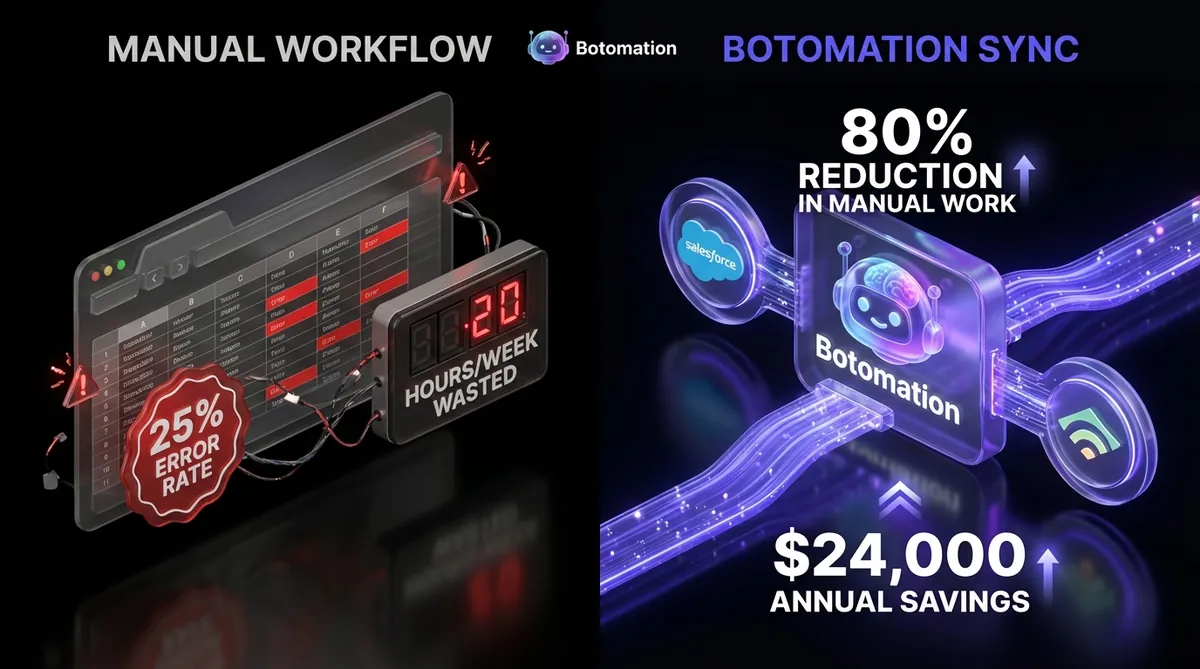
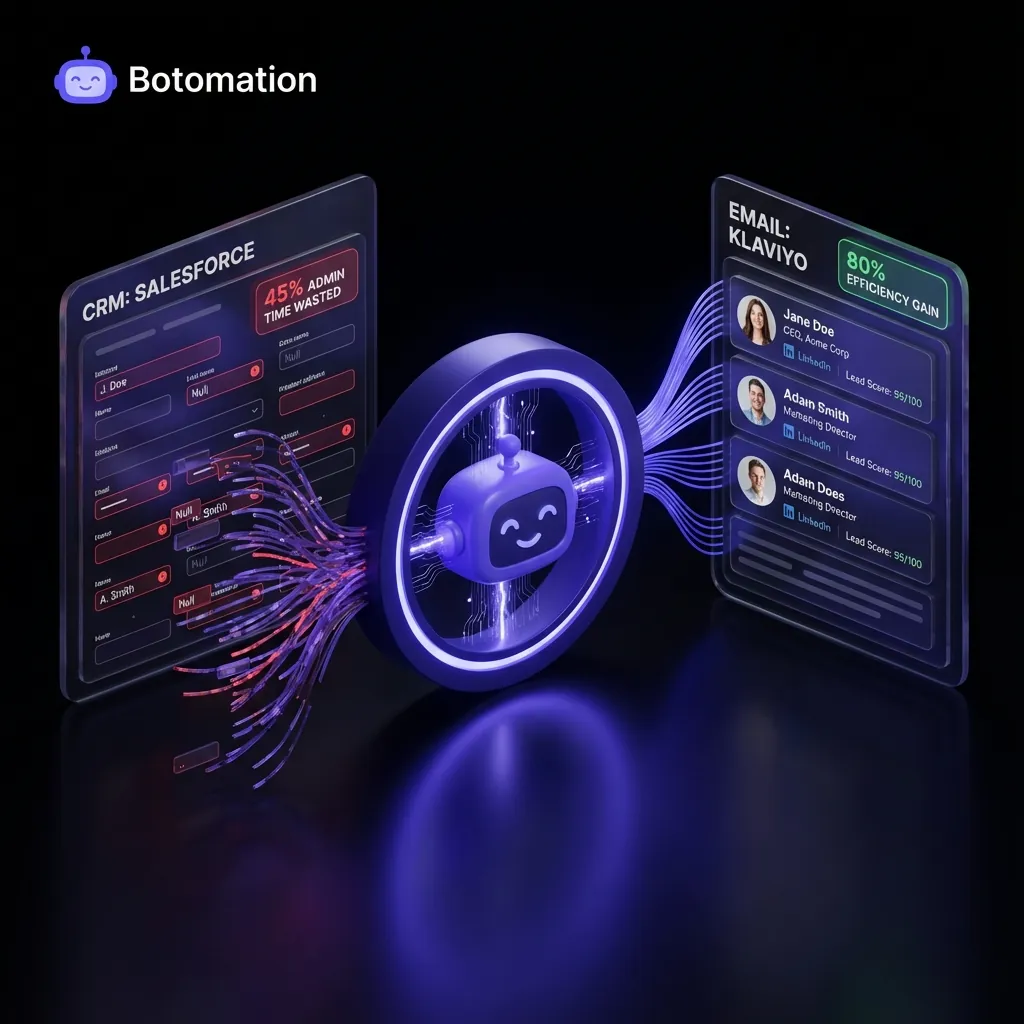
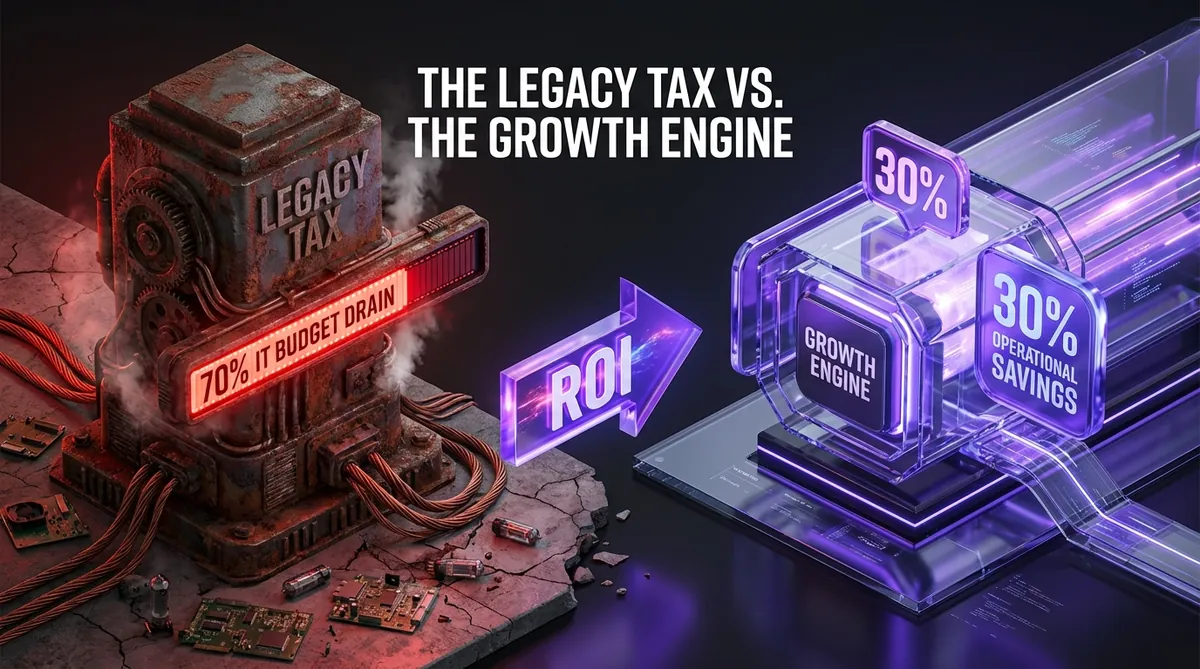
The hidden tax on modern business growth is rarely found as a line item on a profit and loss statement. Instead, it lurks in the rhythmic tapping of keys as a marketing coordinator copies an email address from a CRM and pastes it into a mailing list. While this seems like a minor inconvenience, data from the January 2026 operations report reveals that 45% of administrative time is currently wasted on these repetitive copy-paste cycles. This inefficiency does more than drain payroll; it creates a fragmented customer experience where data remains perpetually out of sync. To fix this, businesses must learn how to eliminate data silos between applications. Implementing comprehensive business process automation is no longer optional for firms targeting manual data entry reduction.
When information lives in silos, the sales pipeline suffers from a lack of real-time visibility. A lead might click a link in a promotional email, but if that engagement data doesn't find its way back to the CRM instantly, the sales representative remains unaware of the prospect's high intent. Our team at Botomation sees this struggle daily across service businesses that have outgrown their manual processes and need to automate client onboarding. The solution is no longer about working harder or hiring more staff to manage the load. Many businesses start by learning how to connect Excel to CRM systems, but the ultimate answer lies in a sophisticated automated data sync that bridges the gap between your core systems.
The transition to a fully automated back-office allows your team to focus on high-value strategy rather than the digital equivalent of moving piles of sand from one bucket to another. By the end of 2026, the gap between businesses that automate and those that rely on manual entry will become an unbridgeable chasm. Partnering with experts to build these bridges ensures that your data flows as fast as your business moves.
Why is Manual Data Entry Still Hurting Your Automated Data Sync?
Identifying where friction exists is the first step toward reducing admin tasks in service operations and reclaiming your team's time. Most operations managers realize there is a problem only when a major error occurs, such as a high-value client receiving a "new subscriber" discount code they should never have seen. These manual data transfer scenarios are often deeply embedded in daily habits, making them invisible to the casual observer. The "Old Way" of managing these tasks relies on human memory and diligence—finite resources that inevitably fail under pressure.
One of the most frequent points of failure is the handoff between lead generation and lead nurturing, which can be improved using automated lead verification. When a new prospect enters your CRM via a trade show or a direct outreach campaign, the delay in moving that data to your email marketing platform often results in missed opportunities. If the data transfer happens once a week, you are effectively giving your competitors a seven-day head start. In 2024, a HubSpot customer documented their journey of reducing manual work by 80% simply by implementing an automated data sync for their contact properties. They found that real-time updates allowed their marketing team to send personalized follow-ups within minutes of a CRM status change, rather than days.
Common Manual Data Transfer Scenarios
The most common scenario involves copying new leads from a CRM like Salesforce or Pipedrive into an email marketing platform like Klaviyo or Beehiiv. This process is rarely just about the email address; it usually involves moving tags, lead scores, and custom field data to ensure the right person gets the right message. When this is done manually, details like the "industry" or "company size" often get left behind to save time, resulting in generic, ineffective marketing. Reliable contact synchronization ensures these attributes are preserved across all platforms, similar to how businesses automate data transfer between Google Sheets and business apps.
Another critical pain point is the reverse flow of data: updating email engagement back to the CRM records. When a contact unsubscribes or changes their preferences in an email, that information must be reflected in the CRM to prevent sales reps from making awkward or non-compliant phone calls. Manually checking email reports and updating individual CRM profiles is a soul-crushing task that rarely gets done consistently. Furthermore, segmenting contacts based on their behavior—such as moving a lead from "Cold" to "Warm" after they open three consecutive emails—is nearly impossible to manage by hand at scale and is a primary cause of lead list decay.
Quantifying the Time and Cost Impact
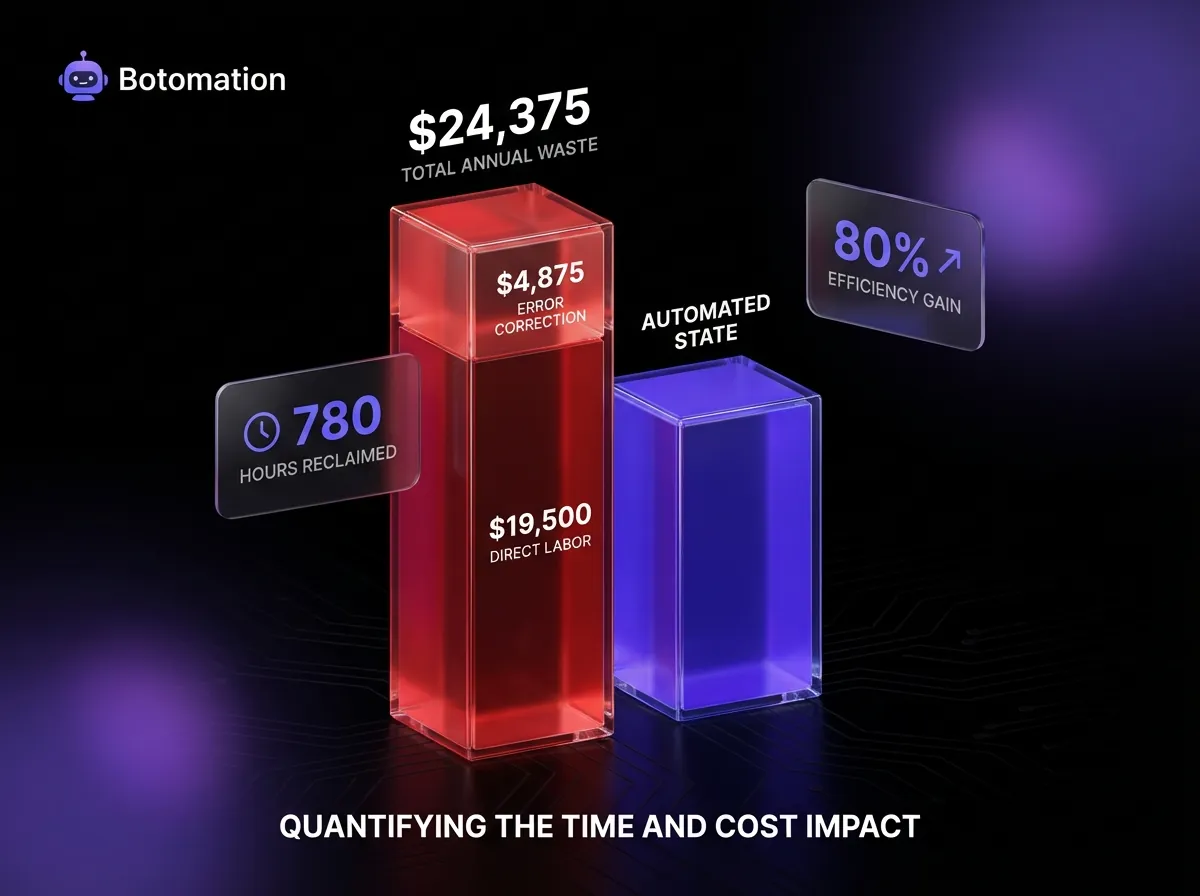
To understand the true cost, we must look at the numbers behind the labor. For a mid-sized team, an average of 15 to 20 hours per week is spent on these manual tasks. If we assume an administrative salary of $52,000 per year, which breaks down to roughly $25 per hour, the direct labor cost of manual entry is $19,500 annually. However, this doesn't account for the 25% of manual entries that contain errors requiring correction. When you factor in the time spent hunting down mistakes and the $4,875 lost to error correction, the total waste exceeds $24,000 per year for a single employee's manual workload.
The emotional cost is perhaps even higher than the financial one. Employee satisfaction plummeted in 2024 studies among staff members who spent more than three hours a day on repetitive data tasks. By implementing an automated data sync, businesses aren't just saving money; they are protecting their best talent from burnout. The math is simple, but the implications are massive: every hour saved through a complete guide to automating administrative tasks is an hour that can be reinvested into closing deals or improving service quality.
| Manual Entry Metric | Estimated Annual Impact (Per 1.0 FTE) |
|---|---|
| Direct Labor Hours | 780 Hours |
| Direct Labor Cost | $19,500 |
| Error Correction Time | 195 Hours |
| Total Financial Waste | $24,375 |
| Data Accuracy Rate | 75% - 82% |
Which Automation Tools Best Support Your Automated Data Sync?
The landscape of automation has shifted dramatically as we move through 2026. We are no longer limited to simple "if this, then that" triggers. Modern automation platforms offer drag-and-drop functionality that allows our experts at Botomation to build complex, multi-step workflows without the need for custom coding. These tools act as the central nervous system of your business, ensuring that when a heart beats in your CRM, the pulse is felt in your email marketing and your project management tools simultaneously. Robust CRM email integration is the foundation of this ecosystem.
A major milestone in this space was the release of RPA v2026.2 by Automation Anywhere, which introduced advanced CRM connectors that handle nested data structures with ease. This allows for a deeper level of integration than was previously possible. Whether you are using a standard combination like Salesforce and Mailchimp or something more niche, the latest updates in these platforms have made it possible to sync data with sub-second latency. This ensures that your "automated" business actually feels automated to the end-user.
Workflow Automation Platforms Comparison
When choosing an integration platform for an automated data sync, the big three names are Zapier, Make, and Tray.io. Zapier remains the king of accessibility, boasting the largest library of integrations, making it ideal for standard CRM-to-email tasks. However, Make (formerly Integromat) offers a more visual and granular approach, allowing for complex branching logic that Zapier sometimes struggles to handle without multiple "Zaps." Tray.io sits at the enterprise level, offering robust security and massive scale for companies handling millions of data points. Using these data automation tools correctly can reduce technical debt significantly.
The pricing for these platforms has evolved to be based on trigger volume and the complexity of the "tasks" performed. For a growing service business, Make often provides a better price-to-performance ratio, while Zapier is the go-to for speed of deployment. The setup complexity varies significantly; while a simple sync can be built in an hour, a professional-grade architecture that handles error logging and data transformation requires technical expertise to ensure long-term stability.
Robotic Process Automation Solutions
For businesses dealing with legacy software or highly complex manual processes that don't have open APIs, Robotic Process Automation (RPA) is the heavy hitter. RPA tools like UiPath and Blue Prism can "watch" a human perform a task on a screen and then replicate those actions across different windows and applications. This is particularly useful for CRM systems that are hosted on-premise or have restrictive integration capabilities.
In 2024, a notable case study followed a UiPath customer who successfully automated 95% of their manual CRM updates. They were dealing with a legacy database that didn't talk to their modern email platform. By deploying a software "bot" to handle the data bridge, they avoided a multi-million dollar software migration while achieving the same efficiency gains as a modern API-driven stack. This highlights that no matter how legacy your systems are, there is always a path toward full automation if you have the right partner.
How Do You Set Up a Reliable Automated Data Sync Workflow?
Building a reliable automated data sync is an architectural challenge, not just a technical one. It requires a deep understanding of how data is structured in both your CRM and your email marketing tool. If the CRM uses a "Company" record as the primary anchor but the email tool uses "Email Address," you must build logic that maps these two different worlds together. This is where many DIY automation attempts fail; they don't account for the nuances of data relationships.
The process begins with a clear mapping of every field that needs to move between systems. Our experts look at everything from standard contact info to custom tags like "Last Purchase Date" or "Lead Source." Once the map is created, we configure the triggers and actions that drive the workflow. The goal is to create a "set it and forget it" system that handles exceptions just as well as standard entries.
Creating Triggers and Actions for Data Sync
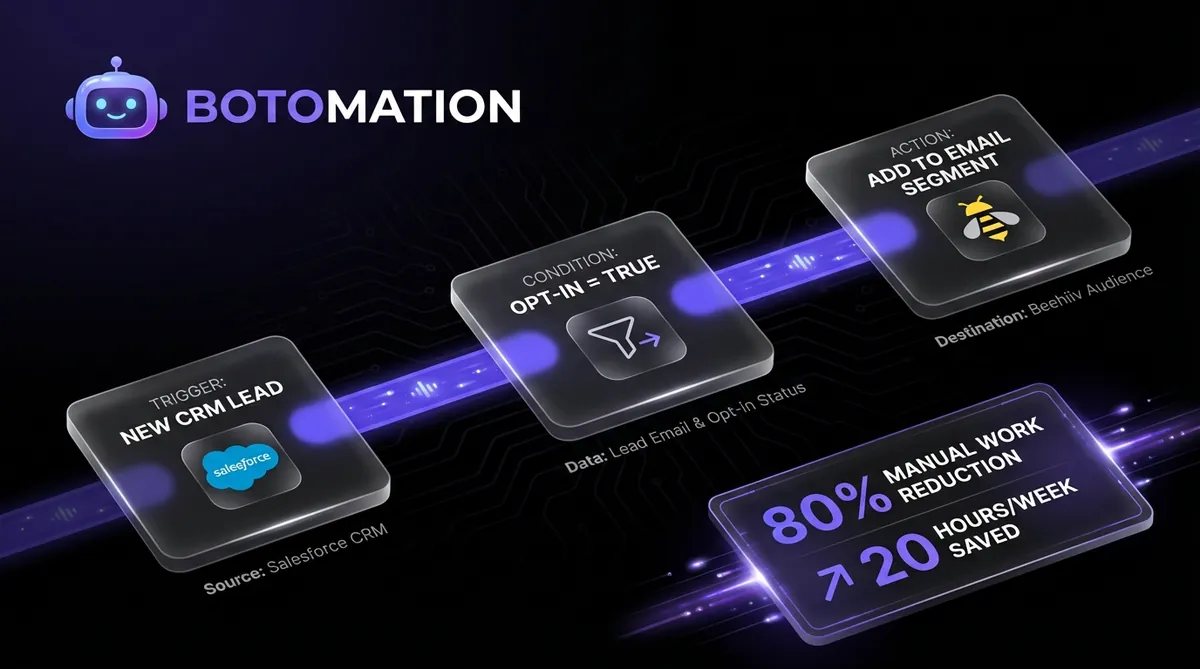
The "Trigger" is the event that starts the entire process. In a CRM-to-email workflow, this is usually a "New Contact Created" or "Contact Field Updated" event. For example, when a salesperson changes a lead's status to "Qualified," that change acts as a trigger to move that contact into a specific high-intent email sequence. This creates a seamless lead management workflow that requires zero manual intervention. We also set up triggers for email engagement events, such as a contact clicking a specific link, which then triggers an update in the CRM to alert the sales team.
The "Action" is what happens after the trigger is fired. This might involve creating a new contact in the email tool, adding them to a specific segment, or even sending a notification to a Slack channel. We often implement filtering and conditional logic to ensure that only the right data moves. You might only want to sync contacts who have a valid phone number or those who reside in a specific geographic region. This precision prevents your email lists from becoming cluttered with low-quality data.
Expert Tip: Never sync your entire CRM database to your email tool in one go. Use "Filter Steps" to ensure only active, marketable leads are transferred, which keeps your email costs down and your engagement rates high.
Testing and Validation Procedures
Before any automation goes live, it must be put through a rigorous testing phase. We use test data—often referred to as "dummy" records—to ensure that every branch of the logic works as intended. This prevents embarrassing situations where a test email is accidentally sent to your entire client list. Validation rules are also established to ensure data quality; for instance, the system should be told what to do if an email address is missing or if a name is written in all capital letters.
Error handling is the final piece of the setup puzzle. Even the best automations can encounter issues, such as an API being temporarily down or a field being formatted incorrectly. We build notification systems that alert our team or your operations manager the moment a workflow fails. This proactive approach ensures that a small technical glitch doesn't lead to a massive data backlog. Reliability is the hallmark of a professional Botomation setup.
Step-by-Step Implementation Guide
- Audit Your Fields: Identify which fields in your CRM (e.g., Lead Status, Industry) need to exist in your email tool for segmentation.
- Select Your "Source of Truth": Decide which system holds the master record to prevent data loops where two systems keep updating each other indefinitely.
- Map the Connection: Use a tool like Make or Zapier to connect the two apps, ensuring the "Email" field in the CRM matches the "Email" field in the marketing tool.
- Set the Trigger: Choose "New/Updated Record" in your CRM as the starting point.
- Add a Filter: Only allow contacts with "Opt-in = True" to pass through to comply with privacy laws.
- Define the Action: Select "Add/Update Subscriber" in your email tool.
- Run a Live Test: Manually update one record in your CRM and verify it appears correctly in your email tool within 60 seconds.
How Can You Optimize Workflows for Maximum Efficiency?
Once the basic sync is running, the focus shifts to optimization. A workflow that works for 100 leads a month might break when you scale to 10,000. High-volume data transfers require a different approach to avoid hitting API limits or causing delays in data processing. Efficiency in automation isn't just about speed; it's about resource management.
Performance optimization involves looking at the frequency of your syncs and the way data is bundled. If you have a high volume of updates, "Real-time" sync might not always be the best choice. Sometimes, batching updates every 15 minutes is more stable and cost-effective. Our team monitors these patterns to ensure that your automation infrastructure scales seamlessly with your business growth.
Performance Optimization Strategies
Batch processing is one of the most effective ways to handle large data transfers. Instead of triggering a workflow for every single click, the system collects clicks over a short period and sends them all at once. This reduces the number of "tasks" consumed in your automation platform and stays well within the rate limits imposed by CRM providers. Sync frequency optimization is another key strategy; we prioritize urgent data (like new leads) for instant sync while non-urgent data (like updated mailing addresses) can be processed during off-peak hours.
Load balancing is also critical when multiple workflows are running simultaneously. If your CRM-to-email sync is running at the same time as your automated project management and billing workflows, it can put a strain on your system's performance. We architect these flows to ensure they don't compete for resources. This level of foresight is what separates a professional agency implementation from a standard DIY setup.
Monitoring and Maintenance Best Practices
Automation is not a "one and done" project. Software companies update their APIs, fields get renamed, and business processes evolve. Regular maintenance is essential to keep the "glue" holding your business together from drying out. We implement alert systems that provide detailed logs of why a specific record failed to sync, allowing for rapid troubleshooting.
Documentation is often the most overlooked part of automation maintenance. Every workflow we build for our clients includes a clear map of what it does, why it exists, and how to fix it. This ensures that if your internal team changes, the knowledge of how your business operates isn't lost. Regular reviews—at least once a quarter—help identify automations that are no longer needed or those that could be improved with new features released in 2026.
What is the Financial ROI of Eliminating Manual Data Entry?
To justify the investment in automation, you must be able to measure the results. We don't just look at "hours saved" as a vanity metric; we look at how those hours impact the bottom line. When a team is freed from manual entry, their output in other areas should increase. If your sales team no longer has to spend Friday afternoons updating records, they can conduct more discovery calls or follow up on more proposals.
The 2026 data shows that the ROI of automation is often realized much faster than traditional software implementations. A recent study by Automation Anywhere showed that customers saw an average of 320% ROI within the first year. This is because the costs are front-loaded in the setup, while the benefits—saved time, reduced errors, and faster lead response—accrue every single day.
Key Performance Metrics to Track
The most immediate metric is the reduction in data entry errors. Most businesses see a 90% decrease in errors almost immediately after the automated data sync goes live. This leads to cleaner data, automated executive reporting, and fewer "oops" emails to customers. We also track "Lead Response Time," which typically drops from hours or days to mere seconds when you reduce lead response time with WhatsApp automation.
Employee satisfaction is a qualitative but vital metric. When we interview teams after a Botomation implementation, the most common feedback is a sense of relief. The "mental load" of remembering to sync data is gone, allowing employees to engage in the creative and strategic work they were actually hired to perform. High morale leads to lower turnover, which is a massive indirect cost saving for any business.
Calculating Financial ROI
Let's break down a realistic ROI calculation for a service business with five employees who each spend 5 hours a week on manual data entry.
- Total Hours per Week: 25 hours
- Total Hours per Year: 1,300 hours
- Average Hourly Rate (Fully Burdened): $35/hour
- Annual Cost of Manual Entry: $45,500
- Cost of Botomation Setup & Annual Management: ~$15,000
- First Year Net Savings: $30,500
- Return on Investment: 203%
In this scenario, the system pays for itself in less than four months. Beyond the direct labor savings, the revenue impact of faster lead response can be even more significant. If faster automation leads to just two additional closed deals per year, the ROI can easily climb into the 500% range. Automation isn't an expense; it's a high-yield investment in your business's infrastructure.
How Does AI-Enhanced Data Processing Change the Game?
As we move deeper into 2026, the integration of AI into automated data sync has changed the game. We are no longer just moving data; we are improving it as it moves. With tools like GPT-5 and specialized machine learning models, we can now clean, categorize, and enrich data during the transfer process. This means your email marketing automation platform doesn't just get a name and an email; it gets a fully profiled lead.
Smart data enrichment is the new standard. Imagine a lead enters their email on your site. As that data moves to your CRM, an AI agent looks up their LinkedIn profile, determines their job title, and categorizes their company size. By the time that lead reaches your email marketing tool, they are already segmented into the "Enterprise Tech" bucket with a personalized greeting that references their recent company news. This is the level of sophistication that our agency brings to the table.
AI-Powered Data Enrichment Features
One of the most powerful AI features is automated contact information verification. The system can check if an email address is likely to bounce or if a phone number is a landline versus a cell phone before the data even hits your CRM. Intelligent lead scoring is another leap forward. Instead of using static points, AI models analyze the behavior of your most successful customers and assign scores based on complex patterns of CRM and email interaction.
Predictive analytics can now forecast customer behavior, such as churn risk. If a long-term client stops opening your emails and their CRM activity drops, the automated sync can trigger a "High Churn Risk" alert to your account management team. This proactive approach to customer retention is only possible when your data systems are tightly integrated and enhanced with machine learning.
Future Trends in Process Automation
The future of automation is moving toward Natural Language Processing (NLP) for manual data extraction. Soon, you won't need a form to get data into your CRM. You'll be able to forward a messy email thread to an automation address, and an AI agent will extract the names, dates, and deal values, then sync them to the correct records. This "zero-entry" future is exactly where Botomation is leading our clients.
We are also seeing a massive trend in the integration of chatbots and customer service automation with CRM data. When a customer interacts with a bot on your website, that bot should already know their purchase history and their last email interaction. This creates a "seamless" experience that customers in 2026 have come to expect. If your systems are disconnected, your customer service will always feel disjointed and slow.
Frequently Asked Questions
What is the main benefit of automated data sync?
The primary benefit is the elimination of manual errors and the reclamation of administrative time. By ensuring data is identical and real-time across your CRM and email tools, you improve lead response times and marketing personalization accuracy.
How long does it take to set up an automated data sync?
A standard integration between a common CRM and an email platform typically takes 2 to 4 weeks to fully architect, test, and deploy. More complex systems involving legacy software or heavy AI enrichment may take longer, but we always prioritize the most impactful "quick wins" first.
Is my data secure during these transfers?
Security is our top priority. We use enterprise-grade automation platforms that offer end-to-end encryption and comply with global standards like GDPR and SOC2. We never store your data on our own servers; we simply build the secure "pipes" that allow it to flow between your existing tools.
Can I automate niche or custom-built software?
Yes. While "out-of-the-box" connectors are great for popular tools, we specialize in building custom API integrations and using RPA (Robotic Process Automation) to connect even the most obscure or outdated software systems.
Will automation replace my current staff?
No. Automation is designed to replace the tasks that your staff hates doing. By eliminating manual data entry, you allow your team to move into higher-value roles that require human judgment, empathy, and strategic thinking—things that bots cannot replicate.
The era of manual data entry is over, and the first step is to eliminate manual data copying across your organization. Businesses that continue to rely on human effort to move data between systems are choosing to operate with a self-imposed handicap. The cost in lost time, human error, and missed revenue is simply too high to ignore in a competitive 2026 market. By partnering with the experts at Botomation, you aren't just buying a technical setup; you are investing in a future where your business operations run on autopilot, free from the friction of disconnected tools.
Our team at Botomation acts as the "glue" for your entire organization, ensuring that your CRM, email marketing, and back-office workflows function as a single, cohesive unit. This is the "New Way" of doing business—where data is instant, errors are non-existent, and your team is empowered to do their best work. Stop wasting your most valuable resource on tasks that a machine can do better and faster.
Ready to automate your growth? Book a call below.
The hidden tax on modern business growth is rarely found as a line item on a profit and loss statement. Instead, it lurks in the rhythmic tapping of keys as a marketing coordinator copies an email address from a CRM and pastes it into a mailing list. While this seems like a minor inconvenience, data from the January 2026 operations report reveals that 45% of administrative time is currently wasted on these repetitive copy-paste cycles. This inefficiency does more than drain payroll; it creates a fragmented customer experience where data remains perpetually out of sync. To fix this, businesses must learn how to eliminate data silos between applications. Implementing comprehensive business process automation is no longer optional for firms targeting manual data entry reduction.
When information lives in silos, the sales pipeline suffers from a lack of real-time visibility. A lead might click a link in a promotional email, but if that engagement data doesn't find its way back to the CRM instantly, the sales representative remains unaware of the prospect's high intent. Our team at Botomation sees this struggle daily across service businesses that have outgrown their manual processes and need to automate client onboarding. The solution is no longer about working harder or hiring more staff to manage the load. Many businesses start by learning how to connect Excel to CRM systems, but the ultimate answer lies in a sophisticated automated data sync that bridges the gap between your core systems.
The transition to a fully automated back-office allows your team to focus on high-value strategy rather than the digital equivalent of moving piles of sand from one bucket to another. By the end of 2026, the gap between businesses that automate and those that rely on manual entry will become an unbridgeable chasm. Partnering with experts to build these bridges ensures that your data flows as fast as your business moves.
Why is Manual Data Entry Still Hurting Your Automated Data Sync?
Identifying where friction exists is the first step toward reducing admin tasks in service operations and reclaiming your team's time. Most operations managers realize there is a problem only when a major error occurs, such as a high-value client receiving a "new subscriber" discount code they should never have seen. These manual data transfer scenarios are often deeply embedded in daily habits, making them invisible to the casual observer. The "Old Way" of managing these tasks relies on human memory and diligence—finite resources that inevitably fail under pressure.
One of the most frequent points of failure is the handoff between lead generation and lead nurturing, which can be improved using automated lead verification. When a new prospect enters your CRM via a trade show or a direct outreach campaign, the delay in moving that data to your email marketing platform often results in missed opportunities. If the data transfer happens once a week, you are effectively giving your competitors a seven-day head start. In 2024, a HubSpot customer documented their journey of reducing manual work by 80% simply by implementing an automated data sync for their contact properties. They found that real-time updates allowed their marketing team to send personalized follow-ups within minutes of a CRM status change, rather than days.
Common Manual Data Transfer Scenarios
The most common scenario involves copying new leads from a CRM like Salesforce or Pipedrive into an email marketing platform like Klaviyo or Beehiiv. This process is rarely just about the email address; it usually involves moving tags, lead scores, and custom field data to ensure the right person gets the right message. When this is done manually, details like the "industry" or "company size" often get left behind to save time, resulting in generic, ineffective marketing. Reliable contact synchronization ensures these attributes are preserved across all platforms, similar to how businesses automate data transfer between Google Sheets and business apps.
Another critical pain point is the reverse flow of data: updating email engagement back to the CRM records. When a contact unsubscribes or changes their preferences in an email, that information must be reflected in the CRM to prevent sales reps from making awkward or non-compliant phone calls. Manually checking email reports and updating individual CRM profiles is a soul-crushing task that rarely gets done consistently. Furthermore, segmenting contacts based on their behavior—such as moving a lead from "Cold" to "Warm" after they open three consecutive emails—is nearly impossible to manage by hand at scale and is a primary cause of lead list decay.
Quantifying the Time and Cost Impact
To understand the true cost, we must look at the numbers behind the labor. For a mid-sized team, an average of 15 to 20 hours per week is spent on these manual tasks. If we assume an administrative salary of $52,000 per year, which breaks down to roughly $25 per hour, the direct labor cost of manual entry is $19,500 annually. However, this doesn't account for the 25% of manual entries that contain errors requiring correction. When you factor in the time spent hunting down mistakes and the $4,875 lost to error correction, the total waste exceeds $24,000 per year for a single employee's manual workload.
The emotional cost is perhaps even higher than the financial one. Employee satisfaction plummeted in 2024 studies among staff members who spent more than three hours a day on repetitive data tasks. By implementing an automated data sync, businesses aren't just saving money; they are protecting their best talent from burnout. The math is simple, but the implications are massive: every hour saved through a complete guide to automating administrative tasks is an hour that can be reinvested into closing deals or improving service quality.
| Manual Entry Metric | Estimated Annual Impact (Per 1.0 FTE) |
|---|---|
| Direct Labor Hours | 780 Hours |
| Direct Labor Cost | $19,500 |
| Error Correction Time | 195 Hours |
| Total Financial Waste | $24,375 |
| Data Accuracy Rate | 75% - 82% |
Which Automation Tools Best Support Your Automated Data Sync?
The landscape of automation has shifted dramatically as we move through 2026. We are no longer limited to simple "if this, then that" triggers. Modern automation platforms offer drag-and-drop functionality that allows our experts at Botomation to build complex, multi-step workflows without the need for custom coding. These tools act as the central nervous system of your business, ensuring that when a heart beats in your CRM, the pulse is felt in your email marketing and your project management tools simultaneously. Robust CRM email integration is the foundation of this ecosystem.
A major milestone in this space was the release of RPA v2026.2 by Automation Anywhere, which introduced advanced CRM connectors that handle nested data structures with ease. This allows for a deeper level of integration than was previously possible. Whether you are using a standard combination like Salesforce and Mailchimp or something more niche, the latest updates in these platforms have made it possible to sync data with sub-second latency. This ensures that your "automated" business actually feels automated to the end-user.
Workflow Automation Platforms Comparison
When choosing an integration platform for an automated data sync, the big three names are Zapier, Make, and Tray.io. Zapier remains the king of accessibility, boasting the largest library of integrations, making it ideal for standard CRM-to-email tasks. However, Make (formerly Integromat) offers a more visual and granular approach, allowing for complex branching logic that Zapier sometimes struggles to handle without multiple "Zaps." Tray.io sits at the enterprise level, offering robust security and massive scale for companies handling millions of data points. Using these data automation tools correctly can reduce technical debt significantly.
The pricing for these platforms has evolved to be based on trigger volume and the complexity of the "tasks" performed. For a growing service business, Make often provides a better price-to-performance ratio, while Zapier is the go-to for speed of deployment. The setup complexity varies significantly; while a simple sync can be built in an hour, a professional-grade architecture that handles error logging and data transformation requires technical expertise to ensure long-term stability.
Robotic Process Automation Solutions
For businesses dealing with legacy software or highly complex manual processes that don't have open APIs, Robotic Process Automation (RPA) is the heavy hitter. RPA tools like UiPath and Blue Prism can "watch" a human perform a task on a screen and then replicate those actions across different windows and applications. This is particularly useful for CRM systems that are hosted on-premise or have restrictive integration capabilities.
In 2024, a notable case study followed a UiPath customer who successfully automated 95% of their manual CRM updates. They were dealing with a legacy database that didn't talk to their modern email platform. By deploying a software "bot" to handle the data bridge, they avoided a multi-million dollar software migration while achieving the same efficiency gains as a modern API-driven stack. This highlights that no matter how legacy your systems are, there is always a path toward full automation if you have the right partner.
How Do You Set Up a Reliable Automated Data Sync Workflow?
Building a reliable automated data sync is an architectural challenge, not just a technical one. It requires a deep understanding of how data is structured in both your CRM and your email marketing tool. If the CRM uses a "Company" record as the primary anchor but the email tool uses "Email Address," you must build logic that maps these two different worlds together. This is where many DIY automation attempts fail; they don't account for the nuances of data relationships.
The process begins with a clear mapping of every field that needs to move between systems. Our experts look at everything from standard contact info to custom tags like "Last Purchase Date" or "Lead Source." Once the map is created, we configure the triggers and actions that drive the workflow. The goal is to create a "set it and forget it" system that handles exceptions just as well as standard entries.
Creating Triggers and Actions for Data Sync
The "Trigger" is the event that starts the entire process. In a CRM-to-email workflow, this is usually a "New Contact Created" or "Contact Field Updated" event. For example, when a salesperson changes a lead's status to "Qualified," that change acts as a trigger to move that contact into a specific high-intent email sequence. This creates a seamless lead management workflow that requires zero manual intervention. We also set up triggers for email engagement events, such as a contact clicking a specific link, which then triggers an update in the CRM to alert the sales team.
The "Action" is what happens after the trigger is fired. This might involve creating a new contact in the email tool, adding them to a specific segment, or even sending a notification to a Slack channel. We often implement filtering and conditional logic to ensure that only the right data moves. You might only want to sync contacts who have a valid phone number or those who reside in a specific geographic region. This precision prevents your email lists from becoming cluttered with low-quality data.
Expert Tip: Never sync your entire CRM database to your email tool in one go. Use "Filter Steps" to ensure only active, marketable leads are transferred, which keeps your email costs down and your engagement rates high.
Testing and Validation Procedures
Before any automation goes live, it must be put through a rigorous testing phase. We use test data—often referred to as "dummy" records—to ensure that every branch of the logic works as intended. This prevents embarrassing situations where a test email is accidentally sent to your entire client list. Validation rules are also established to ensure data quality; for instance, the system should be told what to do if an email address is missing or if a name is written in all capital letters.
Error handling is the final piece of the setup puzzle. Even the best automations can encounter issues, such as an API being temporarily down or a field being formatted incorrectly. We build notification systems that alert our team or your operations manager the moment a workflow fails. This proactive approach ensures that a small technical glitch doesn't lead to a massive data backlog. Reliability is the hallmark of a professional Botomation setup.
Step-by-Step Implementation Guide
- Audit Your Fields: Identify which fields in your CRM (e.g., Lead Status, Industry) need to exist in your email tool for segmentation.
- Select Your "Source of Truth": Decide which system holds the master record to prevent data loops where two systems keep updating each other indefinitely.
- Map the Connection: Use a tool like Make or Zapier to connect the two apps, ensuring the "Email" field in the CRM matches the "Email" field in the marketing tool.
- Set the Trigger: Choose "New/Updated Record" in your CRM as the starting point.
- Add a Filter: Only allow contacts with "Opt-in = True" to pass through to comply with privacy laws.
- Define the Action: Select "Add/Update Subscriber" in your email tool.
- Run a Live Test: Manually update one record in your CRM and verify it appears correctly in your email tool within 60 seconds.
How Can You Optimize Workflows for Maximum Efficiency?
Once the basic sync is running, the focus shifts to optimization. A workflow that works for 100 leads a month might break when you scale to 10,000. High-volume data transfers require a different approach to avoid hitting API limits or causing delays in data processing. Efficiency in automation isn't just about speed; it's about resource management.
Performance optimization involves looking at the frequency of your syncs and the way data is bundled. If you have a high volume of updates, "Real-time" sync might not always be the best choice. Sometimes, batching updates every 15 minutes is more stable and cost-effective. Our team monitors these patterns to ensure that your automation infrastructure scales seamlessly with your business growth.
Performance Optimization Strategies
Batch processing is one of the most effective ways to handle large data transfers. Instead of triggering a workflow for every single click, the system collects clicks over a short period and sends them all at once. This reduces the number of "tasks" consumed in your automation platform and stays well within the rate limits imposed by CRM providers. Sync frequency optimization is another key strategy; we prioritize urgent data (like new leads) for instant sync while non-urgent data (like updated mailing addresses) can be processed during off-peak hours.
Load balancing is also critical when multiple workflows are running simultaneously. If your CRM-to-email sync is running at the same time as your automated project management and billing workflows, it can put a strain on your system's performance. We architect these flows to ensure they don't compete for resources. This level of foresight is what separates a professional agency implementation from a standard DIY setup.
Monitoring and Maintenance Best Practices
Automation is not a "one and done" project. Software companies update their APIs, fields get renamed, and business processes evolve. Regular maintenance is essential to keep the "glue" holding your business together from drying out. We implement alert systems that provide detailed logs of why a specific record failed to sync, allowing for rapid troubleshooting.
Documentation is often the most overlooked part of automation maintenance. Every workflow we build for our clients includes a clear map of what it does, why it exists, and how to fix it. This ensures that if your internal team changes, the knowledge of how your business operates isn't lost. Regular reviews—at least once a quarter—help identify automations that are no longer needed or those that could be improved with new features released in 2026.
What is the Financial ROI of Eliminating Manual Data Entry?
To justify the investment in automation, you must be able to measure the results. We don't just look at "hours saved" as a vanity metric; we look at how those hours impact the bottom line. When a team is freed from manual entry, their output in other areas should increase. If your sales team no longer has to spend Friday afternoons updating records, they can conduct more discovery calls or follow up on more proposals.
The 2026 data shows that the ROI of automation is often realized much faster than traditional software implementations. A recent study by Automation Anywhere showed that customers saw an average of 320% ROI within the first year. This is because the costs are front-loaded in the setup, while the benefits—saved time, reduced errors, and faster lead response—accrue every single day.
Key Performance Metrics to Track
The most immediate metric is the reduction in data entry errors. Most businesses see a 90% decrease in errors almost immediately after the automated data sync goes live. This leads to cleaner data, automated executive reporting, and fewer "oops" emails to customers. We also track "Lead Response Time," which typically drops from hours or days to mere seconds when you reduce lead response time with WhatsApp automation.
Employee satisfaction is a qualitative but vital metric. When we interview teams after a Botomation implementation, the most common feedback is a sense of relief. The "mental load" of remembering to sync data is gone, allowing employees to engage in the creative and strategic work they were actually hired to perform. High morale leads to lower turnover, which is a massive indirect cost saving for any business.
Calculating Financial ROI
Let's break down a realistic ROI calculation for a service business with five employees who each spend 5 hours a week on manual data entry.
- Total Hours per Week: 25 hours
- Total Hours per Year: 1,300 hours
- Average Hourly Rate (Fully Burdened): $35/hour
- Annual Cost of Manual Entry: $45,500
- Cost of Botomation Setup & Annual Management: ~$15,000
- First Year Net Savings: $30,500
- Return on Investment: 203%
In this scenario, the system pays for itself in less than four months. Beyond the direct labor savings, the revenue impact of faster lead response can be even more significant. If faster automation leads to just two additional closed deals per year, the ROI can easily climb into the 500% range. Automation isn't an expense; it's a high-yield investment in your business's infrastructure.
How Does AI-Enhanced Data Processing Change the Game?
As we move deeper into 2026, the integration of AI into automated data sync has changed the game. We are no longer just moving data; we are improving it as it moves. With tools like GPT-5 and specialized machine learning models, we can now clean, categorize, and enrich data during the transfer process. This means your email marketing automation platform doesn't just get a name and an email; it gets a fully profiled lead.
Smart data enrichment is the new standard. Imagine a lead enters their email on your site. As that data moves to your CRM, an AI agent looks up their LinkedIn profile, determines their job title, and categorizes their company size. By the time that lead reaches your email marketing tool, they are already segmented into the "Enterprise Tech" bucket with a personalized greeting that references their recent company news. This is the level of sophistication that our agency brings to the table.
AI-Powered Data Enrichment Features
One of the most powerful AI features is automated contact information verification. The system can check if an email address is likely to bounce or if a phone number is a landline versus a cell phone before the data even hits your CRM. Intelligent lead scoring is another leap forward. Instead of using static points, AI models analyze the behavior of your most successful customers and assign scores based on complex patterns of CRM and email interaction.
Predictive analytics can now forecast customer behavior, such as churn risk. If a long-term client stops opening your emails and their CRM activity drops, the automated sync can trigger a "High Churn Risk" alert to your account management team. This proactive approach to customer retention is only possible when your data systems are tightly integrated and enhanced with machine learning.
Future Trends in Process Automation
The future of automation is moving toward Natural Language Processing (NLP) for manual data extraction. Soon, you won't need a form to get data into your CRM. You'll be able to forward a messy email thread to an automation address, and an AI agent will extract the names, dates, and deal values, then sync them to the correct records. This "zero-entry" future is exactly where Botomation is leading our clients.
We are also seeing a massive trend in the integration of chatbots and customer service automation with CRM data. When a customer interacts with a bot on your website, that bot should already know their purchase history and their last email interaction. This creates a "seamless" experience that customers in 2026 have come to expect. If your systems are disconnected, your customer service will always feel disjointed and slow.
Frequently Asked Questions
What is the main benefit of automated data sync?
The primary benefit is the elimination of manual errors and the reclamation of administrative time. By ensuring data is identical and real-time across your CRM and email tools, you improve lead response times and marketing personalization accuracy.
How long does it take to set up an automated data sync?
A standard integration between a common CRM and an email platform typically takes 2 to 4 weeks to fully architect, test, and deploy. More complex systems involving legacy software or heavy AI enrichment may take longer, but we always prioritize the most impactful "quick wins" first.
Is my data secure during these transfers?
Security is our top priority. We use enterprise-grade automation platforms that offer end-to-end encryption and comply with global standards like GDPR and SOC2. We never store your data on our own servers; we simply build the secure "pipes" that allow it to flow between your existing tools.
Can I automate niche or custom-built software?
Yes. While "out-of-the-box" connectors are great for popular tools, we specialize in building custom API integrations and using RPA (Robotic Process Automation) to connect even the most obscure or outdated software systems.
Will automation replace my current staff?
No. Automation is designed to replace the tasks that your staff hates doing. By eliminating manual data entry, you allow your team to move into higher-value roles that require human judgment, empathy, and strategic thinking—things that bots cannot replicate.
The era of manual data entry is over, and the first step is to eliminate manual data copying across your organization. Businesses that continue to rely on human effort to move data between systems are choosing to operate with a self-imposed handicap. The cost in lost time, human error, and missed revenue is simply too high to ignore in a competitive 2026 market. By partnering with the experts at Botomation, you aren't just buying a technical setup; you are investing in a future where your business operations run on autopilot, free from the friction of disconnected tools.
Our team at Botomation acts as the "glue" for your entire organization, ensuring that your CRM, email marketing, and back-office workflows function as a single, cohesive unit. This is the "New Way" of doing business—where data is instant, errors are non-existent, and your team is empowered to do their best work. Stop wasting your most valuable resource on tasks that a machine can do better and faster.
Ready to automate your growth? Book a call below.
The hidden tax on modern business growth is rarely found as a line item on a profit and loss statement. Instead, it lurks in the rhythmic tapping of keys as a marketing coordinator copies an email address from a CRM and pastes it into a mailing list. While this seems like a minor inconvenience, data from the January 2026 operations report reveals that 45% of administrative time is currently wasted on these repetitive copy-paste cycles. This inefficiency does more than drain payroll; it creates a fragmented customer experience where data remains perpetually out of sync. To fix this, businesses must learn how to eliminate data silos between applications. Implementing comprehensive business process automation is no longer optional for firms targeting manual data entry reduction.
When information lives in silos, the sales pipeline suffers from a lack of real-time visibility. A lead might click a link in a promotional email, but if that engagement data doesn't find its way back to the CRM instantly, the sales representative remains unaware of the prospect's high intent. Our team at Botomation sees this struggle daily across service businesses that have outgrown their manual processes and need to automate client onboarding. The solution is no longer about working harder or hiring more staff to manage the load. Many businesses start by learning how to connect Excel to CRM systems, but the ultimate answer lies in a sophisticated automated data sync that bridges the gap between your core systems.
The transition to a fully automated back-office allows your team to focus on high-value strategy rather than the digital equivalent of moving piles of sand from one bucket to another. By the end of 2026, the gap between businesses that automate and those that rely on manual entry will become an unbridgeable chasm. Partnering with experts to build these bridges ensures that your data flows as fast as your business moves.
Why is Manual Data Entry Still Hurting Your Automated Data Sync?
Identifying where friction exists is the first step toward reducing admin tasks in service operations and reclaiming your team's time. Most operations managers realize there is a problem only when a major error occurs, such as a high-value client receiving a "new subscriber" discount code they should never have seen. These manual data transfer scenarios are often deeply embedded in daily habits, making them invisible to the casual observer. The "Old Way" of managing these tasks relies on human memory and diligence—finite resources that inevitably fail under pressure.
One of the most frequent points of failure is the handoff between lead generation and lead nurturing, which can be improved using automated lead verification. When a new prospect enters your CRM via a trade show or a direct outreach campaign, the delay in moving that data to your email marketing platform often results in missed opportunities. If the data transfer happens once a week, you are effectively giving your competitors a seven-day head start. In 2024, a HubSpot customer documented their journey of reducing manual work by 80% simply by implementing an automated data sync for their contact properties. They found that real-time updates allowed their marketing team to send personalized follow-ups within minutes of a CRM status change, rather than days.
Common Manual Data Transfer Scenarios
The most common scenario involves copying new leads from a CRM like Salesforce or Pipedrive into an email marketing platform like Klaviyo or Beehiiv. This process is rarely just about the email address; it usually involves moving tags, lead scores, and custom field data to ensure the right person gets the right message. When this is done manually, details like the "industry" or "company size" often get left behind to save time, resulting in generic, ineffective marketing. Reliable contact synchronization ensures these attributes are preserved across all platforms, similar to how businesses automate data transfer between Google Sheets and business apps.
Another critical pain point is the reverse flow of data: updating email engagement back to the CRM records. When a contact unsubscribes or changes their preferences in an email, that information must be reflected in the CRM to prevent sales reps from making awkward or non-compliant phone calls. Manually checking email reports and updating individual CRM profiles is a soul-crushing task that rarely gets done consistently. Furthermore, segmenting contacts based on their behavior—such as moving a lead from "Cold" to "Warm" after they open three consecutive emails—is nearly impossible to manage by hand at scale and is a primary cause of lead list decay.
Quantifying the Time and Cost Impact
To understand the true cost, we must look at the numbers behind the labor. For a mid-sized team, an average of 15 to 20 hours per week is spent on these manual tasks. If we assume an administrative salary of $52,000 per year, which breaks down to roughly $25 per hour, the direct labor cost of manual entry is $19,500 annually. However, this doesn't account for the 25% of manual entries that contain errors requiring correction. When you factor in the time spent hunting down mistakes and the $4,875 lost to error correction, the total waste exceeds $24,000 per year for a single employee's manual workload.
The emotional cost is perhaps even higher than the financial one. Employee satisfaction plummeted in 2024 studies among staff members who spent more than three hours a day on repetitive data tasks. By implementing an automated data sync, businesses aren't just saving money; they are protecting their best talent from burnout. The math is simple, but the implications are massive: every hour saved through a complete guide to automating administrative tasks is an hour that can be reinvested into closing deals or improving service quality.
| Manual Entry Metric | Estimated Annual Impact (Per 1.0 FTE) |
|---|---|
| Direct Labor Hours | 780 Hours |
| Direct Labor Cost | $19,500 |
| Error Correction Time | 195 Hours |
| Total Financial Waste | $24,375 |
| Data Accuracy Rate | 75% - 82% |
Which Automation Tools Best Support Your Automated Data Sync?
The landscape of automation has shifted dramatically as we move through 2026. We are no longer limited to simple "if this, then that" triggers. Modern automation platforms offer drag-and-drop functionality that allows our experts at Botomation to build complex, multi-step workflows without the need for custom coding. These tools act as the central nervous system of your business, ensuring that when a heart beats in your CRM, the pulse is felt in your email marketing and your project management tools simultaneously. Robust CRM email integration is the foundation of this ecosystem.
A major milestone in this space was the release of RPA v2026.2 by Automation Anywhere, which introduced advanced CRM connectors that handle nested data structures with ease. This allows for a deeper level of integration than was previously possible. Whether you are using a standard combination like Salesforce and Mailchimp or something more niche, the latest updates in these platforms have made it possible to sync data with sub-second latency. This ensures that your "automated" business actually feels automated to the end-user.
Workflow Automation Platforms Comparison
When choosing an integration platform for an automated data sync, the big three names are Zapier, Make, and Tray.io. Zapier remains the king of accessibility, boasting the largest library of integrations, making it ideal for standard CRM-to-email tasks. However, Make (formerly Integromat) offers a more visual and granular approach, allowing for complex branching logic that Zapier sometimes struggles to handle without multiple "Zaps." Tray.io sits at the enterprise level, offering robust security and massive scale for companies handling millions of data points. Using these data automation tools correctly can reduce technical debt significantly.
The pricing for these platforms has evolved to be based on trigger volume and the complexity of the "tasks" performed. For a growing service business, Make often provides a better price-to-performance ratio, while Zapier is the go-to for speed of deployment. The setup complexity varies significantly; while a simple sync can be built in an hour, a professional-grade architecture that handles error logging and data transformation requires technical expertise to ensure long-term stability.
Robotic Process Automation Solutions
For businesses dealing with legacy software or highly complex manual processes that don't have open APIs, Robotic Process Automation (RPA) is the heavy hitter. RPA tools like UiPath and Blue Prism can "watch" a human perform a task on a screen and then replicate those actions across different windows and applications. This is particularly useful for CRM systems that are hosted on-premise or have restrictive integration capabilities.
In 2024, a notable case study followed a UiPath customer who successfully automated 95% of their manual CRM updates. They were dealing with a legacy database that didn't talk to their modern email platform. By deploying a software "bot" to handle the data bridge, they avoided a multi-million dollar software migration while achieving the same efficiency gains as a modern API-driven stack. This highlights that no matter how legacy your systems are, there is always a path toward full automation if you have the right partner.
How Do You Set Up a Reliable Automated Data Sync Workflow?
Building a reliable automated data sync is an architectural challenge, not just a technical one. It requires a deep understanding of how data is structured in both your CRM and your email marketing tool. If the CRM uses a "Company" record as the primary anchor but the email tool uses "Email Address," you must build logic that maps these two different worlds together. This is where many DIY automation attempts fail; they don't account for the nuances of data relationships.
The process begins with a clear mapping of every field that needs to move between systems. Our experts look at everything from standard contact info to custom tags like "Last Purchase Date" or "Lead Source." Once the map is created, we configure the triggers and actions that drive the workflow. The goal is to create a "set it and forget it" system that handles exceptions just as well as standard entries.
Creating Triggers and Actions for Data Sync
The "Trigger" is the event that starts the entire process. In a CRM-to-email workflow, this is usually a "New Contact Created" or "Contact Field Updated" event. For example, when a salesperson changes a lead's status to "Qualified," that change acts as a trigger to move that contact into a specific high-intent email sequence. This creates a seamless lead management workflow that requires zero manual intervention. We also set up triggers for email engagement events, such as a contact clicking a specific link, which then triggers an update in the CRM to alert the sales team.
The "Action" is what happens after the trigger is fired. This might involve creating a new contact in the email tool, adding them to a specific segment, or even sending a notification to a Slack channel. We often implement filtering and conditional logic to ensure that only the right data moves. You might only want to sync contacts who have a valid phone number or those who reside in a specific geographic region. This precision prevents your email lists from becoming cluttered with low-quality data.
Expert Tip: Never sync your entire CRM database to your email tool in one go. Use "Filter Steps" to ensure only active, marketable leads are transferred, which keeps your email costs down and your engagement rates high.
Testing and Validation Procedures
Before any automation goes live, it must be put through a rigorous testing phase. We use test data—often referred to as "dummy" records—to ensure that every branch of the logic works as intended. This prevents embarrassing situations where a test email is accidentally sent to your entire client list. Validation rules are also established to ensure data quality; for instance, the system should be told what to do if an email address is missing or if a name is written in all capital letters.
Error handling is the final piece of the setup puzzle. Even the best automations can encounter issues, such as an API being temporarily down or a field being formatted incorrectly. We build notification systems that alert our team or your operations manager the moment a workflow fails. This proactive approach ensures that a small technical glitch doesn't lead to a massive data backlog. Reliability is the hallmark of a professional Botomation setup.
Step-by-Step Implementation Guide
- Audit Your Fields: Identify which fields in your CRM (e.g., Lead Status, Industry) need to exist in your email tool for segmentation.
- Select Your "Source of Truth": Decide which system holds the master record to prevent data loops where two systems keep updating each other indefinitely.
- Map the Connection: Use a tool like Make or Zapier to connect the two apps, ensuring the "Email" field in the CRM matches the "Email" field in the marketing tool.
- Set the Trigger: Choose "New/Updated Record" in your CRM as the starting point.
- Add a Filter: Only allow contacts with "Opt-in = True" to pass through to comply with privacy laws.
- Define the Action: Select "Add/Update Subscriber" in your email tool.
- Run a Live Test: Manually update one record in your CRM and verify it appears correctly in your email tool within 60 seconds.
How Can You Optimize Workflows for Maximum Efficiency?
Once the basic sync is running, the focus shifts to optimization. A workflow that works for 100 leads a month might break when you scale to 10,000. High-volume data transfers require a different approach to avoid hitting API limits or causing delays in data processing. Efficiency in automation isn't just about speed; it's about resource management.
Performance optimization involves looking at the frequency of your syncs and the way data is bundled. If you have a high volume of updates, "Real-time" sync might not always be the best choice. Sometimes, batching updates every 15 minutes is more stable and cost-effective. Our team monitors these patterns to ensure that your automation infrastructure scales seamlessly with your business growth.
Performance Optimization Strategies
Batch processing is one of the most effective ways to handle large data transfers. Instead of triggering a workflow for every single click, the system collects clicks over a short period and sends them all at once. This reduces the number of "tasks" consumed in your automation platform and stays well within the rate limits imposed by CRM providers. Sync frequency optimization is another key strategy; we prioritize urgent data (like new leads) for instant sync while non-urgent data (like updated mailing addresses) can be processed during off-peak hours.
Load balancing is also critical when multiple workflows are running simultaneously. If your CRM-to-email sync is running at the same time as your automated project management and billing workflows, it can put a strain on your system's performance. We architect these flows to ensure they don't compete for resources. This level of foresight is what separates a professional agency implementation from a standard DIY setup.
Monitoring and Maintenance Best Practices
Automation is not a "one and done" project. Software companies update their APIs, fields get renamed, and business processes evolve. Regular maintenance is essential to keep the "glue" holding your business together from drying out. We implement alert systems that provide detailed logs of why a specific record failed to sync, allowing for rapid troubleshooting.
Documentation is often the most overlooked part of automation maintenance. Every workflow we build for our clients includes a clear map of what it does, why it exists, and how to fix it. This ensures that if your internal team changes, the knowledge of how your business operates isn't lost. Regular reviews—at least once a quarter—help identify automations that are no longer needed or those that could be improved with new features released in 2026.
What is the Financial ROI of Eliminating Manual Data Entry?
To justify the investment in automation, you must be able to measure the results. We don't just look at "hours saved" as a vanity metric; we look at how those hours impact the bottom line. When a team is freed from manual entry, their output in other areas should increase. If your sales team no longer has to spend Friday afternoons updating records, they can conduct more discovery calls or follow up on more proposals.
The 2026 data shows that the ROI of automation is often realized much faster than traditional software implementations. A recent study by Automation Anywhere showed that customers saw an average of 320% ROI within the first year. This is because the costs are front-loaded in the setup, while the benefits—saved time, reduced errors, and faster lead response—accrue every single day.
Key Performance Metrics to Track
The most immediate metric is the reduction in data entry errors. Most businesses see a 90% decrease in errors almost immediately after the automated data sync goes live. This leads to cleaner data, automated executive reporting, and fewer "oops" emails to customers. We also track "Lead Response Time," which typically drops from hours or days to mere seconds when you reduce lead response time with WhatsApp automation.
Employee satisfaction is a qualitative but vital metric. When we interview teams after a Botomation implementation, the most common feedback is a sense of relief. The "mental load" of remembering to sync data is gone, allowing employees to engage in the creative and strategic work they were actually hired to perform. High morale leads to lower turnover, which is a massive indirect cost saving for any business.
Calculating Financial ROI
Let's break down a realistic ROI calculation for a service business with five employees who each spend 5 hours a week on manual data entry.
- Total Hours per Week: 25 hours
- Total Hours per Year: 1,300 hours
- Average Hourly Rate (Fully Burdened): $35/hour
- Annual Cost of Manual Entry: $45,500
- Cost of Botomation Setup & Annual Management: ~$15,000
- First Year Net Savings: $30,500
- Return on Investment: 203%
In this scenario, the system pays for itself in less than four months. Beyond the direct labor savings, the revenue impact of faster lead response can be even more significant. If faster automation leads to just two additional closed deals per year, the ROI can easily climb into the 500% range. Automation isn't an expense; it's a high-yield investment in your business's infrastructure.
How Does AI-Enhanced Data Processing Change the Game?
As we move deeper into 2026, the integration of AI into automated data sync has changed the game. We are no longer just moving data; we are improving it as it moves. With tools like GPT-5 and specialized machine learning models, we can now clean, categorize, and enrich data during the transfer process. This means your email marketing automation platform doesn't just get a name and an email; it gets a fully profiled lead.
Smart data enrichment is the new standard. Imagine a lead enters their email on your site. As that data moves to your CRM, an AI agent looks up their LinkedIn profile, determines their job title, and categorizes their company size. By the time that lead reaches your email marketing tool, they are already segmented into the "Enterprise Tech" bucket with a personalized greeting that references their recent company news. This is the level of sophistication that our agency brings to the table.
AI-Powered Data Enrichment Features
One of the most powerful AI features is automated contact information verification. The system can check if an email address is likely to bounce or if a phone number is a landline versus a cell phone before the data even hits your CRM. Intelligent lead scoring is another leap forward. Instead of using static points, AI models analyze the behavior of your most successful customers and assign scores based on complex patterns of CRM and email interaction.
Predictive analytics can now forecast customer behavior, such as churn risk. If a long-term client stops opening your emails and their CRM activity drops, the automated sync can trigger a "High Churn Risk" alert to your account management team. This proactive approach to customer retention is only possible when your data systems are tightly integrated and enhanced with machine learning.
Future Trends in Process Automation
The future of automation is moving toward Natural Language Processing (NLP) for manual data extraction. Soon, you won't need a form to get data into your CRM. You'll be able to forward a messy email thread to an automation address, and an AI agent will extract the names, dates, and deal values, then sync them to the correct records. This "zero-entry" future is exactly where Botomation is leading our clients.
We are also seeing a massive trend in the integration of chatbots and customer service automation with CRM data. When a customer interacts with a bot on your website, that bot should already know their purchase history and their last email interaction. This creates a "seamless" experience that customers in 2026 have come to expect. If your systems are disconnected, your customer service will always feel disjointed and slow.
Frequently Asked Questions
What is the main benefit of automated data sync?
The primary benefit is the elimination of manual errors and the reclamation of administrative time. By ensuring data is identical and real-time across your CRM and email tools, you improve lead response times and marketing personalization accuracy.
How long does it take to set up an automated data sync?
A standard integration between a common CRM and an email platform typically takes 2 to 4 weeks to fully architect, test, and deploy. More complex systems involving legacy software or heavy AI enrichment may take longer, but we always prioritize the most impactful "quick wins" first.
Is my data secure during these transfers?
Security is our top priority. We use enterprise-grade automation platforms that offer end-to-end encryption and comply with global standards like GDPR and SOC2. We never store your data on our own servers; we simply build the secure "pipes" that allow it to flow between your existing tools.
Can I automate niche or custom-built software?
Yes. While "out-of-the-box" connectors are great for popular tools, we specialize in building custom API integrations and using RPA (Robotic Process Automation) to connect even the most obscure or outdated software systems.
Will automation replace my current staff?
No. Automation is designed to replace the tasks that your staff hates doing. By eliminating manual data entry, you allow your team to move into higher-value roles that require human judgment, empathy, and strategic thinking—things that bots cannot replicate.
The era of manual data entry is over, and the first step is to eliminate manual data copying across your organization. Businesses that continue to rely on human effort to move data between systems are choosing to operate with a self-imposed handicap. The cost in lost time, human error, and missed revenue is simply too high to ignore in a competitive 2026 market. By partnering with the experts at Botomation, you aren't just buying a technical setup; you are investing in a future where your business operations run on autopilot, free from the friction of disconnected tools.
Our team at Botomation acts as the "glue" for your entire organization, ensuring that your CRM, email marketing, and back-office workflows function as a single, cohesive unit. This is the "New Way" of doing business—where data is instant, errors are non-existent, and your team is empowered to do their best work. Stop wasting your most valuable resource on tasks that a machine can do better and faster.
Ready to automate your growth? Book a call below.
Get Started
Book a FREE Consultation Right NOW!
Schedule a Call with Our Team To Make Your Business More Efficient with AI Instantly.
Read More
Complete Guide to Automated Data Sync for CRM & Email Marketing
Eliminate manual data entry between CRM and email marketing with automated data sync. Save time, reduce errors, and boost productivity.
AI B2B Prospecting Tools for SaaS Growth in 2026
Learn how WhatsApp AI slashes support costs for e-commerce & SaaS. Proven strategies to boost sales, recover carts, and scale 24/7 service.