Shopify WhatsApp Shipping Notifications - 2026 Integration
Jan 8, 2026
AI Automation
E-commerce
AI Automation
E-commerce
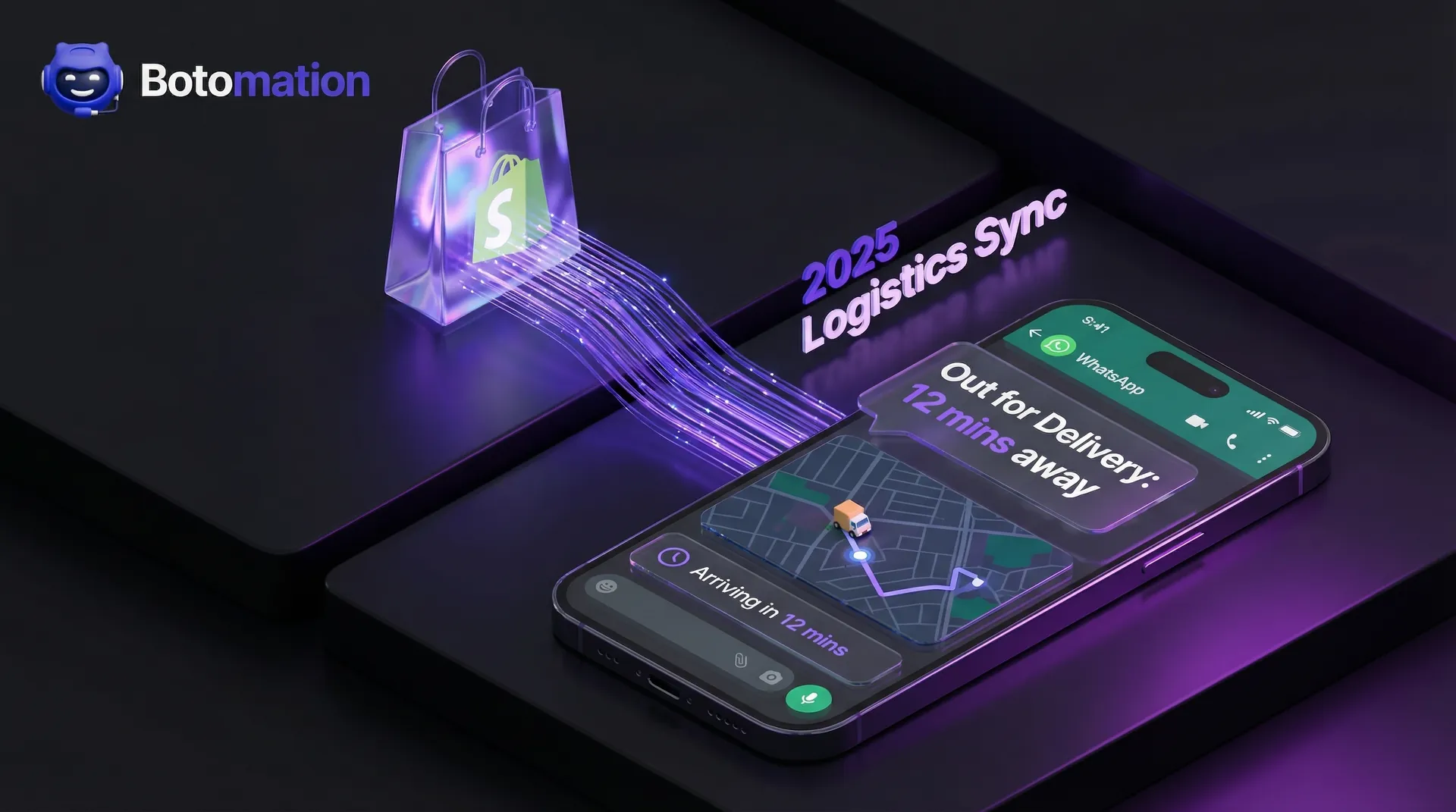
The moment a customer clicks the "Buy Now" button, an anticipatory countdown begins. This period, often called the post-purchase void, is where brand loyalty is either solidified or lost. In 2026, the gold standard for e-commerce excellence has moved away from passive email receipts toward proactive, real-time communication. While traditional email notifications often stall in spam filters or remain buried under promotional noise, WhatsApp has emerged as the definitive channel for transaction-related updates. With open rates consistently hovering around 98% and a global user base that treats the app as their primary communication hub, providing instant shipping notifications via WhatsApp is no longer a luxury for Shopify merchants; it is a fundamental operational requirement.
The friction caused by "Where Is My Order" (WISMO) inquiries accounts for nearly 50% of all customer support tickets for the average e-commerce brand. By bridging the gap between your Shopify backend and the customer’s pocket, you effectively eliminate the anxiety that leads to these support-heavy interactions. This transition requires more than just a simple plugin; it demands a seamless backend integration that synchronizes your logistics data with Meta’s Business API. Our team at Botomation specializes in building these high-performance bridges, ensuring that every movement of a package triggers a meaningful, branded touchpoint that reinforces trust rather than just providing data.
Understanding Instant Shipping Notifications via WhatsApp
Instant shipping notifications represent the evolution of logistics transparency. Unlike legacy systems that batch-process updates every few hours, an instant notification system operates on a zero-latency model. This means the second a warehouse operative scans a label or a carrier updates a tracking status, the customer receives a rich-media message on their smartphone. In the current landscape of January 2026, customers expect the same level of visibility from a boutique DTC brand that they receive from global giants like Amazon. Providing this level of service requires a deep technical marriage between your Shopify store, your shipping carriers, and the WhatsApp Business API.
The distinction between a standard notification and a real-time update is significant. A standard notification might tell a customer their order has "shipped," but it often lacks the granular detail needed to be truly helpful. Real-time updates via WhatsApp allow for dynamic content, such as live tracking maps, estimated delivery windows powered by predictive modeling, and direct links to modify delivery preferences. This proactive approach transforms a mundane logistical update into a premium customer service experience. When a customer knows exactly where their purchase is at every stage, their confidence in your brand increases, which directly correlates with higher lifetime value and a higher propensity for repeat purchases.
What Are Instant Shipping Notifications
At its core, an instant shipping notification is an automated, event-driven message sent via the WhatsApp Business API. These messages are triggered by specific status changes within your Shopify order management system or through direct webhooks from carriers like FedEx, UPS, or DHL. In 2026, these are not merely text strings; they are interactive templates that can include images of the product, buttons for quick actions, and localized language support based on the recipient's phone settings. The goal is to provide a "hands-off" information flow where the customer never feels the need to go searching for a tracking number.
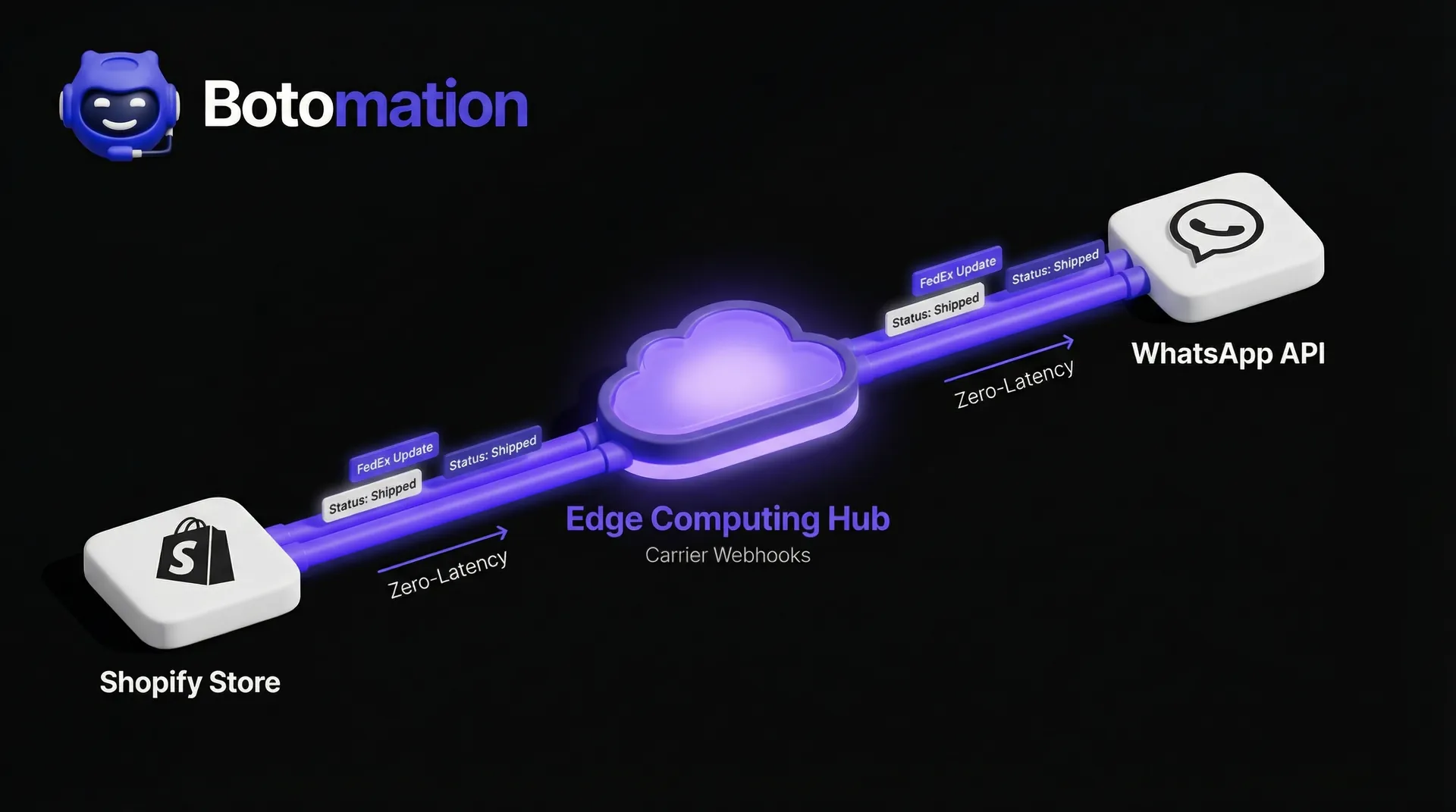
The technical sophistication of these notifications has grown significantly. Modern integrations now utilize edge computing to ensure that the message reaches the customer within milliseconds of the carrier's update. This is particularly crucial for "Out for Delivery" or "Delivered" alerts, where timing is the difference between a package sitting safely inside or being left vulnerable on a doorstep. By automating this flow, you ensure that your communication is always accurate, timely, and consistent, regardless of your order volume or time zone.
Benefits of Instant Notifications
The primary benefit of adopting WhatsApp-based notifications is the drastic reduction in customer anxiety. Shopping is an emotional process, and the period between payment and delivery is a high-stress window. When a brand proactively reaches out via a familiar platform like WhatsApp, it signals that the brand is attentive and organized. This emotional reassurance pays dividends in the form of reduced support tickets. When customers aren't emailing your team to ask about their tracking status, your support staff can focus on high-value tasks like personalized product recommendations or complex problem-solving.
"The cost of acquiring a new customer is five times higher than retaining an existing one. Proactive shipping communication is the most cost-effective retention strategy available to Shopify merchants today." — Senior Logistics Consultant at Botomation.
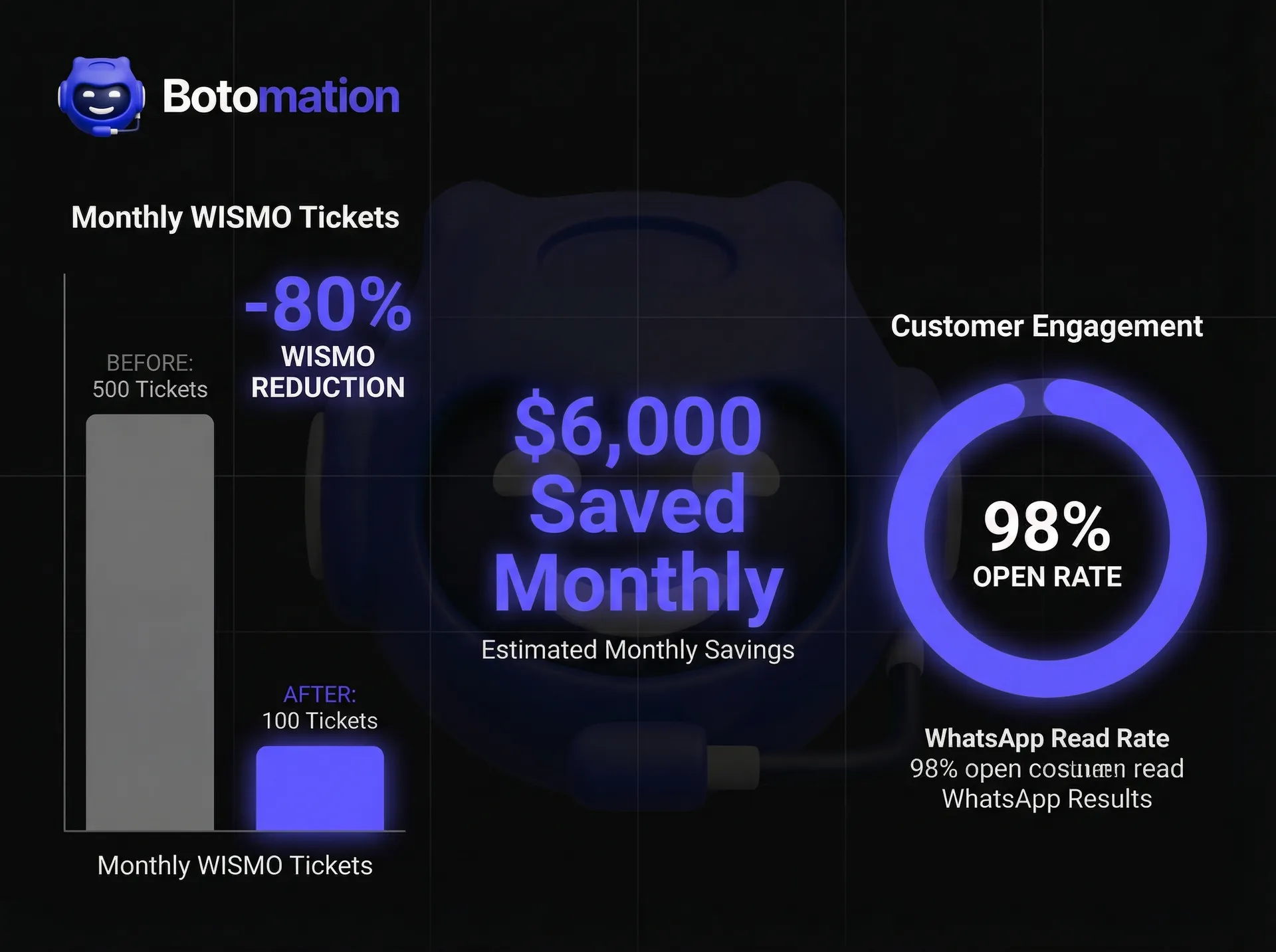
Beyond satisfaction, there is a clear operational ROI focused on boosting customer retention. Consider the math: if your team handles 500 WISMO tickets a month and each ticket costs roughly $12 in labor and overhead, you are losing $6,000 monthly on avoidable questions. Implementing a robust WhatsApp integration can reduce support tickets by up to 80%. This isn't just about saving time; it's about reallocating your human capital toward growth-oriented activities rather than repetitive administrative tasks.
| Feature | Standard Email Notifications | WhatsApp Instant Notifications |
|---|---|---|
| **Open Rate** | 15% - 25% | 95% - 98% |
| **Response Time** | Hours to Days | Minutes |
| **Engagement** | Passive / One-way | Interactive / Two-way |
| **Reliability** | High Spam Risk | Direct & Verified |
| **Rich Media** | Limited | High (Maps, Buttons, Video) |
Setting Up WhatsApp Business API for Shipping Integration
Transitioning to a professional WhatsApp notification system requires moving beyond the standard WhatsApp Business App used by small local shops. For a Shopify store to scale, you must utilize the WhatsApp Business API (WABA). This is a developer-centric interface that allows for high-volume, automated messaging and integration with third-party software. Setting this up involves a multi-step verification process with Meta to ensure your brand is "Official," which grants you the coveted green checkmark and higher messaging limits. Our experts at Botomation guide our clients through this labyrinth, ensuring that all compliance requirements are met from day one.
The integration process is essentially a handshake between three distinct entities: Shopify (the source of truth for orders), the shipping carrier (the source of truth for movement), and Meta (the delivery mechanism). To make this work, you need a centralized logic engine that can interpret carrier data and translate it into a WhatsApp-friendly format. This is where many DIY attempts fail, as carrier APIs are notoriously inconsistent and require significant data cleaning before they can be used to trigger customer-facing messages.
API Configuration Requirements
To begin the configuration, you first need a verified Meta Business Manager account. This serves as the foundation for your WhatsApp Business Account (WABA). Once the account is established, you must register a dedicated phone number that has not been used for a standard WhatsApp account in the last six months. This number will be the "face" of your brand on the platform. Following registration, you will need to generate a permanent access token, which allows your integration scripts to communicate with Meta’s servers securely.
Authentication is the next critical hurdle. You must implement secure OAuth flows or API key management to ensure that customer data remains protected. In 2026, data privacy regulations like GDPR and CCPA are stricter than ever, and Meta requires clear opt-in mechanisms before any automated messages can be sent. Your setup must include a way to capture and store these opt-ins during the Shopify checkout process, ensuring that every message sent is compliant and welcomed by the recipient.
Shipping Carrier Integration
Connecting to shipping carriers is often the most complex part of the technical setup. Each carrier—whether it’s a global giant like DHL or a local last-mile provider—uses different API structures. Some use REST, others use older SOAP protocols, and some even rely on webhooks. To provide a seamless experience, your system must be able to aggregate these various data streams into a unified format. This allows you to send a consistent-looking message to a customer regardless of whether their package is being handled by one carrier or three.
The ROI of Automated Notifications
- Average Cost per Support Ticket: $12.50
- Cost of WhatsApp Notification: $0.04
- Break-even Point: 1 ticket saved per 312 messages
- Typical WISMO Reduction: 75% - 85%
- Estimated Monthly Savings (1,000 orders): $4,200+
Real-time status triggers are the "brain" of the integration. You need to map specific carrier codes to customer-friendly terms. For example, a carrier's "Exception: Address Issue" code should trigger an immediate, helpful WhatsApp message asking the customer to verify their details, rather than a generic "Delivery Delayed" alert. By fine-tuning these triggers, you transform a potential shipping failure into a proactive customer service win.
Message Template Setup
WhatsApp requires that all business-initiated messages follow a pre-approved "Template" format. This is Meta’s way of preventing spam and ensuring a high-quality user experience. These templates use variables (e.g., {{1}} for the customer's name, {{2}} for the tracking number) that are filled in dynamically when the message is sent. Creating these templates requires a balance of brand voice and technical compliance. You cannot include marketing language in a transactional shipping update, or Meta will reject the template.
Testing these templates is vital before going live. You need to ensure that the variables are populating correctly and that the "Quick Reply" buttons—such as "Track Package" or "Contact Support"—point to the correct deep links. At Botomation, we design multi-stage template strategies that cover the entire post-purchase journey: Order Confirmed, Shipped, Out for Delivery, Delivered, and even an automated post-purchase follow-up message 24 hours later. This holistic approach ensures the conversation remains open and the customer feels cared for throughout the process.
Shopify Integration for Shipping Notification Automation
Shopify’s architecture is incredibly flexible, but it doesn't natively "talk" to WhatsApp in a sophisticated way. To bridge this gap, you can automate Shopify order tracking via WhatsApp using an integration layer that monitors your store for specific events. When an order is marked as "Fulfilled" in the Shopify admin, or when a tracking number is added to a shipment, the integration must spring into action. This involves using Shopify’s Webhooks API, which sends a packet of data to your notification engine the millisecond an update occurs.
The automation workflow must be intelligent enough to handle various scenarios. For instance, if an order is split into multiple shipments, the customer should receive separate, clear notifications for each package without being overwhelmed. Similarly, if an order is canceled or a return is initiated, you can automate returns and exchanges via WhatsApp to ensure the flow reflects these changes instantly. This level of synchronization ensures that the information the customer sees in their WhatsApp chat always matches what they see on your website and what your support team sees in the backend.
Shopify App Integration vs. Custom API
While there are several "off-the-shelf" apps in the Shopify App Store that offer basic WhatsApp notifications, they often fall short for high-growth brands. These apps are typically "one-size-fits-all" and offer limited customization in terms of branding, logic, and carrier support. For a truly professional setup, a custom API integration—like the ones our team at Botomation builds—is superior. Custom integrations allow for deeper data utilization, such as pulling in product images from the Shopify CDN to include in the WhatsApp message, which significantly improves the aesthetic quality of the notification.
Furthermore, custom integrations offer better long-term scalability. As your store grows and you move to a custom headless frontend or a more complex ERP system, a bespoke integration can evolve with you. Off-the-shelf apps often become a bottleneck, limiting your ability to implement advanced features like a WhatsApp bot for 24/7 Shopify support that can answer follow-up questions directly within the WhatsApp thread. By investing in a professional integration early, you avoid the "technical debt" of having to replace a limited app later on.
Automated Workflow Configuration
Configuring the workflow involves setting up the "If This, Then That" logic that governs the system. The most common triggers include:
- Order Fulfillment: Triggered when the shipping label is created.
- In Transit: Triggered when the carrier first scans the package.
- Out for Delivery: The most important trigger for customer satisfaction.
- Delivered: Closes the loop and provides proof of delivery.
Managing customer preferences is a critical component of the workflow. Not every customer wants a message at every stage. A sophisticated integration allows customers to opt-in to specific types of alerts or "mute" notifications for a set period. This respect for the customer's digital space is what separates premium brands from those that are perceived as intrusive. By providing a "Manage Preferences" link within the initial WhatsApp message, you empower the customer and build long-term rapport.
Real-time Shipping Alerts: Technical Implementation
The technical infrastructure of a real-time alert system relies heavily on webhooks and asynchronous data processing. When a carrier update occurs, it’s not enough to just send a message; you must also log that event, update the Shopify order notes, and ensure that the message was actually delivered to the recipient. This requires a robust backend architecture, typically built on serverless functions that can scale instantly to handle spikes in traffic—such as during Black Friday or Cyber Monday.
Reliability is the cornerstone of technical implementation. If a webhook fails to deliver or a carrier API goes down, the system must have built-in retry logic. You don't want a customer to receive five "Out for Delivery" messages because a script kept failing and restarting. Implementing "idempotency" ensures that each unique update is only processed and sent once, regardless of how many times the data is received from the carrier. This level of technical detail is what our team at Botomation focuses on to ensure a bulletproof user experience.
Webhook Configuration
Webhooks are essentially automated messages sent from one server to another when a specific event happens. To set them up for shipping, you need to provide your notification engine's URL to both Shopify and your shipping carriers. When the carrier’s database updates, they "post" that data to your URL. Your server then parses this JSON data, identifies the corresponding Shopify order, and determines which WhatsApp template to trigger.
Step-by-Step Integration Guide
- Verify Meta Business Account: Ensure your business is verified to access the full API features.
- Connect Shopify Webhooks: Set up 'Order Fulfillment' and 'Order Update' webhooks in Shopify Settings.
- Carrier API Mapping: Link your carrier accounts to your middleware to receive tracking updates.
- Template Approval: Submit your shipping update templates to Meta for approval.
- Logic Routing: Configure your middleware to match carrier status codes to the correct WhatsApp template.
- Live Testing: Run a test order through the entire lifecycle to ensure all triggers fire correctly.
Error handling is a critical part of webhook configuration. If Meta’s API is temporarily down, your system should queue the message and attempt to resend it until successful. Additionally, you should implement "dead letter queues" for messages that fail repeatedly, allowing your technical team to investigate the issue manually without the customer ever knowing there was a backend hiccup.
Real-time Data Processing
In 2026, real-time means milliseconds, not minutes. To achieve this, we utilize high-speed data pipelines that can process thousands of updates per second. As the data comes in, it is enriched with additional context. For example, if a package is delayed, the system can automatically query the carrier's API for a new estimated delivery date before sending the WhatsApp message. This ensures the customer isn't just told there's a problem, but is immediately given the updated solution.
Ensuring delivery to the customer involves more than just hitting "send." The system must monitor for "Delivery Receipts" and "Read Receipts." If a message isn't delivered (perhaps the customer's phone is off or they've changed numbers), the system can be configured to "fail over" to a traditional SMS or email as a backup. This multi-channel approach guarantees that the customer is never left in the dark, maintaining the integrity of your post-purchase experience.
Measuring Success: Shipping Notification Performance Metrics
You cannot manage what you do not measure. Implementing a WhatsApp notification system is a significant investment, and you need the data to prove its impact on your bottom line. In 2026, we look beyond simple open rates. We analyze the entire customer journey to see how these notifications influence behavior. Are customers who receive WhatsApp updates more likely to leave a positive review? Do they have a higher repeat purchase rate? Does the reduction in support tickets result in lower operational costs?
Data-driven storytelling is key here. Instead of just looking at a dashboard of numbers, we look for the narrative. For example, if we see a spike in "Read" receipts but a low click-through rate on the "Track Package" button, it might mean the message itself is so informative that the customer doesn't feel the need to click away—which is a win for user experience. Our reporting at Botomation focuses on these nuanced insights, helping you understand the logic behind the data.
Tracking Notification Performance
The first layer of metrics is technical: delivery rates and read rates. If your delivery rate drops below 95%, it usually indicates an issue with your phone number's reputation or a technical glitch in the API handshake. Read rates on WhatsApp should consistently remain above 80% within the first hour of sending. If they aren't, it might mean your timing is off or your message previews aren't compelling enough to encourage an immediate open.
The most impactful metric, however, is the reduction in WISMO tickets. By tagging support tickets in your helpdesk (like Zendesk or Gorgias) with "Shipping Inquiry," you can track the volume of these tickets before and after the WhatsApp integration. A successful implementation should show a steady decline in these inquiries as your automated notifications take over the heavy lifting. This is the clearest indicator of ROI, as it directly translates to saved labor hours.
Business Impact Measurement
Beyond the support desk, we measure the impact on brand sentiment and customer lifetime value (LTV). Customers who feel attended to during the shipping process are significantly more likely to become brand advocates. We often see a 15-20% increase in Net Promoter Scores (NPS) specifically related to the shipping experience after implementing WhatsApp notifications. This positive sentiment often leads to organic social media mentions—customers sharing screenshots of their helpful WhatsApp updates—which provides organic marketing for your brand.
Finally, we look at the cost-per-notification versus the cost-per-ticket. As calculated earlier, the savings are often astronomical. If a Shopify store doing 5,000 orders a month can prevent just 1,000 support tickets, they are saving roughly $12,000 in monthly operational costs. When you subtract the nominal cost of the WhatsApp API fees and the integration service, the net profit is substantial. This is why we view WhatsApp integration as a tool to increase customer lifetime value rather than an expense—it's a high-yield profit center for modern e-commerce.
Troubleshooting and Optimization of Shipping Notifications
No technical system is perfect, and the world of international logistics is inherently chaotic. Packages get lost, carriers' servers go down, and API protocols change. Troubleshooting these issues requires a proactive monitoring system that alerts your team before the customer even notices a problem. Optimization is an ongoing process of refining your message timing, tone, and triggers based on real-world feedback and changing consumer preferences.
In 2026, optimization also means staying ahead of Meta’s evolving policies. They frequently update their categories for "Utility" vs. "Marketing" messages, and misclassifying a shipping update can lead to higher costs or even temporary account suspension. Our team stays on top of these changes so you don't have to, ensuring your integration remains compliant and cost-effective as the platform matures.
Common Integration Issues
The most frequent issue we encounter is "Data Lag." This happens when a carrier updates their system, but there is a delay before that data is pushed to your Shopify store or your notification engine. While you can't control the carrier's internal speed, you can optimize your "polling" intervals or webhook listeners to minimize the total delay. Another common hurdle is international phone formatting. If a customer enters their phone number incorrectly at checkout, the WhatsApp message will fail. Implementing real-time phone number validation on your Shopify checkout page is a simple but effective fix for this.
Message template rejection is another common frustration. Meta’s automated review bots can be finicky. Sometimes a simple word choice—like using "Discount" in a transactional message—can trigger a rejection. We’ve developed a library of pre-vetted templates that are designed to pass Meta’s review process on the first try while still maintaining a warm, human brand voice. This saves our clients weeks of experimentation.
Performance Optimization
Once the system is stable, the focus shifts to optimization. This involves A/B testing different message structures. Does a message with a "Live Map" link perform better than one with a simple "Track Now" button? Does sending the "Out for Delivery" message at 8:00 AM local time result in fewer missed deliveries than sending it the moment the truck is loaded? These small tweaks can have a significant cumulative effect on customer satisfaction.
We also look at "AI Enrichment." In 2026, we are increasingly integrating GPT-5 powered agents into the WhatsApp thread. If a customer replies to a shipping notification with a question like "Can I change my delivery address?", the AI agent can instantly provide the correct link or even initiate the change via your carrier's API. This turns a one-way notification into a two-way service channel, further reducing the need for human intervention and providing the instant service that modern consumers demand.
Frequently Asked Questions
Does this integration work for international shipping?
Yes, the WhatsApp Business API is a global platform. As long as your customer has a WhatsApp account and you have the correct international country code for their phone number, they can receive notifications anywhere in the world. Our system automatically handles time zone conversions to ensure messages are sent at appropriate local times.
Will these messages count as marketing spam?
No. Shipping notifications are classified by Meta as "Utility" messages. As long as the content is strictly related to the order and you have obtained the proper opt-in at checkout, these messages are viewed as essential service communications. They do not negatively impact your sender reputation as long as they provide genuine value to the customer.
What happens if a customer doesn't have WhatsApp?
Our integration includes failover logic. If the system detects that a message cannot be delivered via WhatsApp (usually within a 5-minute window), it can automatically trigger a standard SMS or email notification. This ensures 100% coverage of your customer base regardless of their preferred app.
How much does the WhatsApp Business API cost?
Meta uses a conversation-based pricing model. You are charged per "conversation" (a 24-hour window of communication). For shipping updates, these are classified as "Utility" conversations and are generally much cheaper than "Marketing" conversations. The exact price varies by the customer's country, but it is typically a few cents per interaction.
Partner with the Experts at Botomation
The "Old Way" of managing Shopify shipping involves crossing your fingers and hoping your customers check their email. It's a reactive, high-stress model that leaves your support team overwhelmed and your customers anxious. The "New Way"—the Botomation way—is to build a proactive, AI-enhanced communication powerhouse that lives where your customers already are: on WhatsApp. By automating your shipping notifications, you aren't just sending data; you are delivering peace of mind and building a premium brand identity that stands out in a crowded 2026 marketplace.
Building these complex integrations requires a level of technical expertise that most internal teams simply don't have the time to master. From navigating Meta’s API compliance to mapping intricate carrier data streams, the margin for error is slim. Our team at Botomation acts as your dedicated integration partner, handling the heavy lifting so you can focus on scaling your product line and growing your business. We don't just set it up and walk away; we continuously optimize your flows to ensure you are getting the maximum possible ROI from your automation.
The data is clear: brands that prioritize the post-purchase experience through instant, transparent communication see higher retention, lower costs, and better reviews. Don't let your brand be defined by the "where is my order" ticket. Let it be defined by the seamless, high-tech, and human-centric service that only a professional WhatsApp integration can provide. Partnering with Botomation is the most logical step toward a more efficient and profitable Shopify store.
Ready to automate your growth? Book a free consultation call below.
The moment a customer clicks the "Buy Now" button, an anticipatory countdown begins. This period, often called the post-purchase void, is where brand loyalty is either solidified or lost. In 2026, the gold standard for e-commerce excellence has moved away from passive email receipts toward proactive, real-time communication. While traditional email notifications often stall in spam filters or remain buried under promotional noise, WhatsApp has emerged as the definitive channel for transaction-related updates. With open rates consistently hovering around 98% and a global user base that treats the app as their primary communication hub, providing instant shipping notifications via WhatsApp is no longer a luxury for Shopify merchants; it is a fundamental operational requirement.
The friction caused by "Where Is My Order" (WISMO) inquiries accounts for nearly 50% of all customer support tickets for the average e-commerce brand. By bridging the gap between your Shopify backend and the customer’s pocket, you effectively eliminate the anxiety that leads to these support-heavy interactions. This transition requires more than just a simple plugin; it demands a seamless backend integration that synchronizes your logistics data with Meta’s Business API. Our team at Botomation specializes in building these high-performance bridges, ensuring that every movement of a package triggers a meaningful, branded touchpoint that reinforces trust rather than just providing data.
Understanding Instant Shipping Notifications via WhatsApp
Instant shipping notifications represent the evolution of logistics transparency. Unlike legacy systems that batch-process updates every few hours, an instant notification system operates on a zero-latency model. This means the second a warehouse operative scans a label or a carrier updates a tracking status, the customer receives a rich-media message on their smartphone. In the current landscape of January 2026, customers expect the same level of visibility from a boutique DTC brand that they receive from global giants like Amazon. Providing this level of service requires a deep technical marriage between your Shopify store, your shipping carriers, and the WhatsApp Business API.
The distinction between a standard notification and a real-time update is significant. A standard notification might tell a customer their order has "shipped," but it often lacks the granular detail needed to be truly helpful. Real-time updates via WhatsApp allow for dynamic content, such as live tracking maps, estimated delivery windows powered by predictive modeling, and direct links to modify delivery preferences. This proactive approach transforms a mundane logistical update into a premium customer service experience. When a customer knows exactly where their purchase is at every stage, their confidence in your brand increases, which directly correlates with higher lifetime value and a higher propensity for repeat purchases.
What Are Instant Shipping Notifications
At its core, an instant shipping notification is an automated, event-driven message sent via the WhatsApp Business API. These messages are triggered by specific status changes within your Shopify order management system or through direct webhooks from carriers like FedEx, UPS, or DHL. In 2026, these are not merely text strings; they are interactive templates that can include images of the product, buttons for quick actions, and localized language support based on the recipient's phone settings. The goal is to provide a "hands-off" information flow where the customer never feels the need to go searching for a tracking number.
The technical sophistication of these notifications has grown significantly. Modern integrations now utilize edge computing to ensure that the message reaches the customer within milliseconds of the carrier's update. This is particularly crucial for "Out for Delivery" or "Delivered" alerts, where timing is the difference between a package sitting safely inside or being left vulnerable on a doorstep. By automating this flow, you ensure that your communication is always accurate, timely, and consistent, regardless of your order volume or time zone.
Benefits of Instant Notifications
The primary benefit of adopting WhatsApp-based notifications is the drastic reduction in customer anxiety. Shopping is an emotional process, and the period between payment and delivery is a high-stress window. When a brand proactively reaches out via a familiar platform like WhatsApp, it signals that the brand is attentive and organized. This emotional reassurance pays dividends in the form of reduced support tickets. When customers aren't emailing your team to ask about their tracking status, your support staff can focus on high-value tasks like personalized product recommendations or complex problem-solving.
"The cost of acquiring a new customer is five times higher than retaining an existing one. Proactive shipping communication is the most cost-effective retention strategy available to Shopify merchants today." — Senior Logistics Consultant at Botomation.
Beyond satisfaction, there is a clear operational ROI focused on boosting customer retention. Consider the math: if your team handles 500 WISMO tickets a month and each ticket costs roughly $12 in labor and overhead, you are losing $6,000 monthly on avoidable questions. Implementing a robust WhatsApp integration can reduce support tickets by up to 80%. This isn't just about saving time; it's about reallocating your human capital toward growth-oriented activities rather than repetitive administrative tasks.
| Feature | Standard Email Notifications | WhatsApp Instant Notifications |
|---|---|---|
| **Open Rate** | 15% - 25% | 95% - 98% |
| **Response Time** | Hours to Days | Minutes |
| **Engagement** | Passive / One-way | Interactive / Two-way |
| **Reliability** | High Spam Risk | Direct & Verified |
| **Rich Media** | Limited | High (Maps, Buttons, Video) |
Setting Up WhatsApp Business API for Shipping Integration
Transitioning to a professional WhatsApp notification system requires moving beyond the standard WhatsApp Business App used by small local shops. For a Shopify store to scale, you must utilize the WhatsApp Business API (WABA). This is a developer-centric interface that allows for high-volume, automated messaging and integration with third-party software. Setting this up involves a multi-step verification process with Meta to ensure your brand is "Official," which grants you the coveted green checkmark and higher messaging limits. Our experts at Botomation guide our clients through this labyrinth, ensuring that all compliance requirements are met from day one.
The integration process is essentially a handshake between three distinct entities: Shopify (the source of truth for orders), the shipping carrier (the source of truth for movement), and Meta (the delivery mechanism). To make this work, you need a centralized logic engine that can interpret carrier data and translate it into a WhatsApp-friendly format. This is where many DIY attempts fail, as carrier APIs are notoriously inconsistent and require significant data cleaning before they can be used to trigger customer-facing messages.
API Configuration Requirements
To begin the configuration, you first need a verified Meta Business Manager account. This serves as the foundation for your WhatsApp Business Account (WABA). Once the account is established, you must register a dedicated phone number that has not been used for a standard WhatsApp account in the last six months. This number will be the "face" of your brand on the platform. Following registration, you will need to generate a permanent access token, which allows your integration scripts to communicate with Meta’s servers securely.
Authentication is the next critical hurdle. You must implement secure OAuth flows or API key management to ensure that customer data remains protected. In 2026, data privacy regulations like GDPR and CCPA are stricter than ever, and Meta requires clear opt-in mechanisms before any automated messages can be sent. Your setup must include a way to capture and store these opt-ins during the Shopify checkout process, ensuring that every message sent is compliant and welcomed by the recipient.
Shipping Carrier Integration
Connecting to shipping carriers is often the most complex part of the technical setup. Each carrier—whether it’s a global giant like DHL or a local last-mile provider—uses different API structures. Some use REST, others use older SOAP protocols, and some even rely on webhooks. To provide a seamless experience, your system must be able to aggregate these various data streams into a unified format. This allows you to send a consistent-looking message to a customer regardless of whether their package is being handled by one carrier or three.
The ROI of Automated Notifications
- Average Cost per Support Ticket: $12.50
- Cost of WhatsApp Notification: $0.04
- Break-even Point: 1 ticket saved per 312 messages
- Typical WISMO Reduction: 75% - 85%
- Estimated Monthly Savings (1,000 orders): $4,200+
Real-time status triggers are the "brain" of the integration. You need to map specific carrier codes to customer-friendly terms. For example, a carrier's "Exception: Address Issue" code should trigger an immediate, helpful WhatsApp message asking the customer to verify their details, rather than a generic "Delivery Delayed" alert. By fine-tuning these triggers, you transform a potential shipping failure into a proactive customer service win.
Message Template Setup
WhatsApp requires that all business-initiated messages follow a pre-approved "Template" format. This is Meta’s way of preventing spam and ensuring a high-quality user experience. These templates use variables (e.g., {{1}} for the customer's name, {{2}} for the tracking number) that are filled in dynamically when the message is sent. Creating these templates requires a balance of brand voice and technical compliance. You cannot include marketing language in a transactional shipping update, or Meta will reject the template.
Testing these templates is vital before going live. You need to ensure that the variables are populating correctly and that the "Quick Reply" buttons—such as "Track Package" or "Contact Support"—point to the correct deep links. At Botomation, we design multi-stage template strategies that cover the entire post-purchase journey: Order Confirmed, Shipped, Out for Delivery, Delivered, and even an automated post-purchase follow-up message 24 hours later. This holistic approach ensures the conversation remains open and the customer feels cared for throughout the process.
Shopify Integration for Shipping Notification Automation
Shopify’s architecture is incredibly flexible, but it doesn't natively "talk" to WhatsApp in a sophisticated way. To bridge this gap, you can automate Shopify order tracking via WhatsApp using an integration layer that monitors your store for specific events. When an order is marked as "Fulfilled" in the Shopify admin, or when a tracking number is added to a shipment, the integration must spring into action. This involves using Shopify’s Webhooks API, which sends a packet of data to your notification engine the millisecond an update occurs.
The automation workflow must be intelligent enough to handle various scenarios. For instance, if an order is split into multiple shipments, the customer should receive separate, clear notifications for each package without being overwhelmed. Similarly, if an order is canceled or a return is initiated, you can automate returns and exchanges via WhatsApp to ensure the flow reflects these changes instantly. This level of synchronization ensures that the information the customer sees in their WhatsApp chat always matches what they see on your website and what your support team sees in the backend.
Shopify App Integration vs. Custom API
While there are several "off-the-shelf" apps in the Shopify App Store that offer basic WhatsApp notifications, they often fall short for high-growth brands. These apps are typically "one-size-fits-all" and offer limited customization in terms of branding, logic, and carrier support. For a truly professional setup, a custom API integration—like the ones our team at Botomation builds—is superior. Custom integrations allow for deeper data utilization, such as pulling in product images from the Shopify CDN to include in the WhatsApp message, which significantly improves the aesthetic quality of the notification.
Furthermore, custom integrations offer better long-term scalability. As your store grows and you move to a custom headless frontend or a more complex ERP system, a bespoke integration can evolve with you. Off-the-shelf apps often become a bottleneck, limiting your ability to implement advanced features like a WhatsApp bot for 24/7 Shopify support that can answer follow-up questions directly within the WhatsApp thread. By investing in a professional integration early, you avoid the "technical debt" of having to replace a limited app later on.
Automated Workflow Configuration
Configuring the workflow involves setting up the "If This, Then That" logic that governs the system. The most common triggers include:
- Order Fulfillment: Triggered when the shipping label is created.
- In Transit: Triggered when the carrier first scans the package.
- Out for Delivery: The most important trigger for customer satisfaction.
- Delivered: Closes the loop and provides proof of delivery.
Managing customer preferences is a critical component of the workflow. Not every customer wants a message at every stage. A sophisticated integration allows customers to opt-in to specific types of alerts or "mute" notifications for a set period. This respect for the customer's digital space is what separates premium brands from those that are perceived as intrusive. By providing a "Manage Preferences" link within the initial WhatsApp message, you empower the customer and build long-term rapport.
Real-time Shipping Alerts: Technical Implementation
The technical infrastructure of a real-time alert system relies heavily on webhooks and asynchronous data processing. When a carrier update occurs, it’s not enough to just send a message; you must also log that event, update the Shopify order notes, and ensure that the message was actually delivered to the recipient. This requires a robust backend architecture, typically built on serverless functions that can scale instantly to handle spikes in traffic—such as during Black Friday or Cyber Monday.
Reliability is the cornerstone of technical implementation. If a webhook fails to deliver or a carrier API goes down, the system must have built-in retry logic. You don't want a customer to receive five "Out for Delivery" messages because a script kept failing and restarting. Implementing "idempotency" ensures that each unique update is only processed and sent once, regardless of how many times the data is received from the carrier. This level of technical detail is what our team at Botomation focuses on to ensure a bulletproof user experience.
Webhook Configuration
Webhooks are essentially automated messages sent from one server to another when a specific event happens. To set them up for shipping, you need to provide your notification engine's URL to both Shopify and your shipping carriers. When the carrier’s database updates, they "post" that data to your URL. Your server then parses this JSON data, identifies the corresponding Shopify order, and determines which WhatsApp template to trigger.
Step-by-Step Integration Guide
- Verify Meta Business Account: Ensure your business is verified to access the full API features.
- Connect Shopify Webhooks: Set up 'Order Fulfillment' and 'Order Update' webhooks in Shopify Settings.
- Carrier API Mapping: Link your carrier accounts to your middleware to receive tracking updates.
- Template Approval: Submit your shipping update templates to Meta for approval.
- Logic Routing: Configure your middleware to match carrier status codes to the correct WhatsApp template.
- Live Testing: Run a test order through the entire lifecycle to ensure all triggers fire correctly.
Error handling is a critical part of webhook configuration. If Meta’s API is temporarily down, your system should queue the message and attempt to resend it until successful. Additionally, you should implement "dead letter queues" for messages that fail repeatedly, allowing your technical team to investigate the issue manually without the customer ever knowing there was a backend hiccup.
Real-time Data Processing
In 2026, real-time means milliseconds, not minutes. To achieve this, we utilize high-speed data pipelines that can process thousands of updates per second. As the data comes in, it is enriched with additional context. For example, if a package is delayed, the system can automatically query the carrier's API for a new estimated delivery date before sending the WhatsApp message. This ensures the customer isn't just told there's a problem, but is immediately given the updated solution.
Ensuring delivery to the customer involves more than just hitting "send." The system must monitor for "Delivery Receipts" and "Read Receipts." If a message isn't delivered (perhaps the customer's phone is off or they've changed numbers), the system can be configured to "fail over" to a traditional SMS or email as a backup. This multi-channel approach guarantees that the customer is never left in the dark, maintaining the integrity of your post-purchase experience.
Measuring Success: Shipping Notification Performance Metrics
You cannot manage what you do not measure. Implementing a WhatsApp notification system is a significant investment, and you need the data to prove its impact on your bottom line. In 2026, we look beyond simple open rates. We analyze the entire customer journey to see how these notifications influence behavior. Are customers who receive WhatsApp updates more likely to leave a positive review? Do they have a higher repeat purchase rate? Does the reduction in support tickets result in lower operational costs?
Data-driven storytelling is key here. Instead of just looking at a dashboard of numbers, we look for the narrative. For example, if we see a spike in "Read" receipts but a low click-through rate on the "Track Package" button, it might mean the message itself is so informative that the customer doesn't feel the need to click away—which is a win for user experience. Our reporting at Botomation focuses on these nuanced insights, helping you understand the logic behind the data.
Tracking Notification Performance
The first layer of metrics is technical: delivery rates and read rates. If your delivery rate drops below 95%, it usually indicates an issue with your phone number's reputation or a technical glitch in the API handshake. Read rates on WhatsApp should consistently remain above 80% within the first hour of sending. If they aren't, it might mean your timing is off or your message previews aren't compelling enough to encourage an immediate open.
The most impactful metric, however, is the reduction in WISMO tickets. By tagging support tickets in your helpdesk (like Zendesk or Gorgias) with "Shipping Inquiry," you can track the volume of these tickets before and after the WhatsApp integration. A successful implementation should show a steady decline in these inquiries as your automated notifications take over the heavy lifting. This is the clearest indicator of ROI, as it directly translates to saved labor hours.
Business Impact Measurement
Beyond the support desk, we measure the impact on brand sentiment and customer lifetime value (LTV). Customers who feel attended to during the shipping process are significantly more likely to become brand advocates. We often see a 15-20% increase in Net Promoter Scores (NPS) specifically related to the shipping experience after implementing WhatsApp notifications. This positive sentiment often leads to organic social media mentions—customers sharing screenshots of their helpful WhatsApp updates—which provides organic marketing for your brand.
Finally, we look at the cost-per-notification versus the cost-per-ticket. As calculated earlier, the savings are often astronomical. If a Shopify store doing 5,000 orders a month can prevent just 1,000 support tickets, they are saving roughly $12,000 in monthly operational costs. When you subtract the nominal cost of the WhatsApp API fees and the integration service, the net profit is substantial. This is why we view WhatsApp integration as a tool to increase customer lifetime value rather than an expense—it's a high-yield profit center for modern e-commerce.
Troubleshooting and Optimization of Shipping Notifications
No technical system is perfect, and the world of international logistics is inherently chaotic. Packages get lost, carriers' servers go down, and API protocols change. Troubleshooting these issues requires a proactive monitoring system that alerts your team before the customer even notices a problem. Optimization is an ongoing process of refining your message timing, tone, and triggers based on real-world feedback and changing consumer preferences.
In 2026, optimization also means staying ahead of Meta’s evolving policies. They frequently update their categories for "Utility" vs. "Marketing" messages, and misclassifying a shipping update can lead to higher costs or even temporary account suspension. Our team stays on top of these changes so you don't have to, ensuring your integration remains compliant and cost-effective as the platform matures.
Common Integration Issues
The most frequent issue we encounter is "Data Lag." This happens when a carrier updates their system, but there is a delay before that data is pushed to your Shopify store or your notification engine. While you can't control the carrier's internal speed, you can optimize your "polling" intervals or webhook listeners to minimize the total delay. Another common hurdle is international phone formatting. If a customer enters their phone number incorrectly at checkout, the WhatsApp message will fail. Implementing real-time phone number validation on your Shopify checkout page is a simple but effective fix for this.
Message template rejection is another common frustration. Meta’s automated review bots can be finicky. Sometimes a simple word choice—like using "Discount" in a transactional message—can trigger a rejection. We’ve developed a library of pre-vetted templates that are designed to pass Meta’s review process on the first try while still maintaining a warm, human brand voice. This saves our clients weeks of experimentation.
Performance Optimization
Once the system is stable, the focus shifts to optimization. This involves A/B testing different message structures. Does a message with a "Live Map" link perform better than one with a simple "Track Now" button? Does sending the "Out for Delivery" message at 8:00 AM local time result in fewer missed deliveries than sending it the moment the truck is loaded? These small tweaks can have a significant cumulative effect on customer satisfaction.
We also look at "AI Enrichment." In 2026, we are increasingly integrating GPT-5 powered agents into the WhatsApp thread. If a customer replies to a shipping notification with a question like "Can I change my delivery address?", the AI agent can instantly provide the correct link or even initiate the change via your carrier's API. This turns a one-way notification into a two-way service channel, further reducing the need for human intervention and providing the instant service that modern consumers demand.
Frequently Asked Questions
Does this integration work for international shipping?
Yes, the WhatsApp Business API is a global platform. As long as your customer has a WhatsApp account and you have the correct international country code for their phone number, they can receive notifications anywhere in the world. Our system automatically handles time zone conversions to ensure messages are sent at appropriate local times.
Will these messages count as marketing spam?
No. Shipping notifications are classified by Meta as "Utility" messages. As long as the content is strictly related to the order and you have obtained the proper opt-in at checkout, these messages are viewed as essential service communications. They do not negatively impact your sender reputation as long as they provide genuine value to the customer.
What happens if a customer doesn't have WhatsApp?
Our integration includes failover logic. If the system detects that a message cannot be delivered via WhatsApp (usually within a 5-minute window), it can automatically trigger a standard SMS or email notification. This ensures 100% coverage of your customer base regardless of their preferred app.
How much does the WhatsApp Business API cost?
Meta uses a conversation-based pricing model. You are charged per "conversation" (a 24-hour window of communication). For shipping updates, these are classified as "Utility" conversations and are generally much cheaper than "Marketing" conversations. The exact price varies by the customer's country, but it is typically a few cents per interaction.
Partner with the Experts at Botomation
The "Old Way" of managing Shopify shipping involves crossing your fingers and hoping your customers check their email. It's a reactive, high-stress model that leaves your support team overwhelmed and your customers anxious. The "New Way"—the Botomation way—is to build a proactive, AI-enhanced communication powerhouse that lives where your customers already are: on WhatsApp. By automating your shipping notifications, you aren't just sending data; you are delivering peace of mind and building a premium brand identity that stands out in a crowded 2026 marketplace.
Building these complex integrations requires a level of technical expertise that most internal teams simply don't have the time to master. From navigating Meta’s API compliance to mapping intricate carrier data streams, the margin for error is slim. Our team at Botomation acts as your dedicated integration partner, handling the heavy lifting so you can focus on scaling your product line and growing your business. We don't just set it up and walk away; we continuously optimize your flows to ensure you are getting the maximum possible ROI from your automation.
The data is clear: brands that prioritize the post-purchase experience through instant, transparent communication see higher retention, lower costs, and better reviews. Don't let your brand be defined by the "where is my order" ticket. Let it be defined by the seamless, high-tech, and human-centric service that only a professional WhatsApp integration can provide. Partnering with Botomation is the most logical step toward a more efficient and profitable Shopify store.
Ready to automate your growth? Book a free consultation call below.
Get Started
Book a FREE Consultation Right NOW!
Schedule a Call with Our Team To Make Your Business More Efficient with AI Instantly.
Read More
Shopify WhatsApp Shipping Notifications - 2026 Integration
Implement instant shipping notifications whatsapp integration for Shopify. Use Meta Business API to automate tracking, reduce WISMO, and boost ROI.
Automate Shopify Returns and WhatsApp Order Updates 2026
Learn how WhatsApp AI slashes support costs for e-commerce & SaaS. Proven strategies to boost sales, recover carts, and scale 24/7 service.