Top Integration Platforms for Business Software 2026 Guide
Jan 8, 2026
AI Automation
Software Integration
Business Strategy
AI Automation
Software Integration
Business Strategy
In January 2026, identifying the premier integration platforms for business software is the first step toward true business process automation. The promise of the "best-of-breed" software era was simple: select the premier tool for every function. Your sales team utilizes the best CRM, your finance team leverages the top ERP, and your marketing department deploys the most advanced automation suite. However, most operations managers have realized this dream carries a hidden tax. When these tools remain siloed, your employees become the "operational glue," spending hours every week manually transferring data between systems.
Choosing the right integration path has evolved from a technical preference to a core strategic necessity. We are witnessing a massive shift in how companies approach connectivity. It is no longer sufficient to move a single row of data from a spreadsheet to a CRM. Modern operations require autonomous workflows where information flows through the organization without human intervention. This comparison examines the industry leaders and specialized players dominating the landscape this year to help you determine which path fits your specific operational requirements.
The current landscape is defined by the rise of "agentic" integration. We are seeing platforms that transcend basic "if this, then that" logic, utilizing advanced reasoning models to handle exceptions and map complex data structures automatically. As we navigate the options available in late 2026, the objective remains clear: transforming a fragmented collection of software into a unified, high-performance engine.
Key Insight for 2026: The cost of inaction regarding integration has risen by 40% since 2023 due to the increased volume of data generated by AI-driven business tools. Companies that fail to integrate are effectively paying a "manual labor tax" on every customer interaction.
How Integration Platforms for Business Software and iPaaS Solutions Changed the Game
The rise of Integration Platform as a Service (iPaaS solutions) has fundamentally rewritten the rules of business operations. Historically, connecting software required custom-coded middleware, expensive servers, and dedicated developers to maintain connections during API updates. Today, iPaaS solutions provide a centralized, cloud-based hub where these connections are managed through visual interfaces and pre-built connectors. This shift has democratized automation, allowing operations leaders to control their workflows without waiting for IT department availability.
Recent market data from late 2026 suggests that the global iPaaS market has surpassed $14 billion in valuation. This growth is fueled not only by tech firms but also by traditional service businesses, manufacturing firms, and healthcare providers seeking to eliminate administrative bloat. The latest updates this year focus heavily on "self-healing" integrations. Utilizing models like GPT-5, these platforms now detect changes in CRM fields and automatically suggest updates to integration logic to prevent workflow disruptions.
How iPaaS Differs from Traditional Integration
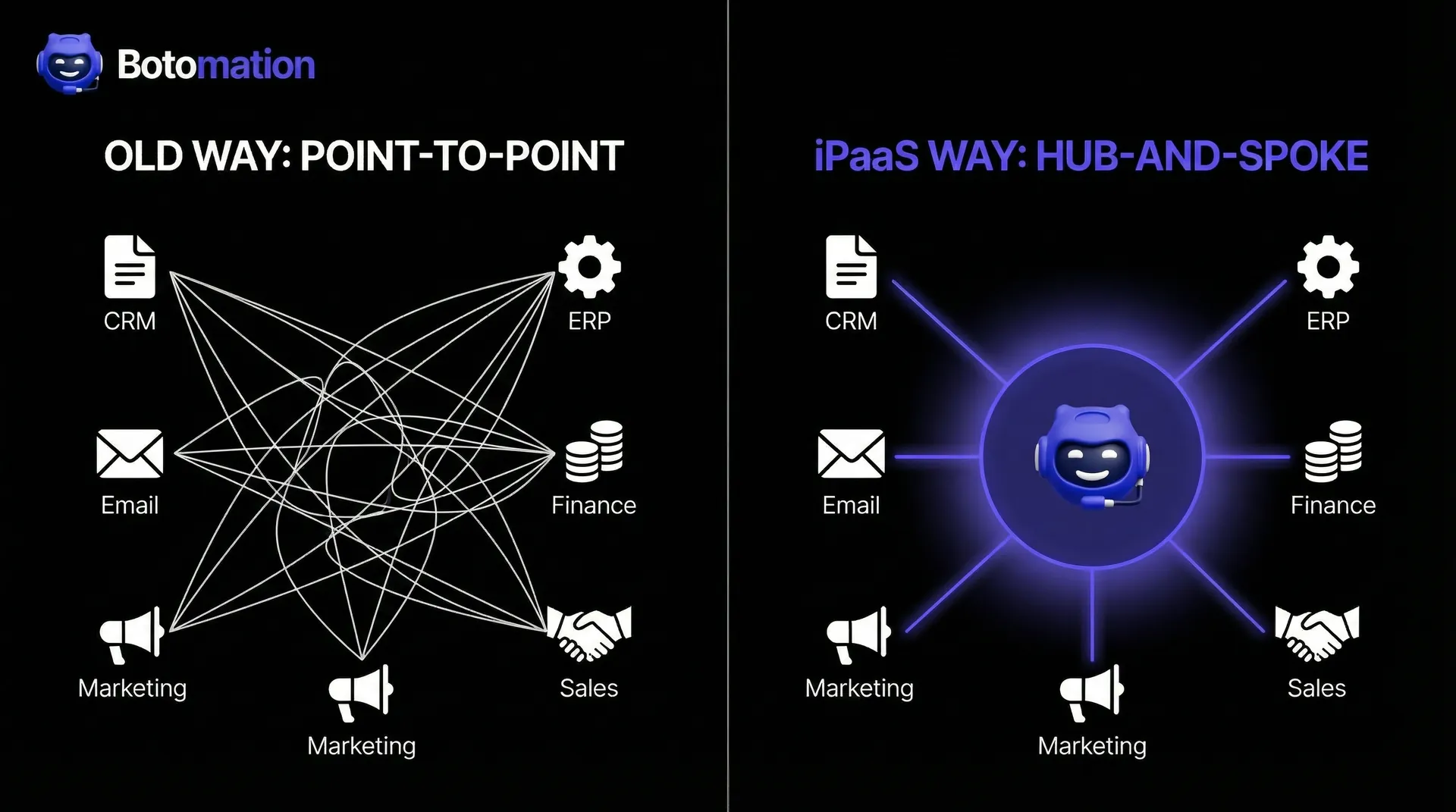
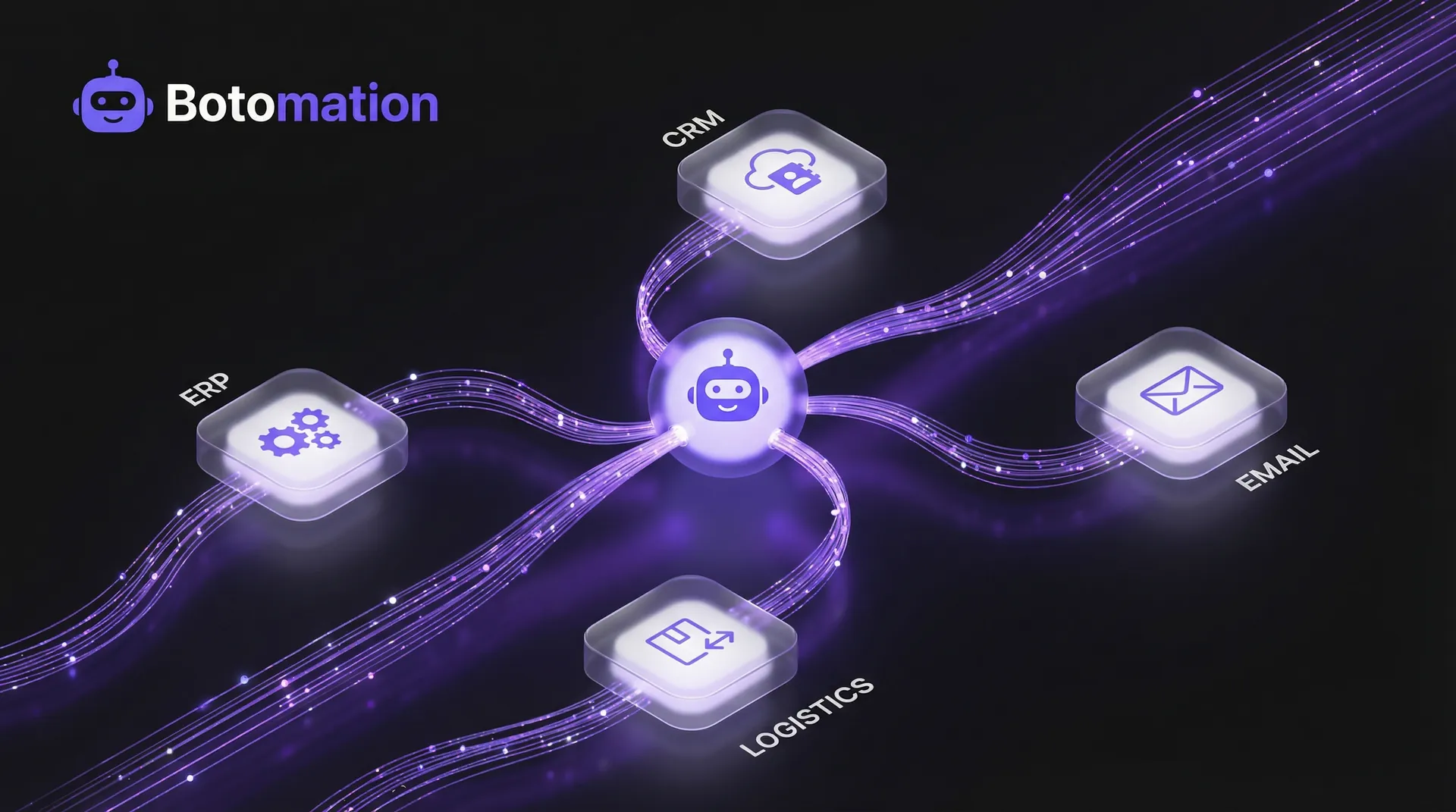
Traditional integration relied on "Point-to-Point" (P2P) connections. Imagine a complex web where every strand is a custom piece of code connecting one app to another. If you utilize five apps, you might need ten different connections; adding a sixth app causes complexity to explode. This model is fragile and expensive to scale. Cloud-based iPaaS solutions utilize a "Hub and Spoke" architecture. Every application connects once to the central platform, which handles the translation and routing of data to all other connected systems.
This cloud-centric approach offers scalability that on-premise solutions cannot match. When your business experiences a surge in volume—perhaps during a major product launch—the iPaaS scales its processing power instantly. Furthermore, the subscription-based model shifts the financial burden from a massive Capital Expenditure (CAPEX) to a predictable Operating Expense (OPEX). You are no longer purchasing servers; you are investing in the guaranteed flow of information.
Key Features to Evaluate in Integration Platforms
When evaluating integration platforms for business software, look beyond the quantity of pre-built connectors. The real value lies in the depth of those connectors. Ensure the platform can handle "webhooks" for real-time triggers rather than relying on "polling" intervals. In a high-velocity business environment, a fifteen-minute delay in data synchronization can lead to double-booked appointments. Implementing automated data entry validation helps mitigate these risks and ensures data integrity.
Security and compliance are paramount in 2026. With stricter global data privacy regulations, your integration platform must offer robust encryption both at rest and in transit. Look for platforms providing granular role-based access control to ensure only authorized personnel can modify critical business logic. Finally, consider the user interface. While "no-code" is a popular term, the platform should offer "low-code" flexibility—allowing your team to write custom logic when standard pre-built steps do not meet unique business requirements.
Enterprise Integration Platforms for Business Software: IBM and Oracle
For large-scale organizations with complex, multi-layered infrastructures, enterprise integration tools remain the gold standard. These enterprise-grade solutions are engineered to handle millions of transactions per hour while maintaining peak security. IBM and Oracle have spent decades refining these tools to serve Fortune 500 needs, focusing on stability and the ability to bridge the gap between modern cloud apps and legacy on-premise hardware.
These platforms facilitate "orchestration," allowing you to build complex business processes that span multiple departments, countries, and regulatory environments. While the learning curve is steeper than consumer-grade tools, the level of control they offer is unparalleled for a COO who must ensure every data point is accounted for and audited.
IBM App Connect Capabilities
IBM App Connect stands out for its focus on event-driven architecture. Rather than waiting for scheduled syncs, the system reacts instantly to "events"—such as a new lead created or an invoice paid. This real-time capability is essential for businesses where timing is a competitive advantage. IBM excels in supporting hybrid cloud environments; many enterprise clients maintain critical data in local databases for security, and IBM provides the secure gateway to connect those assets to modern web tools.
The platform also includes sophisticated API management tools. This allows a business to not only consume data but also to package its internal data as an API for partners. By turning internal processes into digital products, you create new avenues for growth. IBM’s built-in security features, including AI-driven anomaly detection, ensure that if an integration behaves irregularly, the system can sever the connection before data is compromised.
Oracle Integration Cloud Features
Oracle Integration Cloud (OIC) is the logical choice for businesses within the Oracle ecosystem, but in 2026, it has evolved into a powerhouse for AI-powered automation generally. Oracle has integrated Generative AI features directly into the workflow designer. This allows users to describe a process in plain English—for example, "When a high-value customer submits a ticket, check their purchase history and alert the manager via Slack"—and the platform will draft the multi-step workflow automatically.
Compliance and governance are where Oracle excels. For businesses in highly regulated sectors like finance, OIC provides automated documentation of every data movement. This audit trail is vital for regulatory filings. Their pre-built adapters for the Oracle ecosystem are incredibly deep, often allowing for "deep-linking" between applications. This means a user can jump from integration logs directly to a specific transaction in the ERP with a single click.
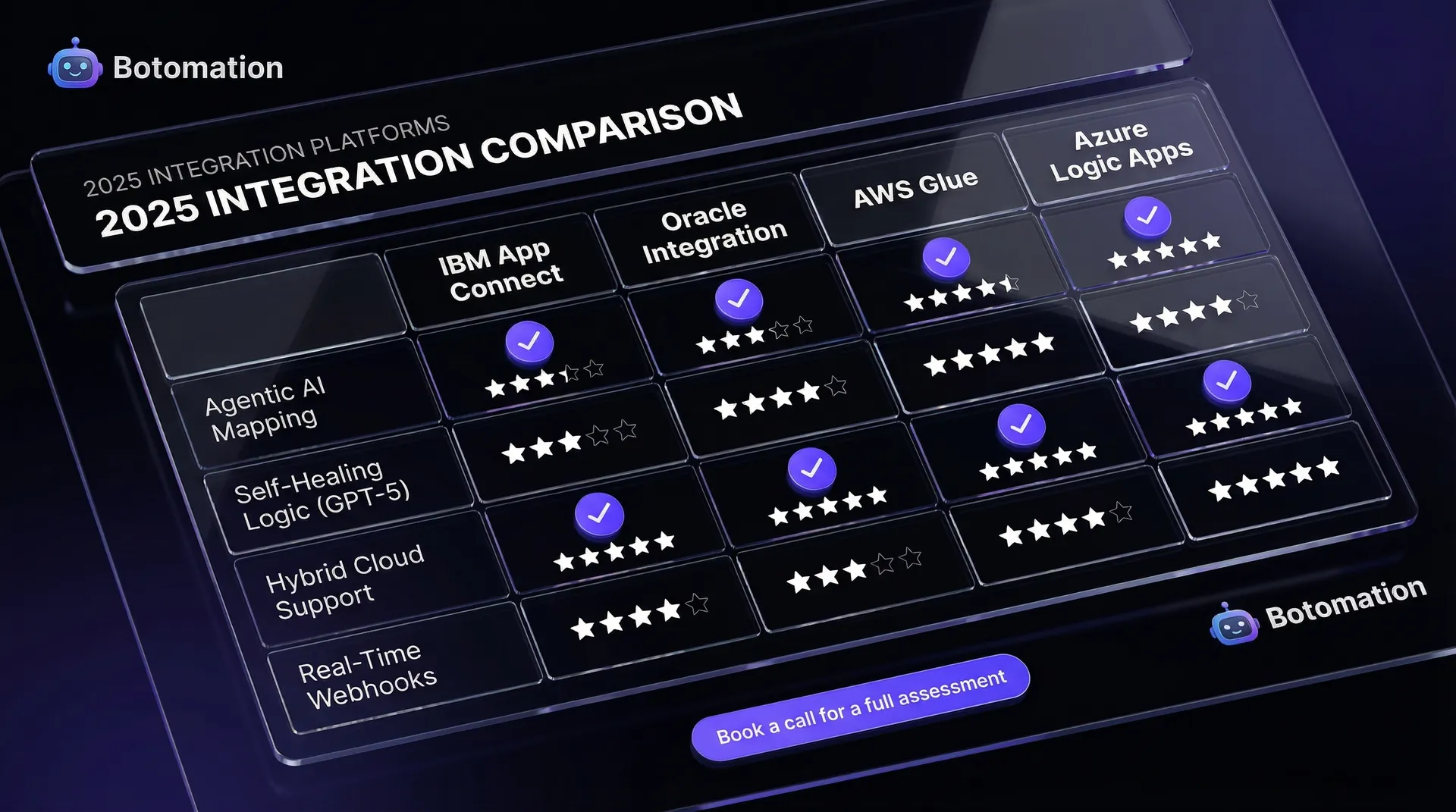
| Feature Category | IBM App Connect | Oracle Integration Cloud | AWS Integration | Azure Logic Apps |
|---|---|---|---|---|
| **Primary User** | Enterprise IT | Oracle Ecosystem Users | Developers/DevOps | Microsoft-centric Orgs |
| **AI Mapping** | Advanced (Watson) | Generative AI (OIC) | Basic/Custom | Copilot Integration |
| **Hybrid Support** | Excellent | Strong | Moderate | Excellent |
| **Setup Speed** | Moderate | Moderate | Slow (Code-heavy) | Fast (Visual) |
| **Cost Model** | Tiered/Usage | Per Message/User | Pay-per-use | Consumption-based |
Cloud-Based Integration Services: AWS and Azure Solutions
As businesses migrate infrastructure to the "Big Three" cloud providers, using native cloud integration services from Amazon Web Services (AWS) and Microsoft Azure has become a primary strategy. These are collections of specialized services that can be stitched together to build robust integration engines. This approach is often favored by CTOs and engineering teams who desire total control over architecture and wish to avoid third-party iPaaS vendor markups.
The primary advantage is data "gravity." If your primary database resides in AWS, it is logical to use AWS tools to process that data. This reduces latency and data egress costs. However, these tools require significant technical expertise to configure and maintain.
AWS Application Integration Services Architecture
The AWS approach is built on "decoupling." Instead of a single program managing everything, AWS uses independent services like Amazon EventBridge, Step Functions, and SNS/SQS. EventBridge acts as a serverless event bus, making it easy to connect applications using data from your own apps and integrated SaaS tools. It functions like a high-speed postal service for data packets, ensuring messages reach the right destination without the sender needing to know the receiver's internal mechanics.
AWS Step Functions allow you to coordinate these services into a coherent workflow. You can build "state machines" that handle complex logic, such as retries and error handling. If a third-party service is temporarily unavailable, Step Functions will wait and retry, ensuring your business process does not fail silently.
Azure Integration Services Components
Microsoft Azure has adopted a more user-friendly approach, making it a favorite for organizations utilizing Microsoft 365 and Dynamics 365. Azure Logic Apps is the centerpiece, providing a visual designer with hundreds of pre-built connectors. In 2026, Azure has deeply integrated Microsoft Copilot, allowing users to build and troubleshoot integrations using natural language prompts.
Beyond Logic Apps, Azure API management platforms provide a central location to secure and monitor connections. For businesses handling massive data bursts, the Azure Service Bus offers a reliable queue. If your website receives 10,000 orders in a minute, the Service Bus holds those orders and feeds them to your fulfillment system at a sustainable pace, preventing back-office crashes. This level of reliability is also essential when you integrate Shopify with WhatsApp for real-time customer updates.
Specialized Integration Platforms: SAP and Emerging Solutions
Some organizations operate in specialized ecosystems where generic data integration tools are insufficient. SAP’s Integration Suite is specifically designed for the complexity of global logistics and manufacturing, often facilitating AI-powered legacy system migrations. Conversely, we see emerging "Integration Ops" players like ONEiO challenging the traditional iPaaS model.
These specialized tools provide a shortcut to success for specific industries. Instead of building from scratch, you can find templates covering 90% of industry-standard data flows, reducing implementation time from months to weeks.
SAP Integration Suite for SAP Ecosystems
For businesses running SAP S/4HANA, the SAP Integration Suite is essential. It offers thousands of pre-built integration flows mapped to SAP’s complex data structures. In 2026, they have added significant AI capabilities to help map legacy data to modern cloud formats via "AI-assisted integration mapping."
The suite also focuses on "Open Connectors," providing a unified way to interact with over 170 non-SAP applications. This acknowledges that even large SAP customers use a variety of tools. By providing a single point of governance, they allow organizations to maintain a single source of truth across global operations.
Emerging Platforms Like ONEiO
ONEiO represents a new philosophy: "Integration Automation." Unlike platforms where you build the bridge yourself, ONEiO acts as a service provider. Their ONEAI® engine automates data mapping between tools, ensuring a "Priority" field in one tool matches a "Severity" field in another. They guarantee 100% uptime and maintain connections even when underlying software tools update their APIs.
This hands-off approach is appealing to mid-sized service businesses that prefer not to hire a full-time integration engineer. Their pricing model is typically based on endpoints rather than data volume, making budgeting predictable. For a COO, the value is simple: you specify the tools, and their team (and AI) ensures connectivity within weeks.
Pricing Models and Total Cost of Ownership
A common mistake is choosing a platform based solely on the monthly subscription. The sticker price is often just the tip of the iceberg. To understand the true impact on your bottom line, you must calculate the Total Cost of Ownership (TCO), including implementation, maintenance, and the opportunity cost of internal team time.
In 2026, pricing models are nuanced. Some charge per transaction, which can lead to "bill shock" during rapid growth. Others charge per active workflow. A platform that appears affordable at 1,000 transactions may become prohibitively expensive at 100,000.
Evaluating Pricing Structures
Subscription-based models often feature tiers. A "Basic" tier might limit sync frequency or restrict access to premium connectors like NetSuite. Enterprise models usually involve an annual commitment but offer unlimited transactions and dedicated support, which is often better for high-volume businesses requiring predictability.
Pay-per-use models (AWS/Azure) offer a low barrier to entry, but require sophisticated monitoring to ensure runaway processes don't rack up massive bills. Always look for platforms that allow you to set hard caps or spending alerts.
Calculating Total Cost of Ownership
Consider a hypothetical mid-sized service business:
- Platform Subscription: $1,200/month ($14,400/year)
- Initial Implementation: $15,000 (One-time expert setup)
- Internal Maintenance: $6,000/year
- Training: $2,000
- Total Year 1 Cost: $37,400
Compare this to manual data entry: two admins spending 15 hours a week each at $30/hour equals $46,800 annually in labor. By automating, the business saves nearly $10,000 in the first year alone, with greater savings in subsequent years as implementation costs vanish.
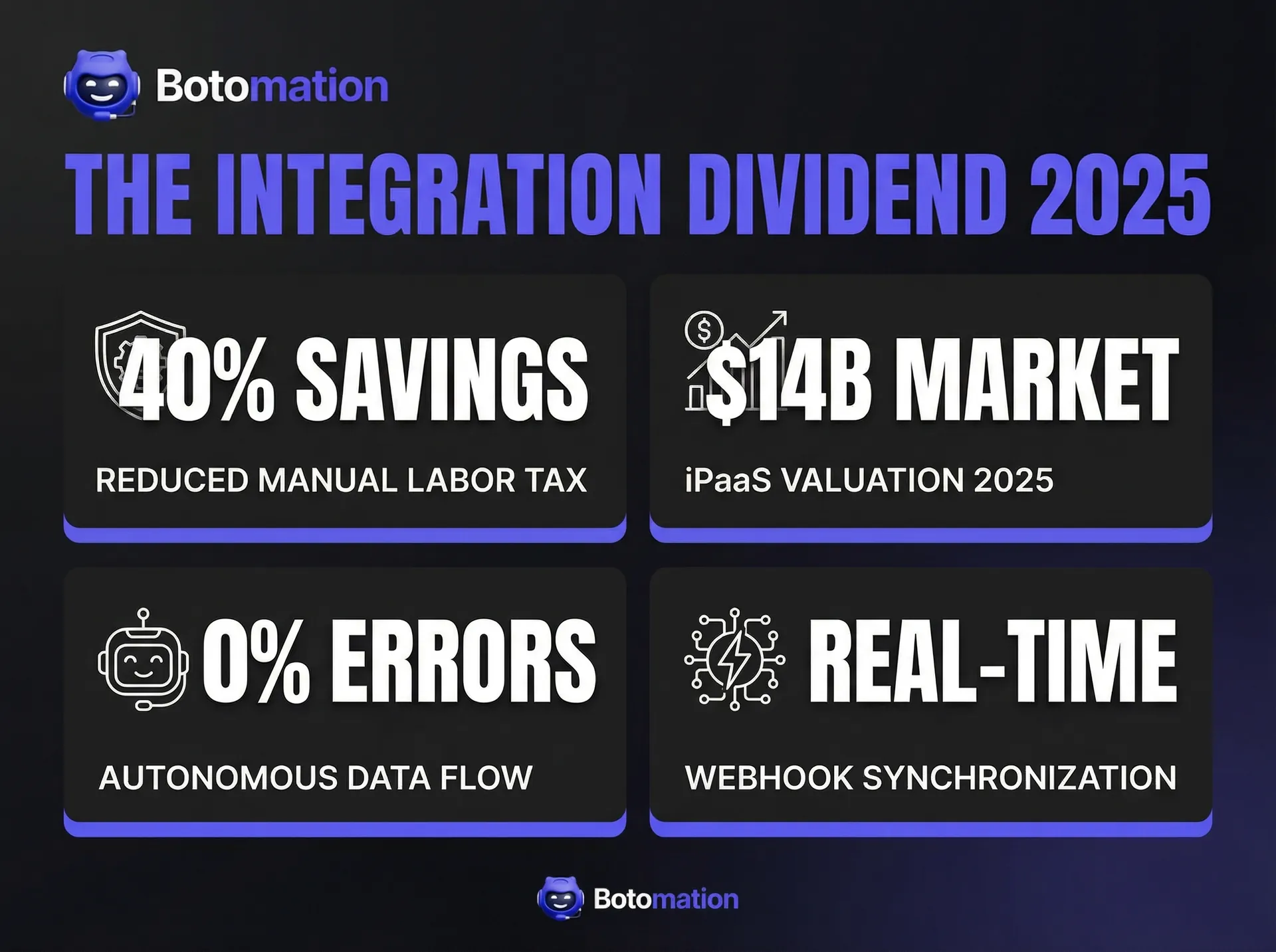
Stat Box: The Integration Dividend
* Average Labor Savings: 25-40% reduction in administrative overhead within 12 months.
* Error Reduction: 99.9% decrease in data entry discrepancies.
* Speed to Lead: Integrated systems respond to inquiries 8x faster than manual workflows.
* Employee Morale: 60% increase in job satisfaction when repetitive tasks are automated.
Implementation Strategies and Success Factors
The most powerful tool is useless if implemented poorly. Successful projects require a clear roadmap and process understanding. We often tell clients: "Automation won't fix a broken process; it will only make it break faster." Ensure your underlying workflow is efficient before connecting tools.
Change management is vital. When you automate a manual process, involve your team early. Explain how the system frees them for high-value work. Success is measured not just by data movement, but by people utilizing the streamlined systems.
Planning Your Integration Project
Begin with a comprehensive inventory of all software, access rights, and data locations. Map your data flows to visualize the customer journey and identify bottlenecks. Prioritize integrations based on business value, starting with "Quick Wins"—easy setups that provide immediate relief, such as syncing a CRM with email marketing tools.
Avoiding Common Implementation Pitfalls
Data quality is the silent killer of integration. If your CRM has duplicate entries, your integration will create duplicate invoices. You must maintain fresh lead lists and clean your data before connecting systems by deduplicating records and standardizing formats.
Testing is also critical. Never go live without testing in a sandbox environment. Check for "edge cases"—what happens if a required field is blank? A robust integration knows how to handle errors, ensuring your business keeps running smoothly.
The Path Forward for Your Business
The landscape of integration platforms for business software in 2026 offers solutions for every organization. Whether you choose the power of IBM, the flexibility of AWS, or the managed efficiency of ONEiO, the goal is eliminating the manual friction holding your business back.
However, most operations managers lack the time to become experts in multiple platforms. This is where expert partnership is invaluable. At Botomation, we provide the agency services needed to transform your business into a self-running machine using advanced workflow automation software. Our specialists design and implement custom strategies to connect your CRM and spreadsheets into a single ecosystem.
Automation is no longer a luxury—it is a survival requirement. By partnering with Botomation, you choose a fast, error-free, and scalable future. We handle the technical complexity so you can focus on growth.
Frequently Asked Questions
What is the biggest mistake businesses make when choosing an integration platform?
The most common mistake is focusing on the quantity of connectors rather than the depth of functionality. If a connector doesn't support custom fields or real-time triggers, it won't solve your complex problems. Look for depth over breadth.
Do I need a developer to set up these integration platforms?
While many platforms are marketed as "no-code," a "low-code" approach is often necessary for effective automation. Simple tasks can be handled by managers, but complex orchestrations involving financial data usually require experts like Botomation to ensure security and scalability.
How do I know if my business is ready for a professional integration strategy?
If your team spends more than five hours a week on manual data entry, or if you find consistent errors in reporting due to disconnected systems, you are ready. Software fatigue is another key indicator that it's time to unify your workflow.
Is it better to use one "All-in-One" software or multiple integrated tools?
In 2026, "All-in-One" tools are often masters of none. Integrated "Best-of-Breed" tools provide a superior experience for specific departments. With a professional integration strategy, you get the best of both worlds: specialized power with seamless data flow.
Ready to automate your growth? Stop losing money on manual tasks and start scaling your business on autopilot. Book a call below to speak with our experts.
In January 2026, identifying the premier integration platforms for business software is the first step toward true business process automation. The promise of the "best-of-breed" software era was simple: select the premier tool for every function. Your sales team utilizes the best CRM, your finance team leverages the top ERP, and your marketing department deploys the most advanced automation suite. However, most operations managers have realized this dream carries a hidden tax. When these tools remain siloed, your employees become the "operational glue," spending hours every week manually transferring data between systems.
Choosing the right integration path has evolved from a technical preference to a core strategic necessity. We are witnessing a massive shift in how companies approach connectivity. It is no longer sufficient to move a single row of data from a spreadsheet to a CRM. Modern operations require autonomous workflows where information flows through the organization without human intervention. This comparison examines the industry leaders and specialized players dominating the landscape this year to help you determine which path fits your specific operational requirements.
The current landscape is defined by the rise of "agentic" integration. We are seeing platforms that transcend basic "if this, then that" logic, utilizing advanced reasoning models to handle exceptions and map complex data structures automatically. As we navigate the options available in late 2026, the objective remains clear: transforming a fragmented collection of software into a unified, high-performance engine.
Key Insight for 2026: The cost of inaction regarding integration has risen by 40% since 2023 due to the increased volume of data generated by AI-driven business tools. Companies that fail to integrate are effectively paying a "manual labor tax" on every customer interaction.
How Integration Platforms for Business Software and iPaaS Solutions Changed the Game
The rise of Integration Platform as a Service (iPaaS solutions) has fundamentally rewritten the rules of business operations. Historically, connecting software required custom-coded middleware, expensive servers, and dedicated developers to maintain connections during API updates. Today, iPaaS solutions provide a centralized, cloud-based hub where these connections are managed through visual interfaces and pre-built connectors. This shift has democratized automation, allowing operations leaders to control their workflows without waiting for IT department availability.
Recent market data from late 2026 suggests that the global iPaaS market has surpassed $14 billion in valuation. This growth is fueled not only by tech firms but also by traditional service businesses, manufacturing firms, and healthcare providers seeking to eliminate administrative bloat. The latest updates this year focus heavily on "self-healing" integrations. Utilizing models like GPT-5, these platforms now detect changes in CRM fields and automatically suggest updates to integration logic to prevent workflow disruptions.
How iPaaS Differs from Traditional Integration
Traditional integration relied on "Point-to-Point" (P2P) connections. Imagine a complex web where every strand is a custom piece of code connecting one app to another. If you utilize five apps, you might need ten different connections; adding a sixth app causes complexity to explode. This model is fragile and expensive to scale. Cloud-based iPaaS solutions utilize a "Hub and Spoke" architecture. Every application connects once to the central platform, which handles the translation and routing of data to all other connected systems.
This cloud-centric approach offers scalability that on-premise solutions cannot match. When your business experiences a surge in volume—perhaps during a major product launch—the iPaaS scales its processing power instantly. Furthermore, the subscription-based model shifts the financial burden from a massive Capital Expenditure (CAPEX) to a predictable Operating Expense (OPEX). You are no longer purchasing servers; you are investing in the guaranteed flow of information.
Key Features to Evaluate in Integration Platforms
When evaluating integration platforms for business software, look beyond the quantity of pre-built connectors. The real value lies in the depth of those connectors. Ensure the platform can handle "webhooks" for real-time triggers rather than relying on "polling" intervals. In a high-velocity business environment, a fifteen-minute delay in data synchronization can lead to double-booked appointments. Implementing automated data entry validation helps mitigate these risks and ensures data integrity.
Security and compliance are paramount in 2026. With stricter global data privacy regulations, your integration platform must offer robust encryption both at rest and in transit. Look for platforms providing granular role-based access control to ensure only authorized personnel can modify critical business logic. Finally, consider the user interface. While "no-code" is a popular term, the platform should offer "low-code" flexibility—allowing your team to write custom logic when standard pre-built steps do not meet unique business requirements.
Enterprise Integration Platforms for Business Software: IBM and Oracle
For large-scale organizations with complex, multi-layered infrastructures, enterprise integration tools remain the gold standard. These enterprise-grade solutions are engineered to handle millions of transactions per hour while maintaining peak security. IBM and Oracle have spent decades refining these tools to serve Fortune 500 needs, focusing on stability and the ability to bridge the gap between modern cloud apps and legacy on-premise hardware.
These platforms facilitate "orchestration," allowing you to build complex business processes that span multiple departments, countries, and regulatory environments. While the learning curve is steeper than consumer-grade tools, the level of control they offer is unparalleled for a COO who must ensure every data point is accounted for and audited.
IBM App Connect Capabilities
IBM App Connect stands out for its focus on event-driven architecture. Rather than waiting for scheduled syncs, the system reacts instantly to "events"—such as a new lead created or an invoice paid. This real-time capability is essential for businesses where timing is a competitive advantage. IBM excels in supporting hybrid cloud environments; many enterprise clients maintain critical data in local databases for security, and IBM provides the secure gateway to connect those assets to modern web tools.
The platform also includes sophisticated API management tools. This allows a business to not only consume data but also to package its internal data as an API for partners. By turning internal processes into digital products, you create new avenues for growth. IBM’s built-in security features, including AI-driven anomaly detection, ensure that if an integration behaves irregularly, the system can sever the connection before data is compromised.
Oracle Integration Cloud Features
Oracle Integration Cloud (OIC) is the logical choice for businesses within the Oracle ecosystem, but in 2026, it has evolved into a powerhouse for AI-powered automation generally. Oracle has integrated Generative AI features directly into the workflow designer. This allows users to describe a process in plain English—for example, "When a high-value customer submits a ticket, check their purchase history and alert the manager via Slack"—and the platform will draft the multi-step workflow automatically.
Compliance and governance are where Oracle excels. For businesses in highly regulated sectors like finance, OIC provides automated documentation of every data movement. This audit trail is vital for regulatory filings. Their pre-built adapters for the Oracle ecosystem are incredibly deep, often allowing for "deep-linking" between applications. This means a user can jump from integration logs directly to a specific transaction in the ERP with a single click.
| Feature Category | IBM App Connect | Oracle Integration Cloud | AWS Integration | Azure Logic Apps |
|---|---|---|---|---|
| **Primary User** | Enterprise IT | Oracle Ecosystem Users | Developers/DevOps | Microsoft-centric Orgs |
| **AI Mapping** | Advanced (Watson) | Generative AI (OIC) | Basic/Custom | Copilot Integration |
| **Hybrid Support** | Excellent | Strong | Moderate | Excellent |
| **Setup Speed** | Moderate | Moderate | Slow (Code-heavy) | Fast (Visual) |
| **Cost Model** | Tiered/Usage | Per Message/User | Pay-per-use | Consumption-based |
Cloud-Based Integration Services: AWS and Azure Solutions
As businesses migrate infrastructure to the "Big Three" cloud providers, using native cloud integration services from Amazon Web Services (AWS) and Microsoft Azure has become a primary strategy. These are collections of specialized services that can be stitched together to build robust integration engines. This approach is often favored by CTOs and engineering teams who desire total control over architecture and wish to avoid third-party iPaaS vendor markups.
The primary advantage is data "gravity." If your primary database resides in AWS, it is logical to use AWS tools to process that data. This reduces latency and data egress costs. However, these tools require significant technical expertise to configure and maintain.
AWS Application Integration Services Architecture
The AWS approach is built on "decoupling." Instead of a single program managing everything, AWS uses independent services like Amazon EventBridge, Step Functions, and SNS/SQS. EventBridge acts as a serverless event bus, making it easy to connect applications using data from your own apps and integrated SaaS tools. It functions like a high-speed postal service for data packets, ensuring messages reach the right destination without the sender needing to know the receiver's internal mechanics.
AWS Step Functions allow you to coordinate these services into a coherent workflow. You can build "state machines" that handle complex logic, such as retries and error handling. If a third-party service is temporarily unavailable, Step Functions will wait and retry, ensuring your business process does not fail silently.
Azure Integration Services Components
Microsoft Azure has adopted a more user-friendly approach, making it a favorite for organizations utilizing Microsoft 365 and Dynamics 365. Azure Logic Apps is the centerpiece, providing a visual designer with hundreds of pre-built connectors. In 2026, Azure has deeply integrated Microsoft Copilot, allowing users to build and troubleshoot integrations using natural language prompts.
Beyond Logic Apps, Azure API management platforms provide a central location to secure and monitor connections. For businesses handling massive data bursts, the Azure Service Bus offers a reliable queue. If your website receives 10,000 orders in a minute, the Service Bus holds those orders and feeds them to your fulfillment system at a sustainable pace, preventing back-office crashes. This level of reliability is also essential when you integrate Shopify with WhatsApp for real-time customer updates.
Specialized Integration Platforms: SAP and Emerging Solutions
Some organizations operate in specialized ecosystems where generic data integration tools are insufficient. SAP’s Integration Suite is specifically designed for the complexity of global logistics and manufacturing, often facilitating AI-powered legacy system migrations. Conversely, we see emerging "Integration Ops" players like ONEiO challenging the traditional iPaaS model.
These specialized tools provide a shortcut to success for specific industries. Instead of building from scratch, you can find templates covering 90% of industry-standard data flows, reducing implementation time from months to weeks.
SAP Integration Suite for SAP Ecosystems
For businesses running SAP S/4HANA, the SAP Integration Suite is essential. It offers thousands of pre-built integration flows mapped to SAP’s complex data structures. In 2026, they have added significant AI capabilities to help map legacy data to modern cloud formats via "AI-assisted integration mapping."
The suite also focuses on "Open Connectors," providing a unified way to interact with over 170 non-SAP applications. This acknowledges that even large SAP customers use a variety of tools. By providing a single point of governance, they allow organizations to maintain a single source of truth across global operations.
Emerging Platforms Like ONEiO
ONEiO represents a new philosophy: "Integration Automation." Unlike platforms where you build the bridge yourself, ONEiO acts as a service provider. Their ONEAI® engine automates data mapping between tools, ensuring a "Priority" field in one tool matches a "Severity" field in another. They guarantee 100% uptime and maintain connections even when underlying software tools update their APIs.
This hands-off approach is appealing to mid-sized service businesses that prefer not to hire a full-time integration engineer. Their pricing model is typically based on endpoints rather than data volume, making budgeting predictable. For a COO, the value is simple: you specify the tools, and their team (and AI) ensures connectivity within weeks.
Pricing Models and Total Cost of Ownership
A common mistake is choosing a platform based solely on the monthly subscription. The sticker price is often just the tip of the iceberg. To understand the true impact on your bottom line, you must calculate the Total Cost of Ownership (TCO), including implementation, maintenance, and the opportunity cost of internal team time.
In 2026, pricing models are nuanced. Some charge per transaction, which can lead to "bill shock" during rapid growth. Others charge per active workflow. A platform that appears affordable at 1,000 transactions may become prohibitively expensive at 100,000.
Evaluating Pricing Structures
Subscription-based models often feature tiers. A "Basic" tier might limit sync frequency or restrict access to premium connectors like NetSuite. Enterprise models usually involve an annual commitment but offer unlimited transactions and dedicated support, which is often better for high-volume businesses requiring predictability.
Pay-per-use models (AWS/Azure) offer a low barrier to entry, but require sophisticated monitoring to ensure runaway processes don't rack up massive bills. Always look for platforms that allow you to set hard caps or spending alerts.
Calculating Total Cost of Ownership
Consider a hypothetical mid-sized service business:
- Platform Subscription: $1,200/month ($14,400/year)
- Initial Implementation: $15,000 (One-time expert setup)
- Internal Maintenance: $6,000/year
- Training: $2,000
- Total Year 1 Cost: $37,400
Compare this to manual data entry: two admins spending 15 hours a week each at $30/hour equals $46,800 annually in labor. By automating, the business saves nearly $10,000 in the first year alone, with greater savings in subsequent years as implementation costs vanish.
Stat Box: The Integration Dividend
* Average Labor Savings: 25-40% reduction in administrative overhead within 12 months.
* Error Reduction: 99.9% decrease in data entry discrepancies.
* Speed to Lead: Integrated systems respond to inquiries 8x faster than manual workflows.
* Employee Morale: 60% increase in job satisfaction when repetitive tasks are automated.
Implementation Strategies and Success Factors
The most powerful tool is useless if implemented poorly. Successful projects require a clear roadmap and process understanding. We often tell clients: "Automation won't fix a broken process; it will only make it break faster." Ensure your underlying workflow is efficient before connecting tools.
Change management is vital. When you automate a manual process, involve your team early. Explain how the system frees them for high-value work. Success is measured not just by data movement, but by people utilizing the streamlined systems.
Planning Your Integration Project
Begin with a comprehensive inventory of all software, access rights, and data locations. Map your data flows to visualize the customer journey and identify bottlenecks. Prioritize integrations based on business value, starting with "Quick Wins"—easy setups that provide immediate relief, such as syncing a CRM with email marketing tools.
Avoiding Common Implementation Pitfalls
Data quality is the silent killer of integration. If your CRM has duplicate entries, your integration will create duplicate invoices. You must maintain fresh lead lists and clean your data before connecting systems by deduplicating records and standardizing formats.
Testing is also critical. Never go live without testing in a sandbox environment. Check for "edge cases"—what happens if a required field is blank? A robust integration knows how to handle errors, ensuring your business keeps running smoothly.
The Path Forward for Your Business
The landscape of integration platforms for business software in 2026 offers solutions for every organization. Whether you choose the power of IBM, the flexibility of AWS, or the managed efficiency of ONEiO, the goal is eliminating the manual friction holding your business back.
However, most operations managers lack the time to become experts in multiple platforms. This is where expert partnership is invaluable. At Botomation, we provide the agency services needed to transform your business into a self-running machine using advanced workflow automation software. Our specialists design and implement custom strategies to connect your CRM and spreadsheets into a single ecosystem.
Automation is no longer a luxury—it is a survival requirement. By partnering with Botomation, you choose a fast, error-free, and scalable future. We handle the technical complexity so you can focus on growth.
Frequently Asked Questions
What is the biggest mistake businesses make when choosing an integration platform?
The most common mistake is focusing on the quantity of connectors rather than the depth of functionality. If a connector doesn't support custom fields or real-time triggers, it won't solve your complex problems. Look for depth over breadth.
Do I need a developer to set up these integration platforms?
While many platforms are marketed as "no-code," a "low-code" approach is often necessary for effective automation. Simple tasks can be handled by managers, but complex orchestrations involving financial data usually require experts like Botomation to ensure security and scalability.
How do I know if my business is ready for a professional integration strategy?
If your team spends more than five hours a week on manual data entry, or if you find consistent errors in reporting due to disconnected systems, you are ready. Software fatigue is another key indicator that it's time to unify your workflow.
Is it better to use one "All-in-One" software or multiple integrated tools?
In 2026, "All-in-One" tools are often masters of none. Integrated "Best-of-Breed" tools provide a superior experience for specific departments. With a professional integration strategy, you get the best of both worlds: specialized power with seamless data flow.
Ready to automate your growth? Stop losing money on manual tasks and start scaling your business on autopilot. Book a call below to speak with our experts.
Get Started
Book a FREE Consultation Right NOW!
Schedule a Call with Our Team To Make Your Business More Efficient with AI Instantly.
Read More
Top Integration Platforms for Business Software 2026 Guide
Compare the top integration platforms for business software in 2026. Review iPaaS, AWS, and Azure tools to achieve seamless business process automation today.
Connect Disparate Software Tools - 2026 Automation Guide
Learn how WhatsApp AI slashes support costs for e-commerce & SaaS. Proven strategies to boost sales, recover carts, and scale 24/7 service.