WhatsApp Order Confirmations for Shopify 2026 Guide
Jan 8, 2026
AI Automation
E-commerce
Shopify
AI Automation
E-commerce
Shopify
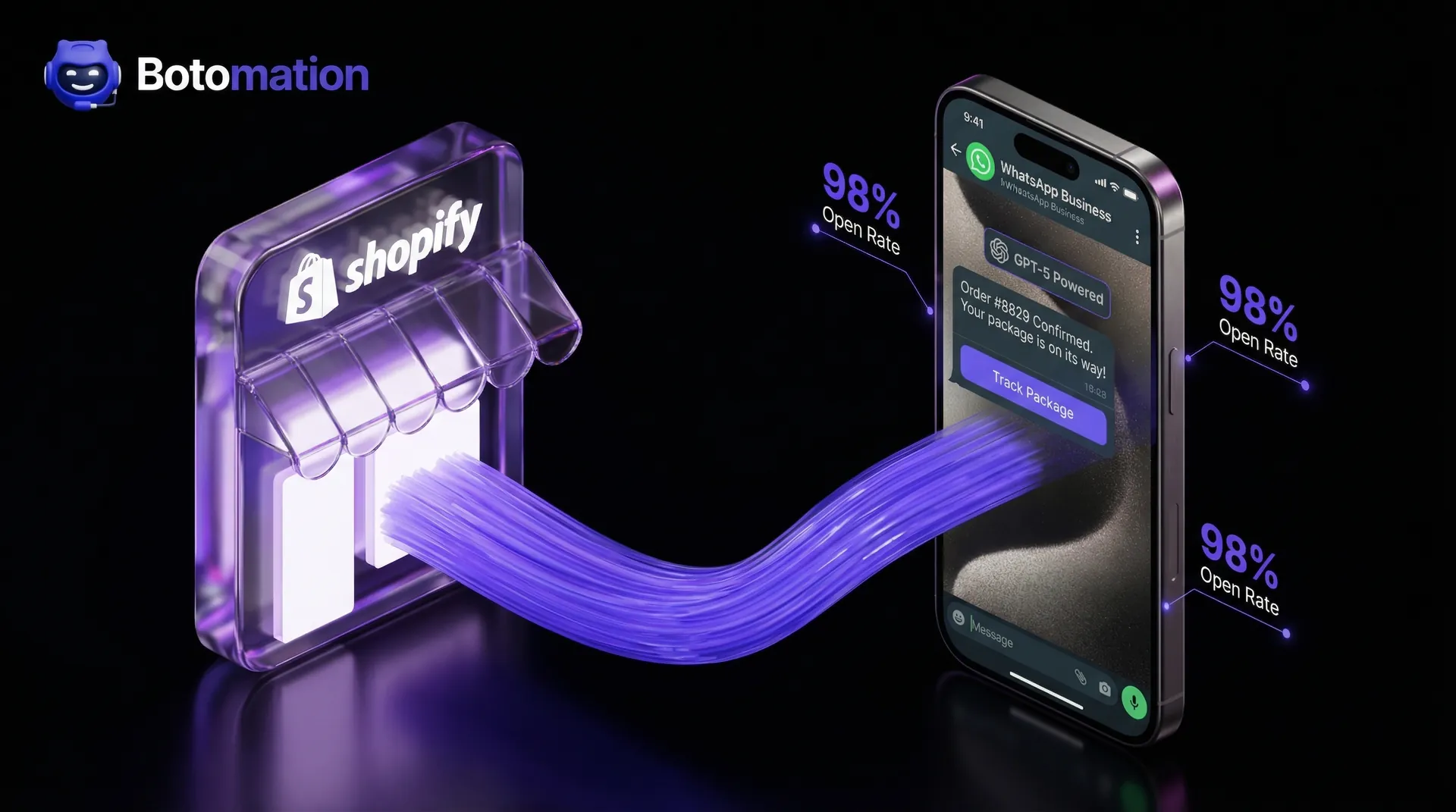
The digital landscape has evolved rapidly, leaving traditional email marketing to struggle for relevance in 2026. While many Shopify store owners still rely on automated emails for post-purchase communication, the reality is that inbox clutter has reached an all-time high. A vast majority of customers now bypass the "Promotions" tab entirely, leading to missed updates and heightened post-purchase anxiety. Consequently, automated order confirmation messages whatsapp have emerged as the gold standard for e-commerce brands looking to implement Shopify WhatsApp order status updates.
When a customer clicks the "Buy" button, they enter a period of high emotional engagement. Statistics from late 2026 indicate that WhatsApp messages boast a staggering 98% open rate—a figure that dwarfs the 20% average seen in traditional email marketing. Leading brands like Skullcandy have already capitalized on this shift, reporting significant gains by recovering abandoned carts on Shopify with WhatsApp automation and boosting post-purchase engagement by meeting customers where they are most active.
Our team at Botomation has observed that the latest WhatsApp Business API updates for 2026 have fundamentally transformed notification functionality. We are no longer limited to simple text alerts; we are now deploying rich, interactive experiences powered by advanced AI agents like GPT-5. These systems do more than confirm an order; they build brand trust and pave the way for future retention.
Understanding automated order confirmation messages whatsapp
To fully leverage this technology, we must define what distinguishes automated order confirmation messages whatsapp from the standard SMS notifications of the past. In the "Old Way," customers received plain text messages with clunky links. In the "New Way" powered by Botomation, the confirmation is a rich media experience featuring your brand’s logo, interactive buttons, and a direct line to a support agent.
The distinction between standard notifications and real-time updates is critical for scaling a DTC brand. Real-time updates via the WhatsApp Business API are triggered the millisecond a Shopify checkout is completed. This immediacy eliminates the "buyer’s remorse" window and prevents the customer from immediately contacting your support team to verify the transaction.
What Are Automated Order Confirmation Messages
At its core, an automated order confirmation on WhatsApp is a pre-approved message template triggered by a specific event in your Shopify backend. When a customer completes a purchase, Shopify sends a signal via a webhook to the WhatsApp Business API. This signal contains essential data: the customer's name, items purchased, total price, and order number.
This process requires zero manual intervention from your fulfillment or support teams, allowing your staff to focus on high-level strategic growth. The integration ensures that every customer receives a consistent, branded experience regardless of order volume. By utilizing the API instead of the standard WhatsApp Business App, you gain the ability to send thousands of messages simultaneously without the risk of being flagged for spam.
Benefits of WhatsApp for Order Confirmations
The primary benefit is the platform's unparalleled visibility. Most users check WhatsApp messages within minutes of receiving a notification, creating a level of intimacy that email cannot replicate. This instant delivery generates a "halo effect" for your brand, positioning you as technologically advanced.
Beyond open rates, Botomation experts have seen these integrations reduce support tickets by 80% with WhatsApp chatbots for order tracking. When a customer has order details accessible in their favorite messaging app, they are far less likely to send an email inquiring about status. This proactive communication style transforms the post-purchase journey from a black hole of uncertainty into a transparent, guided experience.
Setting Up WhatsApp Business API for Shopify Order Notifications
Transitioning from a standard WhatsApp account to a full API integration is a significant step requiring technical precision. Unlike the mobile app, the WhatsApp Business API does not have a native front-end interface; it is a robust conduit connecting your Shopify store to Meta’s global messaging infrastructure.
The whatsapp business api order notifications setup begins within the Meta Business Suite. You must possess a verified Business Manager account to access the API, which involves submitting legal documentation to verify your brand's identity. Once verified, you can claim your official WhatsApp Business Account (WABA) and link it to a dedicated phone number.
Prerequisites and Account Setup
Before sending automated messages, you must navigate Meta's compliance landscape. This includes configuring a payment method for message billing and ensuring your privacy policy meets 2026 standards. Meta requires specific permissions to be granted to your integration partner, allowing them to manage templates and analyze message performance on your behalf.
It is vital to understand that the WhatsApp Business API operates on a "Template" system for business-initiated messages. You cannot send free-form text initially; you must submit a template to Meta for approval. These templates use placeholders (e.g., {{1}} for names) to ensure messages remain helpful and non-intrusive.
Shopify Integration Process
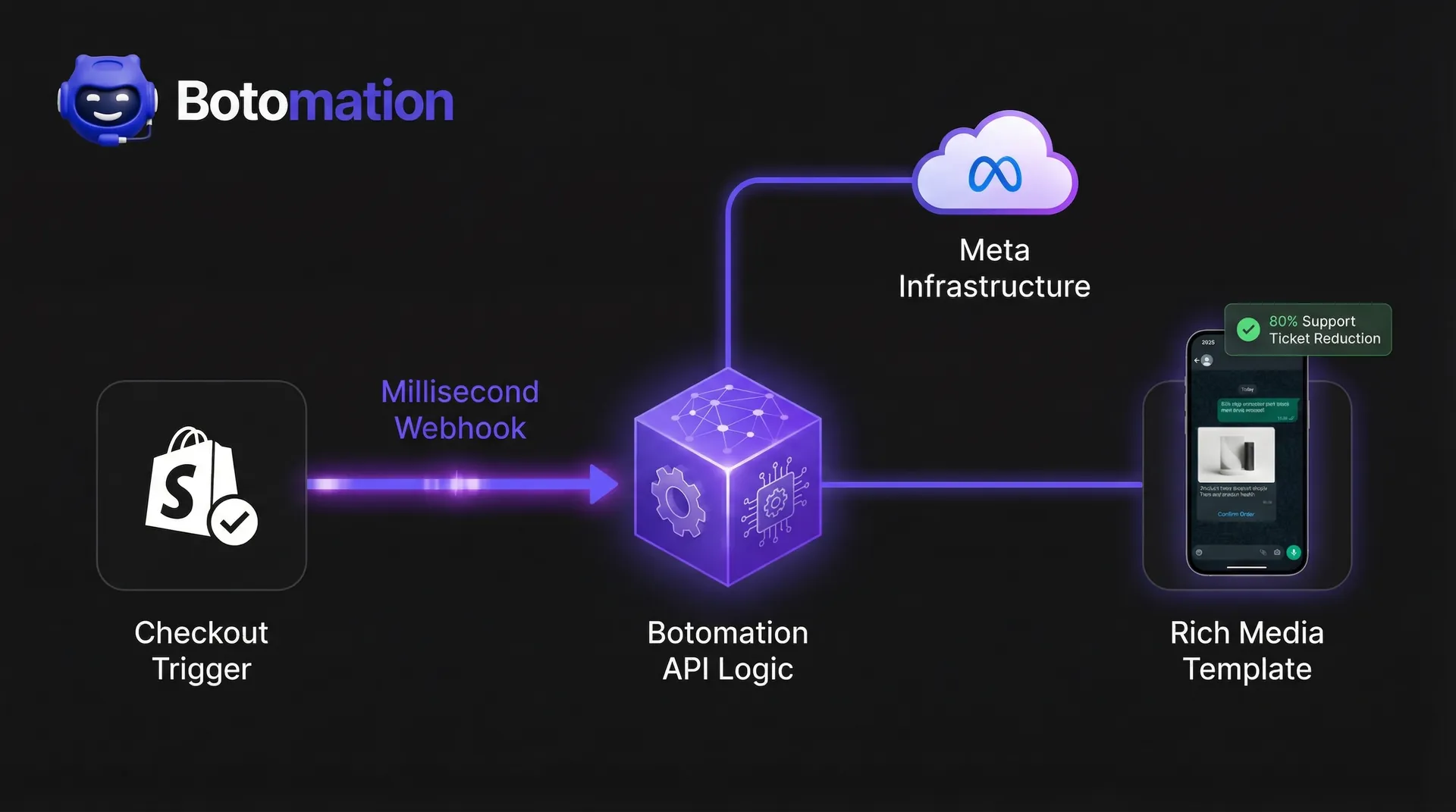
Once the API account is active, the focus shifts to the Shopify admin panel. For a robust shopify whatsapp order status integration, we typically configure webhooks that monitor the orders/paid or orders/create events. When these occur, Shopify sends a JSON payload containing order details to our processing server.
The server then formats this data to match your approved WhatsApp templates. For example, it extracts the "First Name" and "Order ID" to create a personalized greeting. This setup also allows for conditional logic; if a customer purchases a high-value item, you might trigger a specialized confirmation message that includes a care guide.
Technical Configuration
The final technical phase involves the webhook handshake and validation. It is vital to ensure the connection between Shopify and WhatsApp is secure and capable of handling high traffic during peak seasons like Black Friday. We implement sophisticated retry logic to ensure that if a message fails due to a network glitch, the system automatically re-attempts delivery.
Expert Insight: "In 2026, successful brands aren't just sending text. They leverage the API's 'List Buttons' and 'Quick Replies' to allow customers to track packages or update delivery addresses directly within the WhatsApp interface."
Step-by-Step Tutorial: Implementing Your First Automation
- Verify Your Business: Navigate to Meta Business Settings and complete the "Security Center" verification using your tax ID.
- Create a WhatsApp Business Account (WABA): Within Meta Business Suite, add a new WhatsApp account and assign a dedicated phone number.
- Develop Your Message Template: Draft a message like: "Hi {{1}}, thanks for your order #{{2}}! We are preparing it for you now."
- Configure the Shopify Webhook: In Shopify Admin, go to Settings > Notifications > Webhooks. Create a webhook for 'Order Creation'.
- Test the Flow: Place a test order using your own number. Verify that the message arrives within 10 seconds.
Real-time Shipping Notifications and Order Tracking via WhatsApp
The order confirmation is merely the start of the conversation. The real value is realized during the fulfillment phase, where customer anxiety typically peaks. By implementing real-time shipping alerts via WhatsApp, you provide a level of service previously reserved for enterprise logistics firms. When your warehouse scans a package and generates a tracking number in Shopify, the system should immediately trigger a WhatsApp update.
This integration provides the customer with a direct, clickable tracking link. In 2026, we are even deploying integrations that embed tracking maps directly into the WhatsApp chat using rich media cards. This keeps the customer within your brand ecosystem.
Real-time Shipping Alerts Setup
To facilitate this, your Shopify store must be synchronized with your shipping carriers. Whenever the "Shipping Status" field in Shopify updates, a new webhook is triggered. This allows us to send a sequence of messages: "Order Processed," "Shipped," "Out for Delivery," and "Delivered."
Each touchpoint is an opportunity to delight the customer. For instance, the "Out for Delivery" message is the ideal time to remind a customer to be available for a signature. This proactive communication helped Kings Collection achieve a 400% growth rate by turning the shipping process into an engaging narrative.
Order Tracking Integration
Modern tracking integrations allow for two-way communication. Instead of receiving a passive update, using a whatsapp chatbot for order status tracking allows customers to tap a "Check Current Location" button or even initiate automated returns and exchanges directly within the chat. An AI agent, like those built by Botomation, can query the carrier API in real-time and respond with the exact city and estimated delivery time.
We also recommend including a "Report an Issue" button in the delivery confirmation. If a package is marked as delivered but the customer cannot locate it, they can immediately initiate a support chat within the same thread. This prevents negative social media feedback by resolving the issue at the source.
Reducing WISMO Queries with WhatsApp Order Updates
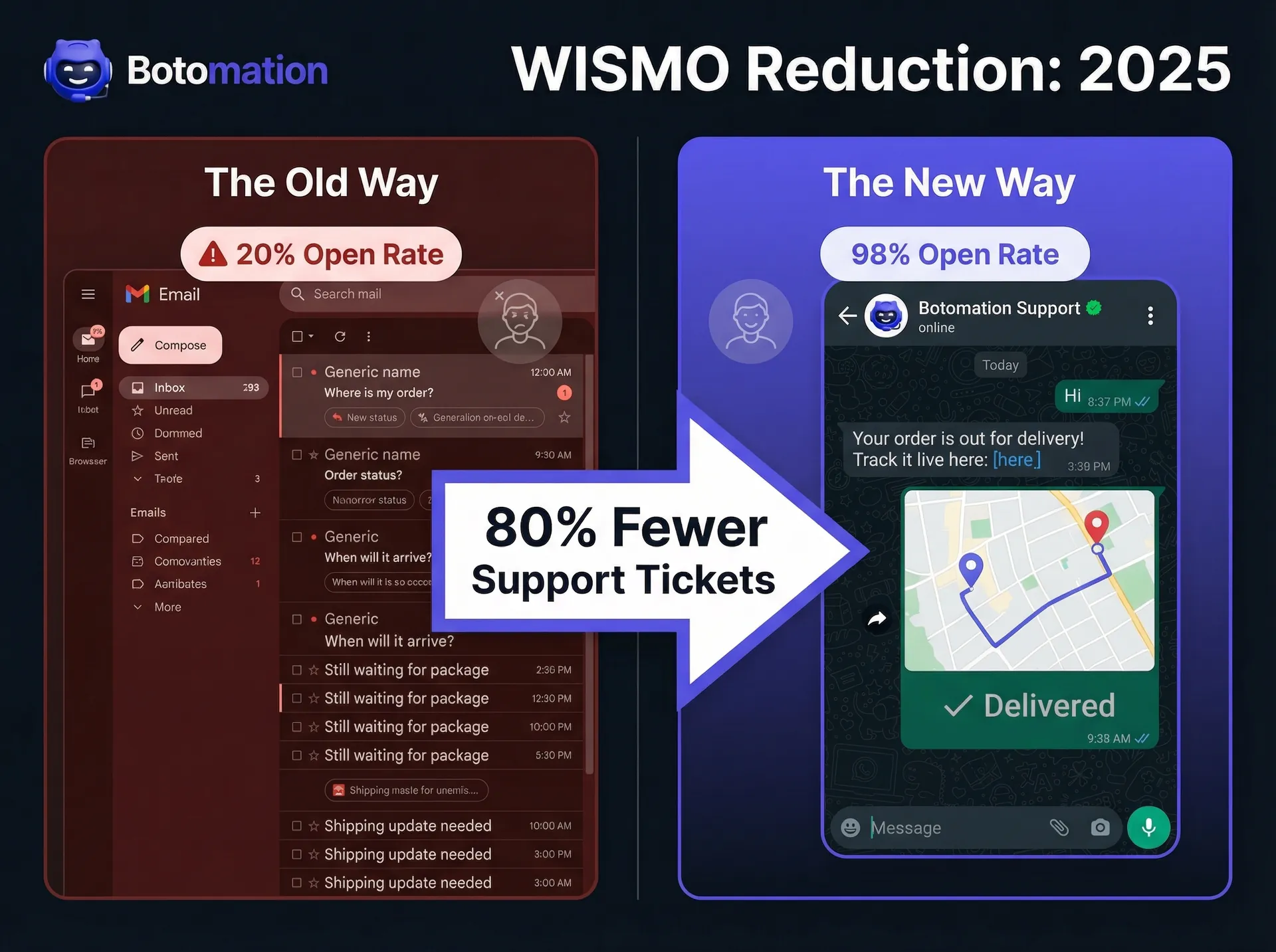
"Where is my order?" (WISMO) queries are the bane of e-commerce management. These tickets are repetitive and expensive. When a support agent spends five minutes locating a tracking number, they are diverted from high-value sales inquiries. For a store processing 1,000 orders monthly, WISMO can easily consume 20-30 hours of labor.
By utilizing automated order confirmation messages whatsapp, you perform a pre-emptive strike against these support tickets. When information is pushed proactively to the customer's phone, the urge to inquire disappears. This is why companies like Cosco have seen support resolution efficiency double.
Impact of WISMO Inquiries on Business
To understand the financial impact, consider the math: if a support agent earns $25 per hour and spends 25% of their time on WISMO questions, you are spending thousands annually on a task that adds no value. In fact, it often detracts from the experience, as customers are already frustrated by the time they reach out.
Furthermore, high WISMO volume leads to longer wait times for all customers. This creates a bottleneck where legitimate product defects or pre-sales questions go unanswered. This hidden cost of poor communication is a primary reason why manual processes are considered the "Old Way" of e-commerce.
How WhatsApp Reduces Support Tickets
The WhatsApp Business API excels at handling these queries autonomously. At Botomation, we integrate AI agents capable of understanding natural language. If a customer ignores automated updates and asks "When will my shoes arrive?", the AI agent parses the request, checks Shopify, and provides an instant answer.
This results in a documented 80% reduction in ticket volume. By the time a human agent is required, the issue is typically complex and requires genuine problem-solving. This shift saves money while improving employee morale, as your support team evolves into brand ambassadors handling meaningful interactions.
Best Practices for High-Conversion WhatsApp Confirmations
Sending a message is simple; sending the right message is an art. In 2026, customers are protective of their WhatsApp inboxes. If you over-communicate, they will block your number. The goal is to sound like a helpful personal shopper rather than a faceless database.
Your automated order confirmation messages whatsapp should always lead with value. Start with a warm "Thank You" followed immediately by the order number. Use bold text for key details so customers can scan the message in seconds. Keep sentences punchy and avoid large blocks of text.
Message Content Best Practices
Every confirmation should include four essentials: order number, item summary, total price, and a clear next step. To excel, add a layer of personalization. Instead of "Your order is confirmed," try: "Great choice, Sarah! We've received your order for the Blue Suede Boots and we're packing them now."
Leverage the API's interactive features. You can even boost revenue by using AI WhatsApp chatbots for product recommendations or including a "Quick Reply" button for joining a VIP community. This turns a transactional notification into a brand-building moment.
Timing and Frequency Optimization
Timing is critical. The order confirmation must be sent within 60 seconds of purchase. Any longer, and the customer may fear a technical failure. However, when sending automated delivery notifications on whatsapp, be cautious not to over-communicate during shipping.
We recommend a maximum of four messages per order:
- Immediate Order Confirmation.
- Shipping Confirmation (with tracking link).
- Out for Delivery (sent the morning of arrival).
- Delivery Confirmation (with a request for a review).
Analyzing the ROI of Automated Order Confirmation Messages WhatsApp
Investing in a premium integration through Botomation is a strategic decision backed by hard data. When analyzing ROI, we focus on three pillars: labor savings, increasing customer lifetime value with WhatsApp bots, and reduced churn. The data consistently shows that this "New Way" of communicating pays for itself within months.
Consider Keeros Superfoods, which saw a 40% increase in sales after optimizing post-purchase WhatsApp flows. This wasn't just from initial orders; it was from natural re-engagement within the WhatsApp thread. Because the brand was already in the customer's chat list, a personalized "Time to Restock?" message felt like a helpful reminder.
Tracking Notification Performance
Measure success beyond open rates. While 98% is impressive, the "Action Rate" is the true metric. How many customers clicked the tracking link? How many used "Quick Reply" buttons? These interactions signal a healthy brand-customer relationship.
We also track the "Deflection Rate"—the percentage of customers who received a WhatsApp update and did not contact support. By comparing ticket volume before and after Botomation integration, you can assign a direct dollar value to the automation. Reducing tickets by 500 per month at $5 per ticket saves $2,500 monthly in labor costs alone.
Calculating ROI of WhatsApp Automation
| Expense/Saving Category | Annual Cost (Old Way) | Annual Cost (New Way) | Net Saving/Gain |
|---|---|---|---|
| Support Labor (WISMO) | $30,000 | $6,000 | +$24,000 |
| Email Marketing Tools | $2,400 | $1,200 | +$1,200 |
| Lost Revenue (Churn) | $15,000 | $5,000 | +$10,000 |
| **Total Annual Impact** | **$47,400** | **$12,200** | **+$35,200** |
Statistics that Matter in 2026
- 98% Open Rate: WhatsApp messages are nearly guaranteed to be seen.
- 80% Ticket Reduction: Proactive updates eliminate the majority of WISMO queries.
- 45% Higher CTR: Customers are more likely to click tracking links in WhatsApp than email.
- 3x Faster Resolution: AI-powered agents resolve queries in seconds, not hours.
Frequently Asked Questions
Is the WhatsApp Business API different from the regular Business App?
Yes, significantly. The regular Business App is designed for small local shops and is limited to a few users with no automation. The WhatsApp Business API is a professional-grade tool built for scaling, often used to build WhatsApp bots for 24/7 Shopify support. It allows for unlimited messages, deep Shopify integration, and the use of advanced AI agents to handle customer interactions autonomously.
Will my customers find WhatsApp messages intrusive?
Not if they are transactional. Customers generally prefer receiving order updates via WhatsApp because it is more convenient than searching a crowded email inbox. As long as you provide helpful post-purchase information and avoid unsolicited marketing, feedback is overwhelmingly positive.
How long does it take to set up the integration with Botomation?
While basic setups are quick, a fully optimized, AI-driven integration typically takes 2 to 4 weeks. This includes Meta verification, template design, webhook configuration, and rigorous testing to ensure your customer experience is flawless from day one.
Does this replace my email marketing?
We view WhatsApp as a powerful companion to email. Email remains excellent for long-form newsletters and digests. However, for time-sensitive, high-anxiety communications like order confirmations and shipping updates, WhatsApp is the superior tool.
Can I send order status updates for international shipments?
Yes. The WhatsApp Business API works globally, allowing you to reach customers in over 180 countries. By integrating with global carriers, you can provide real-time tracking regardless of where the customer is located.
The transition to a streamlined, WhatsApp-first strategy is no longer optional for brands that want to thrive in 2026. The data is clear: customers demand instant communication, and businesses must reduce support overhead to remain profitable. By automating your Shopify order confirmations through the WhatsApp Business API, you solve both problems simultaneously.
The "Old Way" leads to cluttered inboxes and overwhelmed support teams. The Botomation way offers a future of 98% open rates and 80% fewer support tickets. This is about building a foundation for scalable, autonomous growth.
Our team of experts is ready to help you navigate the complexities of the WhatsApp Business API and build a custom integration that fits your brand perfectly. Take control of your post-purchase journey today and watch your retention rates soar.
Ready to automate your growth? Book a call below.
The digital landscape has evolved rapidly, leaving traditional email marketing to struggle for relevance in 2026. While many Shopify store owners still rely on automated emails for post-purchase communication, the reality is that inbox clutter has reached an all-time high. A vast majority of customers now bypass the "Promotions" tab entirely, leading to missed updates and heightened post-purchase anxiety. Consequently, automated order confirmation messages whatsapp have emerged as the gold standard for e-commerce brands looking to implement Shopify WhatsApp order status updates.
When a customer clicks the "Buy" button, they enter a period of high emotional engagement. Statistics from late 2026 indicate that WhatsApp messages boast a staggering 98% open rate—a figure that dwarfs the 20% average seen in traditional email marketing. Leading brands like Skullcandy have already capitalized on this shift, reporting significant gains by recovering abandoned carts on Shopify with WhatsApp automation and boosting post-purchase engagement by meeting customers where they are most active.
Our team at Botomation has observed that the latest WhatsApp Business API updates for 2026 have fundamentally transformed notification functionality. We are no longer limited to simple text alerts; we are now deploying rich, interactive experiences powered by advanced AI agents like GPT-5. These systems do more than confirm an order; they build brand trust and pave the way for future retention.
Understanding automated order confirmation messages whatsapp
To fully leverage this technology, we must define what distinguishes automated order confirmation messages whatsapp from the standard SMS notifications of the past. In the "Old Way," customers received plain text messages with clunky links. In the "New Way" powered by Botomation, the confirmation is a rich media experience featuring your brand’s logo, interactive buttons, and a direct line to a support agent.
The distinction between standard notifications and real-time updates is critical for scaling a DTC brand. Real-time updates via the WhatsApp Business API are triggered the millisecond a Shopify checkout is completed. This immediacy eliminates the "buyer’s remorse" window and prevents the customer from immediately contacting your support team to verify the transaction.
What Are Automated Order Confirmation Messages
At its core, an automated order confirmation on WhatsApp is a pre-approved message template triggered by a specific event in your Shopify backend. When a customer completes a purchase, Shopify sends a signal via a webhook to the WhatsApp Business API. This signal contains essential data: the customer's name, items purchased, total price, and order number.
This process requires zero manual intervention from your fulfillment or support teams, allowing your staff to focus on high-level strategic growth. The integration ensures that every customer receives a consistent, branded experience regardless of order volume. By utilizing the API instead of the standard WhatsApp Business App, you gain the ability to send thousands of messages simultaneously without the risk of being flagged for spam.
Benefits of WhatsApp for Order Confirmations
The primary benefit is the platform's unparalleled visibility. Most users check WhatsApp messages within minutes of receiving a notification, creating a level of intimacy that email cannot replicate. This instant delivery generates a "halo effect" for your brand, positioning you as technologically advanced.
Beyond open rates, Botomation experts have seen these integrations reduce support tickets by 80% with WhatsApp chatbots for order tracking. When a customer has order details accessible in their favorite messaging app, they are far less likely to send an email inquiring about status. This proactive communication style transforms the post-purchase journey from a black hole of uncertainty into a transparent, guided experience.
Setting Up WhatsApp Business API for Shopify Order Notifications
Transitioning from a standard WhatsApp account to a full API integration is a significant step requiring technical precision. Unlike the mobile app, the WhatsApp Business API does not have a native front-end interface; it is a robust conduit connecting your Shopify store to Meta’s global messaging infrastructure.
The whatsapp business api order notifications setup begins within the Meta Business Suite. You must possess a verified Business Manager account to access the API, which involves submitting legal documentation to verify your brand's identity. Once verified, you can claim your official WhatsApp Business Account (WABA) and link it to a dedicated phone number.
Prerequisites and Account Setup
Before sending automated messages, you must navigate Meta's compliance landscape. This includes configuring a payment method for message billing and ensuring your privacy policy meets 2026 standards. Meta requires specific permissions to be granted to your integration partner, allowing them to manage templates and analyze message performance on your behalf.
It is vital to understand that the WhatsApp Business API operates on a "Template" system for business-initiated messages. You cannot send free-form text initially; you must submit a template to Meta for approval. These templates use placeholders (e.g., {{1}} for names) to ensure messages remain helpful and non-intrusive.
Shopify Integration Process
Once the API account is active, the focus shifts to the Shopify admin panel. For a robust shopify whatsapp order status integration, we typically configure webhooks that monitor the orders/paid or orders/create events. When these occur, Shopify sends a JSON payload containing order details to our processing server.
The server then formats this data to match your approved WhatsApp templates. For example, it extracts the "First Name" and "Order ID" to create a personalized greeting. This setup also allows for conditional logic; if a customer purchases a high-value item, you might trigger a specialized confirmation message that includes a care guide.
Technical Configuration
The final technical phase involves the webhook handshake and validation. It is vital to ensure the connection between Shopify and WhatsApp is secure and capable of handling high traffic during peak seasons like Black Friday. We implement sophisticated retry logic to ensure that if a message fails due to a network glitch, the system automatically re-attempts delivery.
Expert Insight: "In 2026, successful brands aren't just sending text. They leverage the API's 'List Buttons' and 'Quick Replies' to allow customers to track packages or update delivery addresses directly within the WhatsApp interface."
Step-by-Step Tutorial: Implementing Your First Automation
- Verify Your Business: Navigate to Meta Business Settings and complete the "Security Center" verification using your tax ID.
- Create a WhatsApp Business Account (WABA): Within Meta Business Suite, add a new WhatsApp account and assign a dedicated phone number.
- Develop Your Message Template: Draft a message like: "Hi {{1}}, thanks for your order #{{2}}! We are preparing it for you now."
- Configure the Shopify Webhook: In Shopify Admin, go to Settings > Notifications > Webhooks. Create a webhook for 'Order Creation'.
- Test the Flow: Place a test order using your own number. Verify that the message arrives within 10 seconds.
Real-time Shipping Notifications and Order Tracking via WhatsApp
The order confirmation is merely the start of the conversation. The real value is realized during the fulfillment phase, where customer anxiety typically peaks. By implementing real-time shipping alerts via WhatsApp, you provide a level of service previously reserved for enterprise logistics firms. When your warehouse scans a package and generates a tracking number in Shopify, the system should immediately trigger a WhatsApp update.
This integration provides the customer with a direct, clickable tracking link. In 2026, we are even deploying integrations that embed tracking maps directly into the WhatsApp chat using rich media cards. This keeps the customer within your brand ecosystem.
Real-time Shipping Alerts Setup
To facilitate this, your Shopify store must be synchronized with your shipping carriers. Whenever the "Shipping Status" field in Shopify updates, a new webhook is triggered. This allows us to send a sequence of messages: "Order Processed," "Shipped," "Out for Delivery," and "Delivered."
Each touchpoint is an opportunity to delight the customer. For instance, the "Out for Delivery" message is the ideal time to remind a customer to be available for a signature. This proactive communication helped Kings Collection achieve a 400% growth rate by turning the shipping process into an engaging narrative.
Order Tracking Integration
Modern tracking integrations allow for two-way communication. Instead of receiving a passive update, using a whatsapp chatbot for order status tracking allows customers to tap a "Check Current Location" button or even initiate automated returns and exchanges directly within the chat. An AI agent, like those built by Botomation, can query the carrier API in real-time and respond with the exact city and estimated delivery time.
We also recommend including a "Report an Issue" button in the delivery confirmation. If a package is marked as delivered but the customer cannot locate it, they can immediately initiate a support chat within the same thread. This prevents negative social media feedback by resolving the issue at the source.
Reducing WISMO Queries with WhatsApp Order Updates
"Where is my order?" (WISMO) queries are the bane of e-commerce management. These tickets are repetitive and expensive. When a support agent spends five minutes locating a tracking number, they are diverted from high-value sales inquiries. For a store processing 1,000 orders monthly, WISMO can easily consume 20-30 hours of labor.
By utilizing automated order confirmation messages whatsapp, you perform a pre-emptive strike against these support tickets. When information is pushed proactively to the customer's phone, the urge to inquire disappears. This is why companies like Cosco have seen support resolution efficiency double.
Impact of WISMO Inquiries on Business
To understand the financial impact, consider the math: if a support agent earns $25 per hour and spends 25% of their time on WISMO questions, you are spending thousands annually on a task that adds no value. In fact, it often detracts from the experience, as customers are already frustrated by the time they reach out.
Furthermore, high WISMO volume leads to longer wait times for all customers. This creates a bottleneck where legitimate product defects or pre-sales questions go unanswered. This hidden cost of poor communication is a primary reason why manual processes are considered the "Old Way" of e-commerce.
How WhatsApp Reduces Support Tickets
The WhatsApp Business API excels at handling these queries autonomously. At Botomation, we integrate AI agents capable of understanding natural language. If a customer ignores automated updates and asks "When will my shoes arrive?", the AI agent parses the request, checks Shopify, and provides an instant answer.
This results in a documented 80% reduction in ticket volume. By the time a human agent is required, the issue is typically complex and requires genuine problem-solving. This shift saves money while improving employee morale, as your support team evolves into brand ambassadors handling meaningful interactions.
Best Practices for High-Conversion WhatsApp Confirmations
Sending a message is simple; sending the right message is an art. In 2026, customers are protective of their WhatsApp inboxes. If you over-communicate, they will block your number. The goal is to sound like a helpful personal shopper rather than a faceless database.
Your automated order confirmation messages whatsapp should always lead with value. Start with a warm "Thank You" followed immediately by the order number. Use bold text for key details so customers can scan the message in seconds. Keep sentences punchy and avoid large blocks of text.
Message Content Best Practices
Every confirmation should include four essentials: order number, item summary, total price, and a clear next step. To excel, add a layer of personalization. Instead of "Your order is confirmed," try: "Great choice, Sarah! We've received your order for the Blue Suede Boots and we're packing them now."
Leverage the API's interactive features. You can even boost revenue by using AI WhatsApp chatbots for product recommendations or including a "Quick Reply" button for joining a VIP community. This turns a transactional notification into a brand-building moment.
Timing and Frequency Optimization
Timing is critical. The order confirmation must be sent within 60 seconds of purchase. Any longer, and the customer may fear a technical failure. However, when sending automated delivery notifications on whatsapp, be cautious not to over-communicate during shipping.
We recommend a maximum of four messages per order:
- Immediate Order Confirmation.
- Shipping Confirmation (with tracking link).
- Out for Delivery (sent the morning of arrival).
- Delivery Confirmation (with a request for a review).
Analyzing the ROI of Automated Order Confirmation Messages WhatsApp
Investing in a premium integration through Botomation is a strategic decision backed by hard data. When analyzing ROI, we focus on three pillars: labor savings, increasing customer lifetime value with WhatsApp bots, and reduced churn. The data consistently shows that this "New Way" of communicating pays for itself within months.
Consider Keeros Superfoods, which saw a 40% increase in sales after optimizing post-purchase WhatsApp flows. This wasn't just from initial orders; it was from natural re-engagement within the WhatsApp thread. Because the brand was already in the customer's chat list, a personalized "Time to Restock?" message felt like a helpful reminder.
Tracking Notification Performance
Measure success beyond open rates. While 98% is impressive, the "Action Rate" is the true metric. How many customers clicked the tracking link? How many used "Quick Reply" buttons? These interactions signal a healthy brand-customer relationship.
We also track the "Deflection Rate"—the percentage of customers who received a WhatsApp update and did not contact support. By comparing ticket volume before and after Botomation integration, you can assign a direct dollar value to the automation. Reducing tickets by 500 per month at $5 per ticket saves $2,500 monthly in labor costs alone.
Calculating ROI of WhatsApp Automation
| Expense/Saving Category | Annual Cost (Old Way) | Annual Cost (New Way) | Net Saving/Gain |
|---|---|---|---|
| Support Labor (WISMO) | $30,000 | $6,000 | +$24,000 |
| Email Marketing Tools | $2,400 | $1,200 | +$1,200 |
| Lost Revenue (Churn) | $15,000 | $5,000 | +$10,000 |
| **Total Annual Impact** | **$47,400** | **$12,200** | **+$35,200** |
Statistics that Matter in 2026
- 98% Open Rate: WhatsApp messages are nearly guaranteed to be seen.
- 80% Ticket Reduction: Proactive updates eliminate the majority of WISMO queries.
- 45% Higher CTR: Customers are more likely to click tracking links in WhatsApp than email.
- 3x Faster Resolution: AI-powered agents resolve queries in seconds, not hours.
Frequently Asked Questions
Is the WhatsApp Business API different from the regular Business App?
Yes, significantly. The regular Business App is designed for small local shops and is limited to a few users with no automation. The WhatsApp Business API is a professional-grade tool built for scaling, often used to build WhatsApp bots for 24/7 Shopify support. It allows for unlimited messages, deep Shopify integration, and the use of advanced AI agents to handle customer interactions autonomously.
Will my customers find WhatsApp messages intrusive?
Not if they are transactional. Customers generally prefer receiving order updates via WhatsApp because it is more convenient than searching a crowded email inbox. As long as you provide helpful post-purchase information and avoid unsolicited marketing, feedback is overwhelmingly positive.
How long does it take to set up the integration with Botomation?
While basic setups are quick, a fully optimized, AI-driven integration typically takes 2 to 4 weeks. This includes Meta verification, template design, webhook configuration, and rigorous testing to ensure your customer experience is flawless from day one.
Does this replace my email marketing?
We view WhatsApp as a powerful companion to email. Email remains excellent for long-form newsletters and digests. However, for time-sensitive, high-anxiety communications like order confirmations and shipping updates, WhatsApp is the superior tool.
Can I send order status updates for international shipments?
Yes. The WhatsApp Business API works globally, allowing you to reach customers in over 180 countries. By integrating with global carriers, you can provide real-time tracking regardless of where the customer is located.
The transition to a streamlined, WhatsApp-first strategy is no longer optional for brands that want to thrive in 2026. The data is clear: customers demand instant communication, and businesses must reduce support overhead to remain profitable. By automating your Shopify order confirmations through the WhatsApp Business API, you solve both problems simultaneously.
The "Old Way" leads to cluttered inboxes and overwhelmed support teams. The Botomation way offers a future of 98% open rates and 80% fewer support tickets. This is about building a foundation for scalable, autonomous growth.
Our team of experts is ready to help you navigate the complexities of the WhatsApp Business API and build a custom integration that fits your brand perfectly. Take control of your post-purchase journey today and watch your retention rates soar.
Ready to automate your growth? Book a call below.
Get Started
Book a FREE Consultation Right NOW!
Schedule a Call with Our Team To Make Your Business More Efficient with AI Instantly.
Read More
WhatsApp Order Confirmations for Shopify 2026 Guide
Automate Shopify with automated order confirmation messages whatsapp. Reduce WISMO tickets by 80% and boost ROI with real-time AI tracking alerts.
Increase Customer Lifetime Value via WhatsApp Bot 2026
Learn how WhatsApp AI slashes support costs for e-commerce & SaaS. Proven strategies to boost sales, recover carts, and scale 24/7 service.