How to Automate Data Entry and Administrative Tasks 2026
Jan 8, 2026
AI Automation
Data Management
Enterprise Tech
AI Automation
Data Management
Enterprise Tech

In 2026, the pressure to automate data entry and administrative tasks has reached a breaking point within modern enterprises, where high-value knowledge workers often find themselves shackled to repetitive manual labor. Recent industry studies indicate that nearly 40% of a typical employee's workday is consumed by manual administrative tasks that require minimal cognitive effort but demand high levels of precision. This operational friction doesn't just slow down growth; it creates a ceiling for how much a business can scale without exponentially increasing headcount costs.
Transitioning to systems where AI agents replace manual data entry work allows organizations to reduce error rates by a staggering 90% while simultaneously slashing processing times by 70%. We are no longer in the era of simple rule-based macros that break the moment a form layout changes. With the integration of OpenAI’s GPT-5 into document processing workflows, systems can now "reason" through unstructured data, understanding context and intent rather than simply identifying specific text strings. This shift represents the difference between a tool that copies data and a solution that understands what that data represents for your business.
Consider a recent case study involving a mid-market retail company struggling with invoice reconciliation. By moving away from manual entry and partnering with our team to implement custom AI automation, they reduced their processing time from five days to less than two. The accuracy gains meant they stopped overpaying vendors due to human error, which directly impacted their bottom line. This article outlines the specific, actionable steps required to reduce admin tasks in service operations with workflow automation and achieve this level of operational excellence by late 2026.
Automate Data Entry and Administrative Tasks with AI-Powered Extraction
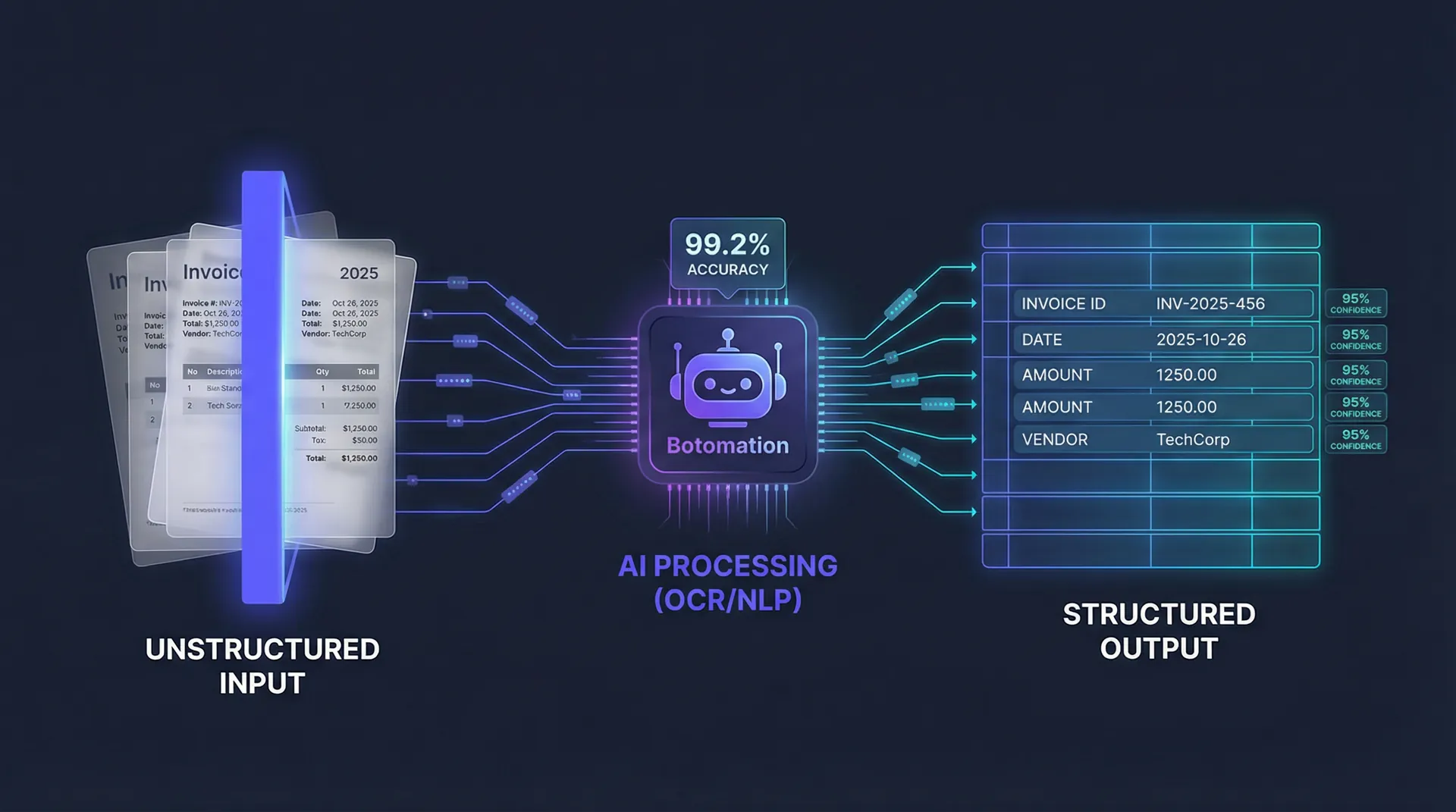
The foundation of any attempt to automate data entry and administrative tasks lies in how a system perceives physical or digital documents. In 2026, the standard for document digitization has moved far beyond basic Optical Character Recognition (OCR). While traditional OCR could turn an image into text, it often failed with skewed scans, low-contrast backgrounds, or complex layouts. Modern AI-powered extraction utilizes deep learning models to treat a document as a spatial map, identifying headers, footers, and line items with 99.2% accuracy.
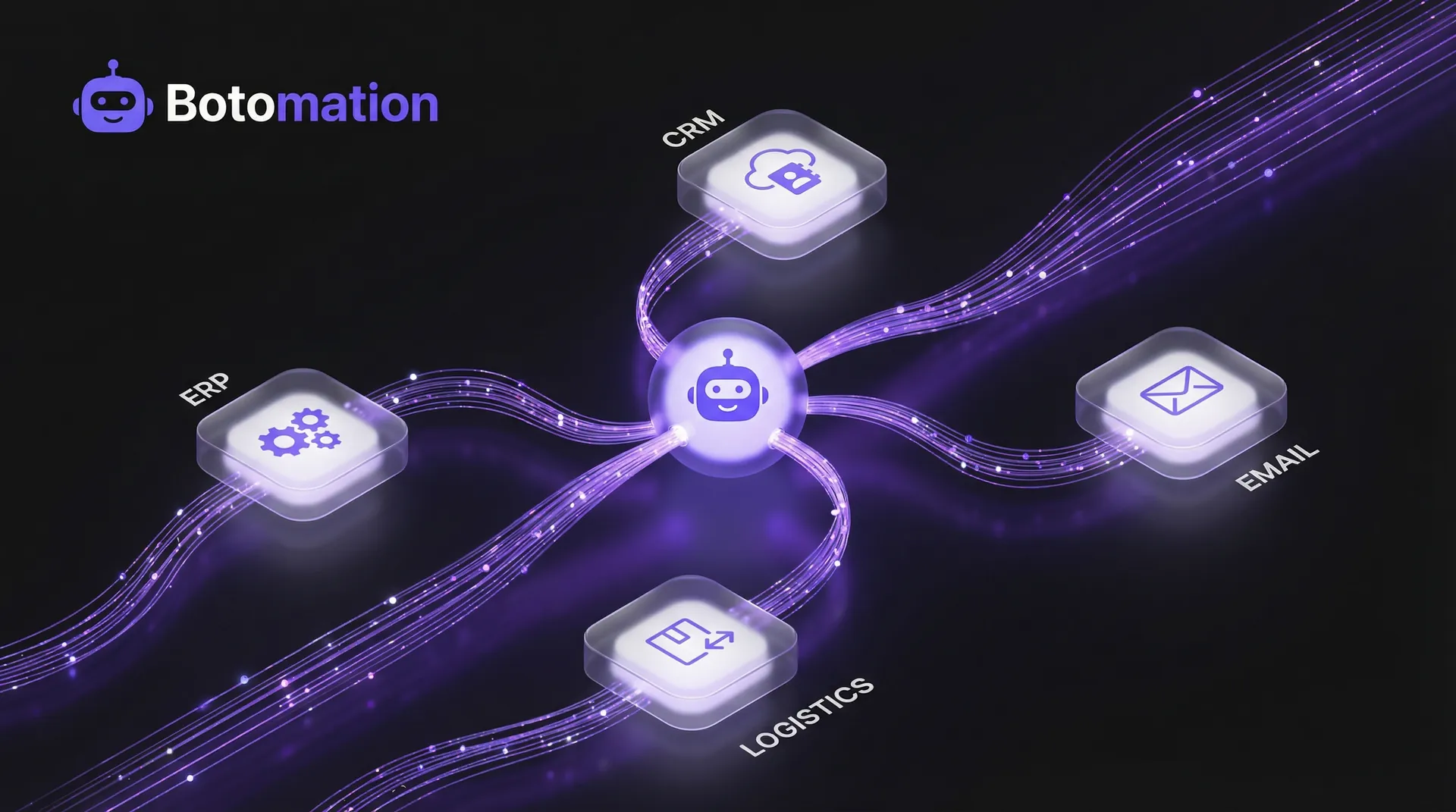
By combining advanced OCR with Natural Language Processing (NLP), businesses can now extract meaning from the text it reads. When a system identifies a date on an invoice, NLP determines whether that date refers to the invoice issuance, the delivery of goods, or the payment deadline. This context-aware processing is what enables true automation. Our experts at Botomation focus on building these intelligent bridges, ensuring that the data extracted is not just a string of characters, but a validated piece of business intelligence ready for your CRM or ERP. Utilizing a complete guide to automated data sync can further streamline how this intelligence is shared across your marketing and sales stacks.
Advanced OCR and Document Understanding
Handling the sheer variety of document formats in a global supply chain is a significant challenge for most internal IT teams. You might receive a perfectly formatted PDF from one vendor and a crumpled, handwritten receipt from another. The latest iterations of AI document understanding can process multi-language documents and even verify signatures against historical records. This capability is vital for industries like legal or logistics, where a missing signature or a mistranslated term can lead to costly delays.
Quality control remains a priority even as AI becomes more sophisticated. We implement real-time data entry validation and automated error correction mechanisms that flag any extraction with a confidence score below a certain threshold—typically 95%. These flagged items are then routed to a human-in-the-loop interface for quick verification. This hybrid approach ensures that the speed of AI is balanced with the oversight required for high-stakes financial or medical data.
NLP for Intelligent Data Classification
Once the text is digitized, the next hurdle is classification. It is one thing to read "Total: $500," but it is another to know that this document is an "Urgent Utility Bill" and not a "Standard Purchase Order." Machine learning models are trained to recognize these document types by analyzing their structure and key entities. This allows the system to automatically route the data to the correct department without any human intervention.
Entity extraction goes deeper by mapping relationships between different data points. For example, the AI can link a tracking number found in an email thread to a specific line item in a warehouse database. Over time, these models learn from correction patterns. If a user consistently corrects a specific field, the AI adjusts its weightings to improve future accuracy. This self-healing nature of modern automation is what makes it a sustainable long-term investment for administrative efficiency.
Step-by-Step Guide to Automate Data Entry and Administrative Tasks
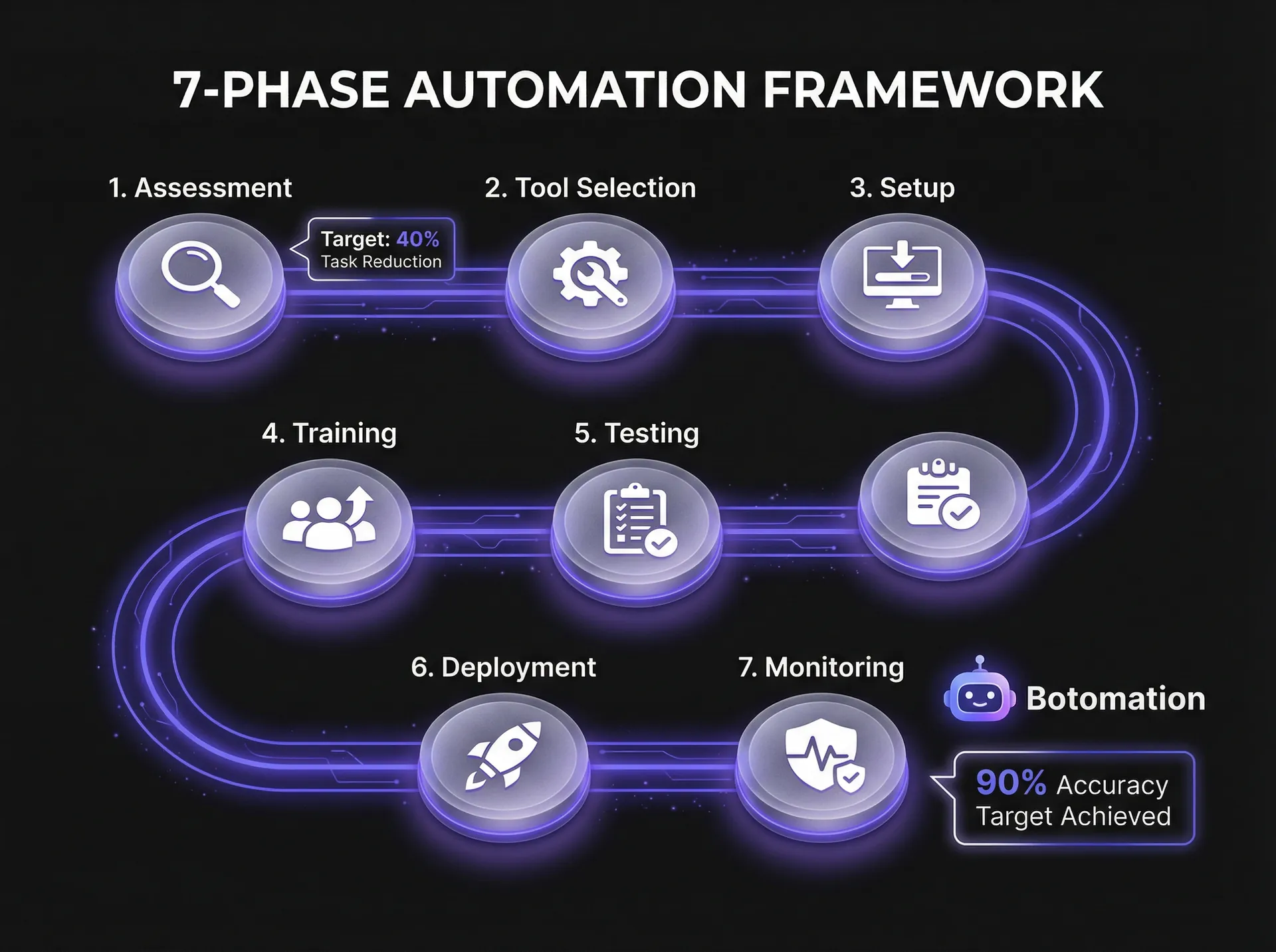
Moving from manual workflows to an automated environment requires a structured approach to avoid data silos and integration failures. We have developed a 7-phase implementation framework that ensures every automation project delivers measurable value. This isn't just about installing software; it’s about re-engineering how data flows through your organization to scale business operations with AI automation effectively. By the end of 2026, the standard tech stack involves the Microsoft AI Platform 2026-01, which offers tighter integration between document processing and core business logic.
Success in these projects is measured by more than just "time saved." We look at the total cost of ownership and the reduction in "exception handling"—the time staff spend fixing mistakes. In our recent pilot projects, we’ve seen a 50% increase in data processing speed within the first 30 days of deployment. This rapid ROI is possible because we focus on the most impactful bottlenecks first rather than trying to automate every minor task simultaneously.
Steps 1-3: Assessment, Tool Selection, and Environment Setup
The first step is a rigorous assessment of your current processes. We identify "automation candidates" by looking for tasks that are high-volume, repetitive, and rule-based. We also evaluate the quality of the source documents. If your data is currently trapped in physical filing cabinets or outdated software, the first priority is a digitization strategy to replace legacy systems with custom web development. During this phase, we also define the security configuration to ensure that sensitive data remains encrypted throughout the automation lifecycle.
Selecting the right tools is the next critical hurdle. While many companies look for a "one size fits all" platform, the reality of 2026 is that a modular approach is often superior. We might use GPT-5 for its reasoning capabilities and combine it with a dedicated OCR engine for specialized handwriting recognition. This setup phase typically takes three to four weeks, ensuring that the infrastructure is scalable and meets enterprise-grade security standards before any data begins to flow.
Steps 4-7: Development, Training, Testing, and Deployment
Once the environment is ready, we move into the development of the AI models. This involves feeding the system historical data so it can learn the nuances of your specific business rules. For instance, if your company uses non-standard abbreviations for product codes, the AI needs to be trained to recognize and map these correctly. Testing protocols are then established to verify accuracy across thousands of document variations, ensuring the system doesn't "hallucinate" or misinterpret data.
The final steps involve a gradual deployment. We rarely recommend a "big bang" switchover. Instead, we run the AI in parallel with existing manual processes for a short period to validate performance. Once the system consistently hits its accuracy targets, we transition to full-scale deployment. Continuous monitoring remains in place to catch any drift in model performance, allowing our team to make real-time adjustments as your business requirements evolve.
Expert Insight: Automation is not a "set and forget" project. It is a living system that requires periodic tuning to maintain its 99% accuracy rate as your document formats and business partners change.
| Feature | Manual Data Entry | Basic RPA (Old Way) | Botomation AI (New Way) |
|---|---|---|---|
| **Accuracy** | 85-90% (Human Error) | 95% (Rule-based) | 99.2% (Self-learning) |
| **Processing Speed** | Minutes per record | Seconds per record | Milliseconds per record |
| **Handling Unstructured Data** | High effort | Impossible | Native Capability |
| **Scalability** | Requires hiring | Linear | Exponential |
| **Cost over 3 years** | Increasing (Labor) | Moderate | Low (High ROI) |
Top AI Tools for Data Entry and Administrative Automation
The landscape of automation tools has matured significantly, with major players like Google, Microsoft, and Amazon offering specialized document AI services. However, simply having access to these tools is not enough. The real value comes from how these services are integrated into your specific workflow. Google Cloud Document AI, for example, now supports over 100 different document types natively, from utility bills to complex tax forms. Meanwhile, Amazon Textract has improved its machine learning-powered analysis to handle tables and forms with unprecedented precision.
In 2026, we are seeing a massive shift toward "Intelligent RPA" (Robotic Process Automation). Tools like UiPath Document Understanding v3.0 have integrated AI directly into their bots, allowing them to handle exceptions that would have stopped an older bot in its tracks. This is where Botomation excels—we act as the expert architects who select the best-of-breed tools and weave them into a seamless operation that connects your email, spreadsheets, and CRM without a single line of manual code.
Cloud-Based AI Processing Platforms
The Microsoft AI Platform 2026-01 has become the gold standard for enterprises already deep in the Azure ecosystem. Its primary advantage is its security framework, which allows for the processing of sensitive data within a private cloud environment. This is crucial for healthcare and finance firms that must adhere to strict data residency requirements. The scalability of these cloud platforms means you can process 10 invoices or 10,000 invoices with the same level of performance.
Pricing models for these platforms have also become more predictable. Instead of massive upfront licensing fees, most now operate on a "pay-per-page" or "pay-per-extraction" model. This allows smaller organizations to access the same high-end AI capabilities as Fortune 500 companies, often by integrating affordable BI tools for growing companies to visualize their newly automated data streams. When we partner with a client, we help them navigate these pricing structures to ensure they are getting the most cost-effective solution for their specific volume.
AI-Powered RPA Integration Tools
While cloud platforms handle the "thinking," RPA tools handle the "doing." Kofax Kapow has emerged as a leader for web-based data extraction, allowing businesses to pull data from vendor portals that don't offer an API. This is a common pain point for operations managers who find themselves logging into twenty different websites a day just to download reports. By automating this "last mile" of data retrieval, we can save a single administrator dozens of hours every month.
A healthcare provider we recently worked with used Kofax Kapow to reduce their patient intake data entry time by 55%. By integrating this with their existing electronic health record (EHR) system, they eliminated the need for staff to copy-paste patient details from insurance portals. This didn't just save time; it reduced the risk of medical errors caused by mistyped patient IDs. This is the "glue" that Botomation provides—connecting disparate systems so they finally talk to each other.
The 2026 Statistics on Automation Impact
- Average Time Saved: 32 hours per month per administrative employee.
- Error Reduction: 92% decrease in manual data entry discrepancies.
- Cost Efficiency: $12.50 saved per document processed compared to manual labor.
- Implementation Speed: Full ROI typically achieved within 14.2 months.
Data Security and Privacy in AI-Powered Automation
As we hand over more administrative control to AI, the conversation around data security becomes paramount. You cannot automate data entry and administrative tasks without a rigorous security framework in place. In 2026, encryption is the bare minimum. We implement "privacy-by-design" principles, ensuring that sensitive data is anonymized or redacted before it even reaches the AI processing layer. This is particularly important when dealing with PII (Personally Identifiable Information) or PHI (Protected Health Information).
Compliance is not just a legal hurdle; it is a competitive advantage. Financial services companies that can demonstrate an airtight, AI-driven audit trail are much more likely to win trust from high-value clients. Our approach at Botomation involves building comprehensive audit logs that record every action the AI takes. If a value is changed in your CRM, you can trace it back to the specific document and the specific AI model that processed it.
AI Data Processing Security Framework
The security of data in transit and at rest is managed through end-to-end encryption protocols that meet 2026 standards. We also utilize secure AI inference environments, where the data is processed in a volatile memory state and never stored on the AI provider's servers. This prevents your proprietary business data from being used to train public AI models—a common concern for businesses using "out of the box" AI tools.
Federated learning and other privacy-preserving techniques allow us to improve model accuracy without ever exposing the raw data to the cloud. By keeping the sensitive parts of the computation on your local infrastructure and only sending the "learnings" to the central model, we maintain a level of security that traditional SaaS platforms simply cannot match. This is why partnering with a specialized agency is superior to using a generic tool; we build the security around your specific needs.
Compliance and Audit Requirements
GDPR and its 2026 successors have introduced the "Right to Explanation." This means if an AI system makes a decision—such as rejecting an invoice based on a data discrepancy—the business must be able to explain why. Our systems are built with "Explainable AI" (XAI) features that provide a clear rationale for every extraction and classification. This makes compliance reporting a matter of clicks rather than weeks of manual investigation.
Data retention policies are also automated. We configure the system to automatically delete source images and temporary processing files once the data has been successfully moved to your primary database. This minimizes your "data footprint" and reduces the risk associated with data breaches. By automating the cleanup process, we ensure that your administrative workflows remain compliant without requiring constant oversight from your IT team.
Measuring Success: KPIs and ROI for AI Data Entry Automation
To justify the investment in AI, you must be able to point to clear, quantifiable metrics. We move beyond "soft" benefits and focus on the hard numbers that matter to a COO or CFO. The most immediate KPI is the processing time reduction percentage. If it used to take 10 minutes to process a complex form and it now takes 15 seconds, that is a 97.5% improvement. This time is then redirected toward high-value tasks like customer relationship management or strategic planning.
The long-term financial ROI is even more compelling. By 2026, data shows that companies implementing these systems see an average cost reduction of 35% across their administrative functions. With a typical payback period of 15 months, the investment pays for itself quickly and then continues to generate savings year after year. A manufacturing client of ours recently achieved $800,000 in annual savings by automating their procurement and accounts payable workflows—savings that were immediately reinvested into R&D.
Performance Metrics and Tracking
Accuracy is the second most important metric. We track "Straight-Through Processing" (STP) rates, which represent the percentage of documents that require zero human intervention. An STP rate of 85% or higher is the goal for most administrative tasks. We also monitor the "Error Detection Rate"—how often the AI correctly identifies a problem with a source document, such as a missing tax ID or a mathematical error on an invoice.
User satisfaction is an often-overlooked KPI. When we remove the drudgery of copy-pasting from an employee's day, their engagement levels rise. We measure this through internal surveys and by tracking the reduction in employee turnover within administrative departments. A team that isn't burnt out by repetitive tasks is a team that stays longer and performs better.
Financial ROI Analysis: A Practical Example
Let’s look at the math for a mid-sized service business processing 5,000 documents per month.
- Manual Cost: 5,000 documents * 10 minutes each = 833 hours. At $30/hour (including benefits), this costs $24,990 per month.
- Automated Cost: 5,000 documents * 30 seconds (human verification for 15% of docs) = 12.5 hours. At $30/hour, this costs $375 per month.
- Software & Support: Estimated at $4,500 per month for high-end AI processing and agency support.
- Total Monthly Savings: $24,990 - ($375 + $4,500) = $20,115.
Over a year, this equates to $241,380 in direct labor savings. This doesn't even account for the cost of errors, which can often be 10x the cost of the initial entry. When you factor in the "error tax," the ROI becomes even more undeniable. Partnering with our team ensures that you capture these savings without the trial-and-error of trying to build it yourself.
Frequently Asked Questions
Will AI automation replace my administrative staff?
No. The goal of automation is to remove the "robotic" parts of a human's job. By automating data entry, your staff can focus on "exception handling," complex problem-solving, and improving customer experiences. Most of our clients find they can grow their business significantly without having to hire additional administrative help, rather than letting current staff go.
How long does it take to see results from an automation project?
While the full setup and fine-tuning take about 3-4 months, most companies see significant time savings within the first 30 days of the pilot phase. Because we focus on the most time-consuming tasks first, the impact is felt almost immediately by the operations team.
Is my data safe when using AI models like GPT-5?
Yes, provided the system is architected correctly. We use enterprise-grade APIs and private cloud environments where your data is never used to train the public models. We also implement end-to-end encryption and strict access controls to ensure your data remains your own.
Can AI handle handwritten notes or old, blurry scans?
The AI models available in 2026 are incredibly proficient at handwriting recognition and "denoising" poor-quality scans. While no system is 100% perfect, our AI-powered OCR can often read messy handwriting more accurately than a tired human clerk.
What happens if the AI makes a mistake?
We build "human-in-the-loop" systems. If the AI is not 95% confident in its extraction, it flags the document for a quick human review. This ensures that the speed of automation never comes at the expense of data integrity.
The transition from manual to automated administrative workflows is no longer a luxury for the tech elite; it is a fundamental requirement for any business that intends to remain competitive in 2026. By following these seven steps—from rigorous assessment to continuous model tuning—you can transform your back office from a cost center into a high-speed engine for growth. The tools are ready, the security frameworks are proven, and the ROI is clear.
At Botomation, we don't just provide a tool; we provide the expertise to ensure these systems work in harmony with your existing business processes. We act as the "glue" that connects your disparate software, ensuring that data flows where it needs to go without human intervention. The "Old Way" of manual entry is slow, expensive, and prone to error. The "New Way" is automated, instant, and scalable.
Ready to automate your growth? Book a call below.
In 2026, the pressure to automate data entry and administrative tasks has reached a breaking point within modern enterprises, where high-value knowledge workers often find themselves shackled to repetitive manual labor. Recent industry studies indicate that nearly 40% of a typical employee's workday is consumed by manual administrative tasks that require minimal cognitive effort but demand high levels of precision. This operational friction doesn't just slow down growth; it creates a ceiling for how much a business can scale without exponentially increasing headcount costs.
Transitioning to systems where AI agents replace manual data entry work allows organizations to reduce error rates by a staggering 90% while simultaneously slashing processing times by 70%. We are no longer in the era of simple rule-based macros that break the moment a form layout changes. With the integration of OpenAI’s GPT-5 into document processing workflows, systems can now "reason" through unstructured data, understanding context and intent rather than simply identifying specific text strings. This shift represents the difference between a tool that copies data and a solution that understands what that data represents for your business.
Consider a recent case study involving a mid-market retail company struggling with invoice reconciliation. By moving away from manual entry and partnering with our team to implement custom AI automation, they reduced their processing time from five days to less than two. The accuracy gains meant they stopped overpaying vendors due to human error, which directly impacted their bottom line. This article outlines the specific, actionable steps required to reduce admin tasks in service operations with workflow automation and achieve this level of operational excellence by late 2026.
Automate Data Entry and Administrative Tasks with AI-Powered Extraction
The foundation of any attempt to automate data entry and administrative tasks lies in how a system perceives physical or digital documents. In 2026, the standard for document digitization has moved far beyond basic Optical Character Recognition (OCR). While traditional OCR could turn an image into text, it often failed with skewed scans, low-contrast backgrounds, or complex layouts. Modern AI-powered extraction utilizes deep learning models to treat a document as a spatial map, identifying headers, footers, and line items with 99.2% accuracy.
By combining advanced OCR with Natural Language Processing (NLP), businesses can now extract meaning from the text it reads. When a system identifies a date on an invoice, NLP determines whether that date refers to the invoice issuance, the delivery of goods, or the payment deadline. This context-aware processing is what enables true automation. Our experts at Botomation focus on building these intelligent bridges, ensuring that the data extracted is not just a string of characters, but a validated piece of business intelligence ready for your CRM or ERP. Utilizing a complete guide to automated data sync can further streamline how this intelligence is shared across your marketing and sales stacks.
Advanced OCR and Document Understanding
Handling the sheer variety of document formats in a global supply chain is a significant challenge for most internal IT teams. You might receive a perfectly formatted PDF from one vendor and a crumpled, handwritten receipt from another. The latest iterations of AI document understanding can process multi-language documents and even verify signatures against historical records. This capability is vital for industries like legal or logistics, where a missing signature or a mistranslated term can lead to costly delays.
Quality control remains a priority even as AI becomes more sophisticated. We implement real-time data entry validation and automated error correction mechanisms that flag any extraction with a confidence score below a certain threshold—typically 95%. These flagged items are then routed to a human-in-the-loop interface for quick verification. This hybrid approach ensures that the speed of AI is balanced with the oversight required for high-stakes financial or medical data.
NLP for Intelligent Data Classification
Once the text is digitized, the next hurdle is classification. It is one thing to read "Total: $500," but it is another to know that this document is an "Urgent Utility Bill" and not a "Standard Purchase Order." Machine learning models are trained to recognize these document types by analyzing their structure and key entities. This allows the system to automatically route the data to the correct department without any human intervention.
Entity extraction goes deeper by mapping relationships between different data points. For example, the AI can link a tracking number found in an email thread to a specific line item in a warehouse database. Over time, these models learn from correction patterns. If a user consistently corrects a specific field, the AI adjusts its weightings to improve future accuracy. This self-healing nature of modern automation is what makes it a sustainable long-term investment for administrative efficiency.
Step-by-Step Guide to Automate Data Entry and Administrative Tasks
Moving from manual workflows to an automated environment requires a structured approach to avoid data silos and integration failures. We have developed a 7-phase implementation framework that ensures every automation project delivers measurable value. This isn't just about installing software; it’s about re-engineering how data flows through your organization to scale business operations with AI automation effectively. By the end of 2026, the standard tech stack involves the Microsoft AI Platform 2026-01, which offers tighter integration between document processing and core business logic.
Success in these projects is measured by more than just "time saved." We look at the total cost of ownership and the reduction in "exception handling"—the time staff spend fixing mistakes. In our recent pilot projects, we’ve seen a 50% increase in data processing speed within the first 30 days of deployment. This rapid ROI is possible because we focus on the most impactful bottlenecks first rather than trying to automate every minor task simultaneously.
Steps 1-3: Assessment, Tool Selection, and Environment Setup
The first step is a rigorous assessment of your current processes. We identify "automation candidates" by looking for tasks that are high-volume, repetitive, and rule-based. We also evaluate the quality of the source documents. If your data is currently trapped in physical filing cabinets or outdated software, the first priority is a digitization strategy to replace legacy systems with custom web development. During this phase, we also define the security configuration to ensure that sensitive data remains encrypted throughout the automation lifecycle.
Selecting the right tools is the next critical hurdle. While many companies look for a "one size fits all" platform, the reality of 2026 is that a modular approach is often superior. We might use GPT-5 for its reasoning capabilities and combine it with a dedicated OCR engine for specialized handwriting recognition. This setup phase typically takes three to four weeks, ensuring that the infrastructure is scalable and meets enterprise-grade security standards before any data begins to flow.
Steps 4-7: Development, Training, Testing, and Deployment
Once the environment is ready, we move into the development of the AI models. This involves feeding the system historical data so it can learn the nuances of your specific business rules. For instance, if your company uses non-standard abbreviations for product codes, the AI needs to be trained to recognize and map these correctly. Testing protocols are then established to verify accuracy across thousands of document variations, ensuring the system doesn't "hallucinate" or misinterpret data.
The final steps involve a gradual deployment. We rarely recommend a "big bang" switchover. Instead, we run the AI in parallel with existing manual processes for a short period to validate performance. Once the system consistently hits its accuracy targets, we transition to full-scale deployment. Continuous monitoring remains in place to catch any drift in model performance, allowing our team to make real-time adjustments as your business requirements evolve.
Expert Insight: Automation is not a "set and forget" project. It is a living system that requires periodic tuning to maintain its 99% accuracy rate as your document formats and business partners change.
| Feature | Manual Data Entry | Basic RPA (Old Way) | Botomation AI (New Way) |
|---|---|---|---|
| **Accuracy** | 85-90% (Human Error) | 95% (Rule-based) | 99.2% (Self-learning) |
| **Processing Speed** | Minutes per record | Seconds per record | Milliseconds per record |
| **Handling Unstructured Data** | High effort | Impossible | Native Capability |
| **Scalability** | Requires hiring | Linear | Exponential |
| **Cost over 3 years** | Increasing (Labor) | Moderate | Low (High ROI) |
Top AI Tools for Data Entry and Administrative Automation
The landscape of automation tools has matured significantly, with major players like Google, Microsoft, and Amazon offering specialized document AI services. However, simply having access to these tools is not enough. The real value comes from how these services are integrated into your specific workflow. Google Cloud Document AI, for example, now supports over 100 different document types natively, from utility bills to complex tax forms. Meanwhile, Amazon Textract has improved its machine learning-powered analysis to handle tables and forms with unprecedented precision.
In 2026, we are seeing a massive shift toward "Intelligent RPA" (Robotic Process Automation). Tools like UiPath Document Understanding v3.0 have integrated AI directly into their bots, allowing them to handle exceptions that would have stopped an older bot in its tracks. This is where Botomation excels—we act as the expert architects who select the best-of-breed tools and weave them into a seamless operation that connects your email, spreadsheets, and CRM without a single line of manual code.
Cloud-Based AI Processing Platforms
The Microsoft AI Platform 2026-01 has become the gold standard for enterprises already deep in the Azure ecosystem. Its primary advantage is its security framework, which allows for the processing of sensitive data within a private cloud environment. This is crucial for healthcare and finance firms that must adhere to strict data residency requirements. The scalability of these cloud platforms means you can process 10 invoices or 10,000 invoices with the same level of performance.
Pricing models for these platforms have also become more predictable. Instead of massive upfront licensing fees, most now operate on a "pay-per-page" or "pay-per-extraction" model. This allows smaller organizations to access the same high-end AI capabilities as Fortune 500 companies, often by integrating affordable BI tools for growing companies to visualize their newly automated data streams. When we partner with a client, we help them navigate these pricing structures to ensure they are getting the most cost-effective solution for their specific volume.
AI-Powered RPA Integration Tools
While cloud platforms handle the "thinking," RPA tools handle the "doing." Kofax Kapow has emerged as a leader for web-based data extraction, allowing businesses to pull data from vendor portals that don't offer an API. This is a common pain point for operations managers who find themselves logging into twenty different websites a day just to download reports. By automating this "last mile" of data retrieval, we can save a single administrator dozens of hours every month.
A healthcare provider we recently worked with used Kofax Kapow to reduce their patient intake data entry time by 55%. By integrating this with their existing electronic health record (EHR) system, they eliminated the need for staff to copy-paste patient details from insurance portals. This didn't just save time; it reduced the risk of medical errors caused by mistyped patient IDs. This is the "glue" that Botomation provides—connecting disparate systems so they finally talk to each other.
The 2026 Statistics on Automation Impact
- Average Time Saved: 32 hours per month per administrative employee.
- Error Reduction: 92% decrease in manual data entry discrepancies.
- Cost Efficiency: $12.50 saved per document processed compared to manual labor.
- Implementation Speed: Full ROI typically achieved within 14.2 months.
Data Security and Privacy in AI-Powered Automation
As we hand over more administrative control to AI, the conversation around data security becomes paramount. You cannot automate data entry and administrative tasks without a rigorous security framework in place. In 2026, encryption is the bare minimum. We implement "privacy-by-design" principles, ensuring that sensitive data is anonymized or redacted before it even reaches the AI processing layer. This is particularly important when dealing with PII (Personally Identifiable Information) or PHI (Protected Health Information).
Compliance is not just a legal hurdle; it is a competitive advantage. Financial services companies that can demonstrate an airtight, AI-driven audit trail are much more likely to win trust from high-value clients. Our approach at Botomation involves building comprehensive audit logs that record every action the AI takes. If a value is changed in your CRM, you can trace it back to the specific document and the specific AI model that processed it.
AI Data Processing Security Framework
The security of data in transit and at rest is managed through end-to-end encryption protocols that meet 2026 standards. We also utilize secure AI inference environments, where the data is processed in a volatile memory state and never stored on the AI provider's servers. This prevents your proprietary business data from being used to train public AI models—a common concern for businesses using "out of the box" AI tools.
Federated learning and other privacy-preserving techniques allow us to improve model accuracy without ever exposing the raw data to the cloud. By keeping the sensitive parts of the computation on your local infrastructure and only sending the "learnings" to the central model, we maintain a level of security that traditional SaaS platforms simply cannot match. This is why partnering with a specialized agency is superior to using a generic tool; we build the security around your specific needs.
Compliance and Audit Requirements
GDPR and its 2026 successors have introduced the "Right to Explanation." This means if an AI system makes a decision—such as rejecting an invoice based on a data discrepancy—the business must be able to explain why. Our systems are built with "Explainable AI" (XAI) features that provide a clear rationale for every extraction and classification. This makes compliance reporting a matter of clicks rather than weeks of manual investigation.
Data retention policies are also automated. We configure the system to automatically delete source images and temporary processing files once the data has been successfully moved to your primary database. This minimizes your "data footprint" and reduces the risk associated with data breaches. By automating the cleanup process, we ensure that your administrative workflows remain compliant without requiring constant oversight from your IT team.
Measuring Success: KPIs and ROI for AI Data Entry Automation
To justify the investment in AI, you must be able to point to clear, quantifiable metrics. We move beyond "soft" benefits and focus on the hard numbers that matter to a COO or CFO. The most immediate KPI is the processing time reduction percentage. If it used to take 10 minutes to process a complex form and it now takes 15 seconds, that is a 97.5% improvement. This time is then redirected toward high-value tasks like customer relationship management or strategic planning.
The long-term financial ROI is even more compelling. By 2026, data shows that companies implementing these systems see an average cost reduction of 35% across their administrative functions. With a typical payback period of 15 months, the investment pays for itself quickly and then continues to generate savings year after year. A manufacturing client of ours recently achieved $800,000 in annual savings by automating their procurement and accounts payable workflows—savings that were immediately reinvested into R&D.
Performance Metrics and Tracking
Accuracy is the second most important metric. We track "Straight-Through Processing" (STP) rates, which represent the percentage of documents that require zero human intervention. An STP rate of 85% or higher is the goal for most administrative tasks. We also monitor the "Error Detection Rate"—how often the AI correctly identifies a problem with a source document, such as a missing tax ID or a mathematical error on an invoice.
User satisfaction is an often-overlooked KPI. When we remove the drudgery of copy-pasting from an employee's day, their engagement levels rise. We measure this through internal surveys and by tracking the reduction in employee turnover within administrative departments. A team that isn't burnt out by repetitive tasks is a team that stays longer and performs better.
Financial ROI Analysis: A Practical Example
Let’s look at the math for a mid-sized service business processing 5,000 documents per month.
- Manual Cost: 5,000 documents * 10 minutes each = 833 hours. At $30/hour (including benefits), this costs $24,990 per month.
- Automated Cost: 5,000 documents * 30 seconds (human verification for 15% of docs) = 12.5 hours. At $30/hour, this costs $375 per month.
- Software & Support: Estimated at $4,500 per month for high-end AI processing and agency support.
- Total Monthly Savings: $24,990 - ($375 + $4,500) = $20,115.
Over a year, this equates to $241,380 in direct labor savings. This doesn't even account for the cost of errors, which can often be 10x the cost of the initial entry. When you factor in the "error tax," the ROI becomes even more undeniable. Partnering with our team ensures that you capture these savings without the trial-and-error of trying to build it yourself.
Frequently Asked Questions
Will AI automation replace my administrative staff?
No. The goal of automation is to remove the "robotic" parts of a human's job. By automating data entry, your staff can focus on "exception handling," complex problem-solving, and improving customer experiences. Most of our clients find they can grow their business significantly without having to hire additional administrative help, rather than letting current staff go.
How long does it take to see results from an automation project?
While the full setup and fine-tuning take about 3-4 months, most companies see significant time savings within the first 30 days of the pilot phase. Because we focus on the most time-consuming tasks first, the impact is felt almost immediately by the operations team.
Is my data safe when using AI models like GPT-5?
Yes, provided the system is architected correctly. We use enterprise-grade APIs and private cloud environments where your data is never used to train the public models. We also implement end-to-end encryption and strict access controls to ensure your data remains your own.
Can AI handle handwritten notes or old, blurry scans?
The AI models available in 2026 are incredibly proficient at handwriting recognition and "denoising" poor-quality scans. While no system is 100% perfect, our AI-powered OCR can often read messy handwriting more accurately than a tired human clerk.
What happens if the AI makes a mistake?
We build "human-in-the-loop" systems. If the AI is not 95% confident in its extraction, it flags the document for a quick human review. This ensures that the speed of automation never comes at the expense of data integrity.
The transition from manual to automated administrative workflows is no longer a luxury for the tech elite; it is a fundamental requirement for any business that intends to remain competitive in 2026. By following these seven steps—from rigorous assessment to continuous model tuning—you can transform your back office from a cost center into a high-speed engine for growth. The tools are ready, the security frameworks are proven, and the ROI is clear.
At Botomation, we don't just provide a tool; we provide the expertise to ensure these systems work in harmony with your existing business processes. We act as the "glue" that connects your disparate software, ensuring that data flows where it needs to go without human intervention. The "Old Way" of manual entry is slow, expensive, and prone to error. The "New Way" is automated, instant, and scalable.
Ready to automate your growth? Book a call below.
Get Started
Book a FREE Consultation Right NOW!
Schedule a Call with Our Team To Make Your Business More Efficient with AI Instantly.
Read More
How to Automate Data Entry and Administrative Tasks 2026
Automate data entry and administrative tasks with AI. Use OCR, NLP, and GPT-5 to cut errors by 90%. Scale workflow automation, ROI, and efficiency now.
Automate Administrative Tasks Using RPA - 2026 Finance Guide
Learn how WhatsApp AI slashes support costs for e-commerce & SaaS. Proven strategies to boost sales, recover carts, and scale 24/7 service.